Page 463 of 706
5-54 Comfort controls
5
To listen to the radio
N00735000782
1. Press the PWR switch (2) to turn the audio system ON and
OFF. The system turns on in the last mode used.
Press the RADIO button (1) to turn ON the radio.
2. Press the RADIO button (1) to select the desired band
(AM/FM1/FM2).
3. Press the SEEK button (5 or 6) to tune to a station, or
press one of the Memory select buttons (10) to recall a sta-
tion memorized for that button.
Refer to “Automatic tuning”, “Manual tuning” or “To
enter frequencies into the memory”.Automatic tuningAfter pressing the SEEK button (5 or 6), a receivable station
will be automatically selected and reception of the station will
begin.
SCAN function
Press the SCAN button (9). The radio will tune consecutively
to each available station for about 5 seconds per station. If you
want to stop scanning, press the SCAN button again.
The frequency display of the current station flashes once per
second during SCAN.Manual tuningThe frequency changes every time the TUNE switch (7) is
turned.
Turn the switch to select the desired station.To enter frequencies into the memoryAs many as 6 AM and 12 FM stations can be entered into the
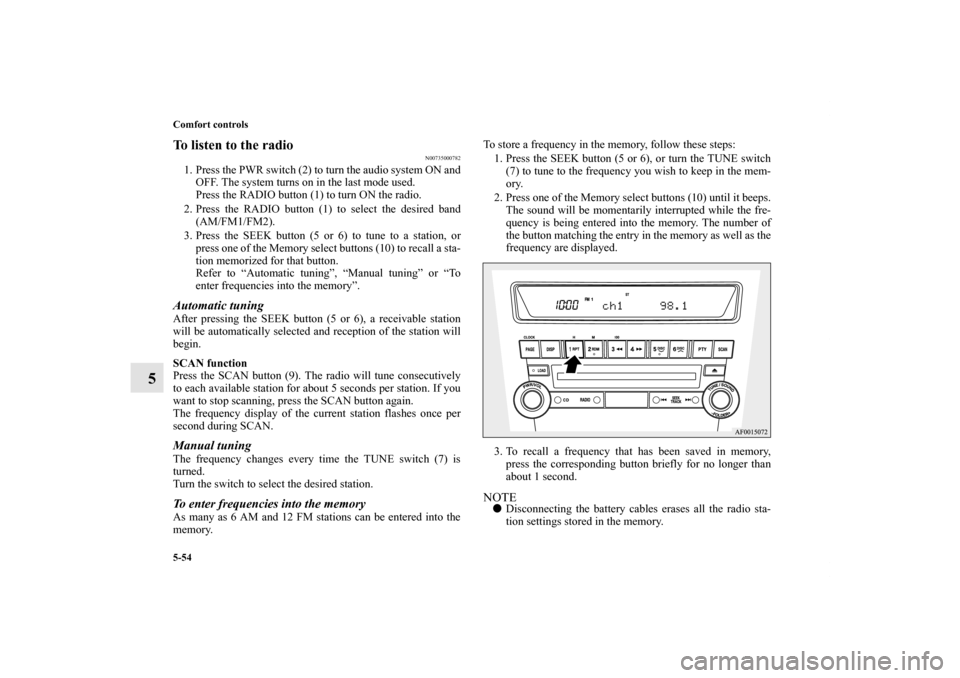
memory.To store a frequency in the memory, follow these steps:
1. Press the SEEK button (5 or 6), or turn the TUNE switch
(7) to tune to the frequency you wish to keep in the mem-
ory.
2. Press one of the Memory select buttons (10) until it beeps.
The sound will be momentarily interrupted while the fre-
quency is being entered into the memory. The number of
the button matching the entry in the memory as well as the
frequency are displayed.
3. To recall a frequency that has been saved in memory,
press the corresponding button briefly for no longer than
about 1 second.
NOTE�Disconnecting the battery cables erases all the radio sta-
tion settings stored in the memory.
BK0125300US.book 54 ページ 2010年5月18日 火曜日 午後1時53分
Page 464 of 706
Comfort controls
5-55
5
Radio broadcast data system (RBDS)
N00751800094
RBDS features are available for use only on FM stations that
broadcast RBDS information.
This RBDS radio can search for stations broadcasting the
selected type of programming and display messages from radio
stations.PTY (Program Type)RBDS broadcasts are classified according to program type
(PTY) as follows.
To search for a broadcast of desired PTY1. To enter PTY (Program Type) mode, press the PTY button
(8) during FM reception.
2. Press the PTY button repeatedly until your desired PTY is
reached.
You can press one of the Memory select buttons (10) for
about 2 seconds to save the currently displayed PTY to
that Memory select button. Thereafter, you can easily call
up your desired PTY by pressing the corresponding Mem-
ory select button.
3. Press the SEEK button (5 or 6), and the radio will begin to
search for a broadcast of the selected PTY. During search,
the selected PTY on the display blinks and the sound will
be momentarily interrupted.
4. When the radio picks up a station with your desired PTY,
the PTY and the frequency will each appear on the display
for 2 seconds. Then the PTY and the station name will
alternately appear on the display for 6 seconds.
5. The frequency will appear on the display. Then the radio
will start receiving the program and exit the PTY mode.
1. ROCK
2. COUNTRY
3. EASY LIS
4. CLASSICL
5. JAZZ
6. Top 40
7. R&B
8. INFORM
9. RELIGION
10. MISC
BK0125300US.book 55 ページ 2010年5月18日 火曜日 午後1時53分
Page 467 of 706
5-58 Comfort controls
5
SIRIUS satellite radio control panel and display
N00700200197
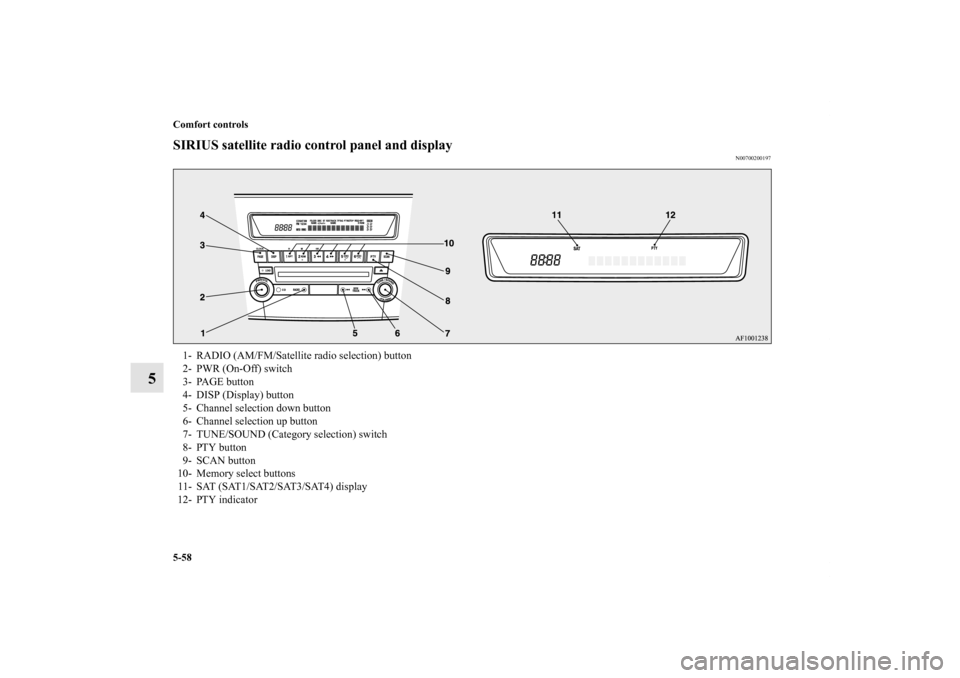
1- RADIO (AM/FM/Satellite radio selection) button
2- PWR (On-Off) switch
3- PAGE button
4- DISP (Display) button
5- Channel selection down button
6- Channel selection up button
7- TUNE/SOUND (Category selection) switch
8- PTY button
9- SCAN button
10- Memory select buttons
1 1 - S AT ( S AT 1 / S AT 2 / S AT 3 / S AT 4 ) d i s p l a y
12- PTY indicator
BK0125300US.book 58 ページ 2010年5月18日 火曜日 午後1時53分
Page 469 of 706
5-60 Comfort controls
5
To enter channels into the memoryYou can save one channel to each Memory select button (10),
for a maximum of 24 channels in memory.
To store a channel in the memory, follow these steps:
1. Press a channel selection button (5 or 6) and select the
channel that you wish to keep in the memory.
2. Press one of the Memory select buttons (10) until it beeps,
indicating that the channel has been stored in memory.NOTE�If you store a channel in the memory, you can call up your
desired channel immediately by simply pushing the corre-
sponding Memory select button (10).
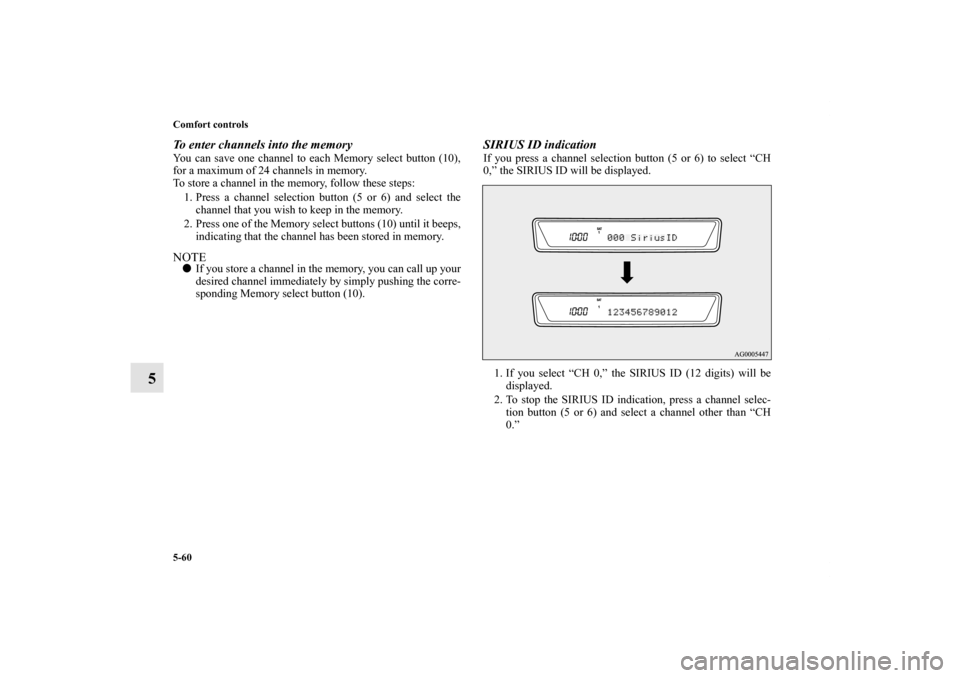
SIRIUS ID indication If you press a channel selection button (5 or 6) to select “CH
0,” the SIRIUS ID will be displayed.
1. If you select “CH 0,” the SIRIUS ID (12 digits) will be
displayed.
2. To stop the SIRIUS ID indication, press a channel selec-
tion button (5 or 6) and select a channel other than “CH
0.”
BK0125300US.book 60 ページ 2010年5月18日 火曜日 午後1時53分
Page 472 of 706
Comfort controls
5-63
5
To unlock locked channelsThere are two ways to unlock a locked channel. One way is to
unlock a single locked channel of your choice. The other way
is to unlock all locked channels.
To unlock a locked channel, you must enter the lock cancella-
tion code.
1. To unlock a single locked channel of your choice, select
the locked channel that you want to unlock. (If you want
to unlock all locked channels, it doesn’t matter which
locked channel you have selected.)
2. Press the TUNE/SOUND switch (7) for about 2 seconds
or longer to enter the MENU mode. Then select the
LOCK setting mode.
3. In the LOCK setting mode, turn the TUNE/SOUND
switch (7) and select “UNLOCK CH” when you want to
unlock one locked channel of your choice or “UNLOCK
ALL” when you want to unlock all locked channels.
4. When you press the TUNE/SOUND switch (7), the code
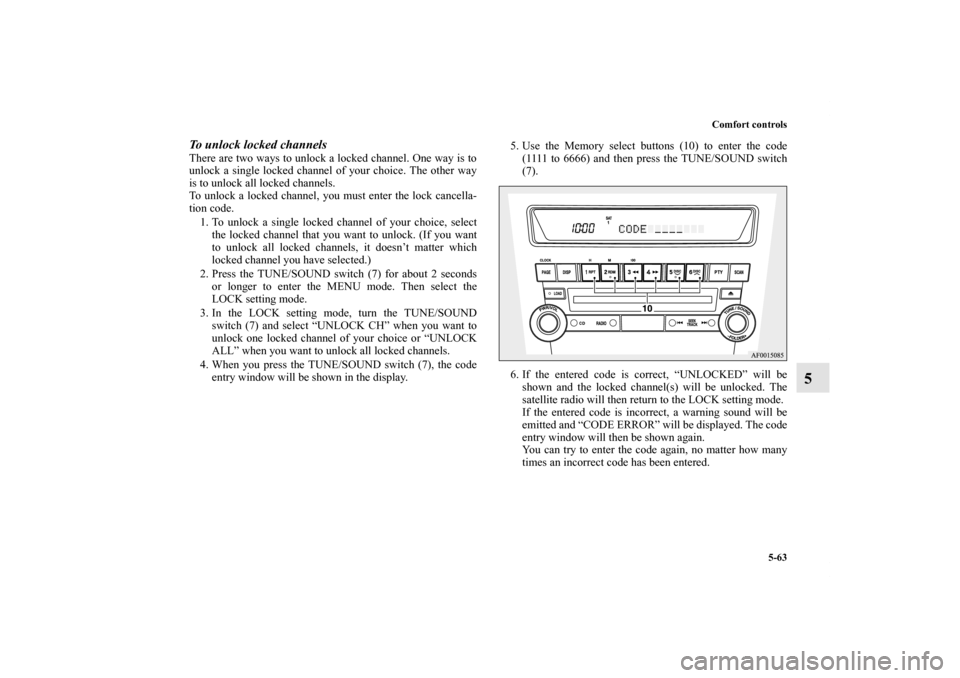
entry window will be shown in the display.5. Use the Memory select buttons (10) to enter the code
(1111 to 6666) and then press the TUNE/SOUND switch
(7).
6. If the entered code is correct, “UNLOCKED” will be
shown and the locked channel(s) will be unlocked. The
satellite radio will then return to the LOCK setting mode.
If the entered code is incorrect, a warning sound will be
emitted and “CODE ERROR” will be displayed. The code
entry window will then be shown again.
You can try to enter the code again, no matter how many
times an incorrect code has been entered.
BK0125300US.book 63 ページ 2010年5月18日 火曜日 午後1時53分
Page 473 of 706
5-64 Comfort controls
5
NOTE�The default factory setting for the code is “1111.”
�You can change the code to any number you want with the
“CODE EDIT” function.
�To cancel a code entry, turn the TUNE/SOUND switch (7)
while the code entry window is displayed.
The code entry will be cancelled and then the setting
menu will be switched.
To change the lock cancellation codeYou can change the code for unlocking channel(s) to any num-
ber you want.
1. Press the TUNE/SOUND switch (7) for about 2 seconds
or longer to enter the MENU mode. Then select the
LOCK setting mode.
2. In the LOCK setting mode, turn the TUNE/SOUND
switch (7) and select “CODE EDIT.”
3. When you press the TUNE/SOUND switch (7), the code
entry window will be shown in the display.
4. Use the memory select buttons (10) to enter the current
code and then press the TUNE/SOUND switch (7).
5. If the correct code is entered, the code entry window will
be shown again. Enter your desired code.
If the entered code is incorrect, a warning sound will be
emitted and “CODE ERROR” will be displayed. The code
entry window will then be shown again.
You can try to enter the code again, no matter how many
times an incorrect code has been entered.
6. After you enter the new code, press the TUNE/SOUND
switch (7). The code entry window will be shown again
for confirmation. Enter the new code again and press the
TUNE/SOUND switch (7).
BK0125300US.book 64 ページ 2010年5月18日 火曜日 午後1時53分
Page 490 of 706
Comfort controls
5-81
5
Radio control panel and display
N00734900739
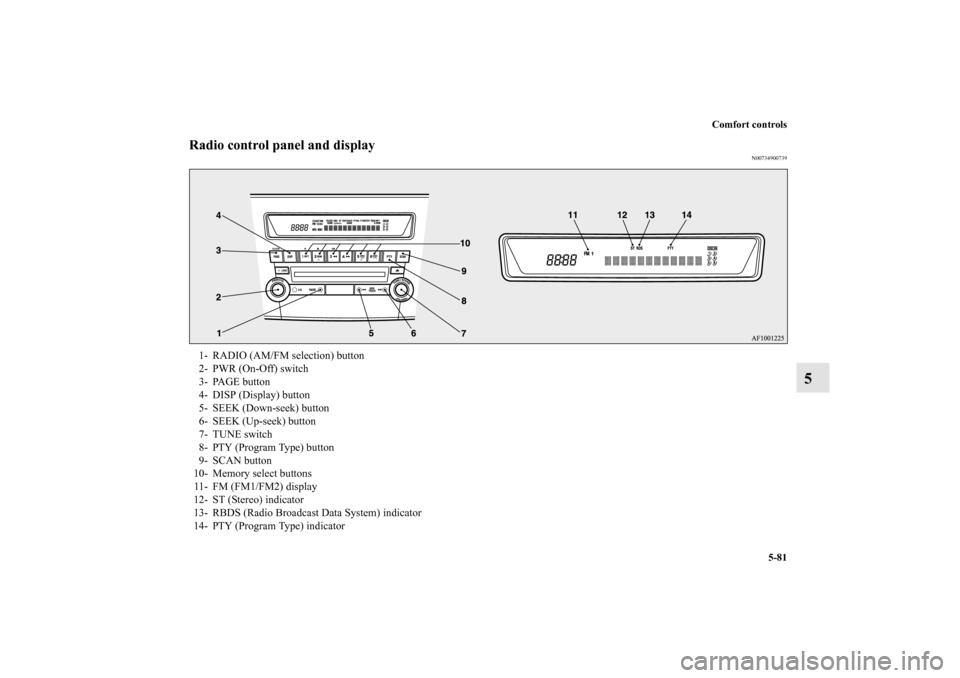
1- RADIO (AM/FM selection) button
2- PWR (On-Off) switch
3- PAGE button
4- DISP (Display) button
5- SEEK (Down-seek) button
6- SEEK (Up-seek) button
7- TUNE switch
8- PTY (Program Type) button
9- SCAN button
10- Memory select buttons
11- FM (FM1/FM2) display
12- ST (Stereo) indicator
13- RBDS (Radio Broadcast Data System) indicator
14- PTY (Program Type) indicator
BK0125300US.book 81 ページ 2010年5月18日 火曜日 午後1時53分
Page 491 of 706
5-82 Comfort controls
5
To listen to the radio
N00735000795
1. Press the PWR switch (2) to turn the audio system ON and
OFF. The system turns on in the last mode used.
Press the RADIO button (1) to turn ON the radio.
2. Press the RADIO button (1) to select the desired band
(AM/FM1/FM2).
3. Press the SEEK button (5 or 6) to tune to a station, or
press one of the Memory select buttons (10) to recall a sta-
tion memorized for that button.
Refer to “Automatic tuning”, “Manual tuning” or “To
enter frequencies into the memory”.Automatic tuningAfter pressing the SEEK button (5 or 6), a receivable station
will be automatically selected and reception of the station will
begin.
SCAN function
Press the SCAN button (9). The radio will tune consecutively
to each available station for about 5 seconds per station. If you
want to stop scanning, press the SCAN button again.
The frequency display of the current station flashes once per
second during SCAN.Manual tuningThe frequency changes every time the TUNE switch (7) is
turned.
Turn the switch to select the desired station.To enter frequencies into the memoryAs many as 6 AM and 12 FM stations can be entered into the
memory.To store a frequency in the memory, follow these steps:
1. Press the SEEK button (5 or 6), or turn the TUNE switch
(7) to tune to the frequency you wish to keep in the mem-
ory.
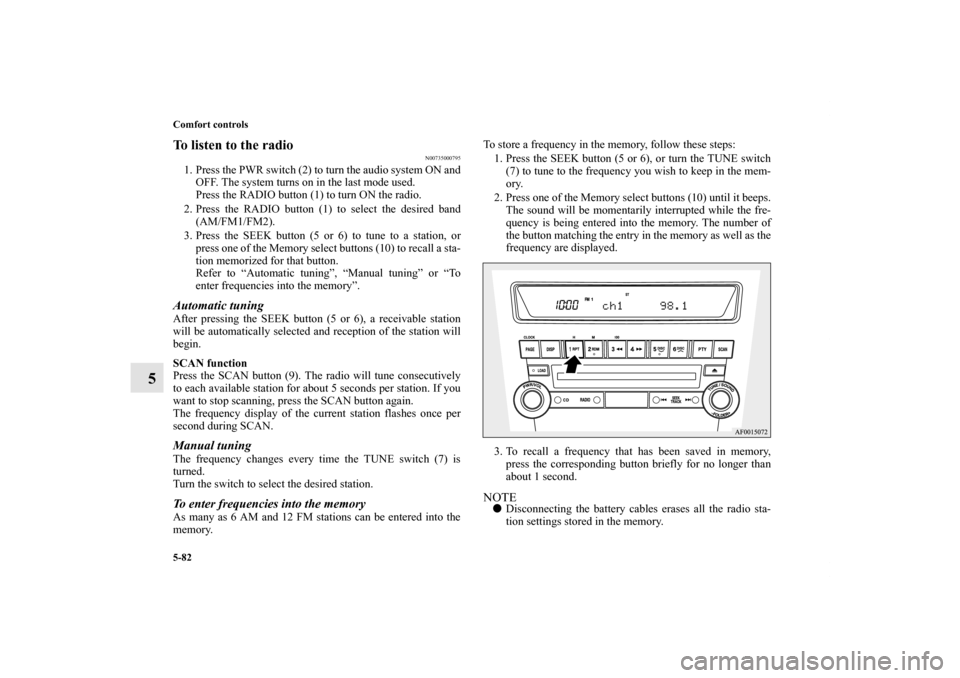
2. Press one of the Memory select buttons (10) until it beeps.
The sound will be momentarily interrupted while the fre-
quency is being entered into the memory. The number of
the button matching the entry in the memory as well as the
frequency are displayed.
3. To recall a frequency that has been saved in memory,
press the corresponding button briefly for no longer than
about 1 second.
NOTE�Disconnecting the battery cables erases all the radio sta-
tion settings stored in the memory.
BK0125300US.book 82 ページ 2010年5月18日 火曜日 午後1時53分