Page 186 of 700

Features and controls
3-91
3
Stopping the engine
N00542300088
1. Bring the vehicle to a complete stop.
2. Fully engage the parking brake while depressing the brake
pedal.
3. For vehicles with a manual transaxle, turn the ignition
switch to the “LOCK” position to stop the engine, and
then move the gearshift lever to the 1st (on a uphill) or
“R” (Reverse) (on a downhill) position.
For vehicles with continuously variable transmission
(CVT) or Twin Clutch SST, place the selector lever (CVT)
or the gearshift lever (Twin Clutch SST) in the “P”
(PARK) position, and then turn the ignition switch to the
“LOCK” position to stop the engine.
NOTE�For vehicles with Twin Clutch SST, the engine will stop
and the vehicle power will turn off approximately 1 sec-
ond after the ignition switch is turned to the “LOCK”;
position.
The reason for this is that, in the time from when the igni-
tion switch is turned to the “LOCK” position until the
engine stops, the gears inside the Twin Clutch SST disen-
gage so that the engine will start smoothly the next time it
is started.
Two clutches installed in the Twin Clutch SST alternately
engage and disengage to achieve smooth shifting.
In addition, the gear on the side with the free clutch is
engaged, therefore, quick shifting is performed.
If the engine was stopped with the gear engaged like this,
it would provide resistance the next time the engine is
started. Therefore, the gear disengages in the approxi-
mately 1-second period until the engine stops.
�For vehicles with Twin Clutch SST, do not operate the
gearshift lever or the accelerator pedal for approximately
1 second until the engine stops.
BK0119300US.book 91 ページ 2010年5月21日 金曜日 午前10時13分
Page 192 of 700

Features and controls
3-97
3
Selector lever operation
N00513800342
As an additional safety precaution, models equipped with a
continuously variable transmission have a shift-lock device
that holds the selector lever in the “P” (PARK) position. To
move the selector lever from the “P” (PARK) position to
another position, follow the steps below.
1. Press and hold the brake pedal down.
2. Move the selector lever to the desired position.NOTE�The selector lever cannot be moved from “P” (PARK) to
another position if the ignition switch is at the “LOCK” or
“ACC” position, or the key has been removed, or if the
brake pedal is not pressed and held down.
Except for vehicles with sports modeThe CVT has 2 forward selector positions and 1 reverse selec-
tor position.
The CVT selects an optimum ratio automatically when the
selector lever is in the “D” (DRIVE) or “L” (LOW) position,
depending on the speed of the vehicle and the position of the
accelerator pedal.
The selector lever has 5 positions.
BK0119300US.book 97 ページ 2010年5月21日 金曜日 午前10時13分
Page 195 of 700

3-100 Features and controls
3
NOTE�To ensure proper transmission operation, stop at each
detent position when shifting. After shifting, check the
position in the multi-information display.
�If the brake pedal is not depressed and held, the shift-lock
device activates to prevent the selector lever from being
moved from the “P” (PARK) position.
�For a shift indicated by in the illustration, depress the
brake pedal before moving the selector lever. If you
attempt to move the selector lever before depressing the
brake pedal, the selector lever will be immovable.
When the selector lever cannot be shifted from
the “P” (PARK) position
N00547400013
When the selector lever cannot be shifted from the “P” (PARK)
position to another position while the brake pedal is pressed
and held down with the ignition switch at the “ON” position,
the battery may be flat or the shift-lock mechanism may be
malfunctioning.
Immediately have your vehicle checked by an authorized Mit-
subishi Motors dealer or a repair facility of your choice.
If you need to move the vehicle, shift the selector lever as fol-
lows.
1. Make sure the parking brake is fully applied.
2. Stop the engine if it is running.
3. Insert a screwdriver with a cloth over its tip into the notch
(A) of the cover. Pry gently as shown to remove the cover.
BK0119300US.book 100 ページ 2010年5月21日 金曜日 午前10時13分
Page 196 of 700
Features and controls
3-101
3
4. Depress the brake pedal with the right foot.
5. Turn the ignition switch to the “ACC” position. NOTE�For vehicles with the Free-hand Advanced Security
Transmitter (F.A.S.T.-key), turn the ignition switch to the
“ACC” position with the emergency key if the vehicle
battery is flat.
6. Insert a screwdriver in the shift-lock release hole (B).
Shift the selector lever to the “N” (NEUTRAL) position
while pressing the screwdriver down.
Selector lever position display
N00513900402
When the ignition switch is turned to the “ON” position, the
selector lever position is shown on the multi-information dis-
play.
BK0119300US.book 101 ページ 2010年5月21日 金曜日 午前10時13分
Page 204 of 700

Features and controls
3-109
3 Twin Clutch SST (Sportronic Shift Trans-
mission)
(if so equipped)
N00539700059
The Twin Clutch SST is a transmission that, through integrated
control of the engine and transmission, is able to achieve both
the smooth shifting of an automatic transaxle and the accelera-
tion and fuel economy close to a manual transaxle. In addition,
the control mode can be selected from two types to suit the
driving conditions.
Together with manual shifting, the transmission is capable of
responding to a variety of driving circumstances.
Twin Clutch SST control mode→ P. 3 - 1 1 7
Manual shift → P. 3 - 1 1 9
Gearshift lever operation
N00539800050
As an additional safety precaution, models equipped with a
Twin Clutch SST have a shift-lock device that holds the gear-
shift lever in the “P” (PARK) position. To move the gearshift
lever from the “P” (PARK) position to another position, follow
the steps below.
1. Press and hold the brake pedal down.
2. Move the gearshift lever to the desired position.NOTE�The gearshift lever cannot be moved from “P” (PARK) to
another position if the ignition switch is at the “LOCK” or
“ACC” position, or the key has been removed, or if the
brake pedal is not pressed and held down.
BK0119300US.book 109 ページ 2010年5月21日 金曜日 午前10時13分
Page 206 of 700

Features and controls
3-111
3
NOTE�For a shift indicated by in the illustration, depress the
brake pedal before moving the gearshift lever. If you
attempt to move the gearshift lever before depressing the
brake pedal, the gearshift lever will be immovable.
�Do not accelerate immediately after moving the gearshift
lever. It may take some time for the transmission to shift
to the selected gear.
�When the gearshift lever is operated when the Twin
Clutch SST fluid temperature is low, the time required to
shift to the selected gear may be longer than usual.
Gearshift lever position display
N00539900064
When the ignition switch is turned to the “ON” position, the
gearshift lever position is shown on the multi-information dis-
play.
WA R N I N G
!�If the pull-ring is always pulled up when using the
gearshift lever, the gearshift lever may be acciden-
tally shifted into the “P” (PARK) or “R”
(REVERSE) position. Do not pull up the pull-ring
when making shifts shown by in the illustration.�Always depress the brake pedal when shifting the
gearshift lever into another position from the “P”
(PARK) or “N” (NEUTRAL) position.
When beginning to drive, do not shift the gearshift
lever from the “P” (PARK) or “N” (NEUTRAL)
position while depressing the accelerator pedal.
Doing so is dangerous because the vehicle will
“jump” forward or backward.
BK0119300US.book 111 ページ 2010年5月21日 金曜日 午前10時13分
Page 213 of 700
3-118 Features and controls
3
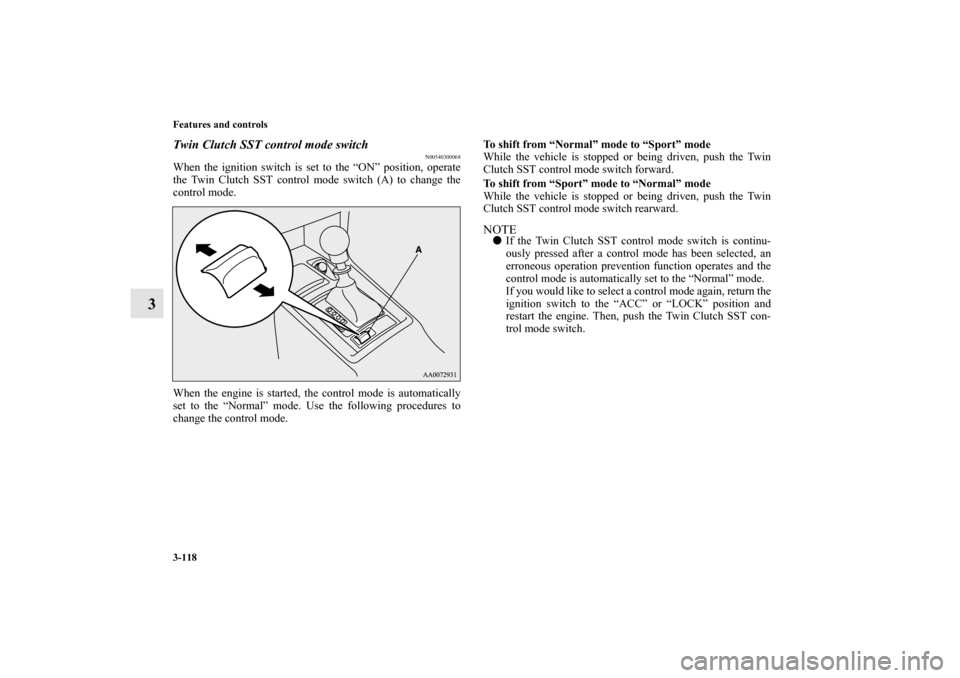
Twin Clutch SST control mode switch
N00540300068
When the ignition switch is set to the “ON” position, operate
the Twin Clutch SST control mode switch (A) to change the
control mode.
When the engine is started, the control mode is automatically
set to the “Normal” mode. Use the following procedures to
change the control mode.To shift from “Normal” mode to “Sport” mode
While the vehicle is stopped or being driven, push the Twin
Clutch SST control mode switch forward.
To shift from “Sport” mode to “Normal” mode
While the vehicle is stopped or being driven, push the Twin
Clutch SST control mode switch rearward.
NOTE�If the Twin Clutch SST control mode switch is continu-
ously pressed after a control mode has been selected, an
erroneous operation prevention function operates and the
control mode is automatically set to the “Normal” mode.
If you would like to select a control mode again, return the
ignition switch to the “ACC” or “LOCK” position and
restart the engine. Then, push the Twin Clutch SST con-
trol mode switch.
BK0119300US.book 118 ページ 2010年5月21日 金曜日 午前10時13分
Page 214 of 700
Features and controls
3-119
3
Twin Clutch SST control mode display
N00540400043
When the ignition switch is set to the “ON” position, the cur-
rently selected control mode is displayed on the multi-informa-
tion display.
Manual shift
N00540500031
Using the gearshift lever (A) or the sportronic steering wheel
shifters (B), shifting can be performed manually.
Shifting can be performed even while the accelerator pedal is
depressed.
This allows the driver to enjoy sporty driving, such as quick
cornering, by nimbly downshifting to reduce vehicle speed just
before entering a curve.
BK0119300US.book 119 ページ 2010年5月21日 金曜日 午前10時13分

