Page 282 of 700

Features and controls
3-187
3
Changing the function settings (With ignition
switch in the “ON” position)
N00556800084
1. Park your vehicle in a safe place.
Fully apply the parking brake and move the shift lever
into the “N” position (manual transaxle), the selector lever
{continuously variable transmission (CVT)} or the gear-
shift lever (Twin Clutch SST) into the “P” position.
2. When you lightly press the multi-information meter
switch, the information screen changes to the function set-
ting screen.
Refer to “Information screen (With ignition switch in the
“ON” position)” on page 3-175.3. Press and hold the multi-information meter switch (for
about 2 seconds or more) to switch from the setting mode
screen to the menu screen.
Type 1 Type 2
CAUTION
!�For safety, stop the vehicle before operating.
While driving, even if you operate the multi-infor-
mation meter switch, the function setting screen is
not displayed.Ty p e 1
Ty p e 2
BK0119300US.book 187 ページ 2010年5月21日 金曜日 午前10時13分
Page 283 of 700

3-188 Features and controls
3
NOTE�To return the menu screen to the function setting screen,
press and hold the multi-information meter switch (for
about 2 seconds or more).
�If no operations are made within about 15 seconds of the
menu screen being displayed, the display returns to the
function setting screen.
4. Select the item to change on the menu screen and change
to the desired setting. For further details on the operation
methods, refer to the following sections.
Refer to “Changing the reset mode for average fuel con-
sumption and average speed” on page 3-188.
Refer to “Changing the fuel consumption display unit” on
page 3-190.
Refer to “Changing the temperature unit” on page 3-192.
Refer to “Changing the display language” on page 3-192.
Refer to “Changing the language on Mitsubishi Multi-
Communication System or Bluetooth
® 2.0 interface to
match the multi-information display (if so equipped)” on
page 3-194.
Refer to “Operation sound setting” on page 3-195.
Refer to “Changing the amount of time until “REST
REMINDER” is displayed” on page 3-197.
Refer to “Changing the turn signal sound” on page 3-198.
Refer to “Changing the momentary fuel consumption dis-
play (Type 2)” on page 3-199.
Refer to “Returning to the factory settings” on page 3-
200.
Changing the reset mode for average fuel consumption
and average speed
N00557000126
You can change the mode condition for the average fuel con-
sumption and average speed display to “Auto reset” or “Man-
ual reset”.
1. Press and hold the multi-information meter switch (for
about 2 seconds or more) to switch from the setting mode
screen to the menu screen.
Refer to “Changing the function settings (With ignition
switch in the “ON” position)” on page 3-187.
2. Lightly press the multi-information meter switch to select
“AVG” (average fuel consumption and average speed set-
ting).
BK0119300US.book 188 ページ 2010年5月21日 金曜日 午前10時13分
Page 285 of 700
3-190 Features and controls
3
Changing the fuel consumption display unit
N00557100130
The fuel consumption display unit can be changed. The dis-
tance, speed, and amount units are also changed to match the
selected fuel consumption unit.
1. Press and hold the multi-information meter switch (for
about 2 seconds or more) to change from the setting mode
screen to the menu screen.
Refer to “Changing the function settings (With ignition
switch in the “ON” position)” on page 3-187.2. Lightly press the multi-information meter switch to select
“AVG UNIT” (fuel consumption display unit setting).
Ty p e 1
Ty p e 2
BK0119300US.book 190 ページ 2010年5月21日 金曜日 午前10時13分
Page 287 of 700

3-192 Features and controls
3
Changing the temperature unit
N00557200102
The temperature display unit can be changed.
1. Press and hold the multi-information meter switch (for
about 2 seconds or more) to change from the setting mode
screen to the menu screen.
Refer to “Changing the function settings (With ignition
switch in the “ON” position)” on page 3-187.
2. Lightly press the multi-information meter switch to select
“ ” (temperature unit setting).3. Press and hold the multi-information meter switch (for
about 2 seconds or more) to change in sequence from °F
→ °C → °F.
The setting is changed to the selected temperature unit.
NOTE�If the battery is disconnected, the memory of the unit set-
ting is erased and is automatically set to °F (°C).Changing the display language
N00557300103
The language of the multi-information display can be changed.
1. Press and hold the multi-information meter switch (for
about 2 seconds or more) to change from the setting mode
screen to the menu screen.
Refer to “Changing the function settings (With ignition
switch in the “ON” position)” on page 3-187.
Ty p e 1
Ty p e 2BK0119300US.book 192 ページ 2010年5月21日 金曜日 午前10時13分
Page 289 of 700

3-194 Features and controls
3
5. Press and hold the multi-information meter switch (for
about 2 seconds or more) to change the setting to the
selected language.NOTE�If the battery is disconnected, the memory of the language
setting is erased and is automatically set to ENGLISH.
�If “---” is selected in the language setting, a warning mes-
sage is not displayed when there is a warning display or
interrupt display.Changing the language on Mitsubishi Multi-Communi-
cation System or Bluetooth
® 2.0 interface to match the
multi-information display
(if so equipped)
N00529800158
The language used in Mitsubishi Multi-Communication Sys-
tem (if so equipped) or Bluetooth
® 2.0 interface (if so
equipped) can be changed automatically to the same language
as that shown in the multi-information display.
1. Press and hold the multi-information meter switch (for
about 2 seconds or more) to change from the setting mode
screen to the menu screen.
Refer to “Changing the function settings (With ignition
switch in the “ON” position)” on page 3-187.2. Lightly press the multi-information meter switch to select
“ ” (language cooperative control).
3. Every time the multi-information meter switch is pressed
for a long time, the setting will change as follows: A (lan-
guage cooperation: enabled) → M (language cooperation:
disabled) → A (language cooperation: enabled). The set-
ting is changed to the selected condition.
Ty p e 1
Ty p e 2
BK0119300US.book 194 ページ 2010年5月21日 金曜日 午前10時13分
Page 290 of 700

Features and controls
3-195
3
NOTE�If the battery is disconnected, the memory of the language
cooperative control is erased and is automatically set to
“A” (language cooperation: enabled).
�The language display modified with the language setting
can be switched in the following manner.
• When “A” (language cooperation: enabled) has been
selected with the language cooperative control, the lan-
guage for the Mitsubishi Multi-Communication System
(if so equipped) or the Bluetooth
® 2.0 interface (if so
equipped) is automatically changed to the language
selected for the multi-information display.
• When “M” (language cooperation: disabled) has been
selected with the language cooperative control, the lan-
guage for the Mitsubishi Multi-Communication System
(if so equipped) or the Bluetooth® 2.0 interface (if so
equipped) is not automatically changed to the language
selected for the multi-information display.
Operation sound setting
N00557400104
You can turn off the operation sounds of the multi-information
meter switch and rheostat meter illumination button.
1. Press and hold the multi-information meter switch (for
about 2 seconds or more) to switch from the setting mode
screen to the menu screen.
Refer to “Changing the function settings (With ignition
switch in the “ON” position)” on page 3-187.
BK0119300US.book 195 ページ 2010年5月21日 金曜日 午前10時13分
Page 292 of 700

Features and controls
3-197
3
Changing the amount of time until “REST
REMINDER” is displayed
N00557500121
The amount of time until the display appears can be changed.
1. Press and hold the multi-information meter switch (for
about 2 seconds or more) to switch from the setting mode
screen to the menu screen.
Refer to “Changing the function settings (With ignition
switch in the “ON” position)” on page 3-187.
2. Lightly press the multi-information meter switch to select
“ALARM” (rest time setting).3. Press and hold the multi-information meter switch (for
about 2 seconds or more) to display “ALARM” (rest time
setting).
4. Lightly press the multi-information meter switch to select
the amount of time until the display appears.
5. Press and hold the multi-information meter switch (for
about 2 seconds or more) to change the setting to the
selected time.
NOTE�If the battery is disconnected, the memory of the unit set-
ting is erased and is automatically set to the “OFF”.
�The drive time is reset when the ignition switch is in the
“OFF” position.
Ty p e 1
Ty p e 2
Type 1 Type 2
BK0119300US.book 197 ページ 2010年5月21日 金曜日 午前10時13分
Page 293 of 700
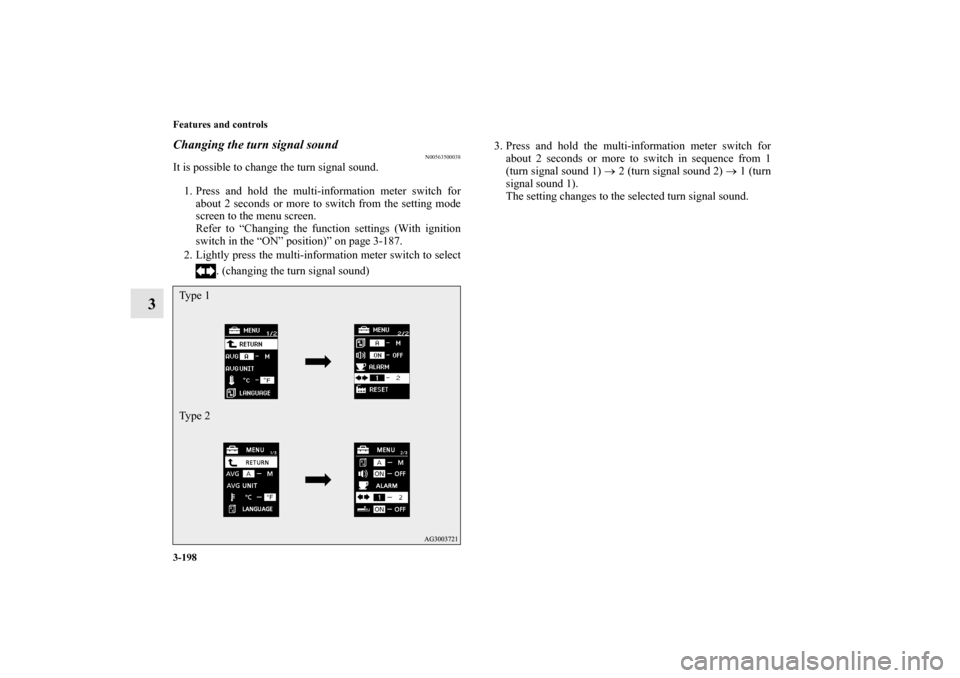
3-198 Features and controls
3
Changing the turn signal sound
N00563500038
It is possible to change the turn signal sound.
1. Press and hold the multi-information meter switch for
about 2 seconds or more to switch from the setting mode
screen to the menu screen.
Refer to “Changing the function settings (With ignition
switch in the “ON” position)” on page 3-187.
2. Lightly press the multi-information meter switch to select
. (changing the turn signal sound)3. Press and hold the multi-information meter switch for
about 2 seconds or more to switch in sequence from 1
(turn signal sound 1) → 2 (turn signal sound 2) → 1 (turn
signal sound 1).
The setting changes to the selected turn signal sound.Ty p e 1
Ty p e 2BK0119300US.book 198 ページ 2010年5月21日 金曜日 午前10時13分