Page 216 of 700
Features and controls
3-121
3
Shifting using the gearshift lever
N00540600032
Selecting manual shifting
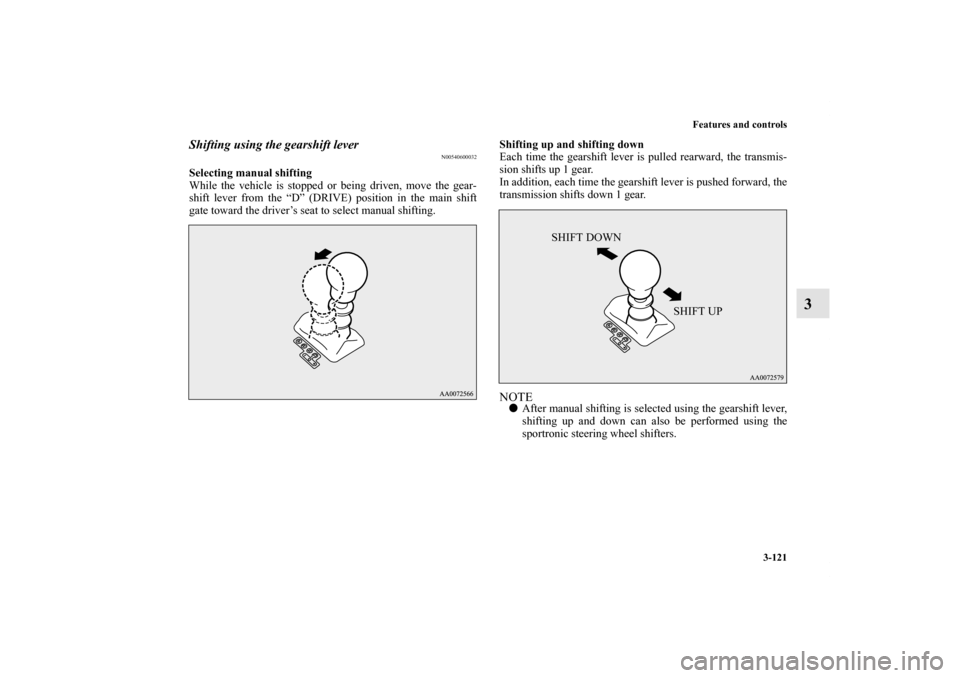
While the vehicle is stopped or being driven, move the gear-
shift lever from the “D” (DRIVE) position in the main shift
gate toward the driver’s seat to select manual shifting.Shifting up and shifting down
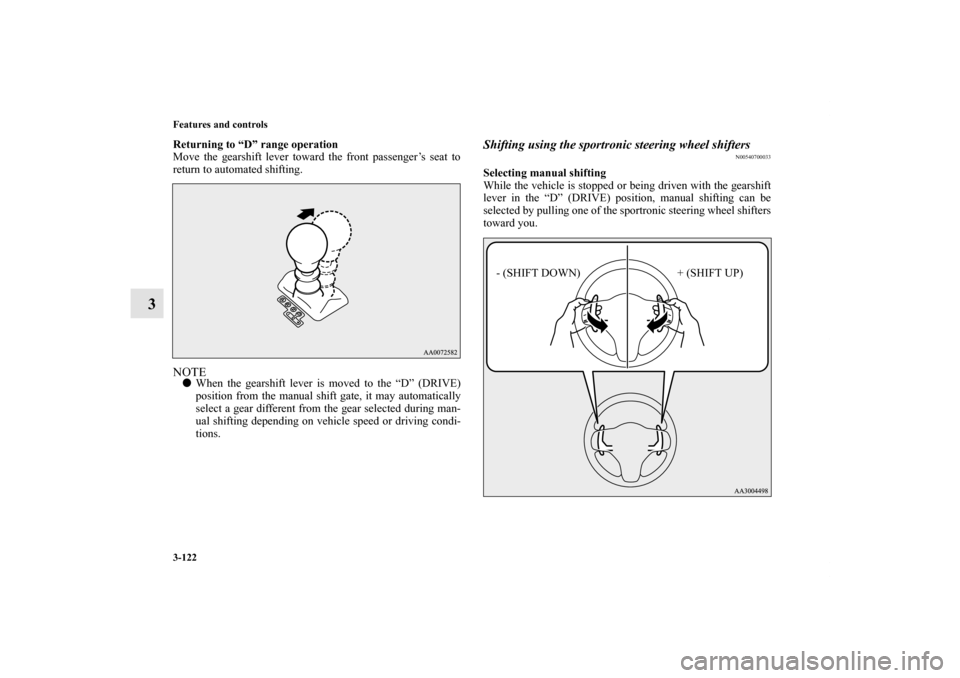
Each time the gearshift lever is pulled rearward, the transmis-
sion shifts up 1 gear.
In addition, each time the gearshift lever is pushed forward, the
transmission shifts down 1 gear.
NOTE�After manual shifting is selected using the gearshift lever,
shifting up and down can also be performed using the
sportronic steering wheel shifters.
SHIFT DOWN
SHIFT UP
BK0119300US.book 121 ページ 2010年5月21日 金曜日 午前10時13分
Page 217 of 700
3-122 Features and controls
3
Returning to “D” range operation
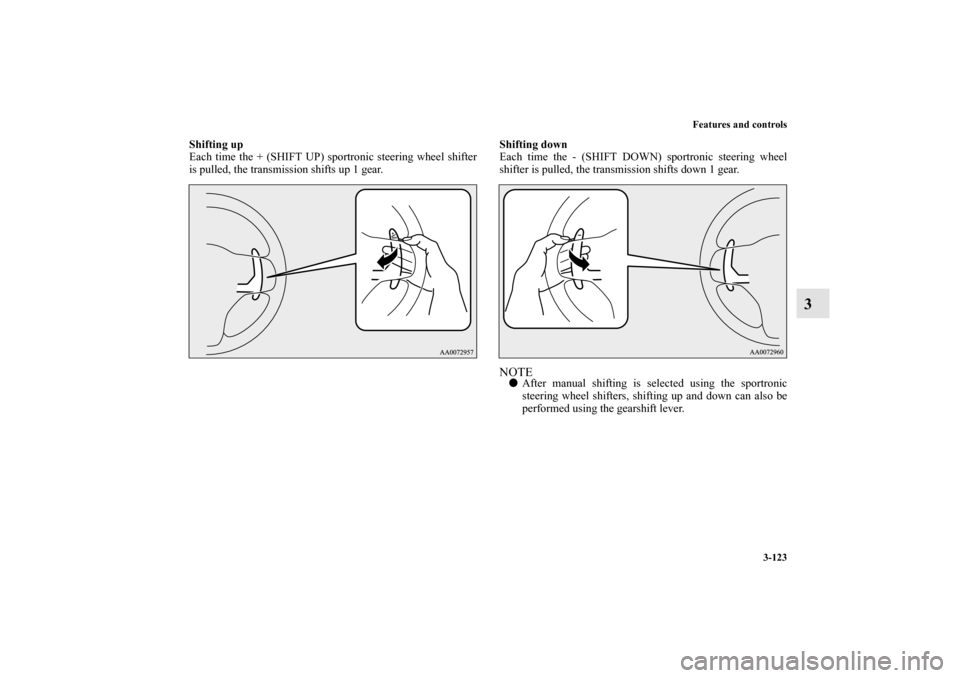
Move the gearshift lever toward the front passenger’s seat to
return to automated shifting.NOTE�When the gearshift lever is moved to the “D” (DRIVE)
position from the manual shift gate, it may automatically
select a gear different from the gear selected during man-
ual shifting depending on vehicle speed or driving condi-
tions.
Shifting using the sportronic steering wheel shifters
N00540700033
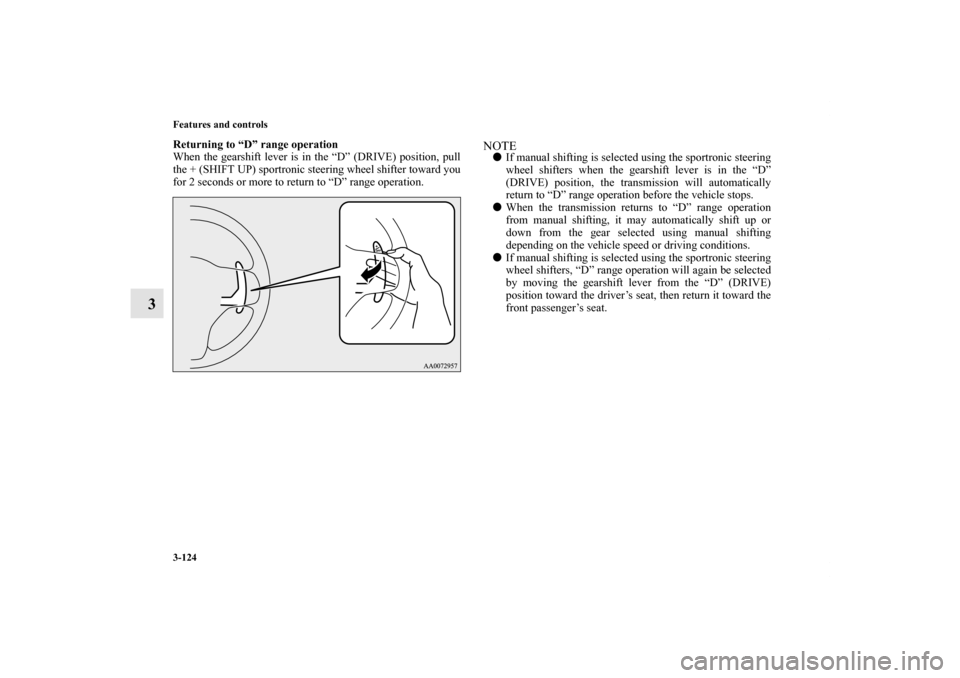
Selecting manual shifting
While the vehicle is stopped or being driven with the gearshift
lever in the “D” (DRIVE) position, manual shifting can be
selected by pulling one of the sportronic steering wheel shifters
toward you.
- (SHIFT DOWN) + (SHIFT UP)
BK0119300US.book 122 ページ 2010年5月21日 金曜日 午前10時13分
Page 218 of 700
Features and controls
3-123
3
Shifting up
Each time the + (SHIFT UP) sportronic steering wheel shifter
is pulled, the transmission shifts up 1 gear.Shifting down
Each time the - (SHIFT DOWN) sportronic steering wheel
shifter is pulled, the transmission shifts down 1 gear.
NOTE�After manual shifting is selected using the sportronic
steering wheel shifters, shifting up and down can also be
performed using the gearshift lever.
BK0119300US.book 123 ページ 2010年5月21日 金曜日 午前10時13分
Page 219 of 700
3-124 Features and controls
3
Returning to “D” range operation
When the gearshift lever is in the “D” (DRIVE) position, pull
the + (SHIFT UP) sportronic steering wheel shifter toward you
for 2 seconds or more to return to “D” range operation.
NOTE�If manual shifting is selected using the sportronic steering
wheel shifters when the gearshift lever is in the “D”
(DRIVE) position, the transmission will automatically
return to “D” range operation before the vehicle stops.
�When the transmission returns to “D” range operation
from manual shifting, it may automatically shift up or
down from the gear selected using manual shifting
depending on the vehicle speed or driving conditions.
�If manual shifting is selected using the sportronic steering
wheel shifters, “D” range operation will again be selected
by moving the gearshift lever from the “D” (DRIVE)
position toward the driver’s seat, then return it toward the
front passenger’s seat.
BK0119300US.book 124 ページ 2010年5月21日 金曜日 午前10時13分
Page 220 of 700

Features and controls
3-125
3
Manual shift display
N00543000040
In manual shift, the currently selected gear is displayed on the
multi-information display.
Operation of the Twin Clutch SST
N00540800021
through
CAUTION
!�Before selecting a position with the engine running
and the vehicle stationary, fully depress the brake
pedal to prevent the vehicle from creeping.
Do not release the brakes until you are ready to
drive away. The vehicle will begin to move as soon as
the Twin Clutch SST is engaged.�Depress the brake pedal with the right foot.
Using the left foot could cause driver movement
delay in case of an emergency.�To prevent sudden acceleration, never run the
engine at high rpms when shifting from the “P”
(PARK) or “N” (NEUTRAL) position.�Operating the accelerator pedal while the other foot
is resting on the brake pedal will affect braking effi-
ciency, may cause premature wear of brake pads
and may cause engine damage.�Use the gearshift lever in the correct shift position in
accordance with driving conditions.
Never coast downhill backward in the driving shift
position { “D” (DRIVE) or manual shifting} or coast
forward in the “R” (REVERSE) position.
Engine stopping and increased brake pedal and
steering effort could lead to an accident.
BK0119300US.book 125 ページ 2010年5月21日 金曜日 午前10時13分
Page 232 of 700
Features and controls
3-137
3 Brake assist system
N00567300018
The brake assist system is a device assisting drivers who can-
not depress the brake pedal firmly such as in emergency stop
situations and provides greater braking force.
If the brake pedal is depressed suddenly, the brakes will be
applied with more force than usual.
NOTE�Once the brake assist system is operational, it maintains
great braking force even if the brake pedal is lightly
released.
To stop its operation, completely remove your foot from
the brake pedal.
�The brake assist system may become operational when the
brake pedal is fully depressed even if it has not been
depressed suddenly.
�When the brake assist system is in use while driving, you
may feel as if the depressed brake pedal is soft, the pedal
moves in small motions in conjunction with the operation
noise, or the vehicle body and the steering wheel vibrate.
This occurs when the brake assist system is operating nor-
mally and does not indicate faulty operation. Continue to
depress the brake pedal.
�You may hear an operation noise when the brake pedal is
depressed suddenly while stationary. This does not indi-
cate a malfunction and the brake assist system is operating
normally.
CAUTION
!�The brake assist system is not a device designed to
exercise braking force greater than its capacity.
Make sure to always keep a sufficient distance
between vehicles in front of you without relying too
much on the brake assist system.
BK0119300US.book 137 ページ 2010年5月21日 金曜日 午前10時13分
Page 234 of 700

Features and controls
3-139
3
Warning display
N00562800063
If an abnormal condition occurs in the system, the following
display/indicator will turn on.
Warning display
Anti-lock braking system
N00517900309
The anti-lock braking system helps prevent the wheels from
locking up when braking. This helps you keep control of your
vehicle and its direction. Driving hints �When using the anti-lock brakes (sudden braking), steer-
ing is slightly different from normal driving conditions.
Use the steering wheel carefully.
�Always keep a safe distance from the vehicle in front of
you. Even if your vehicle is equipped with the anti-lock
braking system, leave a greater braking distance when:
• Driving on gravel or snow-covered roads.
• Driving on uneven road surfaces.
�Operation of anti-lock braking system is not restricted to
situations where brakes are applied suddenly. This system
may also prevent the wheels from locking when you drive
over manholes, steel roadwork plates, road markings, or
any uneven road surface.
�When the anti-lock braking system is in use, you may feel
the brake pedal vibrating and hear a unique sound. You
may also feel as if the pedal resists being pressed.
In this situation, simply hold the brake pedal down
firmly. Do not pump the brake, which will result in
reduced braking performance.
-ASC indicator
CAUTION
!�If the warning is displayed, the hill start assist will
not operate. Start off carefully.�Park your vehicle in a safe place and stop the engine.
Restart the engine and check whether the dis-
play/indicator goes out, in which case the hill start
assist is again working normally.
If they remain displayed or reappear frequently, it is
not necessary to stop the vehicle immediately, but
the vehicle should be inspected by an authorized
Mitsubishi Motors dealer or a repair facility of your
choice as soon as possible.
BK0119300US.book 139 ページ 2010年5月21日 金曜日 午前10時13分
Page 239 of 700

3-144 Features and controls
3
NOTE�An operation noise may be emitted from the engine com-
partment in the following situations. The sound is associ-
ated with checking the operations of the ASC. At this
time, you may feel a shock from the brake pedal if you
depress it. These do not indicate a malfunction.
• When the ignition switch is set to the “ON” position.
• When the vehicle is driven for a while after the engine is
turned on.
�When the ASC is activated, you may feel a vibration in
the vehicle body or hear a whining sound from the engine
compartment.
This indicates that the system is operating normally. It
does not indicate a malfunction.
�When the anti-lock braking system warning light is illu-
minated, the ASC is not active.Traction control function
N00559200034
On slippery surfaces, the traction control function prevents the
drive wheels from spinning excessive, thus helping the vehicle
to start moving from a stopped condition. It also provides suffi-
cient driving force and steering performance as the vehicle
turns while pressing the acceleration pedal.
Skid control function
N00559300035
The skid control function is designed to help the driver main-
tain control of the vehicle on slippery roads or during rapid
steering maneuvers. It works by controlling the engine output
and the brake on each wheel.NOTE�The skid control function operates at speeds of about 9
mph (15 km/h) or higher.
CAUTION
!�When driving a vehicle on a snowy or icy road, be
sure to install snow tires and drive the vehicle at
moderate speeds.
BK0119300US.book 144 ページ 2010年5月21日 金曜日 午前10時13分