Page 283 of 700

3-188 Features and controls
3
NOTE�To return the menu screen to the function setting screen,
press and hold the multi-information meter switch (for
about 2 seconds or more).
�If no operations are made within about 15 seconds of the
menu screen being displayed, the display returns to the
function setting screen.
4. Select the item to change on the menu screen and change
to the desired setting. For further details on the operation
methods, refer to the following sections.
Refer to “Changing the reset mode for average fuel con-
sumption and average speed” on page 3-188.
Refer to “Changing the fuel consumption display unit” on
page 3-190.
Refer to “Changing the temperature unit” on page 3-192.
Refer to “Changing the display language” on page 3-192.
Refer to “Changing the language on Mitsubishi Multi-
Communication System or Bluetooth
® 2.0 interface to
match the multi-information display (if so equipped)” on
page 3-194.
Refer to “Operation sound setting” on page 3-195.
Refer to “Changing the amount of time until “REST
REMINDER” is displayed” on page 3-197.
Refer to “Changing the turn signal sound” on page 3-198.
Refer to “Changing the momentary fuel consumption dis-
play (Type 2)” on page 3-199.
Refer to “Returning to the factory settings” on page 3-
200.
Changing the reset mode for average fuel consumption
and average speed
N00557000126
You can change the mode condition for the average fuel con-
sumption and average speed display to “Auto reset” or “Man-
ual reset”.
1. Press and hold the multi-information meter switch (for
about 2 seconds or more) to switch from the setting mode
screen to the menu screen.
Refer to “Changing the function settings (With ignition
switch in the “ON” position)” on page 3-187.
2. Lightly press the multi-information meter switch to select
“AVG” (average fuel consumption and average speed set-
ting).
BK0119300US.book 188 ページ 2010年5月21日 金曜日 午前10時13分
Page 293 of 700
3-198 Features and controls
3
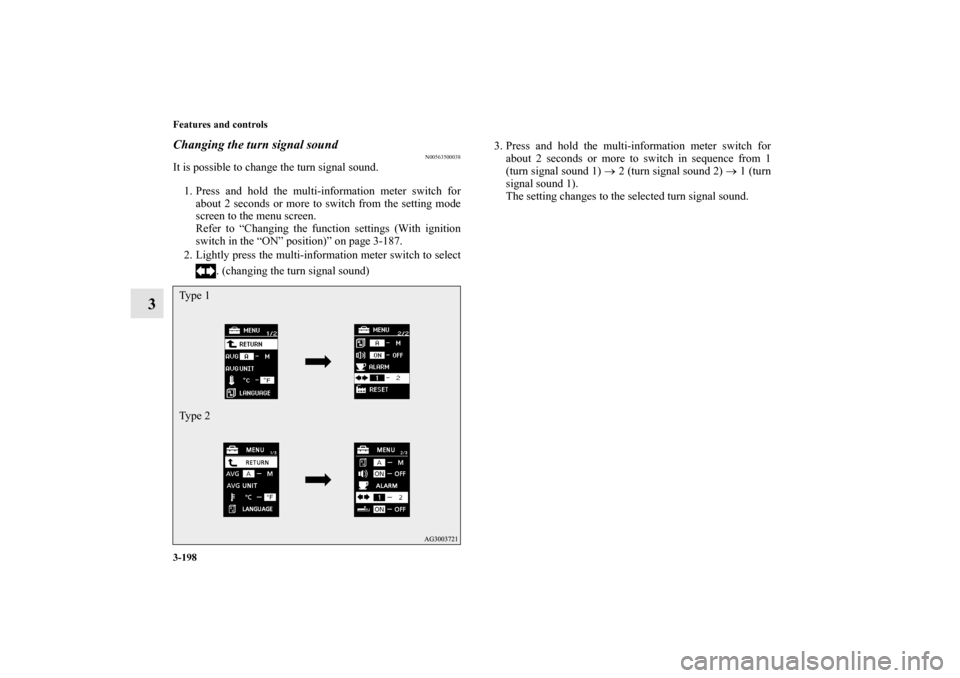
Changing the turn signal sound
N00563500038
It is possible to change the turn signal sound.
1. Press and hold the multi-information meter switch for
about 2 seconds or more to switch from the setting mode
screen to the menu screen.
Refer to “Changing the function settings (With ignition
switch in the “ON” position)” on page 3-187.
2. Lightly press the multi-information meter switch to select
. (changing the turn signal sound)3. Press and hold the multi-information meter switch for
about 2 seconds or more to switch in sequence from 1
(turn signal sound 1) → 2 (turn signal sound 2) → 1 (turn
signal sound 1).
The setting changes to the selected turn signal sound.Ty p e 1
Ty p e 2BK0119300US.book 198 ページ 2010年5月21日 金曜日 午前10時13分
Page 295 of 700

3-200 Features and controls
3
Returning to the factory settings
N00557600148
All of the function settings can be returned to their factory set-
tings.
1. Press and hold the multi-information meter switch (for
about 2 seconds or more) to change from the setting mode
screen to the menu screen.
Refer to “Changing the function settings (With ignition
switch in the “ON” position)” on page 3-187.
2. Lightly press the multi-information meter switch to select
“RESET” (return to the factory settings). 3. Press and hold the multi-information meter switch (for
about 5 seconds or more), the buzzer sounds and all of the
function settings are returned to the factory settings.
NOTE�The factory settings are as follows.
• Average fuel consumption and average speed reset
mode: A (Auto reset)
• Fuel consumption display unit: mpg (US) or (L/100 km)
• Temperature unit: °F (Fahrenheit) or {°C (Centigrade)}
• Display language: ENGLISH
• Cooperative language setting: A
• Operation sounds: ON (Operation sound on)
• “REST REMINDER” display: OFF
• Turn signal sound: Turn signal sound 1
• Momentary fuel consumption with the green bar graph
(Type 2): ON
Ty p e 1
Ty p e 2BK0119300US.book 200 ページ 2010年5月21日 金曜日 午前10時13分
Page 296 of 700

Features and controls
3-201
3 Indicator light, warning light, and information screen display list
N00557700035
Indicator and warning light list
N00557800166
Ty p e A Ty p e B1- Position indicator → P.3-214
2- High beam indicator → P.3-214
3- Charging system warning light → P.3-216
4- Turn signal indicator/hazard warning light → P.3-214
5- Front fog light indicator (if so equipped) → P.3-214
6- Anti-lock braking system warning light → P.3-140
7- Tire pressure monitoring system warning light → P.3-159
8- Brake warning light → P.3-214
9- Cruise control indicator (if so equipped) → P.3-151
10- Seat belt reminder/warning light → P.2-18
11- Supplemental Restraint System (SRS) warning light
→ P.2-4412- Engine malfunction indicator (“SERVICE ENGINE SOON”
or “Check engine light”) → P.3-215
13- Active stability control (ASC) OFF indicator (if so
equipped) → P. 3 - 1 4 6
14- Active stability control (ASC) indicator (if so equipped) →
P.3-146
15- Information screen display list → P.3-202
BK0119300US.book 201 ページ 2010年5月21日 金曜日 午前10時13分
Page 309 of 700

3-214 Features and controls
3Indicators
N00519900127
Turn signal indicators/Hazard warning lights
N00520000216
The arrows will flash in time with the corresponding exterior
turn signals when the turn signal lever is used.
Both arrows will flash when the hazard warning flasher switch
is pressed.NOTE�If the indicator flashes faster than usual or if the indicator
stays on without flashing, check for a malfunctioning turn
signal light bulb or turn signal connection.High beam indicator
N00520100086
A blue light comes on when the headlights are on high beam.Front fog light indicator
(if so equipped)
N00520200205
This indicator comes on while the front fog lights are on.Position indicator
N00551300026
This indicator light illuminates while the position lights are on.
Warning lights
N00520300147
Brake warning light
N00520400467
When the ignition switch is turned to the “ON” position, this
indicator normally comes on and goes out a few seconds later.
A warning is also displayed in the multi-information display.
The warning light also illuminates after starting the engine
under the following conditions:
�When the parking brake is still applied.
�When the brake fluid level is low.
�When the brake force distribution function is not operat-
ing correctly.
Before driving, be sure that the parking brake is fully released
and brake warning light is off.
BK0119300US.book 214 ページ 2010年5月21日 金曜日 午前10時13分
Page 320 of 700

Features and controls
3-225
3
Headlight reminder buzzer
N00549800196
When using a key to start the engineIf the driver’s door is opened with the key in the “LOCK” or
“ACC” position or removed from the ignition switch while the
lights are on, the buzzer will sound to remind you to turn off
the lights.When using the F.A.S.T.-key to start the engineIf the driver’s door is opened with the ignition switch in the
“LOCK” or “ACC” position, or if the ignition switch is moved
to the “LOCK” position while the lights are on, the buzzer will
sound to remind you to turn off the lights.
In either case, the lights and buzzer will turn off automatically.
Or you can turn the combination headlights and dimmer switch
to the “OFF” position to stop the buzzer.
Dimmer (high/low beam change)
N00549900155
To change the headlights from high beam to low beam and vice
versa, pull the turn signal lever to fully toward you (1). Switch
the headlights to low beam as a courtesy whenever there are
oncoming vehicles, or when there is traffic moving ahead of
you. An illuminated blue light in the instrument cluster indi-
cates when the headlights are on high beam.
BK0119300US.book 225 ページ 2010年5月21日 金曜日 午前10時13分
Page 322 of 700

Features and controls
3-227
3
NOTE�While the welcome light function is operating, perform
one of the following operations to cancel the function.
• Push the LOCK button (B) on the remote control trans-
mitter.
• Turn the combination headlights and dimmer switch to
the “ ” or “ ” position.
• Turn the ignition switch to the “ON” position.
�It is possible to modify functions as follows:
• The headlights can be set to come on in the low beam
setting.
• The welcome light function can be deactivated.
For details, consult a Mitsubishi Motors dealer.
Coming home light
N00547300054
This function turns on the headlights in the low beam setting
for about 30 seconds after the ignition switch is turned to the
“LOCK” position.
1. Turn the combination headlights and dimmer switch to the
“OFF” or “AUTO” position (for vehicles equipped with
the automatic light control).
2. Turn the ignition switch to the “LOCK” position. Also, if
a key was used to start the engine, remove the key from
the ignition switch.
3. Within 60 seconds of turning the ignition switch to the
“LOCK” position, pull the turn signal lever toward you.
BK0119300US.book 227 ページ 2010年5月21日 金曜日 午前10時13分
Page 323 of 700

3-228 Features and controls
3
4. The headlights will come on in the low beam setting for
about 30 seconds. After the headlights go off, the head-
lights can be turned on again in the low beam setting for
about 30 seconds by pulling the turn signal lever toward
you within 60 seconds of turning the ignition switch to the
“LOCK” position. To turn on the headlights again after 60
seconds of turning the ignition switch to the “LOCK”
position, repeat the process from step 1.NOTE�While the coming home light function is operating, per-
form one of the following operations to cancel the func-
tion.
• Pull the turn signal lever toward you.
• Turn the combination headlights and dimmer switch to
the “ ” or “ ” position.
• Turn the ignition switch to the “ON” position.
�It is possible to modify functions as follows:
• The time that the headlights remain on can be changed.
• The coming home light function can be deactivated.
For details, consult a Mitsubishi Motors dealer.
Headlight leveling switch
(if so equipped)
N00537100088
The direction of the headlight beam (the direction in which the
light shines) alters according to the number of people and the
load in the vehicle. Lower the headlight angle if it is too high
due to the number of people and/or the load in the vehicle so
that the headlights’ glare does not distract the drivers of
approaching vehicles. First set the combination headlights and
dimmer switch to the “ ” position, then turn the headlight
leveling switch knob to lower the beam. The greater the num-
ber on the headlight leveling switch knob, the lower the beam
will point.
Set the switch to the appropriate position so that the headlight
beam is level with the road.
BK0119300US.book 228 ページ 2010年5月21日 金曜日 午前10時13分