Page 336 of 618
Features and controls
3-251
3
3. Connect the Dock connector (C) to the iPod (B).NOTE�Use a genuine Dock connector from Apple Inc.4. Connect the Dock connector (C) to the USB input termi-
nal (D).
NOTE�When closing the glove compartment, be careful not to
trap the connector cable.
WA R N I N G
!�An open glove compartment door can cause a seri-
ous injury or death to the front passenger in an acci-
dent, even if the passenger is wearing his/her seat
belt. Always keep the glove compartment door
closed when driving.
BK0123500US.book 251 ページ 2010年6月4日 金曜日 午後5時1分
Page 350 of 618
Features and controls
3-265
3
Glove compartment
N00551500220
To open the glove compartment, pull the lever (A).NOTE�The USB input terminal is located in the glove compart-
ment (if so equipped). For details, refer to “USB input ter-
minal” on page 3-248.
Card holderThere is a card holder on the inside of the glove compartment.NOTE�Up to 2 cards will fit in the card holder.
WA R N I N G
!�An open glove compartment door can cause a seri-
ous injury or death to the front passenger in an acci-
dent, even if the passenger is wearing his/her seat
belt. Always keep the glove compartment door
closed when driving.
BK0123500US.book 265 ページ 2010年6月4日 金曜日 午後5時1分
Page 358 of 618

Driving safety
4-3
4 Vehicle preparation before driving
N00629000627
For a safer and more enjoyable trip, always observe the follow-
ing: Seat belts and seats �Before starting the vehicle, make certain that you and all
passengers are seated and wearing their seat belts properly
(with children in the rear seat, in appropriate restraints),
and that all the doors are locked.
�Move the driver’s seat as far backward as possible, while
still keeping good visibility, and good control of the steer-
ing wheel, brakes, accelerator, and controls. Check the
instrument panel indicators and multi-information display
for any possible problem.
�Move the front passenger seat as far back as possible.
�Make sure that infants and small children are properly
restrained in accordance with all laws and regulations.Floor matAlways properly position floor mat and assure it does not inter-
fere with operation of the pedals.
Always use retaining clip on the driver’s floorboard to secure
the Mitsubishi genuine floor mat. When used, this clip will
help prevent the floor mat from moving forward and possibly
interfering with the operation of the pedals.
To prevent the floor mat from moving forward and possibly
interfering with the operation of the pedals, Mitsubishi genuine
floor mats are recommended.
WA R N I N G
!�Always properly position floor mat and assure it
does not interfere with operation of the pedals.�Always use retaining clip on the driver’s floorboard
to secure the Mitsubishi genuine floor mat.�Always install the mat with the correct side facing
down.�Never install a second mat over an existing floor
mat.
BK0123500US.book 3 ページ 2010年6月4日 金曜日 午後5時1分
Page 494 of 618
For emergencies
6-3
6
2. Position the vehicles close enough together so that the
jumper cables can reach, but be sure the vehicles aren’t
touching each other.
3. You could be injured if the vehicles move. Set the parking
brake firmly on each vehicle. Put an automatic transaxle,
Twin Clutch SST or CVT in “P” (PARK) or a manual
transaxle in “N” (Neutral). Turn the ignition switch to the
“LOCK” position. NOTE�Turn off all lights, heater, and other electrical loads. This
will avoid sparks and help save both batteries. 4. Remove the joint terminal cover (A).
CAUTION
!�Check the other vehicle. It must have a 12-volt bat-
tery. If the other system isn’t 12-volt, both systems
can be damaged.
WA R N I N G
!�Turn the ignition switch to the “LOCK” position on
both vehicles. Make sure that the cables or your
clothes cannot be caught by the fan or drive belt.
Personal injury could result.
BK0123500US.book 3 ページ 2010年6月4日 金曜日 午後5時1分
Page 515 of 618

7-2 Vehicle care and maintenance
7Service precautions
N00937300299
Taking regular care of your vehicle will preserve its value and
appearance as long as possible.
You can do some of the maintenance work yourself, and the
rest should only be performed by an authorized Mitsubishi
Motors dealer or a repair facility of your choice.
If you discover a malfunction or other problem, have it cor-
rected by an authorized Mitsubishi Motors dealer or a repair
facility of your choice.
This section describes the maintenance inspections that you
can do yourself, if you so desire. Follow the instructions and
precautions for each procedure.
Have you purchased the Mitsubishi Motors Diamond Care Pro-
tection Plan? The Plan supplements your new vehicle warran-
ties. See your authorized Mitsubishi Motors dealer for details.
WA R N I N G
!�When checking or servicing the inside of the engine
compartment, be sure the engine is stopped and has
had a chance to cool down. �If you need to work in the engine compartment with
the engine running, be especially careful that your
clothing, hair, etc. does not get caught in the fan,
drive belts, or other moving parts.�The fan can turn on automatically even if the engine
is not running. Turn the ignition switch to the
“LOCK” position to be safe while you work in the
engine compartment.�Do not smoke or allow open flames around fuel or
the battery. The fumes are flammable.
�Be extremely careful when working around the bat-
tery. It contains poisonous and corrosive sulfuric
acid. �Do not get under your vehicle while it is on a jack.
Always use properly rated automotive jack stands. �Handling your vehicle’s parts and materials in the
wrong way can injure you. Ask an authorized Mit-
subishi Motors dealer or a repair facility of your
choice if you have questions.
WA R N I N G
!
BK0123500US.book 2 ページ 2010年6月4日 金曜日 午後5時1分
Page 547 of 618
7-34 Vehicle care and maintenance
7
Ball joint, steering linkage seals and drive shaft
boots
N00941800077
Check the following parts for damage and grease leaks:
�Ball joint boots of the front suspension and steering link-
age
�Bellows on both ends of the drive shaft
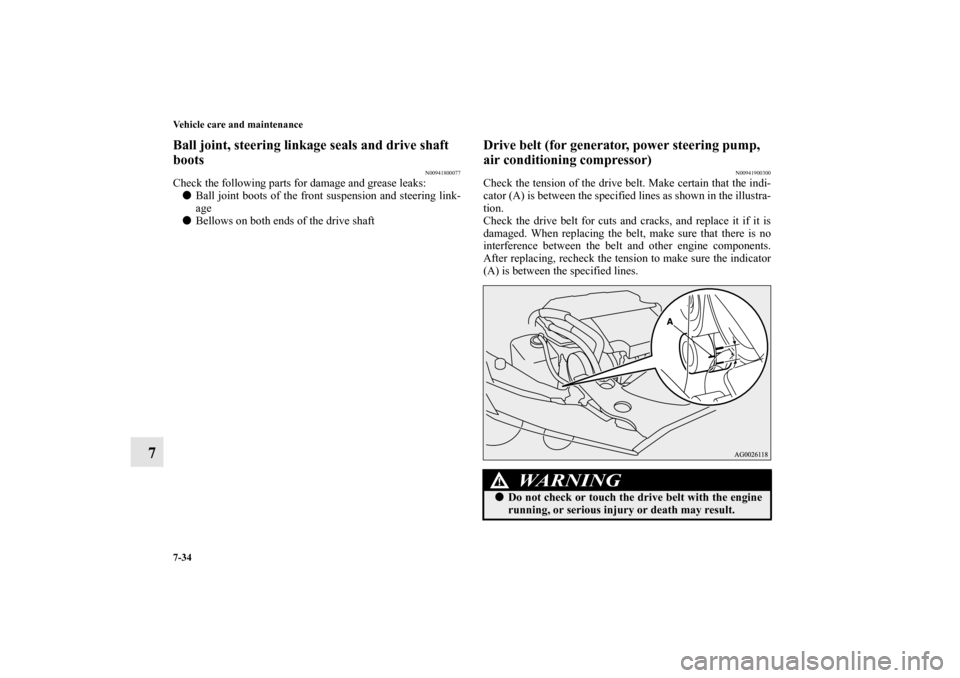
Drive belt (for generator, power steering pump,
air conditioning compressor)
N00941900300
Check the tension of the drive belt. Make certain that the indi-
cator (A) is between the specified lines as shown in the illustra-
tion.
Check the drive belt for cuts and cracks, and replace it if it is
damaged. When replacing the belt, make sure that there is no
interference between the belt and other engine components.
After replacing, recheck the tension to make sure the indicator
(A) is between the specified lines.
WA R N I N G
!�Do not check or touch the drive belt with the engine
running, or serious injury or death may result.
BK0123500US.book 34 ページ 2010年6月4日 金曜日 午後5時1分
Page 599 of 618
9-2 Specifications
9Vehicle labeling
N01147400641
Keep a record of the vehicle identification number. This infor-
mation will assist the police if your vehicle is stolen.1 - Vehicle emission control information labelThe vehicle emission control information label is affixed on the
inside panel of the engine hood.2 - Vehicle identification number plateThe vehicle identification number is stamped on the plate riv-
eted to the left front corner of the dashboard. It is visible from
outside of the vehicle through the windshield.3 - Air conditioning labelThe air conditioning label is affixed on the inside panel of the
engine compartment.
4 - Vehicle information code plateThe vehicle information code plate is located on the front pas-
senger door sill.
BK0123500US.book 2 ページ 2010年6月4日 金曜日 午後5時1分
Page 610 of 618

Alphabetical index
3
Doors
Lock 3-51
Power door locks 3-55
Drive belt 7-34
Driving during cold weather 4-5
Driving, alcohol and drugs 4-2
E
Electric rear window defogger switch 3-220
Electronic immobilizer (Anti-theft starting system) 3-4
,3-40
Emission-control system maintenance 7-31
Engine
Compartment 7-7
Coolant 7-10
,9-9
Hood 7-4
Oil and oil filter 7-7
,9-9
Overheating 6-6
Serial number 9-3
Specifications 9-7
Engine coolant temperature display 3-162
Engine malfunction indicator 3-197
Exhaust system 7-35
External audio input connector 5-103
F
Filling the fuel tank 1-4
Floor console box 3-267
Fluid
AWC control fluid 7-15
,9-9AYC fluid 9-9
Brake fluid 7-16
,9-9
Clutch fluid 7-16,9-9
Engine coolant 7-10,9-9
Power steering fluid 7-17
,9-9
Twin Clutch SST 9-9
Twin Clutch SST fluid 7-14,9-9
Washer fluid 7-16
,9-9
Fluid capacities and lubricants 9-9
Fog lights
Bulb capacity 7-46
Free-hand advanced security transmitter (F.A.S.T.-key) 3-17
Front console boxes 3-266
Front fog lights
Bulb capacity 7-46
Indicators 3-196
Replacement 7-61
Switch 3-211
Front seats 2-3
Front side-marker and parking light
Bulb capacity 7-46
Replacement 7-56,7-58
Front turn signal lights
Bulb capacity 7-46
Replacement 7-59
Fuel
Fuel economy 4-2
Fuel hoses 7-32
Modification/alterations to the electrical or fuel systems 1-8
BK0123500US.book 3 ページ 2010年6月4日 金曜日 午後5時1分