Page 411 of 618
5-42 Comfort controls
5
NOTE�If you wish to listen to another station of the same PTY as
currently selected, repeat the previous procedure from
step 2.
�To display the station name and the PTY, press the DISP
button (4) and the PTY button (8) respectively.
�If no station is found with your desired PTY, “EMPTY”
will appear on the display for 5 seconds. Then the radio
will return to the previous station and exit the PTY mode.
�If the radio cannot read the station name, the PTY and the
frequency will alternately appear on the display for 6 sec-
onds. Then the radio will start receiving the program and
exit the PTY mode.
Scan function
1. After selecting your desired PTY, press the SCAN button
(9). The radio will tune consecutively to each available
station of the selected PTY for about 5 seconds per sta-
tion.
2. To stop the scan mode, press the SCAN button again.
BK0123500US.book 42 ページ 2010年6月4日 金曜日 午後5時1分
Page 414 of 618
Comfort controls
5-45
5
To listen to a CD
N00735500992
To set discs1. Press the PWR switch (3) to turn the audio system ON and
OFF. The system turns on in the last mode used.
2. Insert the disc with the label facing up.
When a disc is inserted, the CD player will begin playing
even if the radio is being used. The CD player will also
begin playing when the CD button (2) is pressed with a
disc set in the CD player or in the disc loading slot (12),
even if the radio is being used.NOTE�For information concerning the adjustment of volume and
tone, refer to “To adjust the volume” on page 5-35 and
“To adjust the tone” on page 5-35.
�For information concerning the handling of the compact
discs, refer to “Handling of compact discs” on page 5-116.To eject discsWhen the eject button (11) is pressed, the disc automatically
stops and is ejected. The system automatically switches to
radio mode.NOTE�If you do not remove an ejected disc before 15 seconds
have elapsed, the disc will be reloaded.
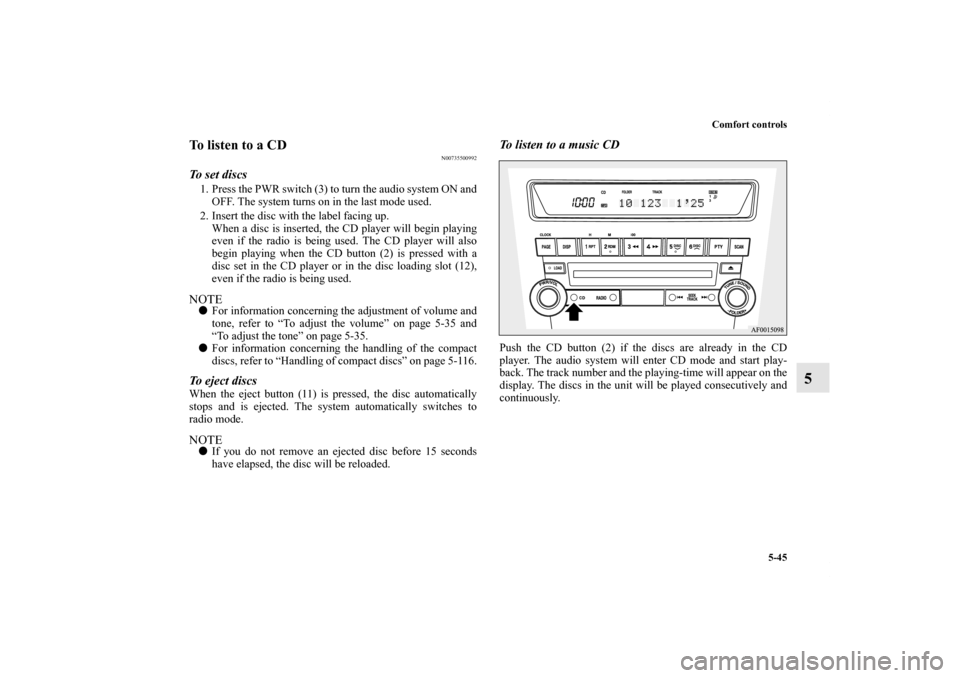
To listen to a music CDPush the CD button (2) if the discs are already in the CD
player. The audio system will enter CD mode and start play-
back. The track number and the playing-time will appear on the
display. The discs in the unit will be played consecutively and
continuously.
BK0123500US.book 45 ページ 2010年6月4日 金曜日 午後5時1分
Page 429 of 618

5-60 Comfort controls
5
To listen to the radio
N00735000867
1. Press the PWR switch (2) to turn the audio system ON and
OFF. The system turns on in the last mode used.
Press the RADIO button (1) to turn ON the radio.
2. Press the RADIO button (1) to select the desired band
(AM/FM1/FM2).
3. Press the SEEK button (5 or 6) to tune to a station, or
press one of the Memory select buttons (10) to recall a sta-
tion memorized for that button.
Refer to “Automatic tuning”, “Manual tuning” or “To
enter frequencies into the memory”.Automatic tuningAfter pressing the SEEK button (5 or 6), a receivable station
will be automatically selected and reception of the station will
begin.
SCAN function
Press the SCAN button (9). The radio will tune consecutively
to each available station for about 5 seconds per station. If you
want to stop scanning, press the SCAN button again.
The frequency display of the current station flashes once per
second during SCAN.Manual tuningThe frequency changes every time the TUNE switch (7) is
turned.
Turn the switch to select the desired station.To enter frequencies into the memoryAs many as 6 AM and 12 FM stations can be entered into the
memory.To store a frequency in the memory, follow these steps:
1. Press the SEEK button (5 or 6), or turn the TUNE switch
(7) to tune to the frequency you wish to keep in the mem-
ory.
2. Press one of the Memory select buttons (10) until it beeps.
The sound will be momentarily interrupted while the fre-
quency is being entered into the memory. The number of
the button matching the entry in the memory as well as the
frequency are displayed.
3. To recall a frequency that has been saved in memory,
press the corresponding button briefly for no longer than
about 1 second.
NOTE�Disconnecting the battery cables erases all the radio sta-
tion settings stored in the memory.
BK0123500US.book 60 ページ 2010年6月4日 金曜日 午後5時1分
Page 431 of 618
5-62 Comfort controls
5
NOTE�If you wish to listen to another station of the same PTY as
currently selected, repeat the previous procedure from
step 2.
�To display the station name and the PTY, press the DISP
button (4) and the PTY button (8) respectively.
�If no station is found with your desired PTY, “EMPTY”
will appear on the display for 5 seconds. Then the radio
will return to the previous station and exit the PTY mode.
�If the radio cannot read the station name, the PTY and the
frequency will alternately appear on the display for 6 sec-
onds. Then the radio will start receiving the program and
exit the PTY mode.
Scan function
1. After selecting your desired PTY, press the SCAN button
(9). The radio will tune consecutively to each available
station of the selected PTY for about 5 seconds per sta-
tion.
2. To stop the scan mode, press the SCAN button again.
BK0123500US.book 62 ページ 2010年6月4日 金曜日 午後5時1分
Page 434 of 618

Comfort controls
5-65
5
To listen to the SIRIUS satellite radio
N00760500215
1. Press the PWR switch (2) to turn the audio system ON and
OFF. The system turns on in the last mode used.
Press the RADIO button (1) to turn ON the radio.
2. Press the RADIO button (1) to select the desired band
(SAT1/SAT2/SAT3/SAT4). Each time you push the but-
ton, the display will change in the following order:
AM→FM1→FM2→SAT1→SAT2→SAT3→SAT4.
Once the display shows “SIRIUS”, satellite radio recep-
tion will begin.Category selection1. Pressing the PTY button (8) will cause the category of the
channel that is currently being received to be displayed for
around 2 seconds.
2. If the TUNE/SOUND switch (7) is turned, the system will
change to the category selection mode, the current cate-
gory will be shown in the display, and the PTY indicator
(12) will light up.
3. Turning the TUNE/SOUND switch (7) while in the cate-
gory selection mode, the next category will be shown.NOTE�Selecting a different category will not change the channel.
During category selection, the original channel will con-
tinue to be received. Use a channel selection button (5 or
6) to change the channel.
�If you do not use the satellite radio again before 15 sec-
onds have elapsed, the category selection mode will be
canceled. (The PTY indicator (12) will go out.)�Pressing the PTY button (8) while in the category selec-
tion mode will cause the current channel to be displayed
for around 2 seconds.
Channel selectionYou can select a channel by pressing a channel selection button
(5 or 6). NOTE�While in the category selection mode, only channels in the
category can be selected.Scan function1. Pressing the SCAN button (9) will cause the satellite radio
to tune consecutively to each available channel for about 7
seconds per channel.
2. To stop the scan mode, press the SCAN button (9) again.NOTE�While in the category selection mode, only channels in the
category can be scanned.
BK0123500US.book 65 ページ 2010年6月4日 金曜日 午後5時1分
Page 444 of 618

Comfort controls
5-75
5
To eject all the discs
1. Press the eject button (15) for 2 seconds or longer (until
you hear a beep).
2. The currently selected disc will be ejected. When you
remove the ejected disc, the next disc will automatically
be ejected.
3. Repeat the above-described steps until all of the discs
have been ejected. The autochanger will then enter load-
ing standby mode.NOTE�If you do not remove an ejected disc before 15 seconds
have elapsed, the disc will be reloaded and the eject mode
will be canceled. The reloaded disc will not be played.To select a desired discYou can select your desired disc by using the DISC button (12
or 13). The active disc will be indicated by “ ” on the display.
Disc up
Press the DISC button (13) repeatedly until the desired disc
number appears on the display.
Disc down
Press the DISC button (12) repeatedly until the desired disc
number appears on the display.
To listen to a music CDPush the CD button (2) if the discs are already in the
autochanger. The autochanger will enter CD mode and start
playback. The disc number, the track number, and the playing-
time will appear on the display. The discs in the unit will be
played consecutively and continuously.
BK0123500US.book 75 ページ 2010年6月4日 金曜日 午後5時1分
Page 479 of 618
5-110 Comfort controls
5Error codes (SIRIUS Satellite Radio)
(if so equipped)
N00760300079
If an error code (1) appears in the display, take action in accordance with the table below.
Error display
Problem
Description
Repair
ANTENNA ↔ ERROR Antenna errorThe antenna may be faulty, not securely
connected, or open-circuited.Take the vehicle to your authorized
Mitsubishi Motors dealer or a repair
facility of your choice.
ACQUIRING Cannot pick up signal. The signal is too weak to be received.Move to a place where the signal is
easy to receive.
CALL ↔ 888-539-SIRIUS Unauthorized channelContract does not include reception of this
channel.Contact SIRIUS Satellite Radio and
obtain a contract.
NO CHANNELThere is no selectable
channel.There is no selectable channel. Cancel SKIP settings.
BK0123500US.book 110 ページ 2010年6月4日 金曜日 午後5時1分
Page 488 of 618
Comfort controls
5-119
5 Antenna
N00734200455
To removeTurn the pole (A) counterclockwise.To installScrew the pole (A) clockwise into the base (B) until it is
securely retained.NOTE�Be sure to remove the roof antenna in the following cases:
• When using an automatic car wash
• When covering your vehicle with a car cover
• When driving into a structure that has a low ceiling.
Digital clock
(if so equipped)
N00755000049
The time is displayed when the ignition switch is in the “ON”
or “ACC” position.To set the time1. Press and hold the CLOCK button and the clock display
flashes.
2. Press the various buttons to adjust.H — “Hour” setting
Press this button to fast-forward the “hours”.
M — “Minutes” setting
Press this button to fast-forward the “minutes”.
CLOCK DISP H M :00
BK0123500US.book 119 ページ 2010年6月4日 金曜日 午後5時1分


