Page 191 of 494

3-96 Features and controls
3
�When your speed slows to about 25 mph (40 km/h) or
less.
�When the active stability control starts operating.
Refer to “Active stability control (ASC)” on page 3-85.
To resume the set speed
N00518900191
If the speed memory has not been erased, resume the previ-
ously set speed by pulling the cruise control lever up while
driving at a speed of about 25 mph (40 km/h) or higher.
Under either of the following conditions, however, using the
switch does not allow you to resume the previously set speed.
In these situations, repeat the speed setting procedure:
�The ignition key is turned OFF.
�The main switch is turned OFF.
WA R N I N G
!�For vehicles with automatic transaxle, although the
cruise control can be turned off by moving the selec-
tor lever to the “N” (NEUTRAL) position, never
move the selector lever to the “N” (NEUTRAL)
position while driving.
You would have no engine braking and could cause
a serious accident.
BK0115900US.book 96 ページ 2009年10月27日 火曜日 午後12時1分
Page 193 of 494

3-98 Features and controls
3
Tire pressure monitoring system warning light
N00554800093
When the ignition key is turned to the “ON” position, this light
normally illuminates and goes off a few seconds later.
If one or more of the vehicle tires (except for the compact spare
tire) is significantly under-inflated, however, this light will
remain illuminated while the key is in the “ON” position.
Refer to “If the warning light illuminates while driving” on
page 3-100 and take the necessary measures.
CAUTION
!�If the tire pressure monitoring system warning light
does not illuminate when the ignition key is turned
to the “ON” position, it means that the tire pressure
monitoring system is not working properly. Have
the system inspected by an authorized Mitsubishi
Motors dealer.
In such situations, a malfunctioning of the system
may be preventing the monitoring of the tire pres-
sure. Avoid sudden braking, sharp turning and
high-speed driving.
�If a malfunction is detected in the tire pressure mon-
itoring system, the tire pressure monitoring system
warning light will blink for approximately 1 minute
and then remain continuously illuminated. The
warning light will issue further warnings each time
the engine is restarted as long as the malfunction
exists.
Check to see whether the warning light goes off after
few minutes of driving.
If it then goes off during driving, there is no prob-
lem.
However, if the warning light does not go off, or if it
blinks again when the engine is restarted, have the
vehicle inspected by an authorized Mitsubishi
Motors dealer.
In such situations, a malfunctioning of the system
may be preventing the monitoring of the tire pres-
sure. For safety reasons, when the warning light
appears while driving, avoid sudden braking, sharp
turning and high-speed driving.
CAUTION
!
BK0115900US.book 98 ページ 2009年10月27日 火曜日 午後12時1分
Page 197 of 494

3-102 Features and controls
3
General information
N00533000092
Your tire pressure monitoring system operates on a radio fre-
quency subject to Federal Communications Commission
(FCC) Rules (For vehicles sold in U.S.A.) and Industry Canada
Rules (For vehicles sold in Canada). This device complies with
Part 15 of the FCC Rules and RSS- 210 of the Industry Canada
Rules.
Operation is subject to the following two conditions.
�This device may not cause harmful interference.
�This device must accept any interference received, includ-
ing interference that may cause undesired operation.
Rear-view camera
(if so equipped)
N00546200043
When the gearshift lever (for vehicles with manual transaxle)
or the selector lever (for vehicles with automatic transaxle) is
in the “R” position with the ignition key in the “ON” position,
the rear-view camera image will be displayed on the left por-
tion of the inside rearview mirror.
When the gearshift lever or the selector lever is shifted out of
the “R” position, the rear-view camera image will turn off.
CAUTION
!�Changes or modifications not expressly approved by
the manufacturer for compliance could void the
user’s authority to operate the equipment.
WA R N I N G
!�Never rely solely on the rear-view camera to clear
the area behind your vehicle. Always check visually
behind and all around your vehicle for persons, ani-
mals, obstructions or other vehicles. Failure to do so
can result in vehicle damage, serious injury or
death.�The rear-view camera is an aid system for backing
up, but it is not a substitute for your visual confir-
mation.�The view on the rear-view camera display is limited,
and objects outside the view, such as under the
bumper or around either corner of the bumper end,
cannot be seen on the display.
BK0115900US.book 102 ページ 2009年10月27日 火曜日 午後12時1分
Page 202 of 494
Features and controls
3-107
3
Tachometer
N00519200159
The tachometer shows engine revolutions per minute. This
allows the driver to determine the most efficient gear range and
engine speed combinations.
This gauge also assists in evaluating engine performance.
Odometer/Trip odometer
N00519500282
When the ignition switch is in the “ON” position, an “ODO” or
“TRIP” indicator is displayed.
CAUTION
!�The red zone indicates an engine speed beyond the
range of safe operation.
Select the correct gear to control the engine speed so
that the tachometer indicator does not enter the red
zone.
1- Reset button
2- Odometer/Trip odometer
BK0115900US.book 107 ページ 2009年10月27日 火曜日 午後12時1分
Page 203 of 494

3-108 Features and controls
3
Every time the reset button (1) is pressed lightly (less than one
second), the indicators are changed.
ODO-OdometerThe odometer shows the total distance the vehicle has traveled. TRIP-Trip odometerThe trip odometer shows the distance traveled since the last
time it was reset.
There are two trip odometer displays: and .
TRIP can be used to measure the distance traveled since
the current trip began.
At the same time, TRIP can be used to measure the dis-
tance from a second location.
To reset the trip odometer
To zero the counter, press and hold the reset button for more
than one second. Only the currently displayed value will be
reset.
If TRIP is displayed, for example, only TRIP will be
reset. NOTE�Both TRIP and TRIP can measure trips up to
9999.9 miles/kilometers.
�Even when the engine has been stopped, the odometer/trip
odometer indication is given for about 30 seconds if any
of the following steps is taken.
• The ignition key is turned to the “OFF” position.
• The driver’s door is opened.
• The odometer/trip odometer reset button is pressed.
�If the battery is disconnected for a long time, both of these
displays will be reset to “0”.
Ty p e 1Ty p e 2BK0115900US.book 108 ページ 2009年10月27日 火曜日 午後12時1分
Page 204 of 494
Features and controls
3-109
3
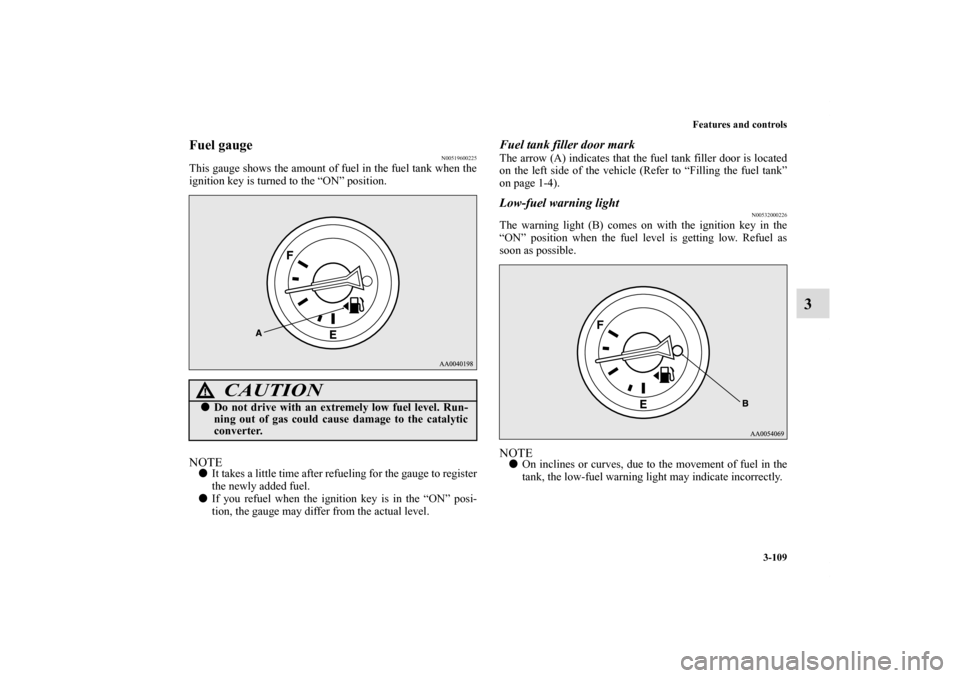
Fuel gauge
N00519600225
This gauge shows the amount of fuel in the fuel tank when the
ignition key is turned to the “ON” position.NOTE�It takes a little time after refueling for the gauge to register
the newly added fuel.
�If you refuel when the ignition key is in the “ON” posi-
tion, the gauge may differ from the actual level.
Fuel tank filler door markThe arrow (A) indicates that the fuel tank filler door is located
on the left side of the vehicle (Refer to “Filling the fuel tank”
on page 1-4).Low-fuel warning light
N00532000226
The warning light (B) comes on with the ignition key in the
“ON” position when the fuel level is getting low. Refuel as
soon as possible.NOTE�On inclines or curves, due to the movement of fuel in the
tank, the low-fuel warning light may indicate incorrectly.
CAUTION
!�Do not drive with an extremely low fuel level. Run-
ning out of gas could cause damage to the catalytic
converter.
BK0115900US.book 109 ページ 2009年10月27日 火曜日 午後12時1分
Page 205 of 494

3-110 Features and controls
3
Engine coolant temperature gauge
N00519700112
This gauge shows the engine coolant temperature. If the tem-
perature is low when the ignition key is turned to the “ON”
position, the indicator will remain at the “C” (cold) position
until the engine begins to warm up.
The indicator will normally stay near the center while driving,
but may rise slightly in stop-and-go traffic or when the engine
is under a heavy load.
Light dimmer control (meter illumination con-
trol)
N00552700030
The rheostat can be adjusted while the headlights or tail lights
are on.
Turn the dial to adjust the illumination (meter, multi center dis-
play, audio system’s control panel, heater control panel, etc.) to
the desired brightness.
CAUTION
!�Take care to keep the engine operating temperature
within the normal range while driving. If the indica-
tor enters the “H” (hot) position, the engine is over-
heating (Refer to “Engine overheating” on page 6-
6).
1- To reduce brightness
2- To increase brightness
BK0115900US.book 110 ページ 2009年10月27日 火曜日 午後12時1分
Page 207 of 494

3-112 Features and controls
3Indicator
N00519900042
Turn signal indicators/Hazard warning lights
N00520000173
The arrows will flash in time with the corresponding exterior
turn signals when the turn signal lever is used.
Both arrows will flash when the hazard warning flasher switch
is pressed. NOTE�If the indicator flashes faster than usual or if the indicator
stays on without flashing, check for a malfunctioning turn
signal light bulb or turn signal connection.High beam indicator
N00520100060
A blue light comes on when the headlights are on high beam.Front fog light indicator
N00520200218
This indicator comes on while the front fog lights are on.
Warning lights
N00520300062
Brake warning light
N00520400210
This light comes on when the ignition key is turned to the
“ON” position (engine off).
When the engine is started, the light should go off.
The light will illuminate under the following conditions:
�When the parking brake lever is engaged.
�When the brake fluid level in the reservoir falls to a low
level.
�When the brake circuit is not operating correctly.
Before driving your vehicle, release the parking brake and
make certain that the brake warning light has gone out.
CAUTION
!�Brake performance or your ability to control the
vehicle may be compromised or the vehicle may
become unstable if the brakes are applied suddenly
in the following situations:
• The brake warning light does not illuminate when
the parking brake is applied or does not turn off
when the parking brake is released.
• The brake warning light remains illuminated dur-
ing driving.
• If any of the above situations occur, stop the vehi-
cle in a safe location, avoiding any sudden brake
application, contact and your nearest authorized
Mitsubishi Motors dealer or a repair facility of
your choice.
BK0115900US.book 112 ページ 2009年10月27日 火曜日 午後12時1分
