Page 168 of 196
MobilityIndicator and warning lamps
166
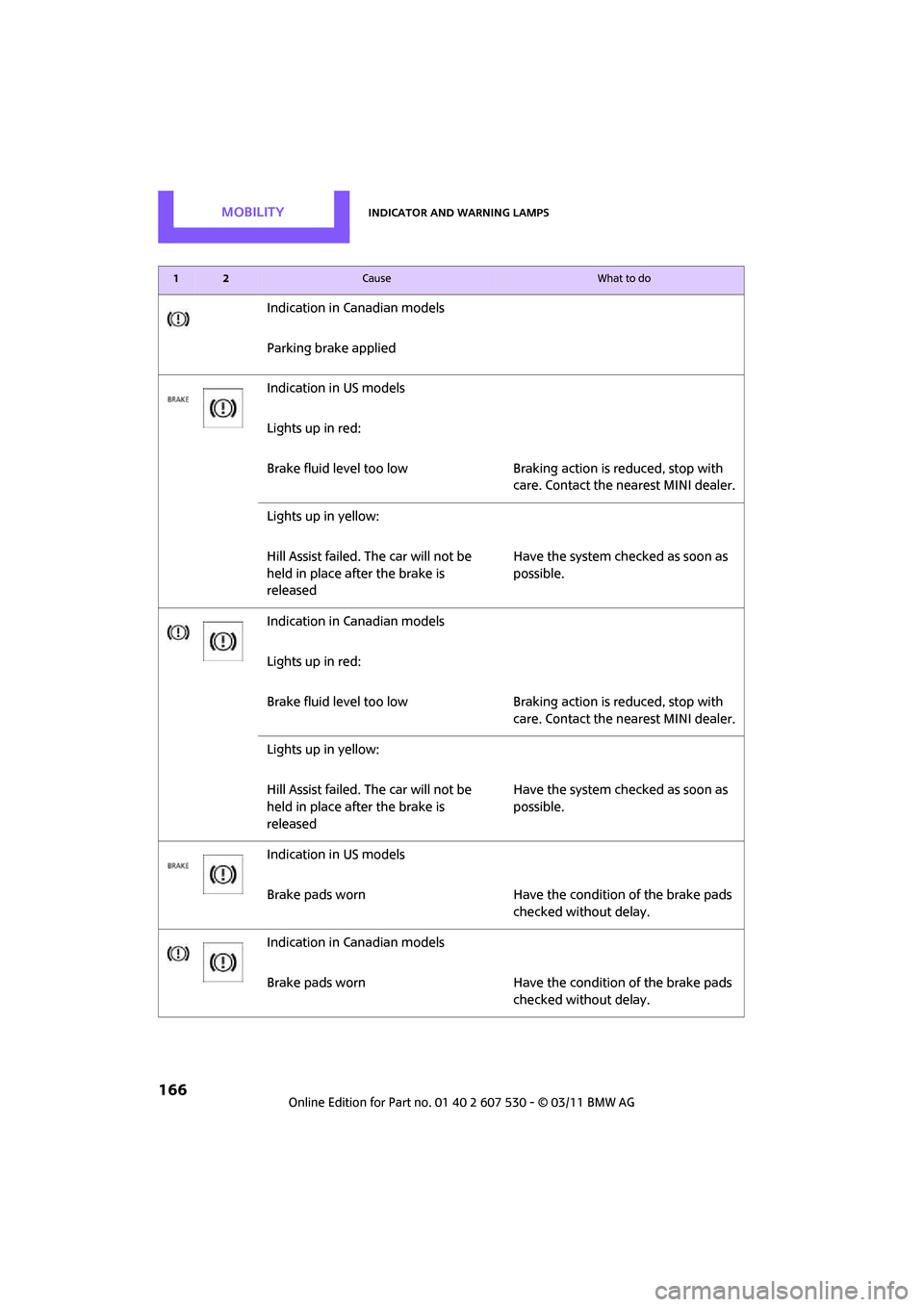
Indication in Canadian models
Parking brake applied
Indication in US models
Lights up in red:
Brake fluid level too low Braking action is reduced, stop with
care. Contact the nearest MINI dealer.
Lights up in yellow:
Hill Assist failed. The car will not be
held in place after the brake is
released Have the system checked as soon as
possible.
Indication in Canadian models
Lights up in red:
Brake fluid level too low Braking action is reduced, stop with
care. Contact the nearest MINI dealer.
Lights up in yellow:
Hill Assist failed. The car will not be
held in place after the brake is
released Have the system checked as soon as
possible.
Indication in US models
Brake pads worn Have the condition of the brake pads checked without delay.
Indication in Canadian models
Brake pads worn Have the condition of the brake pads checked without delay.
12Cause What to do
Page 169 of 196

Indicator and warning lampsMobility
167
Indication in US models
Vehicle electronics failedYou cannot continue your journey.
Contact your MINI dealer.
Indication
* in Canadian models
Vehicle electronics failed You cannot continue your journey.
Contact your MINI dealer.
Lights up in red: Have the system in question checked
without delay.
> Starter failed or The engine cannot be restarted.
> ignition malfunctioning. Engine
restart only possible when brake
is depressed or
> lighting system failed. Low
beams/tail lamps and brake
lamps still operational. All other
lamps failed Depress the brake to start the engine
again.
Lights up in yellow:
> Control of the brake lamps failed
or
> fuel supply malfunctioning You can continue your journey, but
moderate your speed and exercise
due caution. Have the system in ques-
tion checked without delay.
> Drive malfunctioning You can continue your journey, but
moderate your speed and exercise
due caution. Transmission limp-home
program active with restricted range
of gears. Have the system checked
immediately.
Flashing:
Dynamic Stability Control DSC or
Dynamic Traction Control DTC is con-
trolling drive and braking forces, refer
also to page 59
12Cause What to do
Page 172 of 196
MobilityIndicator and warning lamps
170
Vehicles with Tire Pressure Monitor*
Light up in yellow and red:
There is a flat tire or significant tire
pressure loss, e.g. in the front right
tire Carefully bring the car to a stop.
Observe the information starting on
page
64.
Vehicles with Tire Pressure Monitor
*
Light up in yellow:
Tire Pressure Monitor not initialized Check the inflation pressure and reset
the system, page
65.
The small lamp flashes yellow and
then stays on, the large lamp lights
up in yellow:
> Wheel mounted without TPM
electronics Have the system checked.
> The TPM is temporarily malfunc-
tioning due to other systems or
devices using the same radio fre-
quency.
Vehicles with Tire Pressure Monitor
*
The small lamp flashes yellow and
then stays on, the large lamp lights
up in yellow:
> Tire Pressure Monitor failed.
Punctures are not indicated Have the system checked.
> Wheel mounted without TPM
electronics Have the system checked.
12Cause What to do
Page 173 of 196

Indicator and warning lampsMobility
171
Lights up in red:
>Transmission limp-home pro-
gram active with restricted range
of gears, possibly with reduced
acceleration You can continue your journey, but
moderate your speed and exercise
due caution. Have the system
checked without delay.
> Gears can be engaged without
depressing the brake Always depress the brake to engage a
gear.
> Automatic selector lever locked Manually releasing the selector lever
lock, page45.
Lights up in yellow: Have the system checked as soon as
possible.
> Automatic selector lever locked:
Selector lever locked in position P
with engine running and brake
depressed or Manually releasing the selector lever
lock, page
45.
> brake signal malfunctioning: gear
can be engaged without depress-
ing the brake To engage a gear while the vehicle is
at a standstill, always depress the
brake. Before leaving the vehicle,
move the selector lever to position P
and switch off the engine.
Lights up in red:
Transmission overheating Bring the car to a stop and move the
selector lever to position P. Allow the
transmission to cool down. You can
continue your journey, but moderate
your speed and exercise due caution.
Have the system checked if the situa-
tion reoccurs.
Lights up in yellow:
Transmission too hot Avoid high engine loads. You can con-
tinue your journey, but moderate
your speed and exercise due caution.
Selector lever position P not engaged.
Vehicle not prevented from rolling
12Cause What to do
Page 174 of 196

MobilityIndicator and warning lamps
172
Selector lever position P not engaged.
Ignition cannot be switched offEngage selector lever position P when
you wish to switch off the ignition,
page
41.
Cruise control system fail edHave the system checked.
Park Distance Control fail edHave the system checked.
Bulb of exterior lighting system failed Have the exterior lighting checked as
soon as possible.
Low-beam headlamp or fog lamp
failed Have the lamps checked as soon as
possible.
High-beam headlamp failed Have the high-beam headlamps
checked.
Rear fog lamp failed Have the rear fog lamp checked.
Adaptive Light Control has failed
Coolant level too low Add coolant immediately, page140.
Engine oil pressure too low Stop immediately and switch off the
engine. You cannot continue your
journey. Contact your MINI dealer.
Lights up in red:
Service appointment overdue Arrange a service appointment.
Check service requirements, page 55.
Lights up in yellow:
Service due Arrange a service appointment.
Check service requirements, page 55.
12Cause What to do
Page 184 of 196

ReferenceEverything from A to Z
182
Center Rail, refer to Storage compartments 84
Central locking system 21
– Comfort Access 27
– from inside 24
– from outside 21
– setting unlocking
behavior 21
Changing bulbs 148
Changing wheels 155
Chassis number, refer to Engine compartment 139
Check Control 57
Child restraint fixing system LATCH 39
Child restraint systems 38
Child seats 38
Child-safety locks 40
Chrome parts, care 146
Chrome parts, refer to Care 144
Cigarette lighter 85
Cleaning headlamps 48
– washer fluid 49
Clock
– 12 h/24 h mode 54
– setting time 57
Closing
– from inside 24
– from outside 21
Clothes hooks 85
Cockpit 10
Cold start, refer to Starting the
engine 42
Comfort Access 27
– replacing the battery 29
– what to observe before entering a car wash 29
Comfort area, refer to Around
the center console 14
Compartment for remote control, refer to Ignition
lock 41
Compressed audio files 107
Computer 52
Condensation, refer to When the vehicle is parked 92Condition Based Service
CBS 142
Configuring settings, refer to Personal Profile 20
Connecting vacuum cleaner, refer to Connecting electrical
appliances 86
Consumption, refer to Average fuel consumption 52
Controls and displays 10
Convenient access, refer to Comfort Access 27
Convenient operation
– windows 22
Convenient start, refer to
St
arting the engine 42
Coolant 140
– checking level 141
– filling 141
– temperature 141
Coolant temperature 141
Cooling fluid, refer to
Coolant 140
Cooling, maximum 79
Copyright 2
Cornering light, refer to Adaptive Light Control 73
Cruising range 52
Cupholders 85
Curb weight, refer to
Weights 178
Current fuel consumption 52
D
Dashboard instruments, refer
to Displays 12
Dashboard lighting, refer to Instrument lighting 74
Dashboard, refer to Cockpit 10
Data 176
– capacities 179
– dimensions 177
– engine 176
– weights 178
Data memory 143 Date
– setting
57
Date setting 103
Daytime running lights 72
DBC Dynamic Brake Control, refer to Brake Assist 60
Deactivating front passenger
airbags 68
Deadlocking, refer to Locking 22
Defect
– door lock 24
– fuel filler flap 128
Defogging windows 78,80
Defrost position, refer to Defrosting windows 78,80
Defrosting windows 78,80
Defrosting windows and removing condensation
– air conditioner 78
– automatic climate control 80
Defrosting windshield, refer to
Defrosting windows 78,80
Differential, breaking in 90
Digital radio, refer to HD
Radio 105
Dimensions 177
Dipstick, engine oil 139
Directional indicators, refer to Turn signals 46
Displacement, refer to Engine data 176
Display lighting, refer to
Instrument lighting 74
Displays 12
– instrument cluster 12
Displays and controls 10
Displays, care 147
Disposal
– of coolant 140
– remote control battery 29
– vehicle battery 156
Distance remaining to service, refer to Service
requirements 55
Distance warning, refer
to Park
Distance Control PDC 59