2011 MINI Countryman steering wheel
[x] Cancel search: steering wheelPage 125 of 196
TelephoneCommunications
123
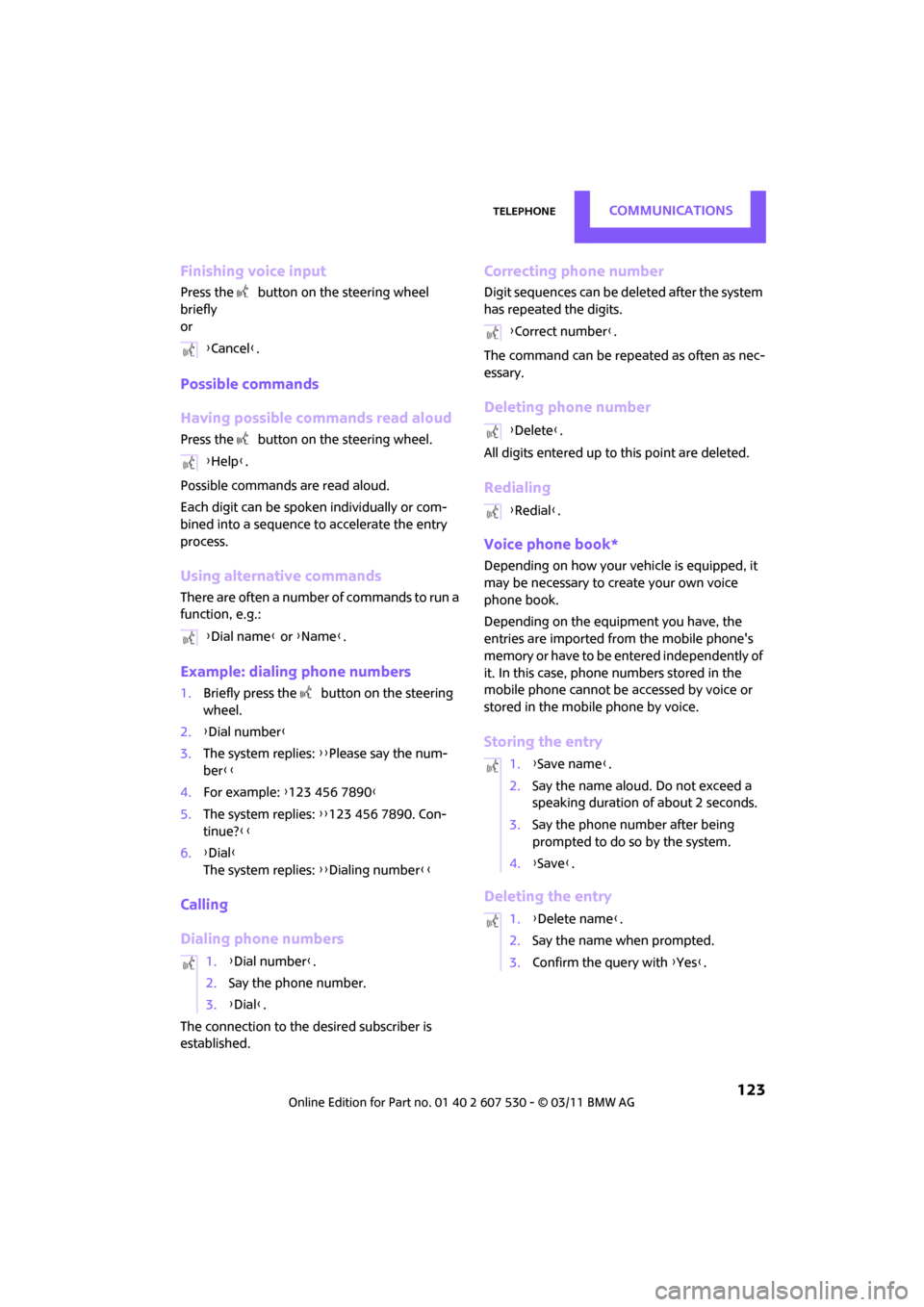
Finishing voice input
Press the button on the steering wheel
briefly
or
Possible commands
Having possible commands read aloud
Press the button on the steering wheel.
Possible commands are read aloud.
Each digit can be spoken individually or com-
bined into a sequence to accelerate the entry
process.
Using alternative commands
There are often a number of commands to run a
function, e.g.:
Example: dialing phone numbers
1. Briefly press the button on the steering
wheel.
2. {Dial number }
3. The system replies: {{Please say the num-
ber }}
4. For example: {123 456 7890 }
5. The system replies: {{123 456 7890. Con-
tinue? }}
6. {Dial }
The system replies: {{Dialing number}}
Calling
Dialing phone numbers
The connection to the desired subscriber is
established.
Correcting phone number
Digit sequences can be de leted after the system
has repeated the digits.
The command can be repeated as often as nec-
essary.
Deleting phone number
All digits entered up to this point are deleted.
Redialing
Voice phone book*
Depending on how your vehicle is equipped, it
may be necessary to create your own voice
phone book.
Depending on the equipment you have, the
entries are imported from the mobile phone's
memory or have to be entered independently of
it. In this case, phone numbers stored in the
mobile phone cannot be accessed by voice or
stored in the mobile phone by voice.
Storing the entry
Deleting the entry
{ Cancel }.
{ Help }.
{ Dial name } or {Name }.
1. {Dial number }.
2. Say the phone number.
3. {Dial }.
{Correct number }.
{ Delete }.
{ Redial }.
1. {Save name }.
2. Say the name aloud. Do not exceed a
speaking duration of about 2 seconds.
3. Say the phone number after being
prompted to do so by the system.
4. {Save }.
1. {Delete name }.
2. Say the name when prompted.
3. Confirm the query with {Yes }.
Page 154 of 196

MobilityReplacing components
152
3.Disengage the bulb holder by pressing down
on the clamping clip, arrow.
4. Remove bulb holder.
5. Apply gentle pressure to the bulb while turn-
ing it to the left for removal and replace-
ment.
6. Re-engage the bulb holder so that it audibly
clicks into place.
7. Replace the cover panel.
License plate lamps
5 watt bulb, C 5 W
1.Using a screwdriver, push the lamp to the
left in the tab of the lamp housing, arrow 1.
2. Remove the lamp, arrow 2.
3. Replace the bulb.
4. Insert the lamp.
Center brake lamp
This lamp uses LED techno logy for operation. In
the event of a malfunction, contact your MINI
dealer or a workshop th at has specially trained
personnel working in acco rdance with the spec-
ifications of your MINI manufacturer.
Repairing a flat tire
Safety measures in the event of a break-
down:
Park the vehicle as far as possible from moving
traffic and switch on the hazard warning flash-
ers.
Turn the steering wheel until the front wheels
are in the straight-ahead position and engage
the steering wheel lock. Engage the parking
brake and shift into 1st or reverse gear or place
the selector leve r in position P.
All passengers should be outside the vehicle and
in a safe place, e.g. behind a guardrail.
Erect a warning triangle or warning flasher at the
appropriate distance if necessary. Comply with
all safety guidelines and regulations. <
In the event of a flat ti re, different procedures
should be followed depending on the equip-
ment included in your vehicle:
> MINI Mobility System, refer to the following
section
> Run-flat tires, page 136
MINI Mobility System*
The Mobility System is located under the left
front seat.
Preparations
Use of the MINI Mobility System may be ineffec-
tive if the tire puncture measures approx. 1/8 in/
4 mm or more. Contact the nearest MINI dealer
if the tire cannot be made drivable with the
Mobility System.
Do not remove foreign bodies which have pen-
etrated the tire if possible.
Follow the instructions on using the Mobil-
ity System found on the compressor and
the sealant bottle. <
Remove the adhesive label for the speed limit
from the sealant bottle an d affix it to the steer-
ing wheel.
Page 162 of 196

MobilityGiving and receiving assistance
160
Using a tow fitting
The screw-in tow fitting must always be carried
in the car. It can be screwed in at the front or at
the right rear.
The tow fitting can be found under the right
front seat or in the pocket of the tire changing
set
* in the cargo area.
Use only the tow fitting provided with the
vehicle and screw it all the way in. Use the
tow fitting for towing on paved roads only. Avoid
lateral loading of the tow fitting, e.g. do not lift
the vehicle by the tow fitting. Otherwise, the tow
fitting and the vehicle could be damaged. <
Access to screw thread
Press the lower part of the cover. This will push
out the upper edge of the cover, which can then
be removed.
Front
Rear Being towed
Make sure that the igni
tion is switched on,
refer to page 41; otherwise, the low
beams, tail lamps, turn signals, and windshield
wipers may be unavailable. Do not tow the vehi-
cle with just the rear axle raised, as this would
allow the steering to turn. <
There is no power assist while the engine is off.
Thus, braking and steering will require increased
effort.
Switch on the hazard wa rning flashers, depend-
ing on local regulations.
Manual transmission
Gearshift lever in neutral position.
Automatic transmission
Tow vehicles with automatic transmission
only with a tow truck or with the front
wheels lifted; otherwise, the transmission can be
damaged. <
Towing methods
Do not lift vehicle by tow fitting or body
and chassis parts, otherwise damage may
result. <
With towbar
The towing vehicle must not be lighter
than the towed vehicle; otherwise, it may
be impossible to maintain control. <
The tow fittings used should be on the same side
on both vehicles. Should it prove impossible to
avoid mounting the tow bar at an angle, please
observe the following:
> Clearance and maneuver ing capability will
be sharply limited during cornering.
> The tow bar will generate lateral forces if it is
attached offset.
Attach the tow bar to the tow fittings only,
as attaching it to other parts of the vehicle
could result in damage. <
Page 183 of 196

Everything from A to ZReference
181
Battery156
– charging 156
– disposal 29,156
– jump-starting 158
– temporary power failure 156
Battery renewal
– remote control 29
Being towed 160
Bell
– volume 102
Belt tensioner, refer to Safety belts 35
Belts, refer to Safety belts 35
Beverage holders, refer to Cupholders 85
Black ice, refer to External
temperature warning 52
Blower, refer to Air flow rate 77,79
Bluetooth, activating/ deactivating 116
Bottle holders, refer to
Cupholders 85
Brake Assist 60
Brake fluid, refer to Service
requirements 55
Brake lamps
– replacing bulbs 151
Brake pads, breaking in 90
Brake rotors 91
– brakes 90
– breaking in 90
Brake system 90
– breaking in 90
– disc brakes 91
– MINI Maintenance
System 142
Brakes
– ABS 60
– breaking in 90
– MINI Maintenance System 142
– parking brake 43
– service requirements 55
Brakes, refer to Braking
safely 91 Breakdown service, refer to
Roadside Assistance 158
Break-in period 90
Breaking in the clutch 90
Bulb changing, refer to Lamps and bulbs 148
Button for starting the
engine 41
Buttons on the steering wheel 11
C
California Proposition 65
warning 5
Call
– accepting 119
– ending 120
– rejecting 120
Calling, refer to Phone numbers, dialing 120
Can holders, refer to
Cupholders 85
Capacities 179
Car battery, refer to Vehicle
battery 156
Car care 144
Car key, refer to Keys/remote
controls 20
Car phone
– installation location, refer to Center armrest 83
Car phone, refer to
Telephone 114
Car wash
– before driving in 43
Car wash, care 144
Car washes 144 Care
144
– car washes 144
– car-care products 144
– CD/DVD drives 147
– external 144
– high-pressure washers 145
– internal 146
– leather 146
– manual washing 145
– upholstery and fabrics 146
– windows 145
– wiper blades 145
Cargo area 92
– capacity 178
– Comfort Access 28
– lamp 75
– opening from outside 25
– trunk lid, refer to Liftgate 25
Cargo area, expanding 92
Cargo area lamp 75
Cargo area lid, refer to Liftgate 25
Cargo area partition net, refer to Cargo net 94
Cargo loading 95
– securing cargo 96
– stowing cargo 96
– vehicle 92
Cargo net 94
Cargo, securing 96
Carpets, care 146
Catalytic converter, refer to Hot exhaust system 90
CD
player 107
– changing the track 107
– fast forward/reverse 107
– playing a track 107
– random order 107
– starting 107
– volume 102
Center armrest 83
Center brake lamp 152
Center console, refer to Around the center
console 14
Center Rail 84
Page 186 of 196

ReferenceEverything from A to Z
184
Flat Tire Monitor FTM62
– indicating a flat tire 63
– initializing the system 63
– snow chains 63
– system limits 63
Flat tires, refer to Tire condition 135
Floor mats, care 146
Floor plate, refer to Flat load floor 94
Fog lamps
– replacing bulb 150
Folding rear seat backrest 92
Footbrake, refer to Braking safely 91
Footwell lamps 75
For your own safety 5
Four-wheel drive, refer to ALL4 62
Front airbags 68
Front fog lamps 74
– indicator lamp 162
– replacing bulb 150
Front seat adjustment 33
Frost on windows, refer to
Defrosting windows 78,80
FTM, refer to Flat Tire Monitor 62
Fuel 129
– gauge 51
– high-quality brands 129
– quality 129
– specifications 129
– tank capacity 179
Fuel clock, refer to Fuel gauge 51
Fuel consumption display
– average fuel consumption 52
Fuel display, refer to Fuel
gauge 51
Fuel filler flap 128
– releasing in the event of
electrical malfunction 128
Fuses 156G
Garage door opener, refer to
Integrated universal remote
control 81
Gasoline
– refer to Average fuel
consumption 52
Gasoline display, refer to Fuel gauge 51
Gasoline, refer to Required fuel 129
Gear indicator
– automatic transmission with Steptronic 44
Gear shifting
– automatic transmission 44
– manual transmission 43
Gearshift lever
– automatic transmission with Steptronic 44
– manual transmission 43
General driving notes 90
Glass roof, electric 29
– convenient operation 22,24
– opening, closing 30
– remote control 22
– tilting 29
Glove compartment 83
Grills, refer to Air vents 76
Gross vehicle weight, refer to Weights 178
H
Halogen lamps
– replacing bulb 149
Handbrake, refe r to Parking
brake 43
Hands-free system 14,122
Hazard warning flashers 14
HD Radio 105
Head airbags 68
Head Light, refer to Adaptive Light Control 73
Head restraints 34
– sitting safely 32 Headlamp control,
automatic 71
Headlamp flasher 46
– indicator lamp 11,162
Headlamp glass lens 149
Headlamps
– replacing bulb 149
Headlamps, care 145
Heated
– mirrors 36
– rear window 77,79
– seats 35
Heating 76
– mirrors 36
– rear window 77,79
– seats 35
Heavy loads, refer to Stowing cargo 96
Height adjustment
– seats 33
– steering wheel 37
Height, refer to
Dimensions 177
High beams 74
– headlamp flasher 74
– indicator lamp 162
– replacing bulb 149
High water, refer to Driving
through water 91
Hill Assist 62
Hills 91
Holders for cups 85
Homepage 4
Hood 138
Horn 10
Hot exhaust system 90
Hydroplaning 91
I
IBOC, refer to HD Radio 105
Ice warning, refer to External
temperature warning 52
Ignition 41
– switched off 42
– switched on 41
Page 188 of 196
ReferenceEverything from A to Z
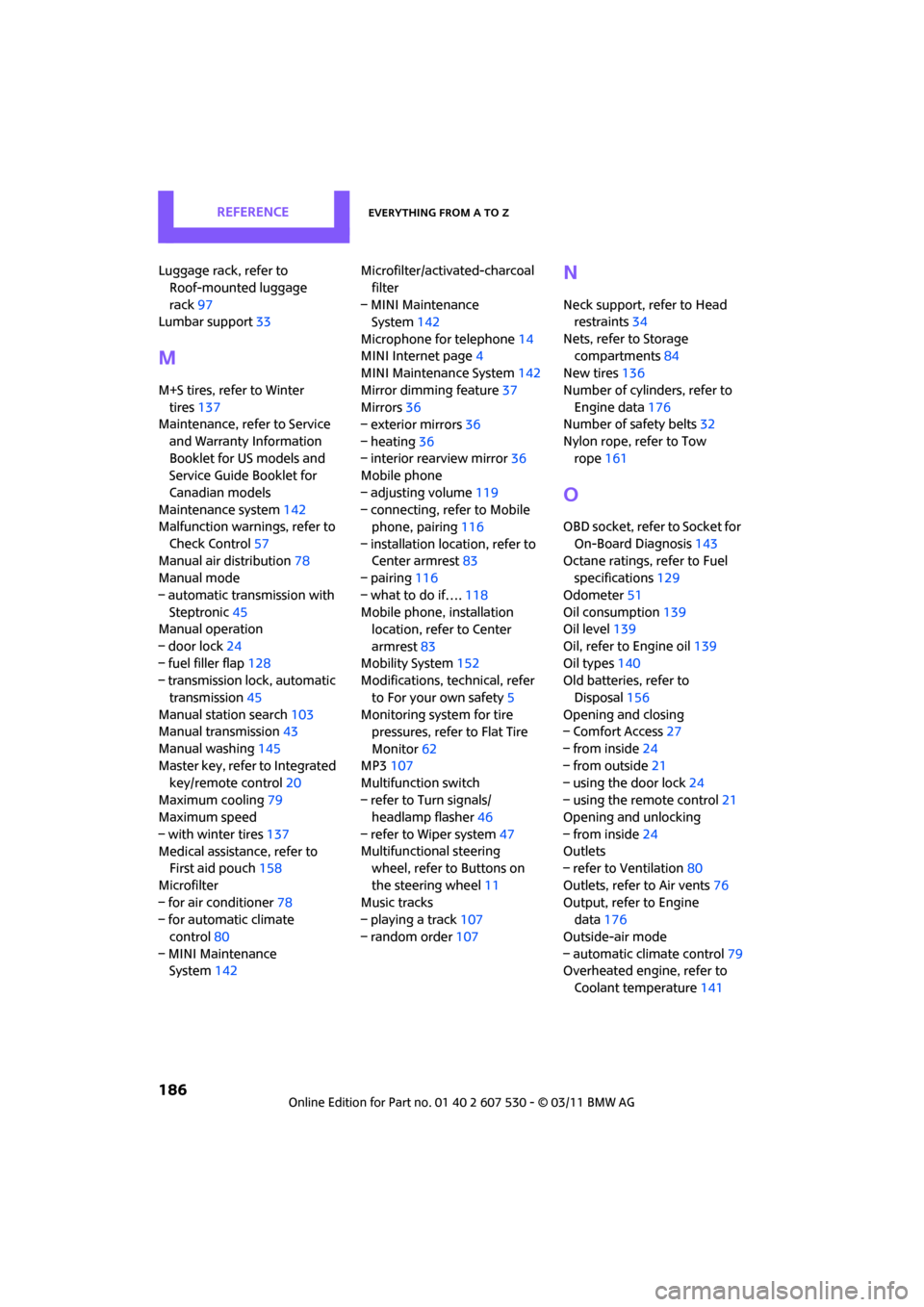
186
Luggage rack, refer to Roof-mounted luggage
rack 97
Lumbar support 33
M
M+S tires, refer to Winter
tires 137
Maintenance, refer to Service
and Warranty Information
Booklet for US models and
Service Guide Booklet for
Canadian models
Maintenance system 142
Malfunction warn ings, refer to
Check Control 57
Manual air distribution 78
Manual mode
– automatic transmission with Steptronic 45
Manual operation
– door lock 24
– fuel filler flap 128
– transmission lock, automatic
transmission 45
Manual station search 103
Manual transmission 43
Manual washing 145
Master key, refer to Integrated
key/remote control 20
Maximum cooling 79
Maximum speed
– with winter tires 137
Medical assistance, refer to First aid pouch 158
Microfilter
– for air conditioner 78
– for automatic climate
control 80
– MINI Maintenance System 142 Microfilter/activated-charcoal
filter
– MINI Maintenance System 142
Microphone for telephone 14
MINI Internet page 4
MINI Maintenance System 142
Mirror dimming feature 37
Mirrors 36
– exterior mirrors 36
– heating 36
– interior rearview mirror 36
Mobile phone
– adjusting volume 119
– connecting, refer to Mobile phone, pairing 116
– installation location, refer to Center armrest 83
– pairing 116
– what to do if…. 118
Mobile phone, installation location, refer to Center
armrest 83
Mobility System 152
Modifications, technical, refer
to For your own safety 5
Monitoring syst em for tire
pressures, refer to Flat Tire
Monitor 62
MP3 107
Mu
ltifunction switch
– refer to Turn signals/ headlamp flasher 46
– refer to Wiper system 47
Multifunctional steering wheel, refer to Buttons on
the steering wheel 11
Music tracks
– playing a track 107
– random order 107
N
Neck support, refer to Head
restraints 34
Nets, refer to Storage compartments 84
New tires 136
Number of cylinders, refer to Engine data 176
Number of safety belts 32
Nylon rope, refer to Tow rope 161
O
OBD socket, refer to Socket for
On-Board Diagnosis 143
Octane ratings, refer to Fuel specifications 129
Odometer 51
Oil consumption 139
Oil level 139
Oil, refer to Engine oil 139
Oil types 140
Old batteries, refer to
Disposal 156
Opening and closing
– Comfort Access 27
– from inside 24
– from outside 21
– using the door lock 24
– using the remote control 21
Opening and unlocking
– from inside 24
Outlets
– refer to Ventilation 80
Outlets, refer to Air vents 76
Output, refer to Engine data 176
Outside-air mode
– automatic climate control 79
Overheated engine, refer to
Coolant temperature 141
Page 191 of 196

Everything from A to ZReference
189
Speedo, refer to Speedometer 12
Speedometer 12
Split rear seat backrest, refer to
Expanding the cargo area 92
Sport button 62
Stability control, refer to
Driving stability control
systems 59
Start/Stop button 41
– starting the engine 42
– switching off the engine 42
Starting assistance, refer to
Jump-starting 158
Starting, refer to Starting the engine 42
Starting the engine
– Start/Stop button 41
Start-off assistance, refer to
– DSC 60
– Hill Assist 62
Stations, refer to Radio MINI
Boost CD 104
Status of this Owner's Manual at time of printing 4
Steering wheel 37
– adjustment 37
– buttons on steering wheel 11
– lock 41
– shift paddles 45
Steptronic, refer to Automatic transmission with
Steptronic 43
Storage area
– cargo area 92
Storage compartments 84
Storage space
– storage compartments 84
Storing the vehicle 147
Storing tires 137
Stowage, refer to Storage compartments 84
Summer tires, re fer to Wheels
and tires 130
Switches, refer to Cockpit 10
Switching off
– engine 42 Switching off the engine
– Start/Stop button
41
Switching on
– CD player 102,107
– Radio MINI Boost CD 102
Switching the co oling function
on and off 80
Symbols 4
T
Tachometer 51
Tail lamp, refer to Tail
lamps 151
– replacing bulb 151
Tail lamps 151
Tank volume, refer to Capacities 179
Technical data 176
Technical modifications 5
Telephone 114
– hands-free system 122
– installation location, refer to Center armrest 83
– voice commands 122
Temperature display
– setting the units 54
Temperature of coolant, refer
to Coolant temperature 141
Temperature setting
– air conditioner 77
– automatic climate control 79
Tempomat, refer to Cruise
control 49
Tensioning straps, refer to Securing cargo 96
The individual vehicle 4
Third brake lamp, refer to Center brake lamp 152
Three-point safety belt 35
Tightening the lug bolts
– torque 156
Tightening torque, refer to Tightening lug bolts 156
Time
– setting 103 Tire failure
– Flat Tire Monitor
63
– indicator/warning lamp 63
– MINI Mobility System 152
– run-flat tires 64
– Tire Pressure Monitor 64
Tire inflation pressure 130
– loss 63
Tire Pressure Monitor TPM 64
– limitations of system 65
– resetting system 65
– warning lamp 65
Tire pressure monitoring, refer
to Flat Tire Monitor 62
Tire Quality Grading 134
Tires
– age 136
– breaking in 90
– changing, refe r to Changing
wheels 155
– condition 135
– damage 135
– inflation pressure 130
– inflation pressure loss 65
– minimu
m tread depth 135
– new tires 136
– pressure monitoring, refer to Flat Tire Monitor 62
– pressure monitoring, refer to Tire Pressure Monitor
TPM 64
– puncture 63
– size 134
– wear indicators, refer to Minimum tread depth 135
– winter tires 137
– with emergency operation properties 136
Tires with emergency
operation properties, refer to
Run-flat tires 136
Tires with safety features, refer
to Run-flat tires 136
Tone
– control 103
– middle setting 103