2011 MINI Countryman wheel
[x] Cancel search: wheelPage 170 of 254

CommunicationsMobile phone preparation Bluetooth
168
>Depending on the mobile phone, it is possi-
ble to adjust the strength of the Bluetooth
signal.
> Insert the mobile phone into the snap-in
adapter
* o r p l a c e it in t h e v i c in i t y o f t h e c e n -
ter console.
> Adjust the volume of the microphone and
speaker separately.
If you have gone through all items in the list and
still cannot activate the desired function please
contact the Hotline or your MINI dealer.
Operation
Adjusting volume
Turn the knob until the desired volume is
reached.
The setting is stored fo r the remote control cur-
rently in use.
The vehicle automatically adjusts the volume of
the microphone on the mobile phone and the
volume of the person on the phone with you.
Depending on the mobile phone, it may be nec-
essary to adjust the volumes.
Adjustments are only possible during a call and
must be carried out separately for each phone.
When the telephone is unpaired, this deletes the
settings.
1. "Settings"
2. "Tone"
3. "Volume settings"
4. To select the desired setting:
"Microphone" or "Loudspeak." 5.
To adjust: turn the MINI joystick.
6. To store: press the MINI joystick.
Incoming call
Receiving calls
If the number of the caller is stored in the phone
book and is transmitted by the network, then
the name and number of the contact are dis-
played; otherwise, only the number is displayed.
If a contact is assigned more than one phone
number, then only the name of the caller is
transmitted.
With calls to the auxiliary phone, only the num-
ber is displayed if it is transmitted by the net-
work.
An incoming call to the auxiliary phone is auto-
matically rejected if a ca ll with the phone is cur-
rently active.
Accepting a call
Press the button on the steering wheel
or
"Accept"
Rejecting a call
"Reject"
The caller is redirected to the mailbox if it has
been activated.
Ending a call
Press the button on the steering wheel
or
Page 174 of 254

CommunicationsMobile phone preparation Bluetooth
172
Saving an entry in the contacts
1.Highlight the entry.
2. Open "Options".
3. "Store as new contact" or "Add to existing
contact".
4. Select the type of number: "Home", "Busi-
ness", "Mobile" or "Other".
5. Complete the entries if necessary.
6. "Store contact" if necessary
Hands-free system
General information
Calls being conducted using the hands-free sys-
tem can be continued using the mobile phone
and vice versa.
From the mobile phone to the hands-
free system
Calls that have been initiated from outside the
Bluetooth range of the ve hicle can be continued
using the hands-free system if the ignition is
switched on.
Depending on the mobile phone, the call is
automatically switched to hands-free mode.
If the switch does not occur automatically, then
follow the instructions that appear on the dis-
play of the mobile phone, also refer to the
Owner's Manual for the mobile phone.
From hands-free system to mobile
phone
Calls being conducted using the hands-free sys-
tem can also be continued using the mobile
phone if so desired, depending on the mobile
phone.
At this point, follow the instructions that appear
on the display of the mobile phone, also refer to
the Owner's Manual for the mobile phone.
Operation by voice*
Equipped with voice activation system: opera-
tion, refer to page 21. For the list with the short
commands, refer to page 227, does not apply
for this type of voice operation.
Without voice activation system: depending
upon the equipment, the mobile phone can be
voice-operated as described below.
The concept
> The mobile phone can be operated without
removing your hand from the steering
wheel.
> In many cases, the entry process is sup-
ported by means of announcements or
questions.
> {... } Verbal instructions to use with the voice
activation system.
> {{...}} Indicates responses of the voice acti-
vation system.
Voice commands
Activating voice activation system
1. Briefly press the button on the steering
wheel.
2. Say the command.
Finishing voice input
Press the button on the steering wheel
briefly
or
Possible commands
Having possible commands read aloud
Press the button on the steering wheel.
Possible commands are read aloud. {
Cancel }.
{ Help }.
Page 175 of 254
Mobile phone preparation BluetoothCommunications
173
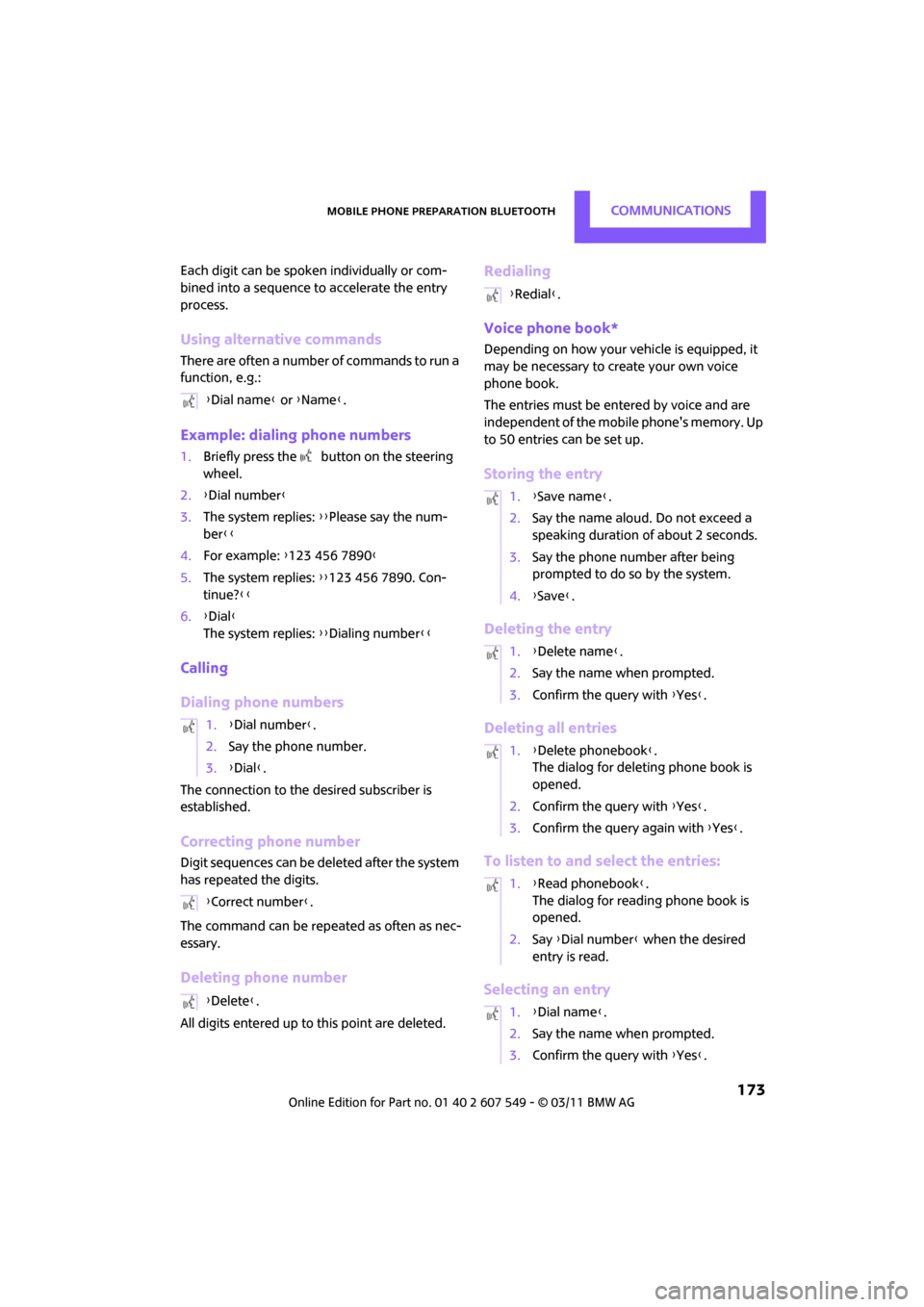
Each digit can be spoken individually or com-
bined into a sequence to accelerate the entry
process.
Using alternative commands
There are often a number of commands to run a
function, e.g.:
Example: dialing phone numbers
1.Briefly press the button on the steering
wheel.
2. {Dial number }
3. The system replies: {{Please say the num-
ber }}
4. For example: {123 456 7890 }
5. The system replies: {{123 456 7890. Con-
tinue? }}
6. {Dial }
The system replies: {{Dialing number}}
Calling
Dialing phone numbers
The connection to the desired subscriber is
established.
Correcting phone number
Digit sequences can be de leted after the system
has repeated the digits.
The command can be repeated as often as nec-
essary.
Deleting phone number
All digits entered up to this point are deleted.
Redialing
Voice phone book*
Depending on how your vehicle is equipped, it
may be necessary to create your own voice
phone book.
The entries must be entered by voice and are
independent of the mobile phone's memory. Up
to 50 entries can be set up.
Storing the entry
Deleting the entry
Deleting all entries
To listen to and select the entries:
Selecting an entry
{ Dial name } or {Name }.
1. {Dial number }.
2. Say the phone number.
3. {Dial }.
{ Correct number }.
{ Delete }.
{Redial }.
1. {Save name }.
2. Say the name aloud. Do not exceed a
speaking duration of about 2 seconds.
3. Say the phone number after being
prompted to do so by the system.
4. {Save }.
1. {Delete name }.
2. Say the name when prompted.
3. Confirm the query with {Yes }.
1. {Delete phonebook }.
The dialog for deleting phone book is
opened.
2. Confirm the query with {Yes }.
3. Confirm the query again with { Yes}.
1. {Read phonebook }.
The dialog for reading phone book is
opened.
2. Say {Dial number } when the desired
entry is read.
1. {Dial name }.
2. Say the name when prompted.
3. Confirm the query with {Yes }.
Page 186 of 254

CommunicationsMINI Connected
184
Using MINI Connected
After successful connection of the mobile phone
to the vehicle and activation of MINI Connected,
the applications are di splayed on the Control
Display and can be operated using the MINI joy-
stick.
Volume adjustments can be made using the
buttons on the steering wheel, refer to page 10,
or using the volume control knob on the radio,
refer to page 130.
1. Press the button.
This opens the main menu.
2. "MINI Connected"
3. Select the desired so ftware application.
The extent of MINI Connected that is shown on
the Control Display depends on the range of
installed software applic ations on the mobile
phone.
The data transfer of the software applica-
tion from the telephone to the vehicle can
take a few minutes. Some software applications
depend on the speed of the available Internet
connection for the mobile phone. <
Certain versions of mobile phones used and
their software can make it impossible to use
MINI Connected and the Bluetooth hands-free
system at the same time.
After a phone call, it may be necessary to restart
the software application on the mobile phone.
PlugIn*
Selected functions of an Apple device are shown
on the Control Display. They are operated using
the on-board computer.
1. Connecting an Apple device over a USB
audio interface, refer to page 183.
2. "MINI Connected"
3. "PlugIn"
4. "Activate PlugIn"
5. Navigating among the functions shown via a
MINI joystick and, e. g., selecting a desired
category or track.
Press the button to switch back or to switch
to a higher level within the functions of an Apple
device.
Press the button twice to switch back to the
main menu.
Additional information can be found in the
MINI Connected operatin g instructions at
www.mini.com/c onnectivity.
Page 192 of 254

MOBILITYWheels and tires
190
Wheels and tires
Tire inflation pressures
Information for your safety
It is not merely the tires' service life, but also
driving comfort and, to a great extent, driving
safety that depend on the condition of the tires
and the maintenance of the specified tire pres-
sure.
Checking pressure
Check the tire inflation pressure regularly
and correct it, if necessary: at least twice a
month and before starting long trips. If you fail
to observe this precauti on you may be driving
on tires with incorrect ti re pressures, a condition
that can not only compromise your vehicle's
driving stability, but also l e a d t o t i r e d a m a g e a n d
the risk of an accident. Do not drive with
deflated, i.e. flat tires, except when using run-
flat tires. A flat tire will seriously impair your
vehicle's handling and braking response.
Att empt s to drive o n a flat t ire can lead to lo ss of
control over the vehicle. <
Check the tire inflation pressures only on cold
tires. This means after a maximum of 1.25 miles/
2 km driving or when the vehicle has been
parked for at least 2 hou rs. When tires are warm,
the tire inflation pressure is higher.
After adjusting the tire inflation pressure,
reinitialize the flat tire monitor, page 70,
or reset the Tire Pressure Monitor, page 73.<
Pressure specifications
The tables below provide all the correct inflation
pressures for the specified tire sizes at ambient
temperature.
The tire inflation pressures apply to the
tire sizes approved and the tire brands
recommended by the manufacturer of your
MINI. Your MINI dealer will be glad to advise
you. <
For correct identification of the right tire infla-
tion pressures, ob serve the following:
> Tire sizes for your vehicle
> Maximum allowable driving speed
Tire inflation pressures for driving up to
100 mph or 160 km/h
For normal driving up to 100 mph or 160 km/h
and to achieve optimum driving comfort, adjust
pressures to the respective tire inflation pres-
sures listed on the follo wing pages in the col-
umns for traveling speeds up to a maximum of
100 mph or 160 km/h.
These tire inflation pre ssures can also be found
on the driver's side door pillar when the driver's
door is open.
The maximum permitted speed for these
tire inflation pressures is 100 mph or
160 km/h. Do not exceed this speed; otherwise,
tire damage and accidents may occur. <
Page 193 of 254
Wheels and tiresMOBILITY
191
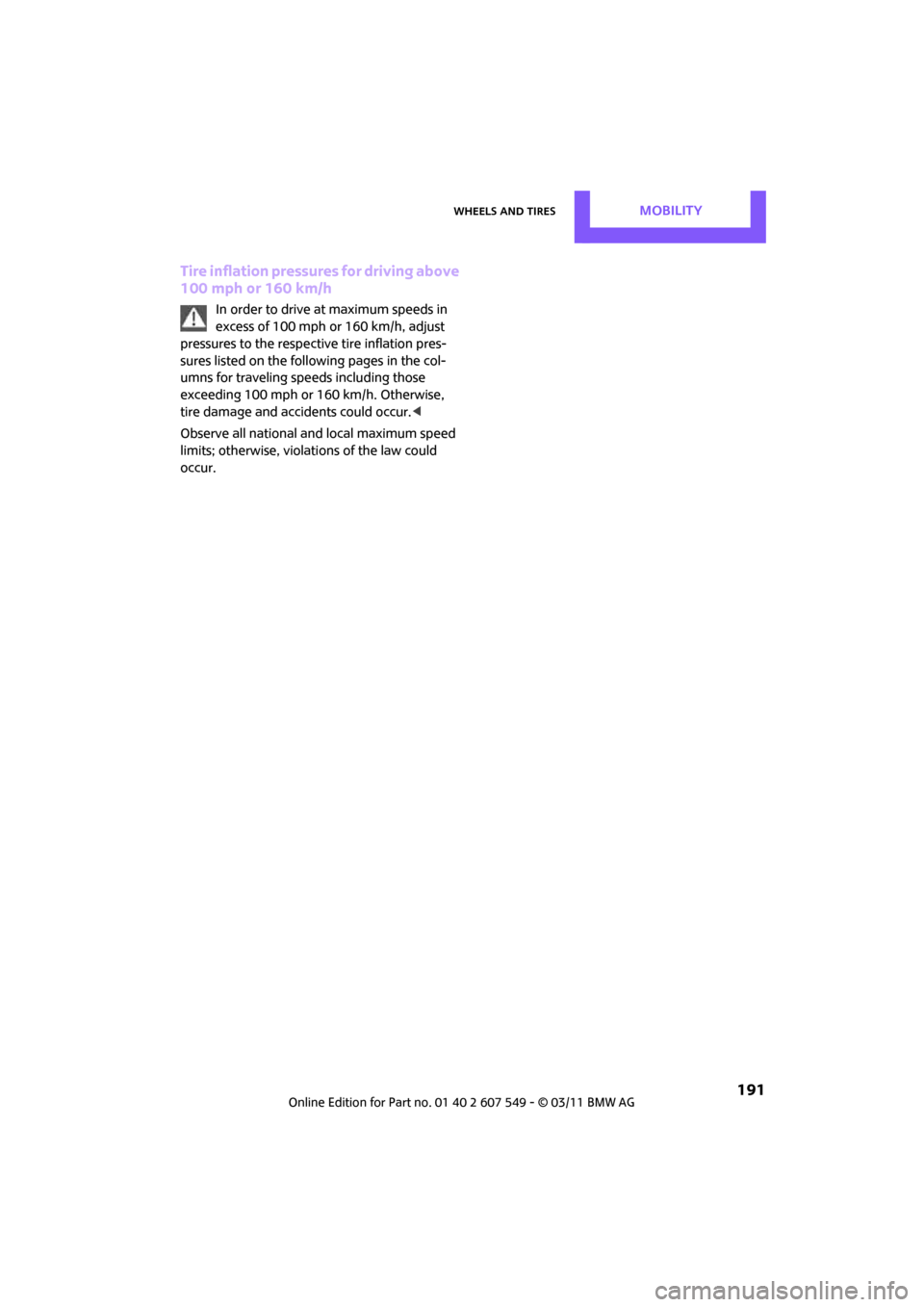
Tire inflation pressures for driving above
100 mph or 160 km/h
In order to drive at maximum speeds in
excess of 100mph or 160km/h, adjust
pressures to the respective tire inflation pres-
sures listed on the foll owing pages in the col-
umns for traveling speeds including those
exceeding 100 mph or 160 km/h. Otherwise,
tire damage and accidents could occur.<
Observe all national and local maximum speed
limits; otherwise, violations of the law could
occur.
Page 194 of 254
MOBILITYWheels and tires
192
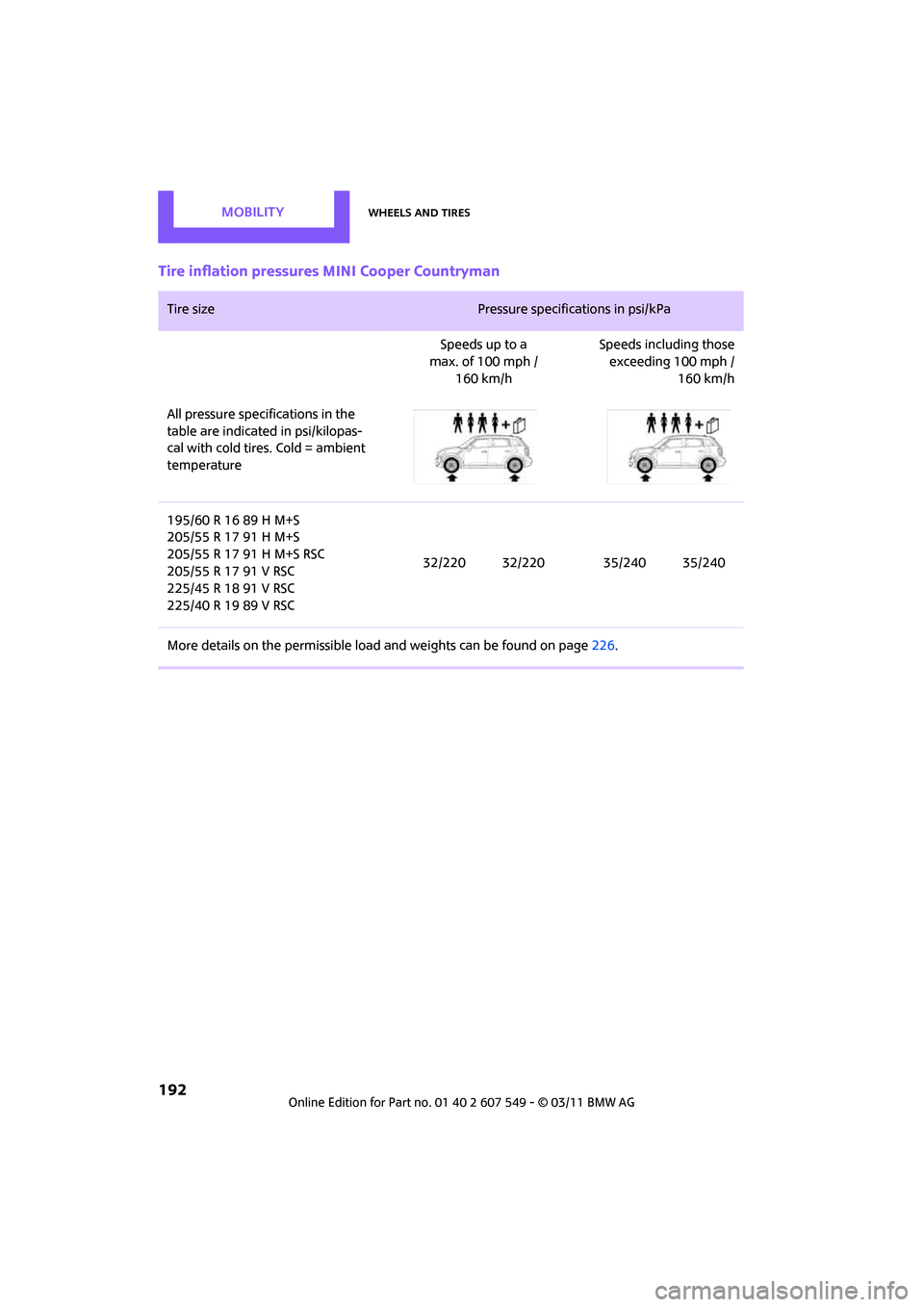
Tire inflation pressures MINI Cooper Countryman
Tire size Pressure specifications in psi/kPa
Speeds up to a
max. of 100 mph /
160 km/h Speeds including those
exceeding 100 mph /
160 km/h
All pressure specifications in the
table are indicated in psi/kilopas-
cal with cold tires. Cold = ambient
temperature
195/60 R 16 89 H M+S
205/55 R 17 91 H M+S
205/55 R 17 91 H M+S RSC
205/55 R 17 91 V RSC
225/45 R 18 91 V RSC
225/40 R 19 89 V RSC 32/220 32/220 35/240 35/240
More details on the permissible load and weights can be found on page226.
Page 195 of 254

Wheels and tiresMOBILITY
193
Tire inflation pressures MINI Cooper S Countryman / Cooper S ALL4 Countryman
Tire size Pressure specifications in psi/kPa
Speeds up to a
max. of 100 mph /
160 km/h Speeds including those
exceeding 100 mph /
160 km/h
All pressure specifications in the
table are indicated in psi/kilopas-
cal with cold tires. Cold = ambient
temperature
195/60 R 16 89 H M+S
205/55 R 17 91 H M+S
205/55 R 17 91 H M+S RSC
205/55 R 17 91 V RSC
225/45 R 18 91 V RSC
225/40 R 19 89 V RSC 32/220 32/220 38/260 38/260
More details on the perm issible load and weights can be found on page 226.