2011 MINI Clubman tow
[x] Cancel search: towPage 97 of 196

Things to remember when drivingDRIVING TIPS
95
Stowing cargo
>Position heavy objects as low and as far for-
ward as possible, ideally directly behind the
rear seat backrests.
> Cover sharp edges and corners.
> For very heavy cargo when the rear seat is
not occupied, secure each safety belt in the
respective opposite buckle.
> Do not stack higher than the top edge of the
backrests.
> Use the cargo net, refer to page 93. Ensure
that no objects can penetrate through the
net.
Securing cargo
By way of example, the illustration shows the
cargo compartment in the MINI.
> Secure smaller and lighter items using
retaining or draw straps
*.
> Heavy-duty cargo straps
* for securing larger
and heavier objects ar e available at your
MINI dealer. Four lashing eyes are provided
for attaching the cargo straps. Two of them
are located on the forward wall of the cargo
area. Comply with the information enclosed with
the load-securing devices.
Always position and secure the cargo as
described above, so that it cannot endan-
ger the car's occupants, for example if sudden
braking or swerves are necessary.
Do not exceed the approved gross vehicle
weight and axle loads, page 178; otherwise, the
vehicle's operating safety is no longer assured
and the vehicle will not be in compliance with
the construction and use regulations.
Heavy or hard objects should not be carried
loose inside the car, since they could be thrown
around, for example as a re sult of heavy braking,
sudden swerves, etc., and endanger the occu-
pants. Do not secure ca rgo using the fastening
points for the tether strap, page 39; they may
become damaged. <
Roof-mounted luggage
rack*
A special rack system is available as an option for
your MINI. Your MINI dealer will be glad to
advise you. Comply with the installation instruc-
tions supplied with the rack system.
Mounting points
By way of example, the illustration shows the
roof of the MINI.
Remove the cover panel.
Page 125 of 196

TelephoneCOMMUNICATIONS
123
Snap-in adapter*
Installation location
In the center armrest.
Inserting snap-in adapter
1.Press the button an d remove the cover.
2. Insert the snap-in adapter at the front,
arrow 1, and press downward, arrow 2, until
it clicks into place.
Inserting mobile phone
1. Depending on the mobile phone, it may be
necessary to remove the protective cap of
the antenna connector and from the USB
connection of the mobile phone.
2. Push the mobile phone with the buttons fac-
ing upward toward the electrical connec-
tions and press down until it engages.
Removing mobile phone
Press the button and remove the mobile phone.
Page 135 of 196

Wheels and tiresMOBILITY
133
M+S
Winter and all-season tires.
These have better winter properties than sum-
mer tires.
XL
Designation for specially reinforced tires.
Tire condition
Inspect your tires regula rly for tread wear, signs
of damage and for foreig n objects lodged in the
tread. Check the tread depth.
Tread depth
The tread depth should not drop below 1/8 in/
3 mm, although, for exam ple, European legis-
lation only specifies a minimum tread depth of
1/16 in/1.6 mm. At tread depths below 1/8 in/
3 mm there is an increased risk of high-speed
hydroplaning, even when only small amounts of
water are present on the road surface.
Winter tires
When winter tires wear down past a tread depth
of 1/6 in/4 mm, they become perceptibly less
suitable for winter conditions. In the interest of
safety, new tires should be installed.
Minimum tread depth
Wear indicators in the base of the tread groove
are distributed around the tire's circumference;
the letters TWI, for Tread Wear Indicator, on the
tire's sidewalls identify tires that incorporate
these wear indicators. When tire tread is worn down to the level of the wear indicators, the
remaining tread depth is 1/16 in/1.6 mm.
Tire damage
Due to low-profile tires, please note that wheels,
tires and suspensions parts are more susceptible
to road hazards and consequential damages.
Unusual vibrations encountered during normal
vehicle operation can indicate tire failure or
some other vehicle defect
. This can, for exam-
ple, be caused by driving over curbs. The same
applies to any other ab normal road behavior,
such as pulling severely to the right or left.
In these cases, reduce speed immediately
and have wheels an d tires thoroughly
checked. To do so, drive carefully to the nearest
MINI dealer or tire shop that works according to
MINI repair procedures with correspondingly
trained personnel. If necessary, have the vehicle
towed there.
Otherwise, tire damage can be extremely dan-
gerous for vehicle occupants and other road
users. <
Tire age
The manufacturing date of tires is contained in
the tire coding:
DOT ... 0211 means that the tire was manufac-
tured in week 2 of 2011.
For various reasons, such as the development of
brittleness, the manufacturer of your MINI rec-
ommends tire replacemen t after no more than
6 years, regardless of th e actual wear of the
tires.
Page 139 of 196
Under the hoodMOBILITY
137
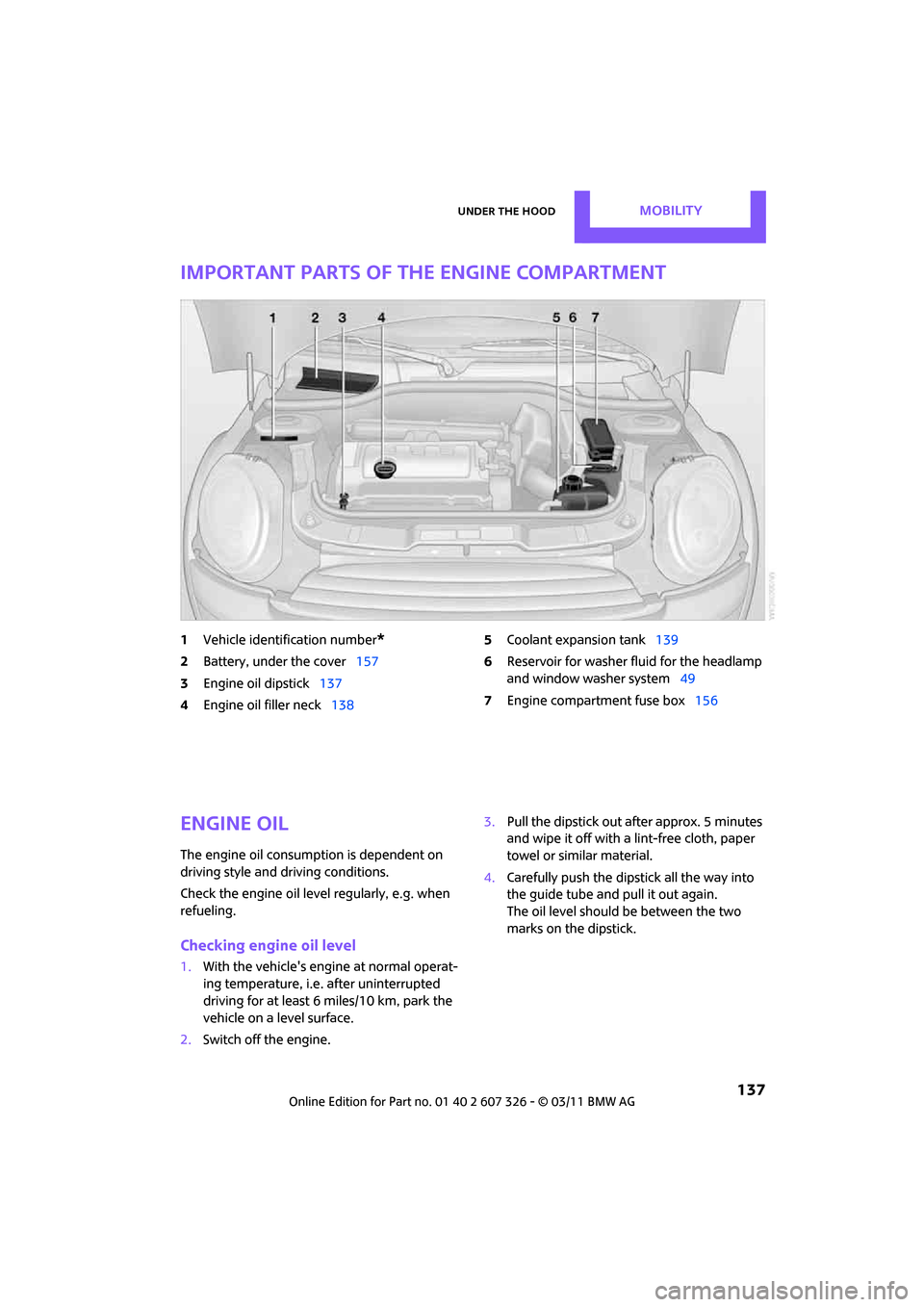
Important parts of the engine compartment
1Vehicle identification number*
2Battery, under the cover 157
3 Engine oil dipstick 137
4 Engine oil filler neck 138 5
Coolant expansion tank 139
6 Reservoir for washer fl uid for the headlamp
and window washer system 49
7 Engine compartment fuse box 156
Engine oil
The engine oil consumption is dependent on
driving style and driving conditions.
Check the engine oil level regularly, e.g. when
refueling.
Checking engine oil level
1.With the vehicle's engi ne at normal operat-
ing temperature, i.e. after uninterrupted
driving for at least 6 miles/10 km, park the
vehicle on a level surface.
2. Switch off the engine. 3.
Pull the dipstick out after approx. 5 minutes
and wipe it off with a lint-free cloth, paper
towel or similar material.
4. Carefully push the dipstick all the way into
the guide tube and pull it out again.
The oil level should be between the two
marks on the dipstick.
Page 148 of 196

MOBILITYReplacing components
146
Replacing components
Onboard vehicle toolkit
Your vehicle comes with an onboard vehicle
toolkit that varies with the equipment version; it
is stored underneath the flat load floor.
With the MINI Mobility System*
1 Compressor
2 Wheel stud wrench
*
3Vehicle jack*
4Torx insert bit for screwdriver
5 Flat screwdriver/Phillips screwdriver, towing
eyelet
6 Extractor hook
7 Sealant bottle
Run-flat tires* or space-saver spare tire*
1Folding chock* and cover for defective
wheel
2 Vehicle jack
3 Wheel stud wrench
4 Extractor hook
*
5Flat screwdriver/Phillips screwdriver
6 Torx insert bit for screwdriver
7 Towing eyelet
The onboard vehicle tool kit includes a pouch
with a plastic bag in which you can place the
damaged wheel.
Wiper blades
Changing the front wiper blades
1. Fold up the wiper arm.
2. Position the wiper blade horizontally.
3. Press the securing spring, arrow.
Page 149 of 196

Replacing componentsMOBILITY
147
4.Unhook the wiper blade toward the wind-
shield.
5. Pull the wiper blade past the wiper arm
toward the top.
6. Insert the new wiper blade.
7. Press into position until you hear it engage.
8. Fold down the wiper arm.
To avoid damage, make sure that the
wiper arms are against the windshield
before you open the hood. <
Changing the rear wiper blade
1.Fold out the wiper arm and hold it.
2. Press together the locking spring, arrow 1,
and fold out the wiper blade.
3. Pull the wiper blade away from and out of
the catch mechanism, arrow 2.
4. Press the new wiper blade into the fixture
until it engages audibly.
Lamps and bulbs
Lamps and bulbs make an essential contribution
to vehicle safety. They should, therefore, be
handled carefully. The manufacturer of your
MINI recommends having your MINI dealer per-
form any work that you do not feel competent to
perform yourself or that is not described here.
Never touch the glass of new bulbs with
your bare fingers, as even minute
amounts of contaminatio n will burn into the
bulb's surface and reduce its service life. Use a clean tissue, cloth or some
thing similar, or hold
the bulb by its base.<
You can obtain a selectio n of replacement bulbs
at your MINI dealer.
When working on electrical systems,
always begin by switching off the con-
sumer in question; otherwise, short circuits
could result. To avoid possible injury or equip-
ment damage when replacing bulbs, observe
any instructions provided by the bulb manufac-
turer. <
Caring for headlamps, refer to page 143.
For any bulb replacement not described
below, contact a MINI dealer or a work-
shop that has specially trained personnel work-
ing in accordance with th e specifications of the
MINI manufacturer. <
For checking and adjusting headlamp aim,
please contact your MINI dealer. <
Light-emitting diodes LEDs
Light-emitting diodes installed behind translu-
cent lenses serve as the light sources for many of
the controls and displays in your vehicle. These
light-emitting diodes are related to conven-
tional laser diodes, and legislation defines them
as Class 1 light-emitting diodes.
Do not remove the covers or expose the
eyes directly to the unfiltered light source
for several hours; otherwise, this could cause
irritation of the retina. <
Headlamp glass lens
In cool or humid weather, condensation may
occur on the interior of outside lights. The con-
densation disappears a short time after the light
is switched on. The headlamp glasses do not
need to be changed. If a lot of moisture is
present, e.g. water droplets in the light, have
them checked by your service center.
Page 152 of 196

MOBILITYReplacing components
150
Side turn signals
5 watt bulb, W 5 W
1.Push the lamp with the ventilation grate for-
ward and remove.
2. Unscrew the bulb holder counterclockwise.
3. Pull out and replace the bulb.
4. To insert the new bulb and replace the
cover, proceed in reverse order.
Tail lamps
Brake light: bulb 21 Watt/5 Watt, W 5 W
Other lights: bulbs 21 Watt, P 21 W
1Brake light
2 Turn signal
3 Tail lamp LED
4 Rear fog lamp
*
5Backup lamps
Changing
1.Using the screwdriver from the onboard
vehicle toolkit, remove the screw at the top.
2. Swing out the tail lamp and remove it
toward the top.
3. Disconnect the cable co nnector if necessary,
arrow 1.
4. Unscrew the corresponding bulb counter-
clockwise, arrow 2, and remove it.
5. To insert the new bulb and reinstall the tail
lamp, proceed in reverse order.
Rear fog lamps*/Reverse lights
Bulbs 16 Watt, W 16W
The rear fog lamp is located in the left tail
lamp, refer to Tail lamps page 150.<
Page 155 of 196

Replacing componentsMOBILITY
153
Stowing Mobility System
1.Unscrew filler hose 2 of the sealant bottle
from the wheel.
2. Unscrew connecting hose of the
compressor 6 from the sealant bottle.
3. Connect the filler hose 2 of the sealant bot-
tle to the unoccupied connection on the
sealant bottle.
This prevents the rest of the sealant from
escaping from the bottle.
4. Wrap the empty sealant bottle in suitable
material to avoid dirtying the cargo area.
5. Stow Mobility System back in the vehicle.
Distributing the sealant
Immediate drive approx. 3.1 miles/5 km so that
the sealant evenly distributes itself.
Do not exceed speeds of 50 mph/
80 km/h.
If possible, do not drop below 10 mph/
20 km/h.<
Adjusting the tire pressure
1. After driving approx. 3.1 miles/5 km or
10 minutes, stop at a suitable location.
2. Screw the connection hose 6 of the com-
pressor directly onto the tire valve.
3. Insert the plug 5 into the power socket in
the vehicle interior.
4. Correct inflation pressu re to 26 psi/180 kPa.
With the engine running:
> To increase the inflatio n pressure: switch on
the compressor. To check the current infla-
tion pressure, switch off the compressor.
Do not run the compressor for longer
than 10 minutes; otherwise, the
device will overheat and possibly be dam-
aged. <
> To decrease the inflation pressure: press the
release button 9. If the tire cannot ma
intain the inflation
pressure, drive the vehicle again, refer to
Distributing the sealan t. Then repeat steps
1to4.
If an inflation pressure of 26 psi/180 kPa still
cannot be reached, the tire is too heavily dam-
aged. Contact the nearest MINI dealer. <
Driving on
Do not exceed the permitted maximum
speed of 50 mph/80 km/h; doing so may
result in an accident.<
Replace the defective tire as soon as possible
and have the new wheel/tire assembly bal-
anced.
Have the Mobility System refilled.
Changing wheels
Run-flat tires*
Tire change for run-flat tires:
> Prepare for tire change, page 154
> Jack up vehicle, page 154
> Tighten lug bolts, page 155
Space-saver spare tire*
Tire change with space-saver spare tire:
>Remove the space-saver spare tire,
page 154
> Prepare for tire change, page 154
> Jack up vehicle, page 154
> Mount space-saver spare tire, page 155
> Tighten lug bolts, page 155
> Drive with space-saver spare tire, page 154