2011 MINI Clubman service
[x] Cancel search: servicePage 100 of 256

DRIVING TIPSThings to remember when driving
98
Things to remember when driving
Break-in period
Moving parts need breaking-in time to adjust to
each other. Please follow the instructions below
in order to achieve the optimal service life and
economy of operation for your vehicle.
Engine and differential
Always obey all official speed limits.
Up to 1,200 miles/2,000 km
Drive at varying engine and road speeds, but do
not exceed the following:
> Gasoline engine
4,500 rpm or 100 mph/160 km/h
Avoid full-throttle operation and use of the
transmission's kickdown mode.
After driving 1,200 miles/2,000 km
Engine and vehicle speeds can be gradually
increased.
Tires
Due to technical factors associated with their
manufacture, tires do not achieve their full trac-
tion potential until after an initial break-in
period. Therefore, drive cautiously during the
first 200 miles/300 km.
Brake system
Brakes require an initial break-in period of
approx. 300 miles/500 km to achieve optimized
contact and wear patterns between brake pads
and rotors. Drive cautiously during this break-in
period.
Clutch
The function of the clutch reaches its optimal
level only after a distan ce driven of approx.
300 miles/500 km. During this break-in period,
engage the clutch gently.
Following part replacement
The same break-in procedures should be
observed if any of the components mentioned
above have to be renewed in the course of the
vehicle's operating life.
General driving notes
Close Split Rear Barn Doors
Only drive with the Split Rear Barn Doors
closed. Failure to do so may endanger
passengers or other road users or may damage
the vehicle in the event of an accident or a brak-
ing and evasive maneuver. In addition, exhaust
gas may flow into the passenger compart-
ment. <
If special circumstances make it absolutely nec-
essary to drive with the Split Rear Barn Doors
open:
1. Close all windows and the glass roof
*.
2. Switch off the recirculated-air mode and sig-
nificantly increase the air flow rate of the
automatic climate control, page 88.
Hot exhaust system
As in all vehicles, extremely high tempera-
tures are generated on the exhaust sys-
tem. Do not remove the heat shields installed
adjacent to various sections of the exhaust sys-
tem, and never apply undercoating to them.
Make sure that when driving, idling or when
parking, no easily flamma ble materials, such as
hay, leaves, grass, etc. come into contact with
the hot exhaust system. Such contact could lead
to a fire, with the risk of serious personal injuries
and property damage. Do not touch hot exhaust
tail pipes. Otherwise, there is a risk of burns. <
Page 107 of 256

Things to remember when drivingDRIVING TIPS
105
Have the vehicle serviced
Have your vehicle serviced regularly to achieve
good economy and a long vehicle life. The man-
ufacturer of your MINI recommends having the
vehicle serviced by a MINI dealer. Also note the
MINI Maintenance System, page202.
Page 126 of 256

NAVIGATIONRoute guidance
124
Traffic bulletins in the map
When the traffic info map is activated, the pic-
ture on the Control Display is switched to a gray-
scale. This permits an optimized depiction of
traffic information. The day/night mode is disre-
garded in this setting. The symbols for the spe-
cial destinations are no longer displayed.
1. "Navigation"
2. "Map"
3. Open "Options".
4. "Settings"
5. "Traffic conditions/gray map"
Symbols in map view
The symbols of traffic ob structions are displayed
differently, depending on the scale of the map
and location of the traffi c obstruction in relation
to the route.
Additional information in the map
display
Depending on the map scale, the length, direc-
tion, and effects of a traffic obstruction are
depicted by traffic symbol s in the map or by bars
along the planned route. The colors displayed
depend on the informatio n sent by the traffic
information service.
> Red: traffic congestion
> Orange: stop-and-go traffic
> Yellow: heavy traffic
> Green: clear roads
> Gray: general traffic information such as
road construction
The colors displayed depend on the information
sent by the traffic information service.
Filtering of traffic bulletins
To set which traffic bulletins the system should
display:
1."Navigation"
2. "Map" 3.
Open "Options".
4. "Traffic Info categories"
5. Select the desired categories.
Traffic bulletins of the selected categories are
displayed.
> Traffic bulletins on in cidents along the route
are always displayed.
> For personal safety, traffic information that
indicates a potential hazard can not be hid-
den.
Route guidance with traffic information
Semi-dynamic route guidance
With traffic information reception switched on,
semi-dynamic route gu idance is active.
The system takes into account the existing traffic
information during route guidance. A message is
displayed as a function of the route, the traffic
information, and the po ssible alternate routes.
The message displays the traffic information and
in the event of a traffic obstruction, suggests an
alternate route. The difference in distance and
time between the origin al route and the alter-
nate route are also displayed.
Taking an alternate route:
"Detour"
With particular hazards, e.g. objects on the road-
way, a message is displayed without a possible
alternate route.
It is also possible to take alternate routes can
also be taken if the tr affic reports are accessed
via the list:
Page 160 of 256

CommunicationsHands-free device Bluetooth
158
Calls with multiple parties
General information
It is possible to switch between two calls and to
connect two calls to form a conference call.
These functions must be supported by the
mobile phone and by the service provider.
Accepting a call wh ile speaking to
another party
This function may have to be activated by the
service provider and the mobile phone may
need to be adjusted for this.
When a second call comes in during an ongoing
call, a call-waiting signal sounds.
"Accept"
The call is accepted and the existing call is put on
hold.
Establishing a second call
Establish another call during an active call.
1. "Telephone"
2. "Active calls"
3. "Hold"
The existing call is put on hold.
4. Dial the new phone number or select it from
a list.
"Return"
The conversion that was on hold is continued.
Switching between two calls, toggling
Active call: highlighted.
The call on hold is identified with:
"on hold...".
Select the symbol to switch to the call on
hold.
Establishing a conference call
Two calls can be connected to a single tele-
phone conference call.
1. Establish two calls.
2. "Conference call"
Both calls are always ended when a conference
call is terminated. If one call is terminated by
another party, the other call can be continued.
Muting the microphone*
The microphone can be muted in active calls.
1. "Telephone"
2. "Active calls"
3. "Microphone mute"
Page 161 of 256
Hands-free device BluetoothCommunications
159
The muted microphone is automatically acti-
vated:
>If a new call is made.
> When switching between callers on hold.
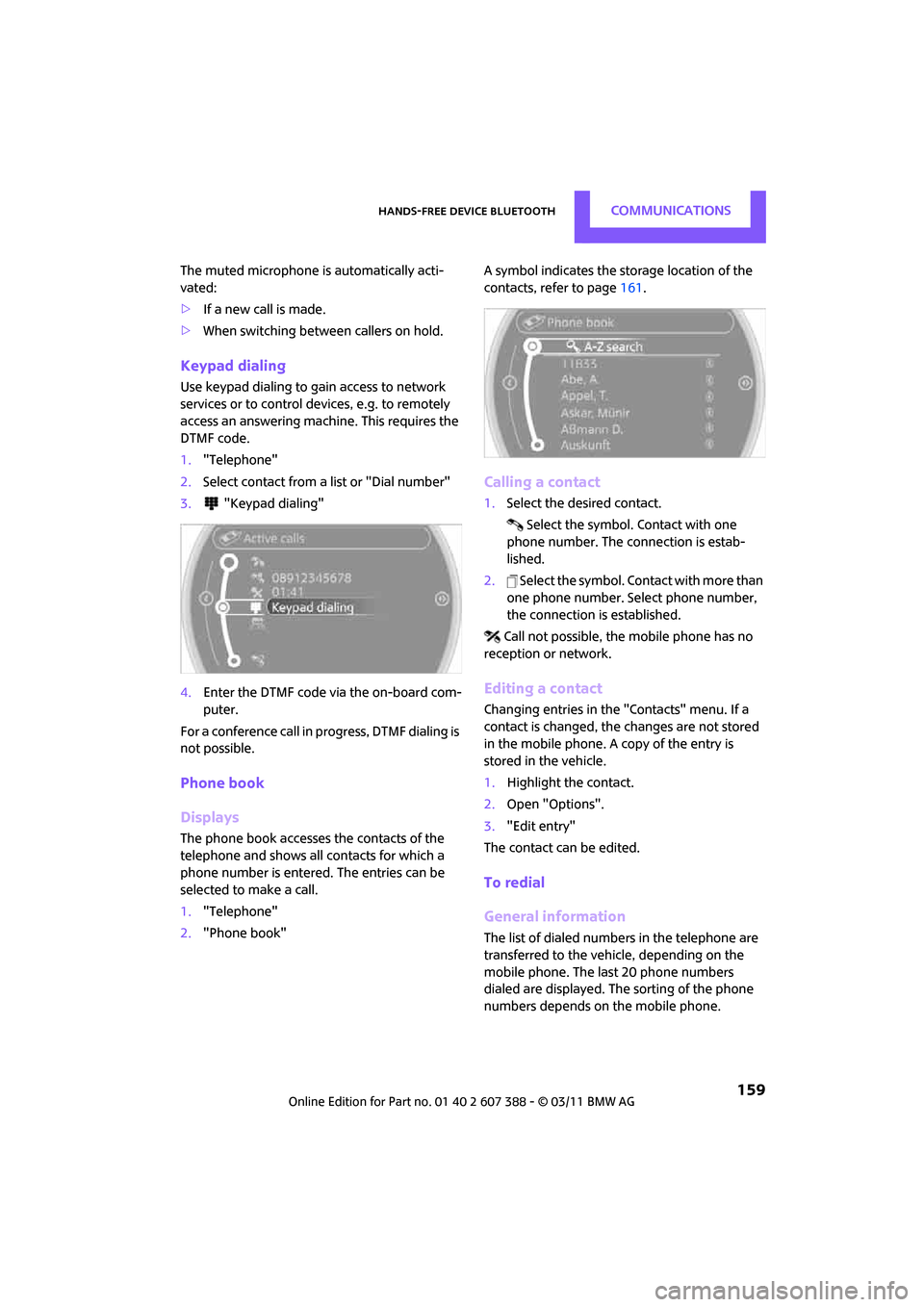
Keypad dialing
Use keypad dialing to gain access to network
services or to control de vices, e.g. to remotely
access an answering machine. This requires the
DTMF code.
1. "Telephone"
2. Select contact from a list or "Dial number"
3. "Keypad dialing"
4. Enter the DTMF code via the on-board com-
puter.
For a conference call in progress, DTMF dialing is
not possible.
Phone book
Displays
The phone book accesses the contacts of the
telephone and shows all contacts for which a
phone number is entered. The entries can be
selected to make a call.
1. "Telephone"
2. "Phone book" A symbol indicates the storage location of the
contacts, refer to page
161.
Calling a contact
1.Select the desired contact.
Select the symbol. Contact with one
phone number. The connection is estab-
lished.
2. Select the symbol. Contact with more than
one phone number. Select phone number,
the connection is established.
Call not possible, the mobile phone has no
reception or network.
Editing a contact
Changing entries in the "Contacts" menu. If a
contact is changed, the changes are not stored
in the mobile phone. A copy of the entry is
stored in the vehicle.
1. Highlight the contact.
2. Open "Options".
3. "Edit entry"
The contact can be edited.
To redial
General information
The list of dialed numbers in the telephone are
transferred to the vehicle, depending on the
mobile phone. The last 20 phone numbers
dialed are displayed. The sorting of the phone
numbers depends on the mobile phone.
Page 162 of 256

CommunicationsHands-free device Bluetooth
160
Selecting the number using the
on-board computer
1."Telephone"
2. "Redial"
3. Select the desired entry and phone number,
if necessary.
The connection is established.
Deleting a single entry or all entries*
1. Highlight the entry.
2. Open "Options".
3. "Delete entry" or "Delete list".
Saving an entry in the contacts
1.Highlight the entry.
2. Open "Options".
3. "Store as new contact" or "Add to existing
contact".
4. Select the type of number: "Home", "Busi-
ness", "Mobile" or "Other".
5. Complete the entries if necessary.
6. "Store contact" if necessary
Received calls
Displaying calls
The list of received calls in the telephone is
transferred into the vehi cle, depending on the
mobile phone. The last 20 calls received are dis-
played. The sorting and displaying of phone
numbers depends on the mobile phone. 1.
"Telephone"
2. "Received calls"
Calling a number from the list
Select an entry.
The connection is established.
Deleting a single entry or all entries*
1.Highlight the entry.
2. Open "Options".
3. "Delete entry" or "Delete list".
Saving an entry in the contacts
1.Highlight the entry.
2. Open "Options".
3. "Store as new contact" or "Add to existing
contact".
4. Select the type of number: "Home", "Busi-
ness", "Mobile" or "Other".
5. Complete the entries if necessary.
6. "Store contact" if necessary
Messages*
General information
The display of messages depends on whether
the transmission from the mobile phone into the
vehicle is supported. Te xt messages may not be
supported by the service provider or the func-
tion may have to be separately activated. After a
mobile phone is paired for the first time, the
transmission may take several minutes. Mes-
sages are only displayed completely when the
vehicle is stopped.
Page 172 of 256

CommunicationsMobile phone preparation Bluetooth
170
Ending a call
Press the button on the steering wheel
or
1. "Telephone"
2. "Active calls"
3. "End call"
Entering phone numbers
Dialing a number
1."Telephone"
2. "Dial number"
3. Select the digits individually.
4. Select the symbol.
It is also possible to enter phone numbers by
voice.
Calls with multiple parties
General information
It is possible to switch between two calls and to
connect two calls to fo rm a conference call.
These functions must be supported by the
mobile phone and by the service provider.
Accepting a call while speaking to
another party
This function may have to be activated by the
service provider and the mobile phone may
need to be adjusted for this.
When a second call comes in during an ongoing
call, a call-waiting signal sounds.
"Accept"
The call is accepted and the existing call is put on
hold.
Establishing a second call
Establish another call during an active call.
1. "Telephone"
2. "Active calls"
3. "Hold"
The existing call is put on hold.
4. Dial the new phone number or select it from
a list.
Switching between two calls, toggling
Active call: highlighted.
The call on hold is identified with:
"on hold...".
Select the symbol to switch to the call on
hold.
Page 173 of 256

Mobile phone preparation BluetoothCommunications
171
Establishing a conference call
Two calls can be connected to a single tele-
phone conference call.
1.Establish two calls.
2. "Conference call"
Both calls are always ended when a conference
call is terminated. If on e call is terminated by
another party, the other call can be continued.
Muting the microphone*
The microphone can be muted in active calls.
1. "Telephone"
2. "Active calls"
3. "Microphone mute"
The muted microphone is automatically acti-
vated:
> If a new call is made.
> When switching between callers on hold.
Keypad dialing
Use keypad dialing to gain access to network
services or to control de vices, e.g. to remotely
access an answering machine. This requires the
DTMF code.
1. "Telephone"
2. Select contact from a list or "Dial number"
3. "Keypad dialing"
4. Enter the DTMF code via the on-board com-
puter.
Phone book
Displays
The phone book accesses the contacts of the
telephone and shows all contacts for which a
phone number is entered. The entries can be
selected to make a call.
1. "Telephone"
2. "Phone book"
A symbol indicates the storage location of the
contacts, refer to page 177.