2011 MINI Clubman key battery
[x] Cancel search: key batteryPage 170 of 256
CommunicationsMobile phone preparation Bluetooth
168
1.Activating and connecting mobile phone in
vehicle, refer to page 166.
2. "Use for audio"
The mobile phone is connected as an audio
source. The previous audio source is no
longer connected to the vehicle.
Unpairing device
1."Telephone"
2. "Bluetooth® (phone)"
All paired mobile phones are listed.
3. Highlight the device to be unpaired.
4. Open "Options".
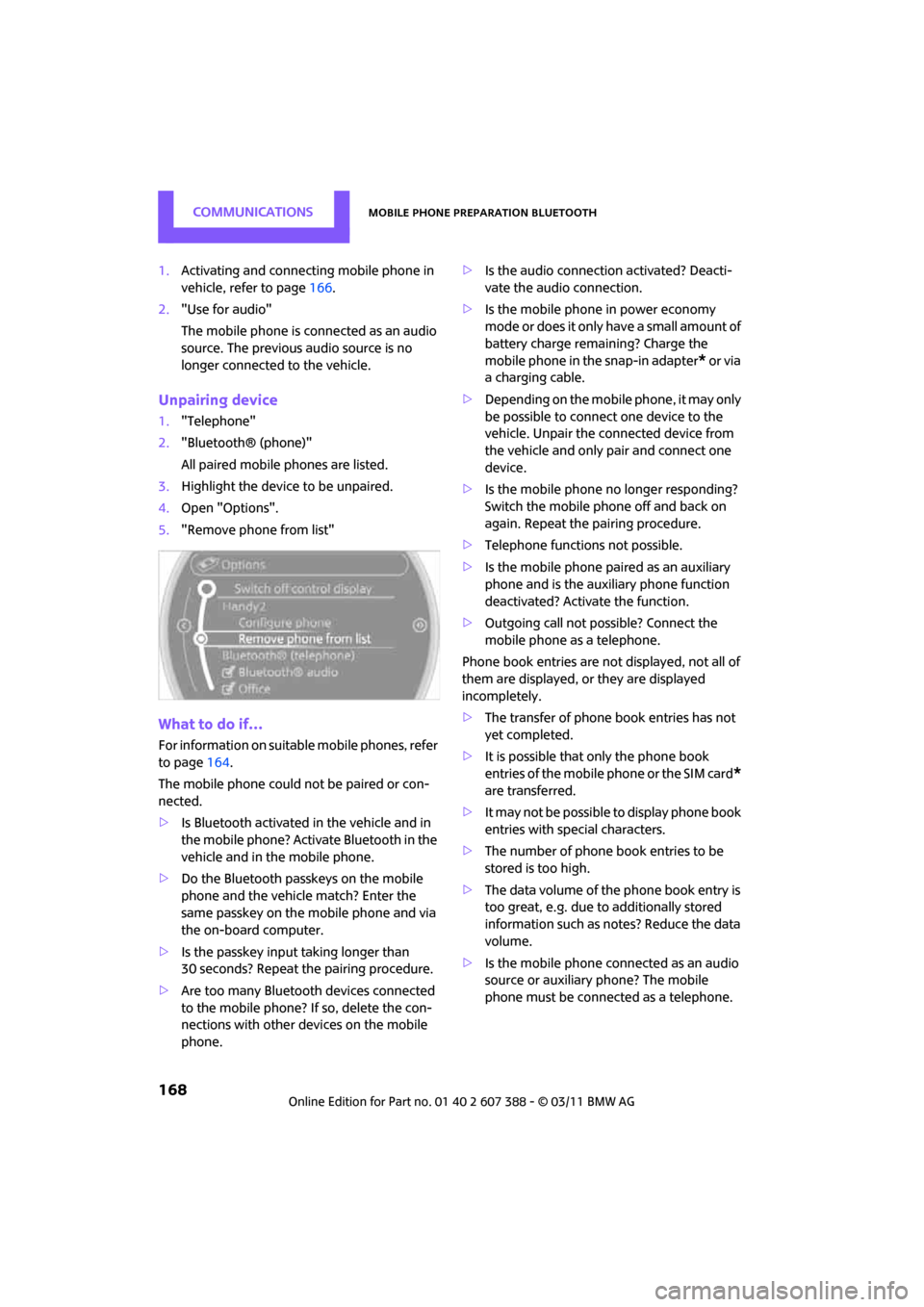
5. "Remove phone from list"
What to do if…
For information on suitab le mobile phones, refer
to page 164.
The mobile phone could not be paired or con-
nected.
> Is Bluetooth activated in the vehicle and in
the mobile phone? Activate Bluetooth in the
vehicle and in the mobile phone.
> Do the Bluetooth passkeys on the mobile
phone and the vehicle match? Enter the
same passkey on the mobile phone and via
the on-board computer.
> Is the passkey input taking longer than
30 seconds? Repeat th e pairing procedure.
> Are too many Bluetoot h devices connected
to the mobile phone? If so, delete the con-
nections with other devices on the mobile
phone. >
Is the audio connection activated? Deacti-
vate the audio connection.
> Is the mobile phone in power economy
m o d e o r d o e s i t o n l y have a small amount of
battery charge remaining? Charge the
mobile phone in the snap-in adapter
* or via
a charging cable.
> Depending on the mobile phone, it may only
be possible to connect one device to the
vehicle. Unpair the connected device from
the vehicle and only pair and connect one
device.
> Is the mobile phone no longer responding?
Switch the mobile phone off and back on
again. Repeat the pairing procedure.
> Telephone functions not possible.
> Is the mobile phone paired as an auxiliary
phone and is the auxiliary phone function
deactivated? Activate the function.
> Outgoing call not possible? Connect the
mobile phone as a telephone.
Phone book entries are not displayed, not all of
them are displayed, or they are displayed
incompletely.
> The transfer of phone book entries has not
yet completed.
> It is possible that only the phone book
entries of the mobile phone or the SIM card
*
are transferred.
> It may not be possible to display phone book
entries with special characters.
> The number of phone book entries to be
stored is too high.
> The data volume of the phone book entry is
too great, e.g. due to additionally stored
information such as notes? Reduce the data
volume.
> Is the mobile phone connected as an audio
source or auxiliary phone? The mobile
phone must be connected as a telephone.
Page 241 of 256

Everything from A to ZREFERENCE
239
B
Background lighting, refer to
Ambient lighting 84
Backrests, refer to Seats 38
Backup lamps
– replacing bulb 212
Band-aids, refer to First aid pouch 219
Bar, refer to Tow-starting,
towing away 221
Base plate for telephone or mobile phone
– refer to Snap-in adapter 175
Bass sounds, refer to Tone control 131
Battery 217
– charging 217
– disposal 35,217
– jump-starting 219
– temporary power failure 217
Battery renewal
– remote control 35
Being towed 221
Belt tensioner, refer to Safety
belts 40
Belts, refer to Safety belts 40
Beverage holders, refer to
Cupholders 94
Black ice, refer to External
temperature warning 57
Blower, refer to Air flow rate 86,88
Bluetooth, activating/ deactivating 154,165
Bluetooth audio 146
– device pairing 146
– disconnecting an audio connection 148
– playback 147
– unpairing device 148
– What to do if... 148
Bottle holders, refer to Cupholders 94
Brake Assist 69
Brake fluid, refer to Service requirements 60 Brake lamps
– replacing bulbs
212
Brake pads, breaking in 98
Brake rotors 99
– brakes 98
– breaking in 98
Brake system 98
– breaking in 98
– disc brakes 99
– MINI Maintenance
System 202
Brakes
– ABS 69
– b
reaking in 98
– MINI Maintenance System 202
– parking brake 48
– service requirements 60
Brakes, refer to Braking
safely 99
Breakdown service, refer to Roadside Assistance 219
Break-in period 98
Breaking in the clutch 98
Bulb changing, refer to Lamps
and bulbs 209
Button for starting the engine 46
Buttons on the steering wheel 11
C
Calendar 180
– displaying appointment 181
– selecting calendar day 181
California Proposition 65 warning 5
Call
– accepting 157,169
– ending 157,170
– muting the
microphone 158,171
– rejecting 157,169
Calling, refer to Phone
numbers, dialing 157,170 Can holders, refer to
Cupholders 94
Capacities 229
Car battery, refer to Vehicle
battery 217
Car care 204
Car key, refer to Keys/remote
controls 26
Car phone
– installation location, refer to
Center armrest 93
– refer to separate Owner's Manual
Car phone, refer to Telephone 154,164
Car radio, refer to Radio 132
Car wash, care 204
Car washes 204
Care 204
– car washes 204
– car-care products 204
– CD/DVD drives 207
– external 204
– high-pressure washers 205
– internal 206
– leather 206
– manual washing 205
– upholstery and fabrics 206
– windows 205
– wiper blades 205
Cargo area 100
– capacity 228
– Comfort Access 34
– doors, refer to Split Rear Barn Doors 31
– lamp 84
– opening from outside 31
– trunk lid, refer to Split Rear Barn Doors 31
Cargo area doors, refer to Split Re
ar Barn Doors 31
Cargo area, expanding 100
Cargo area lamp 84
Cargo area partition net, refer to Cargo net 101
Page 243 of 256

Everything from A to ZREFERENCE
241
Date
– setting63
– setting format 63
Daytime running lights 82
DBC Dynamic Brake Control, refer to Brake Assist 69
Deactivating front passenger
airbags 79
Deadlocking, refer to Locking 28
Defect
– door lock 29
– fuel filler flap 188
Defining a home address 179
Defogging windows 87,89
Defrost position, refer to
Defrosting windows 87,89
Defrosting windows 87,89
Defrosting windows and
removing condensation
– air conditioner 87
– automatic climate control 89
Defrosting windshield, refer to Defrosting windows 87,89
Destination address
– entering 109,115
Destination for navigation
– entering 109
– entering via map 114
Differential, breaking in 98
Digital radio, refer to HD Radio 133
Dimensions 227
Dipstick, engine oil 199
Direction announcements, refer to Voice
instructions 122
Direction instructions, refer to Voice instructions 122
Directional indicators, refer to Turn signals 51
Directory for navigation, refer
to Address book 111
Displacement, refer to Engine data 226
Display lighting, refer to Instrument lighting 83Display, refer to On-board
computer controls 16
Displaying contact pictures 180
Displaying special destinations 114
Displays 12
– instrument cluster 12
– on the Control Display 16
Displays and controls 10
Displays, care 207
Disp
osal
– of coolant 200
– remote control battery 35
– vehicle battery 217
Distance remaining to service,
refer to Service
requirements 60
Distance warning, refer to Park
Distance Control PDC 68
Door
– rear, refer to Club Door 30
Door key, refer to Integrated key/remote control 26
Door lock 29
Door lock, confirmation signals 28
Doors, manual operation 29
DOT Quality Grades 194
Double doors, refer to Split
Rear Barn Doors 31
Drinks holders, refer to Cupholders 94
Drive-off assistant, refer to Hill
Assist 71
Driving dynamics control, refer
to Sport button 71
Driving lamps, refer to Parking lamps/low beams 81
Driving notes 98
Driving off on inclines, refer to Hill Assist 71
Driving stability control systems 69
Driving through water 99
Driving tips, refer to Driving notes 98 Dry air, refer to Cooling
function 89
DSC Dynamic Stability Control 69
DTC Dynamic Traction Control 70
Dynamic Brake Control DBC,
refer to Brake Assist 69
Dynamic route guidance 125
Dynamic Stability Control
DSC 69
Dynamic Traction Control DTC 70
E
Eject button, refer to Buttons
on the CD player 130
Electrical malfunction
– door lock 29
– fuel filler flap 188
Electronic brake-force
distribution 69
Electronic Stability Program ESP, refer to Dynamic
Stability Control DSC 69
Emergency operation, refer to Manual operation
– door lock 29
– fuel filler flap 188
– transmission lock, automatic transmission 50
Emergency services, refer to
Roadside Assistance 219
Engine
– breaking in 98
– data 226
– overheated, refer to Coolant temperature 201
– speed 226
– starting 47
– starting, Comfort Access 33
– switching off 47
Engine compartment 199
Engine coolant, refer to
Coolant 200
Page 248 of 256

REFERENCEEverything from A to Z
246
P
Paintwork, care205
Park Distance Control PDC 68
Parking
– vehicle 47
Parking aid, refer to Park
Distance Control PDC 68
Parking brake 48
– indicator lamp 13
Parking lamps, replacing bulb 211
Parking lamps/low beams 81
Parts and accessories, refer to Your individual vehicle 4
Pathway lighting 81
Personal Profile 26
Phone numbers
– dialing 157,170
Pinch protection system
– windows 36
Plastic parts, care 206
Pollen
– refer to Microfilter for air conditioner 87
– refer to Microfilter/activated- charcoal filter for automatic
climate control 89
Power failure 217
Power windows 36
Power windows, refer to Windows 35
Pressure monitoring of tires,
refer to Tire Pressure Monitor
TPM 74
Pressure moni toring, tires71
– Flat Tire Monitor 71
Pressure, tires 190
Protective function, refer to
Pinch protection system
– windows 36
Puncture
– Flat Tire Monitor 71
R
Radio
– controls130
– HD Radio 133
– satellite radio 134
– select waveband 132
– storing stations 133
– switching on/off 130
– tone control 131
– volume 130
Radio key, refer to Integrated key/remote control 26
Radio position, refer to Radio readiness 46
Radio readiness 46
– switched off 47
– switched on 46
Rain sensor 52
Random play sequence
– external devices 145
Range, refer to Cruising
range 57
Reading aloud 183
Reading lamps 84
Rear door, re fer to Club
Door 30
Rear doors, refer to Split Rear
Barn Doors 31
Rear double doors, refer to
Split Rear Barn Doors 31
Rear fog lamp 83
– indicator lamp 13
– replacing bulb 212
Rear lamps
– bulb replacement 212
Rear lamps, refer to Tail lamps 212
Rear seat back rest, folding100
Rear seats
– folding down the backrests 100
Rear window defroster 86,88
Rearview mirror, refer to Mirrors 41 Reception
– quality
133
– radio station 133
Recirculated-air mode 86,88
Recirculation of air, refer to Recirculated-air
mode 86,88
Reclining seat , refer to
Backrest 38
Refueling 188
Releasing
– hood 198
Reminders 183
Rem
ote control 26
– battery renewal 34
– Comfort Access 33
– garage door opener 90
– malfunctions 29,34
– service data 202
– Split Rear Barn Doors 28
Replacement remote control 26
Replacing bulbs, refer to Lamps and bulbs 209
Replacing tires, refer to New
wheels and tires 196
Reporting safety defects 6
Reserve warning, refer to Fuel
gauge 56
Reservoir for washer
systems 53
Reset, refer to Resetting tone settings 131
Restraint systems
– for children 43
– refer to Safety belts 40
Reverse
– CD player 141
Reverse gear
– automatic transmission with Steptronic 49
– manual transmission 48
Road map 120
Roadside Assistance 219
Roadside parking lamps 83
– replacing bulb 211