2011 MERCEDES-BENZ SL CLASS ignition
[x] Cancel search: ignitionPage 114 of 316
As a result, you will not be able to see
information about your driving conditions,
such as
Rspeed
Routside temperature
Rwarning/indicator lamps
Rmalfunction/warning messages
Rfailure of any systems
Driving characteristics may be impaired.
If you must continue to drive, do so with added
caution. Contact an authorized Mercedes-
Benz Center as soon as possible.
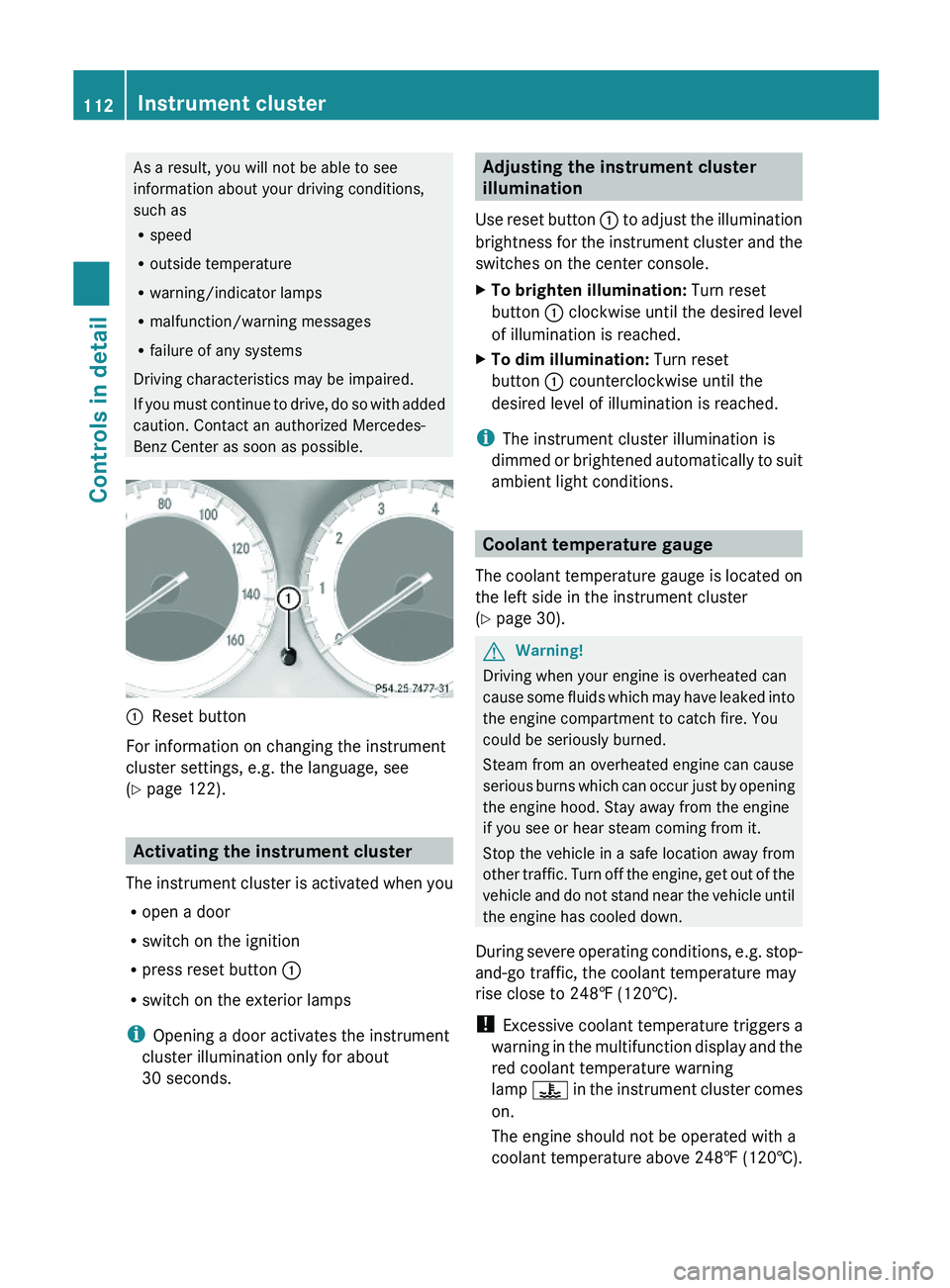
\000FReset button
For information on changing the instrument
cluster settings, e.g. the language, see
(Y page 122).
Activating the instrument cluster
The instrument cluster is activated when you
Ropen a door
Rswitch on the ignition
Rpress reset button \000F
Rswitch on the exterior lamps
iOpening a door activates the instrument
cluster illumination only for about
30 seconds.
Adjusting the instrument cluster
illumination
Use reset button \000F to adjust the illumination
brightness for the instrument cluster and the
switches on the center console.
XTo brighten illumination: Turn reset
button \000F clockwise until the desired level
of illumination is reached.
XTo dim illumination: Turn reset
button \000F counterclockwise until the
desired level of illumination is reached.
iThe instrument cluster illumination is
dimmed or brightened automatically to suit
ambient light conditions.
Coolant temperature gauge
The coolant temperature gauge is located on
the left side in the instrument cluster
(Y page 30).
GWarning!
Driving when your engine is overheated can
cause some fluids which may have leaked into
the engine compartment to catch fire. You
could be seriously burned.
Steam from an overheated engine can cause
serious burns which can occur just by opening
the engine hood. Stay away from the engine
if you see or hear steam coming from it.
Stop the vehicle in a safe location away from
other traffic. Turn off the engine, get out of the
vehicle and do not stand near the vehicle until
the engine has cooled down.
During severe operating conditions, e.g. stop-
and-go traffic, the coolant temperature may
rise close to 248‡ (120†).
! Excessive coolant temperature triggers a
warning in the multifunction display and the
red coolant temperature warning
lamp \000
Page 120 of 316

RACETIMER stops timing. Timing is resumed
when you press button \000Z after switching
the ignition back on or restarting the engine.
Saving lap time and starting a new lap
You can save up to nine laps.
XPress button \000[ while the timer is
running.
The intermediate time will be shown for
5 seconds.
XPress button \000[ within 5 seconds.
The intermediate time shown will be saved
as a lap time.
The RACETIMER begins timing the new lap.
The new lap begins to be timed as soon as
the intermediate time is called up.
\000FBest lap time\000GLap number\000
Page 123 of 316

The Vehicle status message memory menu
only appears if messages have been stored.
GWarning!
Malfunction and warning messages are only
indicated for certain systems and are
intentionally not very detailed. The
malfunction and warning messages are
simply a reminder with respect to the
operation of certain systems. They do not
replace the owner’s and/or driver’s
responsibility to maintain the vehicle’s
operating safety. Have all required
maintenance and safety checks performed on
the vehicle. Bring the vehicle to an authorized
Mercedes-Benz Center to address the
malfunction and warning messages.
XPress button \000Y or \000X repeatedly until
the Vehicle status message memory
menu appears in the multifunction display.
If conditions have occurred causing status
messages to be recorded, the number of
messages appears in the right
multifunction display.
XPress button \000\) or \000-.
The stored messages will now be displayed
in the order in which they have occurred.
For malfunction and warning messages,
see “Vehicle status messages in the
multifunction display” (Y page 226).
iAfter you have scrolled through all
recorded status messages, the first
recorded message appears again.
Should the vehicle’s system record any
conditions while driving, the number of
messages will reappear in the multifunction
display when the SmartKey in the starter
switch is turned to position 0 or removed
from the starter switch. With KEYLESS-GO,
the number of messages will reappear when
you turn off the engine by pressing the
KEYLESS-GO start/stop button and open the
driver’s door.
Except for high-priority messages, the vehicle
status message memory will be cleared when
you switch off the ignition.
Settings menu
Introduction
In the Settings menu there are two
functions: The function To reset, press
reset button for 3 seconds, with which
you can reset all the settings to the original
factory settings and a collection of submenus
with which you can make individual settings
for your vehicle.
The following settings and submenus are
available in the Settings menu:
RResetting to factory settings
(Y page 121)
RSubmenus in the Settings menu
(Y page 122)
RInstrument cluster submenu
(Y page 122)
RLighting submenu (Y page 124)
RVehicle submenu (Y page 126)
RConvenience submenu (Y page 127)
Resetting to factory settings
You can reset the settings of all submenus to
the factory settings.
For safety reasons, the function Light
Circuit Headlamp Mode in the Lighting
submenu cannot be reset while driving.
XPress button \000Y or \000X repeatedly until
the Settings menu appears in the
multifunction display.
Control system121Controls in detail230_AKB; 6; 22, en-USd2ureepe,Version: 2.11.8.12009-07-28T18:49:58+02:00 - Seite 121Z
Page 129 of 316

Convenience submenu
Access the Convenience submenu via the
Settings menu. Use the Convenience
submenu to activate the easy-entry/exit
feature (Y page 127), or to set the fold-in
function for exterior rear view mirrors
(Y page 127).
Activating easy-entry/exit feature
Use this function to activate and deactivate
the easy-entry/exit feature (Y page 85).
GWarning!
You must make sure no one can become
trapped or injured by the moving steering
wheel when the easy-entry/exit feature is
activated.
To stop steering wheel movement do one of
the following:
RMove steering wheel adjustment stalk.
RPress one of the memory position buttons.
RPress memory button M.
Do not leave children unattended in the
vehicle, or with access to an unlocked vehicle.
Children could open the driver’s door and
unintentionally activate the easy-entry/exit
feature, which could result in an accident
and/or serious personal injury.
XPress button \000Y or \000X repeatedly until
the Settings menu appears in the
multifunction display.
XPress button \000\).XMove the selection marker with button
\000Z or \000[ to the Convenience
submenu.
XPress button \000\) or \000- repeatedly until
the message Easy-entry Function
appears in the multifunction display.
The selection marker is on the current
setting.
XPress button \000Z or \000[ to activate (On)
or deactivate (Off) the easy-entry/exit
feature.
Switching fold-in function for exterior
rear view mirrors on or off
This feature is only available in Canada
vehicles.
Use this function to set the exterior rear view
mirrors to be folded in automatically when
you lock your vehicle.
With this function set to On and the exterior
rear view mirrors folded in using the button
on the door control panel (Y page 88), the
exterior rear view mirrors will not fold out
when you switch on the ignition. You will then
have to fold out the exterior rear view mirrors
using the button on the door control panel
(Y page 88).
Make sure both exterior rear view mirrors are
folded out completely before driving off.
XPress button \000Y or \000X repeatedly until
the Settings menu appears in the
multifunction display.
XPress button \000\).XMove the selection marker with button
\000Z or \000[ to the Convenience
submenu.
XPress button \000\) or \000- repeatedly until
the message Fold In Mirrors When
Locking appears in the multifunction
display.
The selection marker is on the current
setting.
Control system127Controls in detail230_AKB; 6; 22, en-USd2ureepe,Version: 2.11.8.12009-07-28T18:49:58+02:00 - Seite 127Z
Page 146 of 316
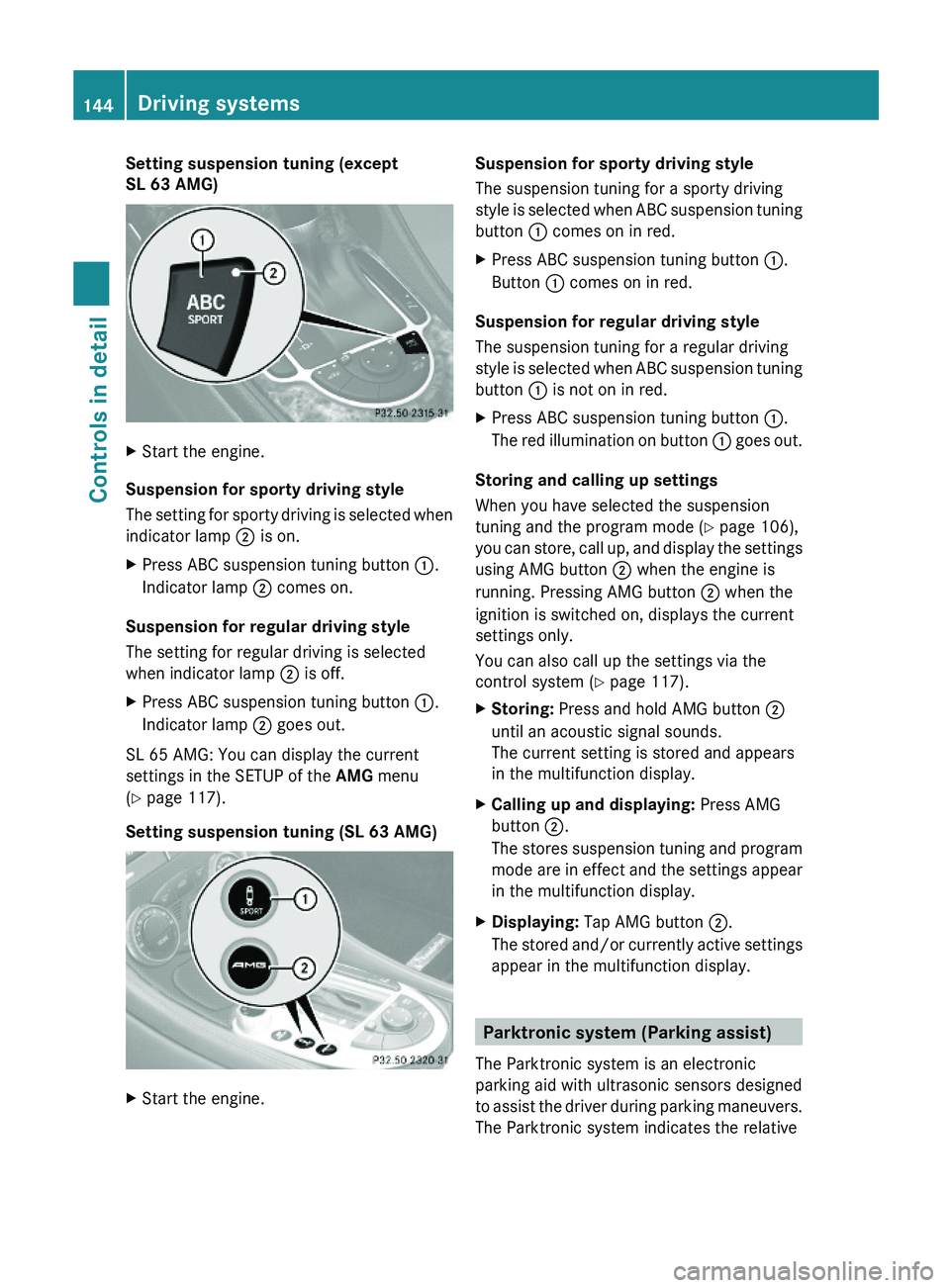
Setting suspension tuning (except
SL 63 AMG)
XStart the engine.
Suspension for sporty driving style
The setting for sporty driving is selected when
indicator lamp \000G is on.
XPress ABC suspension tuning button \000F.
Indicator lamp \000G comes on.
Suspension for regular driving style
The setting for regular driving is selected
when indicator lamp \000G is off.
XPress ABC suspension tuning button \000F.
Indicator lamp \000G goes out.
SL 65 AMG: You can display the current
settings in the SETUP of the AMG menu
(Y page 117).
Setting suspension tuning (SL 63 AMG)
XStart the engine.Suspension for sporty driving style
The suspension tuning for a sporty driving
style is selected when ABC suspension tuning
button \000F comes on in red.
XPress ABC suspension tuning button \000F.
Button \000F comes on in red.
Suspension for regular driving style
The suspension tuning for a regular driving
style is selected when ABC suspension tuning
button \000F is not on in red.
XPress ABC suspension tuning button \000F.
The red illumination on button \000F goes out.
Storing and calling up settings
When you have selected the suspension
tuning and the program mode (Y page 106),
you can store, call up, and display the settings
using AMG button \000G when the engine is
running. Pressing AMG button \000G when the
ignition is switched on, displays the current
settings only.
You can also call up the settings via the
control system (Y page 117).
XStoring: Press and hold AMG button \000G
until an acoustic signal sounds.
The current setting is stored and appears
in the multifunction display.
XCalling up and displaying: Press AMG
button \000G.
The stores suspension tuning and program
mode are in effect and the settings appear
in the multifunction display.
XDisplaying: Tap AMG button \000G.
The stored and/or currently active settings
appear in the multifunction display.
Parktronic system (Parking assist)
The Parktronic system is an electronic
parking aid with ultrasonic sensors designed
to assist the driver during parking maneuvers.
The Parktronic system indicates the relative
144Driving systemsControls in detail
230_AKB; 6; 22, en-USd2ureepe,Version: 2.11.8.12009-07-28T18:49:58+02:00 - Seite 144
Page 147 of 316

distance between the vehicle and an obstacle
visually and audibly.
The Parktronic system is activated
automatically when
Ryou switch on the ignition
and
Ryou release the parking brake
and
Rthe automatic transmission is in drive
position D, reverse gear R, or neutral
position N
The Parktronic system deactivates at speeds
above approximately 11 mph (18 km/h). At
lower speeds, the Parktronic system
activates again.
The Parktronic system also deactivates when
you shift the automatic transmission into
park position P or engage the parking brake.
The Parktronic system monitors the
surroundings of your vehicle with six sensors
in the front bumper and four sensors in the
rear bumper.
Example illustration, sensors in the front bumper
To function properly, sensors \000F must be free
of dirt, ice, snow and slush. Clean
sensors \000F regularly. Be careful not to
scratch or damage sensors \000F, see “Cleaning
the driving systems sensors” (Y page 218).
GWarning!
The Parktronic is a supplemental system. It is
not intended to, nor does it replace, the need
for extreme care. The responsibility during
parking and other critical maneuvers always
remains with the driver.
GWarning!
Make sure no persons or animals are in or
near the area in which you are parking/
maneuvering. Otherwise, they could be
injured.
! Special attention must be paid to objects
with smooth surfaces or low silhouettes
(e.g. trailer couplings, painted posts,
elevated crossbars or road curbs). Such
objects may not be detected by the system
and can damage the vehicle.
During parking maneuvers, pay special
attention to objects located above or below
the height of the sensors (e.g. street curbs,
painted posts, or trailer hitches etc.). The
Parktronic system will not detect such
objects at close range and damage to your
vehicle or the object may result.
! Ultrasonic signals from outside sources
(e.g. truck air brakes, car wash, or
jackhammers) may impair the operation of
the Parktronic system.
Range of the sensors
Driving systems145Controls in detail230_AKB; 6; 22, en-USd2ureepe,Version: 2.11.8.12009-07-28T18:49:58+02:00 - Seite 145Z
Page 149 of 316

segment illuminates and a constant
acoustic warning lasting a maximum of
2 seconds will sound for the second red
distance segment. The signal is canceled
when the automatic transmission is shifted
into park position P or the parking brake is
engaged.
RRear area: An intermittent acoustic
warning will sound when the first distance
segment illuminates. This signal quickens
with each additional distance segment lit.
When the eighth distance segment
illuminates, the acoustic warning becomes
a constant signal. The signal is canceled
when the automatic transmission is shifted
into drive position D, or park position P, or
the parking brake is engaged.
Switching the Parktronic system on/
off
The Parktronic system switches on
automatically when the ignition is switched
on.
XSwitching off: Press Parktronic
switch \000F.
Indicator lamp \000G comes on.
XSwitching on: Press Parktronic switch \000F
again.
Parktronic system malfunction
There is a malfunction in the Parktronic
system, if only the red distance segments
illuminate and an acoustic warning sounds.
The Parktronic system will switch off
automatically after 20 seconds and indicator
lamp \000G in Parktronic switch \000F comes on.
XHave the Parktronic system checked at an
authorized Mercedes-Benz Center as soon
as possible.
If only the red distance segments illuminate
and no acoustic warning sounds, the
Parktronic system sensors are dirty (e.g. dirt,
ice, snow and slush). Another cause could be
interference from other radio or ultrasonic
signals (e.g. truck air brakes, car wash, or
jackhammers). The Parktronic system will
switch off automatically after 20 seconds and
indicator lamp \000G in Parktronic switch \000F
comes on.
XSwitch off the ignition.XClean the Parktronic system sensors
(Y page 218).
XSwitch on the ignition.
or
XCheck the Parktronic system operation at
another location to rule out interference
from outside radio or ultrasonic signals.
Driving systems147Controls in detail230_AKB; 6; 22, en-USd2ureepe,Version: 2.11.8.12009-07-28T18:49:58+02:00 - Seite 147Z
Page 156 of 316

MAX COOL is only operational when the
engine is running.
If the air distribution controls as well as the
air volume control are set to \000Z and there
is a high need for cooling, MAX COOL is
activated. “MAX COOL” appears in
temperature controls \000n and \000s
(Y page 148).
This provides the fastest possible cooling of
the vehicle interior (when retractable hardtop
is closed).
Automatic climate control panel with MAX COOLactivated
Air recirculation mode
Switch to air recirculation mode to prevent
unpleasant odors from entering the vehicle
from the outside (e. g. before driving through
a tunnel). This setting cuts off the intake of
outside air and recirculates the air in the
passenger compartment.
GWarning!
Fogged windows impair visibility,
endangering you and others. If the windows
begin to fog on the inside, switching off the
air recirculation mode immediately should
clear interior window fogging. If interior
window fogging persists, make sure the air
conditioning is activated, or press button
\000f.
XActivating: Press button \000t.
The indicator lamp in the button comes on.
iThe air recirculation mode is activated
automatically at high outside
temperatures.
The indicator lamp in button \000t is not lit
when the air recirculation mode is switched
on automatically.
A quantity of outside air is added after
approximately 30 minutes.
XDeactivating: Press button \000t again.
The indicator lamp in the button goes out.
iThe manually selected air recirculation
mode is deactivated automatically:
Rafter 5 minutes if the outside
temperature is below approximately
41‡ (5†)
Rafter 5 minutes if the air conditioning is
turned off
Rafter 30 minutes if the outside
temperature is above approximately
41‡ (5†)
Residual heat and ventilation
With the engine turned off, it is possible to
continue to heat or ventilate the interior for
up to 30 minutes. This feature makes use of
the residual heat produced by the engine.
iIf you switch on the residual heat function
when outside temperatures are high, only
the ventilation will be switched on.
iHow long the system will provide heating
depends on the coolant temperature and
the selected temperature. The blower will
run at low speed regardless of the air
distribution control setting.
XActivating: Switch off the ignition.XPress button \000X.
The indicator lamp in the button comes on.
XDeactivating: Press button \000X.
The indicator lamp in the button goes out.
154Climate control systemControls in detail
230_AKB; 6; 22, en-USd2ureepe,Version: 2.11.8.12009-07-28T18:49:58+02:00 - Seite 154