2011 MERCEDES-BENZ SL CLASS abs
[x] Cancel search: absPage 61 of 316
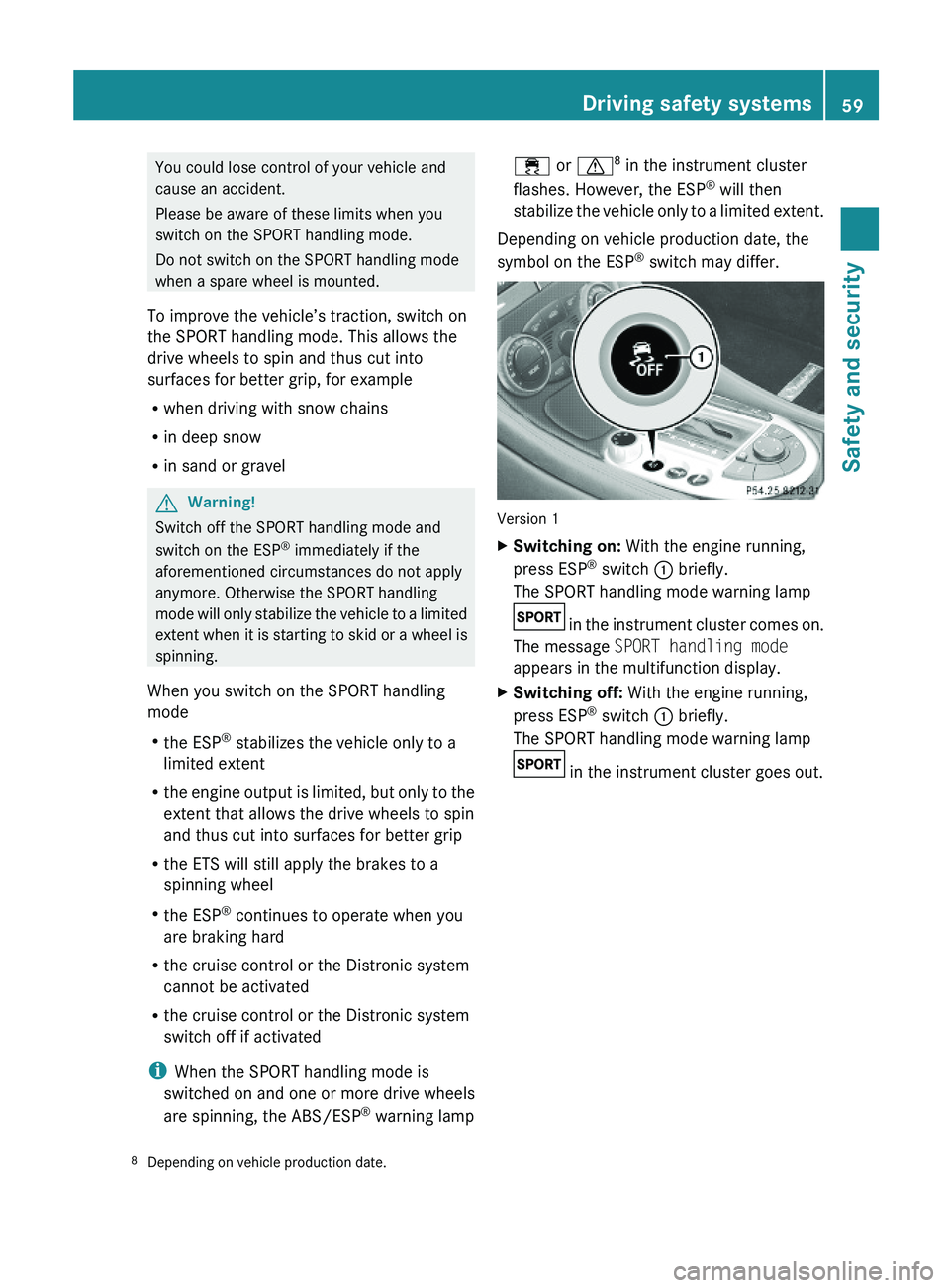
You could lose control of your vehicle and
cause an accident.
Please be aware of these limits when you
switch on the SPORT handling mode.
Do not switch on the SPORT handling mode
when a spare wheel is mounted.
To improve the vehicle’s traction, switch on
the SPORT handling mode. This allows the
drive wheels to spin and thus cut into
surfaces for better grip, for example
Rwhen driving with snow chains
Rin deep snow
Rin sand or gravel
GWarning!
Switch off the SPORT handling mode and
switch on the ESP® immediately if the
aforementioned circumstances do not apply
anymore. Otherwise the SPORT handling
mode will only stabilize the vehicle to a limited
extent when it is starting to skid or a wheel is
spinning.
When you switch on the SPORT handling
mode
Rthe ESP® stabilizes the vehicle only to a
limited extent
Rthe engine output is limited, but only to the
extent that allows the drive wheels to spin
and thus cut into surfaces for better grip
Rthe ETS will still apply the brakes to a
spinning wheel
Rthe ESP® continues to operate when you
are braking hard
Rthe cruise control or the Distronic system
cannot be activated
Rthe cruise control or the Distronic system
switch off if activated
iWhen the SPORT handling mode is
switched on and one or more drive wheels
are spinning, the ABS/ESP® warning lamp
\000
Page 62 of 316

Version 2
XSwitching on: With the engine running,
press ESP® switch \000F briefly.
The ABS/ESP® warning lamp \000g in the
instrument cluster comes on. The message
ESP-SPORT appears in the multifunction
display.
XSwitching off: With the engine running,
press ESP® SPORT switch \000F briefly.
The ABS/ESP® warning lamp \000g in the
instrument cluster goes out. The message
ESP-ON appears in the multifunction
display.
The SPORT handling mode switches off
automatically when you turn off the engine.
When starting the engine, the ESP® is
activated automatically.
Switching the ESP® off or on
GWarning!
The ESP® should not be switched off during
normal driving.
Disabling of the system will result in the
following:
Rno restriction to engine torque
Rloss of system-supported traction control
“ESP® OFF” is designed for driving on closed
tracks when the vehicle’s natural oversteer
and understeer characteristics are desired
and requires a highly skilled and experienced
driver able to handle these critical driving
situations.
You could lose control of your vehicle and
cause an accident.
Please be aware of these limits when you
switch off the ESP®.
Do not switch off the ESP® when a spare
wheel is mounted.
To improve the vehicle’s traction, switch off
the ESP®. This allows the drive wheels to spin
and thus cut into surfaces for better grip, for
example
Rwhen driving with snow chains
Rin deep snow
Rin sand or gravel
GWarning!
Switch on the ESP® immediately if the
aforementioned circumstances do not apply
anymore. Otherwise the ESP® will not
stabilize the vehicle when it is starting to skid
or a wheel is spinning.
When you switch off the ESP®,
Rthe ESP® will not stabilize the vehicle
Rthe engine output is not limited, which
allows the drive wheels to spin and thus cut
into surfaces for better grip
Rthe ETS will still apply the brakes to a
spinning wheel
Rthe ESP® continues to operate when you
are braking hard
Rthe cruise control or the Distronic system
cannot be activated
Rthe cruise control or the Distronic system
switch off if activated
iWhen the ESP® is switched off and one or
more drive wheels are spinning, the ABS/
ESP® warning lamp \000
Page 100 of 316

XClosing: Close the door window.XPull and hold switch 0046 or 0047.
The corresponding rear side window moves
upward until you release the switch.
Closing with KEYLESS-GO
When locking the vehicle, you can
simultaneously close the windows.
XPress and hold the lock button on an
outside door handle ( Y page 71) until the
windows are completely closed.XRelease the lock button on the outside door
handle to interrupt the closing procedure.
Synchronizing power windows
The windows must be synchronized after the
battery has been disconnected or if the
windows cannot be fully closed (express
operation).
Each window must be synchronized
separately.
XClose all doors.XSwitch on the ignition.XPull and hold switch 0046 or 0047 (Y page 97)
until the respective window is closed.
The window opens again slightly.XPull and hold the respective switch once
more immediately until the window is
closed completely.XHold the respective switch for
approximately 1 second.
The window is synchronized.
Driving and parking
Safety notes
GWarning!
Make sure absolutely no objects are
obstructing the pedals’ range of movement.
Keep the driver’s footwell clear of all
obstacles. If there are any floormats or
carpets in the footwell, make sure the pedals
still have sufficient clearance.
During sudden driving or braking maneuvers
the objects could get caught between or
under the pedals. You could then no longer
brake or accelerate. This could lead to
accidents and injury.GWarning!
With the engine not running, there is no power
assistance for the brake and steering
systems. In this case, it is important to keep
in mind that a considerably higher degree of
effort is necessary to brake and steer the
vehicle. Adapt your driving accordingly.
Starting the engine
GWarning!
Inhalation of exhaust gas is hazardous to your
health. All exhaust gas contains carbon
monoxide (CO), and inhaling it can cause
unconsciousness and possible death.
Do not run the engine in confined areas (such
as a garage) which are not properly ventilated.
If you think that exhaust gas fumes are
entering the vehicle while driving, have the
cause determined and corrected
immediately. If you must drive under these
conditions, drive only with at least one
window fully open at all times.
98Driving and parkingControls in detail
230_AKB; 6; 22, en-USd2ureepe,Version: 2.11.8.12009-07-28T18:49:58+02:00 - Seite 98
Page 102 of 316

switch to position 0 and repeat the starting
procedure.XIf you are starting the engine with KEYLESS-
GO: Close any doors that may be open to
allow for better detection of the SmartKey.
or
XStart the engine with the SmartKey as radio
signals from another source may be
interfering with the KEYLESS-GO function.XRepeat the starting procedure.
If the engine does not start after several
starting attempts:
XContact an authorized Mercedes-Benz
Center or call Roadside Assistance.
The engine does not start. You cannot
hear the starter.
The battery may not be charged sufficiently.
XGet a jump start ( Y page 285).
If the engine will not start despite a jump
start:
XContact an authorized Mercedes-Benz
Center or call Roadside Assistance.
The starter has been exposed to excessive
temperatures.
XLet the starter cool for about 2 minutes.XRepeat the starting procedure.
If the engine does not start after several
starting attempts:
XContact an authorized Mercedes-Benz
Center or call Roadside Assistance.
Driving off
GWarning!
On slippery road surfaces, never downshift in
order to obtain braking action. This could
result in drive wheel slip and reduced vehicle
control. Your vehicle’s ABS will not prevent
this type of loss of control.
! Do not run a cold engine at high engine
speeds. Running a cold engine at high
engine speeds may shorten the service life
of the engine. This is not covered by the
Mercedes-Benz Limited Warranty.
SL 63 AMG: At engine temperatures below
68‡ (20†), the engine’s maximum speed
is restricted in order to protect it from
damage. Avoid driving your vehicle at full
speed when the engine is cold to prevent
premature engine wear and/or diminished
comfort.
! If an acoustic warning sounds and the
message Release Parking Brake
appears in the multifunction display when
driving off, you have forgotten to release
the parking brake.
Release the parking brake.
! Avoid spinning of a drive wheel. This may
cause serious damage to the drivetrain
which is not covered by the Mercedes-Benz
Limited Warranty.
! Simultaneously depressing the
accelerator pedal and applying the brakes
reduces engine performance and causes
premature brake and drivetrain wear which
is not covered by the Mercedes-Benz
Limited Warranty.
i Once the vehicle is in motion, the
automatic central locking function engages
and the locking knobs in the doors move
down.
The automatic central locking function can
be switched off ( Y page 126).
Automatic transmissionGWarning!
It is dangerous to shift the automatic
transmission out of park position P or neutral
position N if the engine speed is higher than
idle speed. If your foot is not firmly on the
brake pedal, the vehicle could accelerate
100Driving and parkingControls in detail
230_AKB; 6; 22, en-USd2ureepe,Version: 2.11.8.12009-07-28T18:49:58+02:00 - Seite 100
Page 105 of 316

XRemove the SmartKey from the starter
switch.
The SmartKey can only be removed from the
starter switch with the automatic
transmission in park position P.
With KEYLESS-GO
XPress the KEYLESS-GO start/stop button.
With the driver’s door closed, the starter
switch is now in position 1. With the driver’s
door opened, the starter switch is set to
position 0, same as the SmartKey removed
from the starter switch (Y page 78).
If an acoustic warning sounds, you have tried
to turn off the engine with the KEYLESS-GO
start/stop button while the automatic
transmission was not in park position P.
Read and observe messages that may appear
in the multifunction display (Y page 234).
Automatic transmission
Introduction
For information on driving with an automatic
transmission, see “Driving and parking”
(Y page 98).
GWarning!
Make sure absolutely no objects are
obstructing the pedals’ range of movement.
Keep the driver’s footwell clear of all
obstacles. If there are any floormats or
carpets in the footwell, make sure the pedals
still have sufficient clearance.
During sudden driving or braking maneuvers
the objects could get caught between or
under the pedals. You could then no longer
brake or accelerate. This could lead to
accidents and injury.
! Allow the engine to warm up under low
load use. Do not place full load on the
engine until the operating temperature has
been reached.
Avoid spinning of a drive wheel for an
extended period when driving off on
slippery road surfaces.
This may cause serious damage to the
engine and the drivetrain which is not
covered by the Mercedes-Benz Limited
Warranty.
iDuring the brief warm-up, transmission
upshifting is delayed. This allows the
catalytic converter to heat up more quickly
to operating temperature.
Gear selector lever
Gearshift pattern for automatic transmission
\000`Park position with gear selector lever lock\000aReverse gear\000_Neutral position\000^Drive positionGWarning!
It is dangerous to shift the automatic
transmission out of park position P or neutral
position N if the engine speed is higher than
idle speed. If your foot is not firmly on the
brake pedal, the vehicle could accelerate
quickly forward or in reverse. You could lose
control of the vehicle and hit someone or
something. Only shift into gear when the
engine is idling normally and when your right
foot is firmly on the brake pedal.
! Only shift the automatic transmission into
reverse gear R or park position P when the
Automatic transmission103Controls in detail230_AKB; 6; 22, en-USd2ureepe,Version: 2.11.8.12009-07-28T18:49:58+02:00 - Seite 103Z
Page 110 of 316

Selecting program mode C means:
RThe vehicle starts out more gentle, both
forward and reverse, except when driving
off with full throttle.
RTraction and driving stability are improved
on icy roads.
RUpshifts occur earlier even when you give
more gas. The engine then operates at
lower revolutions and the wheels are less
likely to spin.
Selecting program mode S means that
upshifts occur later.
One-touch gearshifting
With the automatic transmission in drive
position D and driving in automatic program
mode C or S, you can limit or extend the gear
range using the gear selector lever or the
steering wheel gearshift control.
SL 63 AMG and SL 65 AMG: For information
on using the gear selector lever or the
steering wheel gearshift control in manual
program mode M, see “Manual shift program”
(Y page 109).
Steering wheel gearshift control (exampleillustration)
iYou cannot shift with the steering wheel
gearshift control when the automatic
transmission is in park position P, neutral
position N, or reverse gear R.
Limiting gear range GWarning!
On slippery road surfaces, never downshift in
order to obtain braking action. This could
result in drive wheel slip and reduced vehicle
control. Your vehicle’s ABS will not prevent
this type of loss of control.
XBriefly press the gear selector lever to the
left in the D- direction.
or
XBriefly pull left gearshift control \000F.
The automatic transmission will shift into
the next lower gear as permitted by the
shift program. This action simultaneously
limits the gear range of the automatic
transmission.
iTo avoid overrevving the engine when
downshifting, the automatic transmission
will not shift into a lower gear if the engine’s
maximum speed would be exceeded.
Extending gear range
XBriefly press the gear selector lever to the
right in the D+ direction.
or
XBriefly pull right gearshift control \000G.
The automatic transmission will shift into
the next higher gear as permitted by the
shift program. This action simultaneously
extends the gear range of the automatic
transmission.
iIf you press on the accelerator pedal
when the engine has reached the
revolution limit of the current gear range,
the automatic transmission will upshift
beyond any gear range limit selected.
Canceling gear range limit
XPress and hold the gear selector lever to
the right in the D+ direction until D
108Automatic transmissionControls in detail
230_AKB; 6; 22, en-USd2ureepe,Version: 2.11.8.12009-07-28T18:49:58+02:00 - Seite 108
Page 112 of 316

C ComfortFor comfort drivingS SportFor standard drivingM MANUALFor manual gearshifting
Program mode selector switch on vehicles withAMG Sport Package
C ComfortFor comfort drivingS SportFor standard drivingM ManualFor manual gearshifting
The current program mode appears in the
right multifunction display (Y page 107).
For information on automatic program mode
(C or S), see “Automatic shift program”
(Y page 106) and “One-touch gearshifting”
(Y page 108).
Activating manual shift program
X All models except SL 63 AMG: Press the
program mode selector switch repeatedly
until M appears in the right multifunction
display.
XSL 63 AMG: Turn the program mode
selector dial until M appears in the right
multifunction display.
The automatic transmission switches to
manual program mode M. Automatic
shifting is switched off. The gear range is
not limited.
You can change the gears manually with drive
position D selected. You can upshift or
downshift through the gears in succession.
iManual program mode M will not be
stored. When the engine is turned off with
manual program mode M selected, the
automatic transmission will go to
automatic program mode C when the
engine is restarted.
Upshifting
! In manual program mode M, the
automatic transmission will not upshift,
even if the engine has reached its
overrevving range. Shift up into the next
gear before the engine has reached its
overrevving range. Make absolutely certain
that the engine speed does not reach the
red marking on the tachometer. Otherwise
the engine could be damaged which is not
covered by the Mercedes-Benz Limited
Warranty.
XBriefly press the gear selector lever to the
right in the D+ direction.
or
XBriefly pull right gearshift control \000G
(Y page 108).
The automatic transmission shifts into the
next higher gear.
Upshift indicator
In manual program mode M, upshift
indicator \000G in the right multifunction display
advises you to upshift before the engine
reaches the overspeed range. In addition,
symbol ^ may appear instead of manual
program mode symbol M in the right
multifunction display. Thus you can drive at
110Automatic transmissionControls in detail
230_AKB; 6; 22, en-USd2ureepe,Version: 2.11.8.12009-07-28T18:49:58+02:00 - Seite 110
Page 113 of 316

the maximum engine speed for each gear
without overrevving the engine.XShift the automatic transmission from
current gear 0046 into the next higher gear.
The fuel supply will otherwise be
interrupted to prevent the engine from
overrevving.
Downshifting
GWarning!
On slippery road surfaces, never downshift in
order to obtain braking action. This could
result in drive wheel slip and reduced vehicle
control. Your vehicle’s ABS will not prevent
this type of loss of control.
XBriefly press the gear selector lever to the
left in the D- direction.
or
XBriefly pull left gearshift control 0046
( Y page 108).
The automatic transmission shifts into the
next lower gear.
i For maximum acceleration, press and
hold the gear selector lever to the left in the
D- direction or pull and hold the left
gearshift control. Depending on the engine
speed the automatic transmission selects
the optimal gear for maximum
acceleration.
i When you brake or stop, the automatic
transmission shifts down into a gear from
which you can easily accelerate or take off.
Kickdown
Using the kickdown while driving in manual
program mode M is not possible.
Deactivating manual shift program
XAll models except SL 63 AMG: Press the
program mode selector switch repeatedly
until C or S appears in the right
multifunction display.XSL 63 AMG: Turn the program mode
selector dial until C or S appears in the right
multifunction display.
or
XRestart the engine.
The automatic transmission will go to
automatic program mode C.
Manual program mode M is not stored.
Emergency operation (limp-home
mode)
If vehicle acceleration becomes less
responsive or sluggish or the automatic
transmission no longer shifts, the automatic
transmission is most likely operating in limp-
home (emergency operation) mode. In this
mode only second gear and reverse gear R
can be selected.
XStop the vehicle in a safe location.XShift the automatic transmission into park
position P.XTurn off the engine.XWait at least 10 seconds before restarting.XRestart the engine.XShift the automatic transmission into drive
position D (for second gear) or reverse gear
R .XHave the automatic transmission checked
at an authorized Mercedes-Benz Center as
soon as possible.
Instrument cluster
Introduction
For a full view illustration of the instrument
cluster, see “Instrument cluster”
( Y page 30).
GWarning!
No messages will be displayed if either the
instrument cluster or the multifunction
display is inoperative.
Instrument cluster111Controls in detail230_AKB; 6; 22, en-USd2ureepe,Version: 2.11.8.12009-07-28T18:49:58+02:00 - Seite 111Z