2011 MERCEDES-BENZ S-Class trunk
[x] Cancel search: trunkPage 88 of 524

Opening and closing manually
Opening
You can only open the trunk lid after
unlocking it first.
XPress the % button on the SmartKey.XPull handle :.
Closing
GWarning
To prevent possible personal injury, always
keep hands and fingers away from the trunk
opening when closing the trunk lid. Be
especially careful when small children are
around.
XPull the trunk lid down using recess :.XLock the vehicle if necessary with
the & button on the SmartKey or with
KEYLESS-GO (Y page 77).
Automatic opening and closing from
the outside
Important safety guidelines
GWarning
Make sure the trunk lid is closed when the
engine is running and while driving. Among
other dangers, deadly carbon monoxide (CO)
gases may enter the vehicle interior resulting
in unconsciousness and death.
! The trunk lid swings upwards when
opened. Therefore, make sure that there is
sufficient clearance above the trunk lid.
For the trunk lid to be opened fully, there must
be a minimum clearance from floor to ceiling
of 5.90 ft (1.80 m).
Opening
You can open the trunk lid with the SmartKey.
XPress and hold the F button on the
SmartKey until the trunk lid opens.
Closing
GWarning!
Monitor the closing procedure carefully to
make sure no one is in danger of being
injured. To prevent possible personal injury,
always keep hands and fingers away from the
trunk opening when closing the trunk lid. Be
especially careful when small children are
around. To stop the closing procedure, do one
of the following:
RPress button F on the SmartKey.
RPress the remote trunk opening/closing
switch (on the driver's door).
RPress the trunk closing switch.
RPress the KEYLESS-GO locking/closing
switch.
RPull the trunk lid handle.
Even with the SmartKey removed from the
starter switch or the SmartKey with KEYLESS-
GO removed from the vehicle, the remote
86TrunkOpening and closing
Page 89 of 524

trunk opening/closing switch can be
operated. Therefore, do not leave children
unattended in the vehicle, or with access to
an unlocked vehicle. A child's unsupervised
access to a vehicle could result in an accident
and/or serious personal injury.
You can close the trunk lid automatically by
using the closing button5 or locking button6.
XTo close: press closing button : in the
trunk lid.
XTo close and lock simultaneously:
Press locking button ; in the trunk lid.
iThe trunk lid can only be locked if there is
a KEYLESS-GO key outside the vehicle.
Automatic opening and closing from
the inside
GWarning!
Maintain sight of the area around the rear of
the vehicle while operating the trunk lid with
the door mounted switch. Monitor the closing
procedure carefully to make sure no one is in
danger of being injured.
To interrupt the closing procedure, release
the door mounted remote trunk opening/
closing switch again.
Even with the SmartKey removed from the
starter switch or the SmartKey with KEYLESS-
GO removed from the vehicle, the remote
trunk opening/closing switch can be
operated. Therefore, do not leave children
unattended in the vehicle, or with access to
an unlocked vehicle. A child’s unsupervised
access to a vehicle could result in an accident
and/or serious personal injury.
GWarning
Make sure the trunk lid is closed when the
engine is running and while driving. Among
other dangers, deadly carbon monoxide (CO)
gases may enter the vehicle interior resulting
in unconsciousness and death.
You can open/close the trunk lid from the
driver's seat when the vehicle is stationary.
XTo open: press remote operating switch for
trunk lid : until the trunk lid opens.
XTo close: press remote operating switch
for trunk lid : until the trunk lid is closed.
Locking the trunk separately
You can lock the trunk separately. If you then
unlock the vehicle centrally, the trunk
remains locked and cannot be opened.
XClose the trunk lid.XTake the mechanical key out of the
SmartKey (Y page 79).5For vehicles with the trunk lid remote closing feature only.6For vehicles with the trunk lid remote closing feature and KEYLESS-GO only.
Trunk87Opening and closingZ
Page 90 of 524

XInsert the mechanical key into the trunk lid
lock as far as the stop.
XTurn the mechanical key clockwise from
position 1 to position 2.
XRemove the mechanical key.
Unlocking the trunk (mechanical key)
! The trunk lid swings upwards when
opened. Therefore, make sure that there is
sufficient clearance above the trunk lid.
If the trunk can no longer be unlocked with
the SmartKey or KEYLESS-GO:
XTake the mechanical key out of the
SmartKey (Y page 79).
XInsert the mechanical key into trunk lid
lock : as far as possible.
XTurn the mechanical key counter-clockwise
as far as possible.
The trunk is unlocked.
XTurn the mechanical key back and remove
it.Trunk emergency release
You can open the trunk lid from inside the
vehicle with the emergency release button.
XBriefly press emergency release
button :.
The trunk lid unlocks and opens.
The trunk lid can be unlocked and opened
with the trunk lid emergency release when
the vehicle is stationary or while driving.
Trunk lid emergency release light:
RThe button flashes for 30 minutes after the
trunk lid is opened.
RThe button flashes for 60 minutes after the
trunk lid is closed.
The trunk lid emergency release does not
open the trunk lid if the battery is
disconnected or discharged.
88TrunkOpening and closing
Page 122 of 524

NaviAudioTelephoneVideoVehicleModeFM/AM radioVideo DVDECOMap orientationSatRadioAUXMulticontour
seat/lumbar
settingsPoint of interest
symbols on the mapDiscVideo offRear window
blindRoad signs on the
mapMemory cardEASY-ENTRY/
EXIT systemText information on
mapMUSIC
REGISTERExterior
lighting
delayed
switch-off timeO Speed Limit AssistMedia
InterfaceInterior
lighting
delayed
switch-offO Topographical
mapUSBAmbient
lightingO City viewRearO Automatic
mirror fold-in
functionO Freeway
informationAUXO Locator
lightingO Audio fadeoutAudio offO Automatic
lockingSIRIUS serviceO Interior
motion sensorMap versionO Tow-away
protectionO Trunk lid
opening height
restrictionSPLITVIEW
SPLITVIEW allows the driver and front
passenger to use separate COMAND
functions at the same time. Depending on the
viewing angle of the display (from the driver's
seat or from the front passenger seat), you
will see two different displays.
For example, the "Navi" function can be
viewed from the driver's side while the video120At a glanceCOMAND
Page 259 of 524

Vehicle
Vehicle
General notes
In this menu, you can set the following vehicle
functions:
RECO
RMulticontour seat settings
RRear window blind
REASY-ENTRY/EXIT feature
RExterior lighting delayed switch-off time
RInterior lighting delayed switch-off
RAmbient lighting
RAutomatic folding mirror
RLocator lighting
RAutomatic locking feature
RTrunk lid opening height restriction
You can open the "Vehicle" menu in one of
two ways.
Opening the "Vehicle" menu from the
main area in the center of the display
:"Vehicle" menu item;Main areaXSelect Vehicle in the main function bar by
sliding XVY and turning cVd the
COMAND controller and press W to
confirm.
Main area ; is active.
XSelect the individual vehicle functions by
sliding XVY or turning cVd the COMAND
controller and press W to confirm.
Opening from the "Vehicle" menuXSelect Vehicle in the main function bar by
sliding XVY and turning cVd the
COMAND controller and press W to
confirm.
The "Vehicle" submenu opens.
XSelect the individual vehicle functions in
the menu by sliding XVY or turning cVd
the COMAND controller and press W to
confirm.
In the next section, it is the first procedure
that is always described.
Switching the ECO function on/off
The ECO start/stop function switches the
engine off automatically when the vehicle is
stopped under certain conditions. When
pulling away again, the engine starts
automatically (Y page 302). You can switch
the ECO start/stop function on and off using
COMAND.
If you switch the ECO start/stop function off
using COMAND, the function is switched on
again automatically when you switch the
ignition off and on again.
Vehicle257COMANDZ
Page 263 of 524
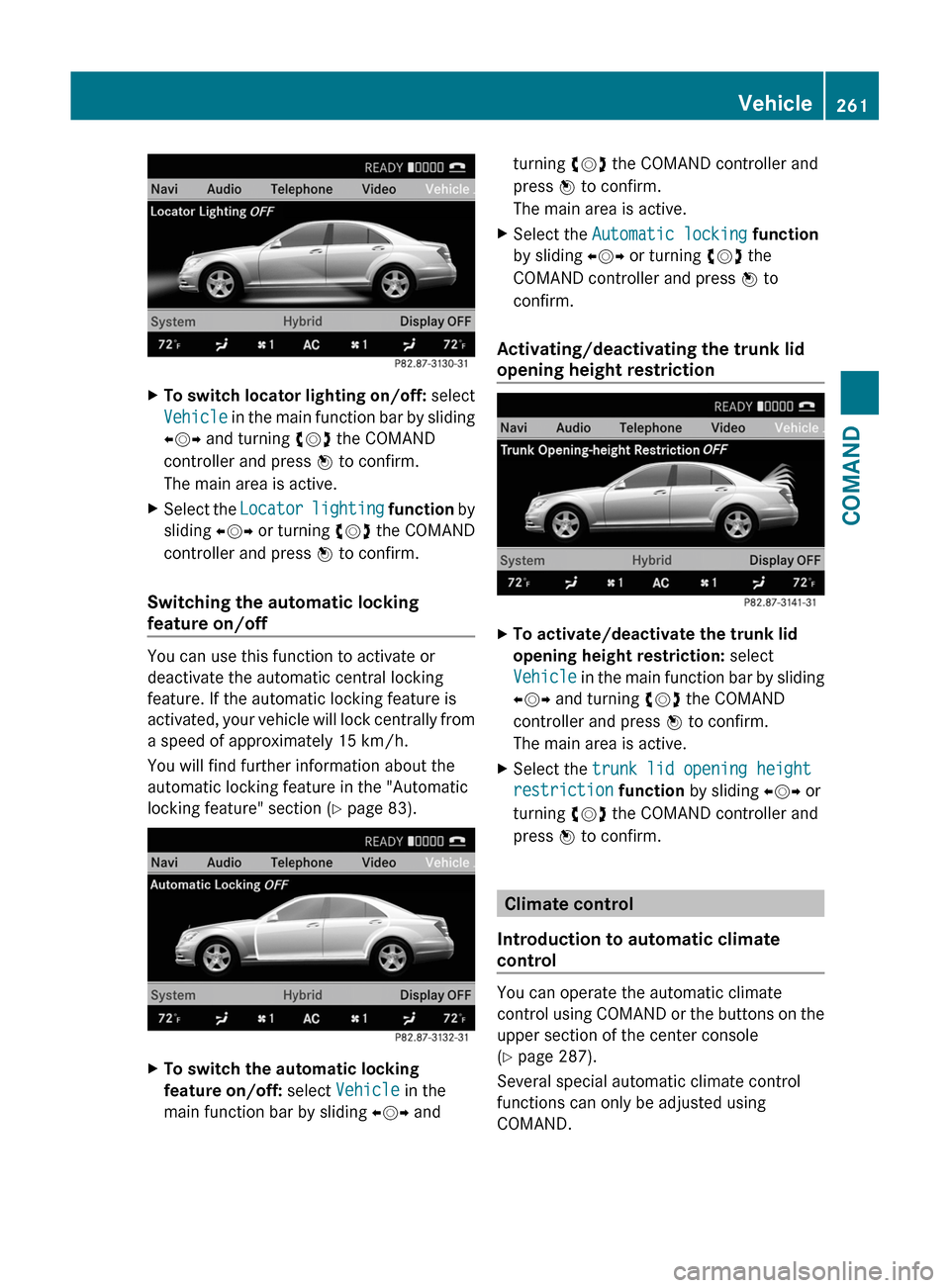
XTo switch locator lighting on/off: select
Vehicle in the main function bar by sliding
XVY and turning cVd the COMAND
controller and press W to confirm.
The main area is active.
XSelect the Locator lighting function by
sliding XVY or turning cVd the COMAND
controller and press W to confirm.
Switching the automatic locking
feature on/off
You can use this function to activate or
deactivate the automatic central locking
feature. If the automatic locking feature is
activated, your vehicle will lock centrally from
a speed of approximately 15 km/h.
You will find further information about the
automatic locking feature in the "Automatic
locking feature" section (Y page 83).
XTo switch the automatic locking
feature on/off: select Vehicle in the
main function bar by sliding XVY and
turning cVd the COMAND controller and
press W to confirm.
The main area is active.
XSelect the Automatic locking function
by sliding XVY or turning cVd the
COMAND controller and press W to
confirm.
Activating/deactivating the trunk lid
opening height restriction
XTo activate/deactivate the trunk lid
opening height restriction: select
Vehicle in the main function bar by sliding
XVY and turning cVd the COMAND
controller and press W to confirm.
The main area is active.
XSelect the trunk lid opening height
restriction function by sliding XVY or
turning cVd the COMAND controller and
press W to confirm.
Climate control
Introduction to automatic climate
control
You can operate the automatic climate
control using COMAND or the buttons on the
upper section of the center console
(Y page 287).
Several special automatic climate control
functions can only be adjusted using
COMAND.
Vehicle261COMANDZ
Page 320 of 524

lock is in position 1 or if the ignition is
switched on using the Start/Stop button.
Releasing the electric parking brake
automatically
The electric parking brake is released
automatically when the following conditions
are simultaneously fulfilled:
R the engine is running.
R the automatic transmission is in position
D or R.
R the hood is closed.
R your seat belt is fastened.
R you depress the accelerator pedal.
If the automatic transmission is in position
R , the trunk lid must be closed.
For the parking brake to be released
automatically if your seat belt is not fastened,
the following conditions must be fulfilled:
R the driver's door is closed.
R you shift out of P or you have previously
driven faster than 2 mph (3 km/h).
Engaging the electric parking brake
manually
XPush handle :.
The red F indicator lamp (USA only) or
the red ! indicator lamp (Canada only)
in the instrument cluster lights up.
i The electric parking brake can also be
applied even if the SmartKey has been
removed.
Engaging the electric parking brake
automatically
The electric parking brake is automatically
applied if HOLD or DISTRONIC PLUS brakes
the vehicle until it is stationary and at least
one of the following conditions is fulfilled:
R the engine is switched off.
R the driver's door is open and the seat belt
is not fastened.
R the hood is released.
R the trunk lid is opened while the automatic
transmission is in position R.
R the vehicle is stationary for a lengthy
period.
The red F indicator lamp (USA only) or the
red ! indicator lamp (Canada only) in the
instrument cluster lights up.
i In addition to the electric parking brake,
P may also be engaged automatically.
Emergency braking with the electric
parking brake
The vehicle can also be braked during an
emergency using the electric parking brake.
XWhile driving, push handle : of the electric
parking brake ( Y page 317).
i
The vehicle is braked as long as you keep
the handle of the electric parking brake
pressed. The longer the electric parking
brake handle is depressed, the greater the
braking force.
During braking:
R a warning tone sounds.
R the Release parking brake message
appears.
R red F indicator lamp (USA only) or
red ! indicator lamp (Canada only)
appears in the instrument cluster
When the vehicle has been braked to a
standstill, the electric parking brake is
engaged.
Parking up the vehicle
If you leave the vehicle parked up for longer
than four weeks, the battery may be damaged
by exhaustive discharge.
XDisconnect the battery or connect it to a
trickle charger.
i You can obtain information about trickle
chargers from a qualified specialist
318ParkingDriving and parking
Page 337 of 524
example, the detected vehicle turns a corner
and reveals an obstacle or stationary vehicle,
DISTRONIC PLUS will not brake for these.
Crossing vehicles
DISTRONIC PLUS may detect vehicles that
are crossing your lane by mistake. Activating
DISTRONIC PLUS at traffic lights with
crossing traffic, for example, could cause
your vehicle to pull away unintentionally.
HOLD function
General notes
The HOLD function can assist the driver in the
following situations:
Rwhen pulling away, especially on steep
slopes
Rwhen maneuvering on steep slopes
Rwhen waiting in traffic
The vehicle is kept stationary without the
driver having to depress the brake pedal.
The braking effect is canceled and the HOLD
function deactivated when you depress the
accelerator pedal to pull away.
GWarning!
HYBRID vehicles: It is imperative that you read
the HYBRID Supplemental Operating
Instructions included in your vehicle literature
portfolio. You may otherwise not receive all
necessary safety information and warning for
the operation of your vehicle.
Activation conditions
You can activate the HOLD function if:
Rthe vehicle is stationary.
Rthe driver's door is closed or if your seat
belt is fastened.
Rthe electric parking brake is released.
Rthe hood is closed.
Rthe transmission is in position R, N or D.
The trunk lid must be closed in position R.
RDISTRONIC PLUS is deactivated.
Activating the HOLD function
XMake sure that the activation conditions
are met.
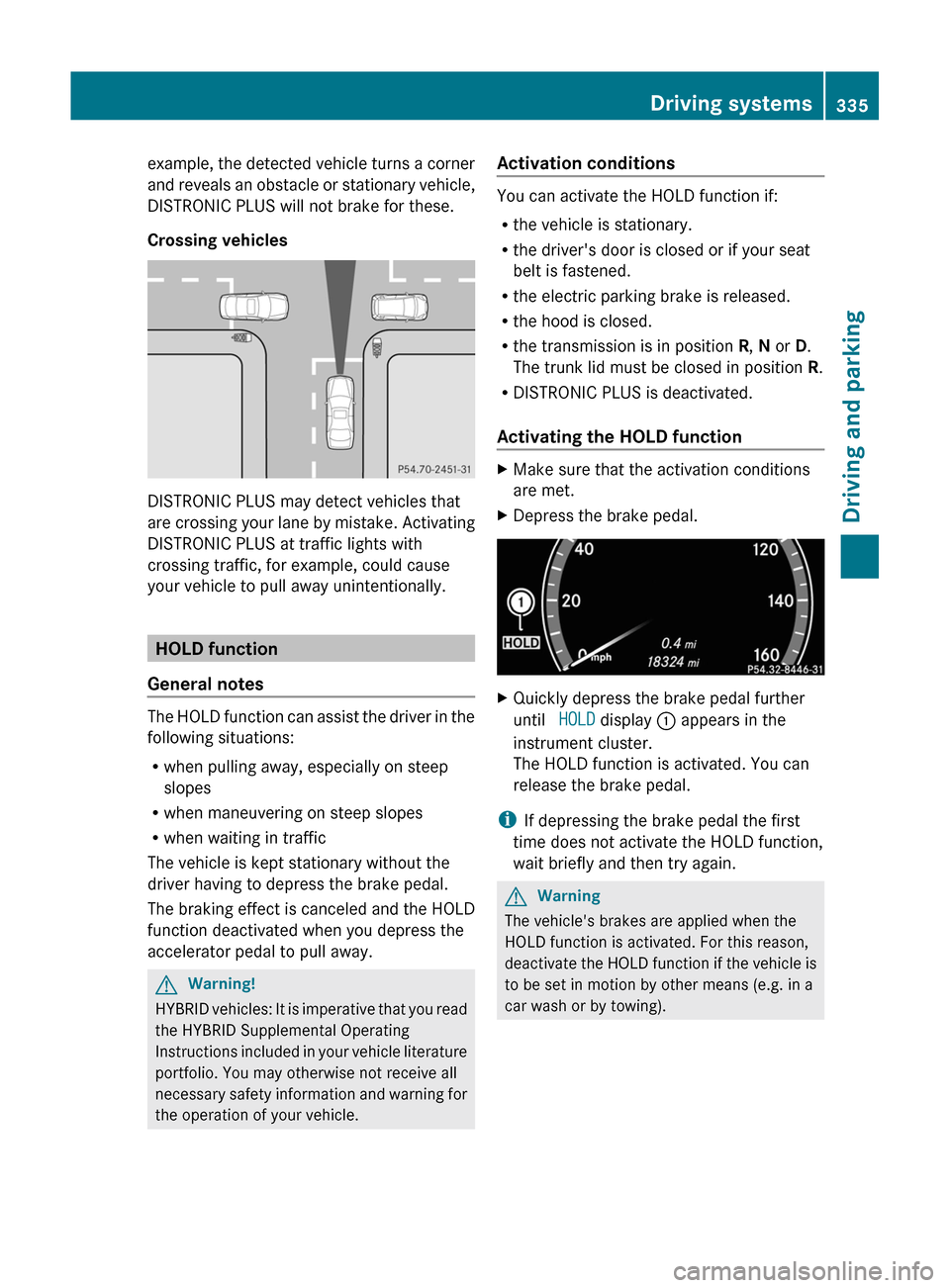
XDepress the brake pedal.XQuickly depress the brake pedal further
until HOLD display : appears in the
instrument cluster.
The HOLD function is activated. You can
release the brake pedal.
iIf depressing the brake pedal the first
time does not activate the HOLD function,
wait briefly and then try again.
GWarning
The vehicle's brakes are applied when the
HOLD function is activated. For this reason,
deactivate the HOLD function if the vehicle is
to be set in motion by other means (e.g. in a
car wash or by towing).
Driving systems335Driving and parkingZ