2011 MERCEDES-BENZ M-Class tailgate
[x] Cancel search: tailgatePage 10 of 372

PARKTRONIC ................................. 184
Rear view camera .......................... 187
Driving tip
Braking .......................................... 163
Driving tips ........................................ 147
DISTRONIC .................................... 179
Downhill gradients .........................161
Driving on flooded roads ................164
Driving on sand .............................. 168
Driving over obstacles ...................169
Off-road driving .............................. 167
Off-road fording ............................. 164
Tire ruts ......................................... 169
Towing a trailer .............................. 198
Wet road surface ........................... 162
Winter ............................................ 166
DSR (Downhill Speed
Regulation) ......................................... 192
Display message ............................ 239
Setting (on-board computer) .......... 219
DVD audio (on-board computer) ...... 212
E
EASY-ENTRY feature ......................... 100
Activating/deactivating (on-
board computer) ............................ 218
EASY-EXIT feature ............................. 100
Crash-responsive ........................... 101
EASY-PACK cargo compartment
management system ........................ 263
EASY-PACK load-securing kit ........... 263
EBD (Electronic Brake force
Distribution) Display message ............................ 229
Function/notes ................................ 68
Electrical fuses
see Fuses
Electronic Brake-force
Distribution) see EBD
Electronic Stability Program
see ESP ®
Electronic Traction System
see ETS/4ETS
Emergency call
see mbrace
Emergency release
Fuel filler flap ................................. 153
Vehicle ............................................. 80
Emergency running mode
Automatic transmission .................151
Emergency spare wheel
Storage location ............................ 299
Stowing .......................................... 299
Emergency tensioning device
Function ........................................... 57
Safety guidelines ............................. 37
Emergency unlocking
Tailgate ............................................ 84
Emissions purification
Service and warranty information ....19
Engine
Irregular running ............................ 143
Starting problems ..........................143
Starting the engine with the key ....141
Starting with KEYLESS GO .............141
Switching off .................................. 158
Warning lamp (engine
diagnostics) ................................... 252
Engine electronics
Malfunction .................................... 143
Engine emergency stop .................... 322
Engine number .................................. 356
Engine oil Adding ........................................... 284
Checking the oil level ..................... 283
Display message ............................ 235
Lubricant additives ........................361
Notes about oil grades ................... 361
Temperature (on-board computer) . 209
Viscosity ........................................ 361
ESP ®
(Electronic Stability
Program) Activating/deactivating ...................67
Display message ............................ 223
ETS/4ETS ........................................ 67
Important safety information ...........66
Trailer stabilization ........................... 68
Warning lamp ................................. 250
ETS/4ETS (Electronic Traction
System) ................................................ 67
Exhaust check ................................... 1618IndexBA 164.1 USA, CA Edition B 2011; 1; 2, en-USd2mskotVersion: 3.0.3.52010-04-21T17:25:06+02:00 - Seite 8
Page 17 of 372

SRS (Supplemental Restraint
System) Display message ............................ 224
Introduction ..................................... 36
Warning lamp ................................. 251
Warning lamp (function) ................... 36
Standard display (on-board
computer) .......................................... 208
Starting the engine Important safety instructions ......... 140
Station
see Radio
Status line (on-board computer)
Multifunction display .....................206
Selecting the display ...................... 214
Steering (display message) .............. 244
Steering wheel Adjusting (electrically) ...................100
Adjusting (manually) ........................99
Buttons (on-board computer) ......... 205
Cleaning ......................................... 292
Important safety instructions ...........99
Memory function (storing
settings) ......................................... 100
Steering wheel heating ..................100
Storing settings (memory
function) ........................................ 103
Steering wheel heating
Indicator lamp (Malfunction) ..........100
Steering wheel paddle shifters ........ 148
Stowage compartments Armrest (under) ............................. 257
Glove box ....................................... 257
Stowage space
Center console .............................. 257
Center console (rear) .....................258
Cup holders ................................... 265
Important safety information .........256
Submenu (on-board computer)
Convenience .................................. 218
Instrument cluster .........................214
Lighting .......................................... 215
Time/Date ..................................... 215
Vehicle ........................................... 217
Summer opening
see Convenience opening feature
Sun visor ............................................ 266Supplemental Restraint System
see SRS
Surround lighting (on-board
computer) .......................................... 215
SUV (Sport Utility Vehicle) .......................21
Switching off the alarm (ATA) ............ 69
T
Tachometer ........................................ 204
Tailgate Display message ............................ 244
Emergency unlocking .......................84
Important safety guidelines .............80
Limiting the opening angle ...............83
Taillight
see Tail lamps
Tank contents
Gauge .............................................. 28
Technical data ................................... 354
ML 350 .......................................... 364
ML 350 4MATIC ............................. 364
ML 350 BlueTEC 4MATIC ...............363
ML 550 4MATIC ............................. 364
ML 63 AMG ................................... 365
Tires/wheels ................................. 347
TELEAID
Call priority .................................... 274
Display message ............................ 224
Downloading destinations
(COMAND) ..................................... 274
Emergency call .............................. 271
Important safety notes ..................270
Locating a stolen vehicle ...............275
MB info call button ........................273
Roadside Assistance button ..........272
Self-test ......................................... 271
System .......................................... 271
Vehicle remote unlocking ..............275
Telephone
Accepting a call ............................. 220
Display message ............................ 245
Menu (on-board computer) ............220
Number from the phone book ........ 221
Redialing ........................................ 221
Rejecting/ending a call .................221
Telephone compartment .................. 257
Index15BA 164.1 USA, CA Edition B 2011; 1; 2, en-USd2mskotVersion: 3.0.3.52010-04-21T17:25:06+02:00 - Seite 15
Page 28 of 372

Exterior viewFunctionPage:Tailgate80Vehicle tool kit298;Rear window heating133=Lights111?Fuel filler flap151AExterior mirrors101BRoof carrier265Sliding sunroof88CDefrosting the windshield132Cleaning the windows290FunctionPageDWindshield wipers117EOpening the hood282Engine oil283Coolant285FTowing away317GTires and wheels324Flat tire30026Exterior viewAt a glance
BA 164.1 USA, CA Edition B 2011; 1; 2, en-USd2mskotVersion: 3.0.3.52010-04-21T17:25:06+02:00 - Seite 26
Page 35 of 372

Door control panelFunctionPage:Opens the door79;%& Locks/unlocks
the vehicle
79
=7 Adjusts the exterior
mirrors
101
?Zª\ Selects the
exterior mirror, electrically
folds the exterior mirrors
in/out
101
AW Opens/closes the
side windows
85
n Activates/
deactivates the override
feature for the side
windows in the rear
compartment
64
Bq Opens/closes the
tailgate
82
Door control panel33At a glanceBA 164.1 USA, CA Edition B 2011; 1; 2, en-USd2mskotVersion: 3.0.3.52010-04-21T17:25:06+02:00 - Seite 33
Page 71 of 372

emergency braking situations, for example.
You could lose control of the vehicle and
cause an accident.
Adapt your driving style to the changed
driving characteristics.
Distance warning function (vehicles
with DISTRONIC)
This function warns you from a speed of
approximately 20 mph (30 km/h), if:
R for a period of several seconds, the
distance to the vehicle in front is too short
for the speed at which you are traveling.
The · distance warning lamp in the
instrument cluster will light up.
R you are approaching the vehicle in front
rapidly. An intermittent warning tone will
then sound and the · distance warning
lamp in the instrument cluster will light up.
You must apply the brakes yourself in order
to maintain the appropriate distance to the
vehicle in front and prevent a collision.
GWarning!
If the distance warning lamp · in the
instrument cluster comes on while driving
and/or an intermittent warning sounds,
immediate attention on the part of the driver
is required. As required by the traffic
situation, apply the brakes and navigate
around a possible obstacle. However, do not
drive by relying on the distance warning
function, as this will result in an emergency
braking application. This will not always
enable you to avoid a collision, especially
when traveling on varying road surface
conditions and with varying driver reaction.
Complex driving situations are not always
fully recognized by the distance warning
function. This could result in wrong or missing
distance warnings.
XTo activate/deactivate: activate or
deactivate the distance warning function in
the on-board computer ( Y page 219).
After activation, the Ä symbol is
displayed in the lower multifunction
display.
Anti-theft systems
Immobilizer
The immobilizer prevents your vehicle from
being started without the correct SmartKey.
When leaving the vehicle, always take the
SmartKey with you and lock the vehicle. The
engine can be started by anyone with a valid
SmartKey that is left inside the vehicle.
XTo activate with the SmartKey: remove
the SmartKey from the ignition lock.XTo activate with KEYLESS-GO: switch the
ignition off and open the driver's door.XTo deactivate: switch on the ignition.
i
The immobilizer is always deactivated
when you start the engine.
In the event that the engine cannot be
started when the starter battery is fully
charged, the immobilizer may be faulty.
Contact an authorized Mercedes-Benz
Center or call 1-800-FOR-MERCedes (in
USA) or 1-800-387-0100 (in Canada).
ATA (Anti-Theft Alarm system)
A visual and audible alarm is triggered if the
alarm system is armed and you open:
R a door
R the vehicle with the mechanical key
R the tailgate
R the hood
The alarm is not switched off, even if you
close the open door that has triggered it, for
example.
Anti-theft systems69SafetyBA 164.1 USA, CA Edition B 2011; 1; 2, en-USd2mskotVersion: 3.0.3.52010-04-21T17:25:06+02:00 - Seite 69Z
Page 72 of 372

iIf the alarm stays on for more than 30
seconds, the emergency call system
mbrace (USA only) or Tele Aid (Canada
only) initiates a call to the Customer
Assistance Center automatically. The
emergency call system initiates the call
provided that:
R you have subscribed to the mbrace/Tele
Aid service
R the mbrace/Tele Aid service has been
activated properly
R the mobile phone, power supply and GPS
necessary are availableXTo arm: lock the vehicle with the SmartKey
or KEYLESS-GO.
The turn signal lamps flash three times to
indicate that the vehicle is locked. Indicator
lamp : flashes to indicate that the alarm
system is armed.
i If the turn signal lamps do not flash three
times, a door or the tailgate may not be
properly closed.
It may be necessary to close the affected
door or the tailgate.
XTo deactivate: unlock the vehicle using the
key or KEYLESS-GO.
The turn signal lamps flash once to indicate
that the anti-theft alarm system is switched
off.i Unless you open a door or the trunk lid
within 40 seconds after unlocking the
vehicle:
R the vehicle will be locked again.
R the anti-theft alarm system will be re-
armed.XTo stop the alarm using the SmartKey:
insert the key into the ignition lock.
The alarm is switched off.
or
XPress the % or & button on the key.
The alarm is switched off.XTo stop the alarm using KEYLESS-GO:
grasp the outside door handle. The key
must be outside the vehicle.
The alarm is switched off.
or
XPress the Start/Stop button on the
dashboard. The key must be inside the
vehicle.
The alarm is switched off.70Anti-theft systemsSafety
BA 164.1 USA, CA Edition B 2011; 1; 2, en-USd2mskotVersion: 3.0.3.52010-04-21T17:25:06+02:00 - Seite 70
Page 75 of 372
received, including interference which
could cause unwanted functions.
Unapproved modifications to this device
may lead to withdrawal of permission to
operate it.
i Canada only:
This device complies with Industry
Canada's RSS–210 regulations. Operation
is subject to the following conditions:
1. This device must not cause any harmful
interference, and
2. This device must be able to
accommodate interference that is
received, including interference which
could cause unwanted functions.
Unapproved modifications to this device
may lead to withdrawal of permission to
operate it.
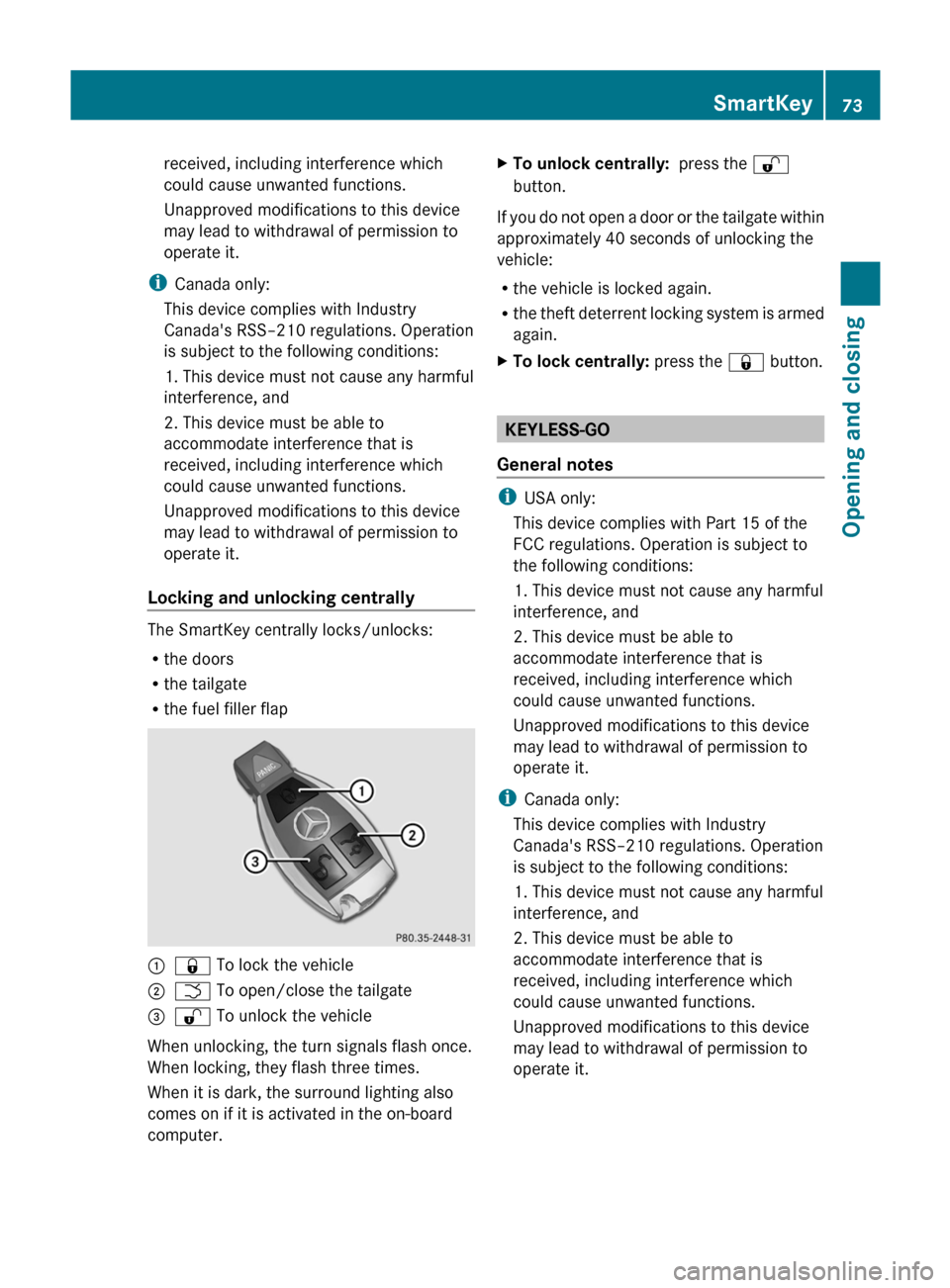
Locking and unlocking centrally
The SmartKey centrally locks/unlocks:
R the doors
R the tailgate
R the fuel filler flap
:& To lock the vehicle;F To open/close the tailgate=% To unlock the vehicle
When unlocking, the turn signals flash once.
When locking, they flash three times.
When it is dark, the surround lighting also
comes on if it is activated in the on-board
computer.
XTo unlock centrally: press the %
button.
If you do not open a door or the tailgate within
approximately 40 seconds of unlocking the
vehicle:
R the vehicle is locked again.
R the theft deterrent locking system is armed
again.
XTo lock centrally: press the & button.
KEYLESS-GO
General notes
i USA only:
This device complies with Part 15 of the
FCC regulations. Operation is subject to
the following conditions:
1. This device must not cause any harmful
interference, and
2. This device must be able to
accommodate interference that is
received, including interference which
could cause unwanted functions.
Unapproved modifications to this device
may lead to withdrawal of permission to
operate it.
i Canada only:
This device complies with Industry
Canada's RSS–210 regulations. Operation
is subject to the following conditions:
1. This device must not cause any harmful
interference, and
2. This device must be able to
accommodate interference that is
received, including interference which
could cause unwanted functions.
Unapproved modifications to this device
may lead to withdrawal of permission to
operate it.
SmartKey73Opening and closingBA 164.1 USA, CA Edition B 2011; 1; 2, en-USd2mskotVersion: 3.0.3.52010-04-21T17:25:06+02:00 - Seite 73Z
Page 76 of 372

Important information about using
KEYLESS-GO
R You can use the KEYLESS-GO key as a
conventional SmartKey.
R You can combine KEYLESS-GO functions
with those of a conventional SmartKey, e.g.
you can open the vehicle with KEYLESS-GO
and close it with the & button.
R Always carry your KEYLESS-GO key on your
person.
R Never store the KEYLESS-GO key together
with:
- electronic devices, such as a mobile
phone or other SmartKey
- metal objects, such as coins or metal foil
Doing so may impair the function of
KEYLESS-GO.
R To open or close the vehicle, the KEYLESS-
GO key should not be more than 3 ft (1 m)
from the door or tailgate.
R If the vehicle is parked for more than
72 hours, the KEYLESS-GO function is
deactivated. Pull an outer door handle and
switch on the ignition to reactivate the
KEYLESS-GO function.
R If the KEYLESS-GO key is removed from the
vehicle, the system may not be able to
recognize the SmartKey anymore. The
vehicle can then no longer be locked or
started with KEYLESS-GO.
R If the KEYLESS-GO key has been removed
from the vehicle, e.g. when another vehicle
occupant with a KEYLESS-GO key leaves
the vehicle:
- when the Start/Stop button is pressed,
or when trying to lock the vehicle using
the locking button on the outside door
handle, the Key Not Detected message
appears in the multifunction display.
- when the engine is running, the red Key
Not Detected message appears in the
multifunction display as you pull away.
Look for the KEYLESS-GO key and place
it somewhere else in the vehicle. Place
the KEYLESS-GO key on the front-
passenger seat, for example, or in your
shirt pocket.
R If you have switched on the engine with the
Start/Stop button, you can switch it off
again by:
- pressing the Start/Stop button
- inserting the KEYLESS-GO key into the
ignition lock while the vehicle is at a
standstill and the automatic
transmission is in park position P.
R You may inadvertently unlock the vehicle if
the KEYLESS-GO key is less than 3 ft (1 m)
from the vehicle and:
- an exterior door handle is hit by a jet of
water, or
- you clean an exterior door handle
R Please note that any vehicle occupant can
start the engine when there is a KEYLESS-
GO key in the vehicle.
Scenario 1: There is a KEYLESS-GO key in
the vehicle and a second one outside the
vehicle. If you leave the KEYLESS-GO key
in the vehicle when you leave and lock the
vehicle, no message appears in the
multifunction display.
Scenario 2: There is a KEYLESS-GO key in
the vehicle, but none outside the vehicle. If
you get out of the vehicle and attempt to
lock it, the Key Detected In Vehicle
message appears in the multifunction
display. The vehicle is not then locked.
When starting the engine and whilst driving,
KEYLESS-GO also checks whether a valid
SmartKey is in the vehicle by periodically
establishing radio contact.74SmartKeyOpening and closing
BA 164.1 USA, CA Edition B 2011; 1; 2, en-USd2mskotVersion: 3.0.3.52010-04-21T17:25:06+02:00 - Seite 74