2011 MERCEDES-BENZ M-Class radio
[x] Cancel search: radioPage 213 of 372

:RACETIMER overall evaluation;Total time driven=Top speed?Distance coveredAAverage speed
Lap evaluation
This function is only available if you have
stored at least two laps and have stopped the
RACETIMER.
XPress V or U on the steering wheel
to select the AMG menu.XPress the & button repeatedly until the
lap evaluation is shown.
Each lap is shown in a separate submenu.
The fastest lap is indicated by flashing
symbol :.:Lap;Lap time=Top speed during lap?Lap lengthAAverage lap speedXPress the & or * button to select a
different lap evaluation.Off-road mode menu in AMG vehicles
In the Off-road Mode menu you can switch
the off-road drive program (Y page 193) on or
off.XPress the V or U button on the
steering wheel to select the Off-road
Mode menu.XPress the W or X button to switch
Off-road Mode on or off.
i
The setting will remain stored after you
switch off the engine.
If the off-road drive program is switched on,
you will see off-road display : in the
multifunction display.
:Off-road display
Audio menu
Selecting a radio station
i SIRIUS XM satellite radio acts like a
normal radio.
For more information on satellite radio
operation, see the separate operating
instructions.
You can only change the waveband and store
new stations using COMAND APS.
XSwitch on COMAND APS and select Radio
(see the separate operating instructions).XPress V or U on the steering wheel
to select the Audio menu.Menus and submenus211On-board computer and displaysBA 164.1 USA, CA Edition B 2011; 1; 2, en-USd2mskotVersion: 3.0.3.52010-04-21T17:25:06+02:00 - Seite 211Z
Page 241 of 372

Display messagesPossible causes/consequences and M SolutionsÅ
Shift briefly into
NYou have reduced the vehicle speed, but the automatic
transmission is not in position N.XBriefly shift the automatic transmission to position N.Å
Shifting Process
Canceled
ReactivateThe gearshift process has been canceled.XRepeat the gearshift process.Ã
InoperativeDSR (Downhill Speed Regulation) is deactivated due to a
malfunction.XHave DSR checked at a qualified specialist workshop.Blind Spot Assist
Currently
Unavailable See
Operator's ManualBlind Spot Assist is temporarily inoperative if:
R the sensors are dirty.
R its function is impaired due to heavy rain or snow.
R the radar sensor system is outside the operating temperature
range.
R the radar sensor system is temporarily inoperative, e.g. due to
electromagnetic radiation emitted by nearby TV or radio
stations or other sources of electromagnetic radiation.
R the on-board voltage is too low.
The yellow 9 indicator lamps also light up in the exterior
mirrors.
Blind Spot Assist is operational again and the display message
disappears when:
R the dirt (e.g. slush) drops away while the vehicle is in motion.
R the system detects that the sensors are fully available again.
R the radar sensor system is back within the operating
temperature range.
If the display message continues to be displayed:XClean the sensors ( Y page 291).XRestart the engine.Blind Spot Assist
InoperativeBlind Spot Assist is faulty.
The yellow 9 indicator lamps also light up in the exterior
mirrors.XVisit a qualified specialist workshop.Cruise Control
InoperativeCruise control is faulty. XVisit a qualified specialist workshop.Display messages239On-board computer and displaysBA 164.1 USA, CA Edition B 2011; 1; 2, en-USd2mskotVersion: 3.0.3.52010-04-21T17:25:06+02:00 - Seite 239Z
Page 242 of 372

Display messagesPossible causes/consequences and M SolutionsCruise Control
--- mph A condition for activating cruise control has not been met.
You wanted to save a speed of less than 20 mph (30 km/h).XIf the situation allows, drive faster than 20 mph (30 km/h) and
save the speed.XCheck the activation conditions for cruise control
( Y page 171).DISTRONIC
--- MPH An activation condition for DISTRONIC is not fulfilled.XIf the situation allows, drive faster than 20 mph (30 km/h) and
save the speed.XCheck activation conditions for DISTRONIC ( Y page 173).DISTRONIC
OverrideDISTRONIC is no longer controlling the speed of the vehicle.XTake your foot off the accelerator pedal.DISTRONIC
InoperativeDISTRONIC is faulty or the display has failed.XVisit a qualified specialist workshop.DISTRONIC
Currently
Unavailable See
Operator's ManualDISTRONIC is deactivated and is temporarily inoperative if:
R the DISTRONIC cover in the radiator grill is dirty.
R its function is impaired due to heavy rain, snow or fog.
R the radar sensor system is temporarily inoperative, e.g. due to
electromagnetic radiation emitted by nearby TV or radio
stations or other sources of electromagnetic radiation.
R the radar sensor system has not detected any vehicles or
stationary objects, e.g. traffic signs, for a long time.
R the system is outside the operating temperature range.
DISTRONIC becomes available again and the display message
disappears when:
R the dirt (e.g. slush) drops away while the vehicle is in motion.
R the system detects that the sensors are fully available again.
R the system is within the operating temperature range.
If the display message continues to be displayed:XClean the DISTRONIC cover in the radiator grill ( Y page 291).XRestart the engine.GWarning
DISTRONIC cannot take weather conditions into account. Switch off DISTRONIC or do not turn
it on if the sensor is dirty or visibility is diminished as a result of snow, rain or fog. The distance
control may be impaired even before the system is able to detect a dirty sensor. The DISTRONIC
240Display messagesOn-board computer and displays
BA 164.1 USA, CA Edition B 2011; 1; 2, en-USd2mskotVersion: 3.0.3.52010-04-21T17:25:06+02:00 - Seite 240
Page 245 of 372

Display messagesPossible causes/consequences and M SolutionsTire Pressure
Monitor
Currently
UnavailableDue to a source of radio interference no signals can be received
from the wheel sensors. The tire pressure monitor is temporarily
malfunctioning.XDrive on.
The TPMS restarts automatically as soon as the problem has
been solved.h
Tire Pressure
Caution: Tire
DefectGRisk of accident
The tire pressure in one or more tires has dropped suddenly.
XStop the vehicle without making any sudden steering or braking
maneuvers. Pay attention to the traffic conditions as you do so.XIf necessary, change the wheel ( Y page 340).h
Tire Pressure
Check TiresGRisk of accident
The tire pressure in one or more tires has dropped significantly.
XStop the vehicle without making any sudden steering or braking
maneuvers. Pay attention to the traffic conditions as you do so.XIf necessary, change the wheel ( Y page 340).XCheck the tire pressure. If necessary, correct the tire pressure
( Y page 331).h
Please correct the
tire pressuresThe tire pressure is insufficient in at least one of the tires or the
tire pressure difference between the wheels is too great.XCheck the tire pressures at the next opportunity. If necessary,
correct the tire pressure ( Y page 331).
Vehicle
Display messagesPossible causes/consequences and M SolutionsShift to P or N
to start engineYou have attempted to start the engine with the transmission in
position R or D. XShift the transmission to position P or N.Auxiliary Battery
MalfunctionThe auxiliary battery for the automatic transmission is no longer
being charged.XVisit a qualified specialist workshop.Depress brake
to shift out of PYou have attempted to move the transmission selector lever to
position D, R or N without depressing the brake pedal.XDepress the brake pedal.Display messages243On-board computer and displaysBA 164.1 USA, CA Edition B 2011; 1; 2, en-USd2mskotVersion: 3.0.3.52010-04-21T17:25:06+02:00 - Seite 243Z
Page 248 of 372

Display messagesPossible causes/consequences and M Solutions+
Key Not Detected
(red display message)The KEYLESS-GO key is not in the vehicle.
If the engine is switched off, you can no longer lock the vehicle
centrally or start the engine.XPull over and stop the vehicle safely as soon as possible, paying
attention to road and traffic conditions.XEngage the parking brake.XLocate the KEYLESS-GO key.The KEYLESS-GO key is not detected while the engine is running
because there is interference from a strong source of radio waves.XPull over and stop the vehicle safely as soon as possible, paying
attention to road and traffic conditions.XEngage the parking brake.XOperate the vehicle with the SmartKey in the ignition lock if
necessary.+
Key Not Detected
(white display
message)The KEYLESS-GO key cannot be detected at present.XChange the location of the SmartKey with the KEYLESS-GO
functions in the vehicle.
If the KEYLESS-GO key is still not detected:
XChange the location of the SmartKey with the KEYLESS-GO
functions in the vehicle.XOperate the vehicle with the key in the ignition lock if necessary.+
Key Detected In
VehicleThe KEYLESS-GO key has been detected inside the vehicle during
locking.XRemove the KEYLESS-GO key from the vehicle.+
Pull starting
button out then
insert keyThe KEYLESS-GO key can continuously not be detected.XInsert the SmartKey into the ignition lock and turn it to the
desired position.XVisit a qualified specialist workshop.246Display messagesOn-board computer and displays
BA 164.1 USA, CA Edition B 2011; 1; 2, en-USd2mskotVersion: 3.0.3.52010-04-21T17:25:06+02:00 - Seite 246
Page 279 of 372
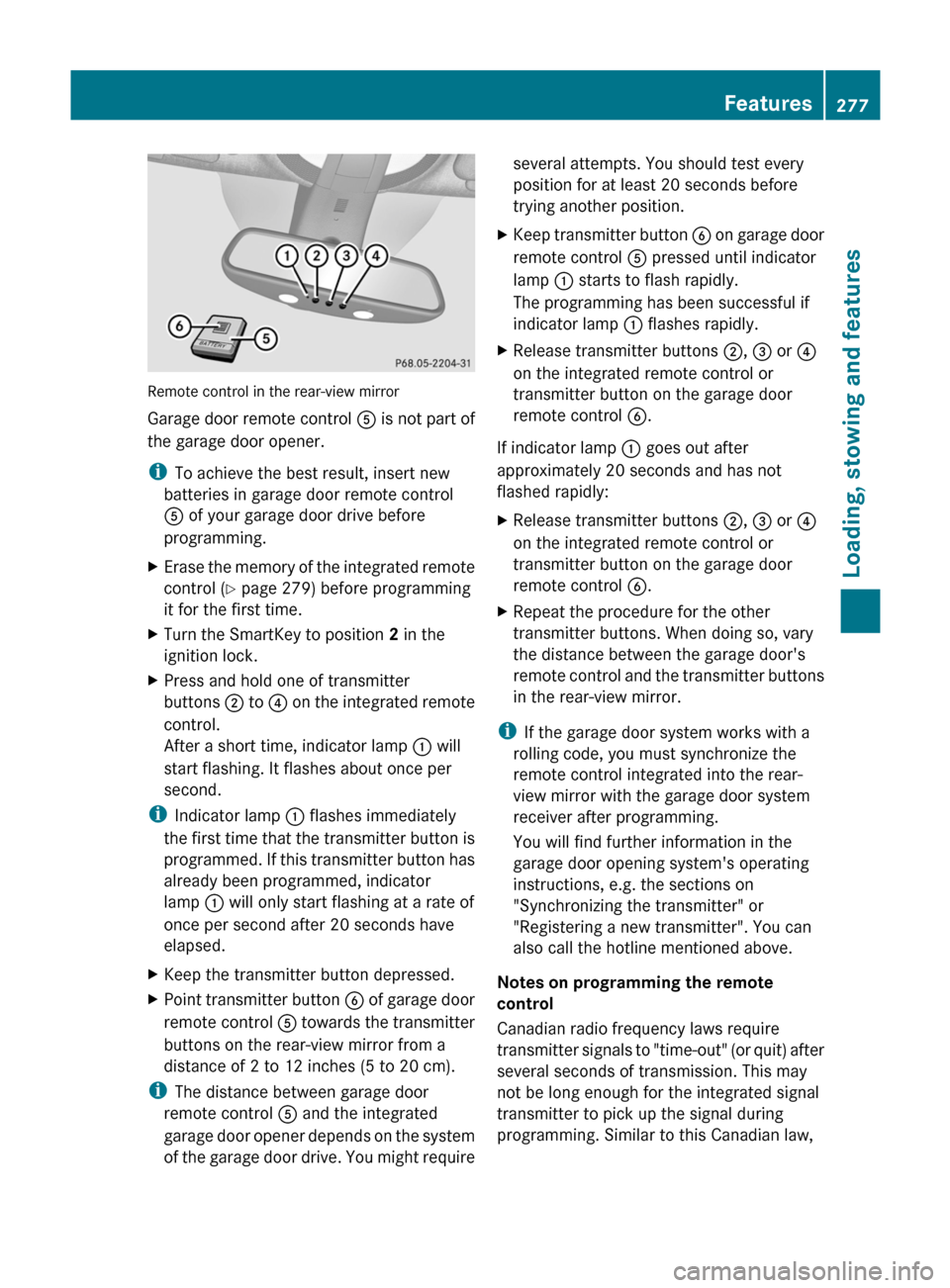
Remote control in the rear-view mirror
Garage door remote control A is not part of
the garage door opener.
i To achieve the best result, insert new
batteries in garage door remote control
A of your garage door drive before
programming.
XErase the memory of the integrated remote
control ( Y page 279) before programming
it for the first time.XTurn the SmartKey to position 2 in the
ignition lock.XPress and hold one of transmitter
buttons ; to ? on the integrated remote
control.
After a short time, indicator lamp : will
start flashing. It flashes about once per
second.
i Indicator lamp : flashes immediately
the first time that the transmitter button is
programmed. If this transmitter button has
already been programmed, indicator
lamp : will only start flashing at a rate of
once per second after 20 seconds have
elapsed.
XKeep the transmitter button depressed.XPoint transmitter button B of garage door
remote control A towards the transmitter
buttons on the rear-view mirror from a
distance of 2 to 12 inches (5 to 20 cm).
i The distance between garage door
remote control A and the integrated
garage door opener depends on the system
of the garage door drive. You might require
several attempts. You should test every
position for at least 20 seconds before
trying another position.XKeep transmitter button B on garage door
remote control A pressed until indicator
lamp : starts to flash rapidly.
The programming has been successful if
indicator lamp : flashes rapidly.XRelease transmitter buttons ;, = or ?
on the integrated remote control or
transmitter button on the garage door
remote control B.
If indicator lamp : goes out after
approximately 20 seconds and has not
flashed rapidly:
XRelease transmitter buttons ;, = or ?
on the integrated remote control or
transmitter button on the garage door
remote control B.XRepeat the procedure for the other
transmitter buttons. When doing so, vary
the distance between the garage door's
remote control and the transmitter buttons
in the rear-view mirror.
i If the garage door system works with a
rolling code, you must synchronize the
remote control integrated into the rear-
view mirror with the garage door system
receiver after programming.
You will find further information in the
garage door opening system's operating
instructions, e.g. the sections on
"Synchronizing the transmitter" or
"Registering a new transmitter". You can
also call the hotline mentioned above.
Notes on programming the remote
control
Canadian radio frequency laws require
transmitter signals to "time-out" (or quit) after
several seconds of transmission. This may
not be long enough for the integrated signal
transmitter to pick up the signal during
programming. Similar to this Canadian law,
Features277Loading, stowing and featuresBA 164.1 USA, CA Edition B 2011; 1; 2, en-USd2mskotVersion: 3.0.3.52010-04-21T17:25:06+02:00 - Seite 277Z
Page 281 of 372

Clearing the remote control memoryXTurn the SmartKey to position 2 in the
ignition lock.
XPress and hold transmitter buttons ;
and ? for approximately 20 seconds until
indicator lamp : flashes rapidly.
The memory is cleared.
iYou should clear the remote control
memory before selling the vehicle.
Compass
XTo call up the compass: press the V
or U button on the multifunction
steering wheel repeatedly until the
AIRMATIC/Compass menu appears in the
multifunction display.
The compass indicates the direction in
which the vehicle is currently driving: N, NE,
E, SE, S, SW, W or NW.
iIf your vehicle is not equipped with the
AIRMATIC package, the multifunction
display only shows the compass.
Floormat on the driver's side
GWarning!
Whenever you are using a floormat, make sure
there is enough clearance and that the
floormat is securely fastened.
The floormat should always be securely
fastened using the fastening equipment.
Before driving off, check that the floormat is
securely in place and adjust it if necessary. A
loose floormat could slip and hinder proper
functioning of the pedals.
Do not place several floormats on top of each
other as this may impair pedal movement.
XSlide seat backwards.XTo install: place the floormat in position.XPress floormat eyelets : onto retainer
pins ;.
XTo remove: pull the floormats off
retainers ;.
XRemove the floormat.
Infrared-reflecting windshield
The infrared reflecting glass prevents the
vehicle interior from becoming too hot. It also
blocks radio waves up into the gigahertz
range.
In order to operate radio-controlled
equipment, e.g. toll systems, there are
areas : on the windshield that are
permeable to radio waves. In these areas, you
can install radio-controlled systems. These
areas can best be seen from outside the
Features279Loading, stowing and featuresBA 164.1 USA, CA Edition B 2011; 1; 2, en-USd2mskotVersion: 3.0.3.52010-04-21T17:25:06+02:00 - Seite 279Z
Page 318 of 372

iJumper cables and further information about jump-starting can be obtained from any
authorized Mercedes-Benz Center.XMake sure that the two vehicles do not touch.XApply the parking brake firmly.XShift the transmission to position P.XSwitch off all electrical consumers (e.g. radio, blower etc.).XOpen the hood ( Y page 282).
Position number C identifies the charged battery of the other vehicle or an equivalent jump-
starting device.
! Never swap the terminal connections.
XLift up cover : of positive terminal ; in the direction of the arrow.XConnect positive terminal ; on your vehicle to positive terminal = of donor battery C
using the jumper cable, beginning with your own battery.XStart the engine of the donor vehicle and run it at idling speed.XRemove cover A from earth point B.XConnect negative terminal ? of donor battery C to earth point B of your vehicle using
the jumper cable, connecting the jumper cable to donor battery C first.XStart the engine.316Jump-startingRoadside assistance
BA 164.1 USA, CA Edition B 2011; 1; 2, en-USd2mskotVersion: 3.0.3.52010-04-21T17:25:06+02:00 - Seite 316