2011 MERCEDES-BENZ GL-Class SD card
[x] Cancel search: SD cardPage 104 of 214

Answ
ering ma chines orothe rdevices canbe
con trolled byDTMF tones, e.g. forremot e
query functions.
X Ifyou would liketolisten tothe messages
on your answering machine,for example,
select thecorr espondin gnumber.
X To transmit individu alchar acter s:onc e
a con nection hasbeen established tothe
answer phone,selectdesired
charact ers?and press the9button to
con firm.
or
X Press thecorr espondin gbutton on
COMAND 'snumber keypad.
Ever ycharact erselect edwill be
tran smitt edimmediately.
X To send aphone bookentry asa
sequence ofchar acter s:select Name using
the9:=; buttonsand
press the9button tocon firm.
X Select thedesired phonebookentryand
press the9button tocon firm.
The entryisimmediately sentasa
charact erstr ing.
X To retu rntothe call displa y:select
Back again
andpress the9button to
con firm.
i You canalso send DTMF tonesusing
Voice ControlSystem (seetheseparate
operatin ginst ruct ions). Using
thephone book Introd
uction
The phone bookdisplays thenames and
phone numbers ofall ofthe address book
ent ries saved inthe COMAND addressbook.
If an address bookentryhas nophone
number, theentrydoes notappear inthe
phone book.
You canimport contact sor receive vCards. i
Inaddition, youcan also import contact s
from anSD memory cardifthe SDmemory
card contains vCards.
The func tions:
R Import ingcon tact s
R receivin gvCards
R deleting contact s
are described indetail inthe "Address book"
sect ion(Ypage 111).
i The storedphone bookandthevCards
remain inCOMAND ,even ifyou use
COMAND withanoth ermobile phone. They
can also beviewed without amobile phone.
For this reason, deletethephone book
before sellingortran sferr ingownership of
your vehicle. Calling
upthe phone book
Overview X
Select Name in
the telephon ebasic menu
using the9:=; buttonsand
press the9button tocon firm.
If the phone bookcontains entries, these
will bedisplayed alphabetically. Character
bar =isactiv e.
The charact erbar serves toreduce the
number ofent ries needed. :
d Icon foraphone bookentryreceived
from amobile phone
; Tocall upoption s
= Character bar 102
Using
thephone bookTelephone
Page 106 of 214
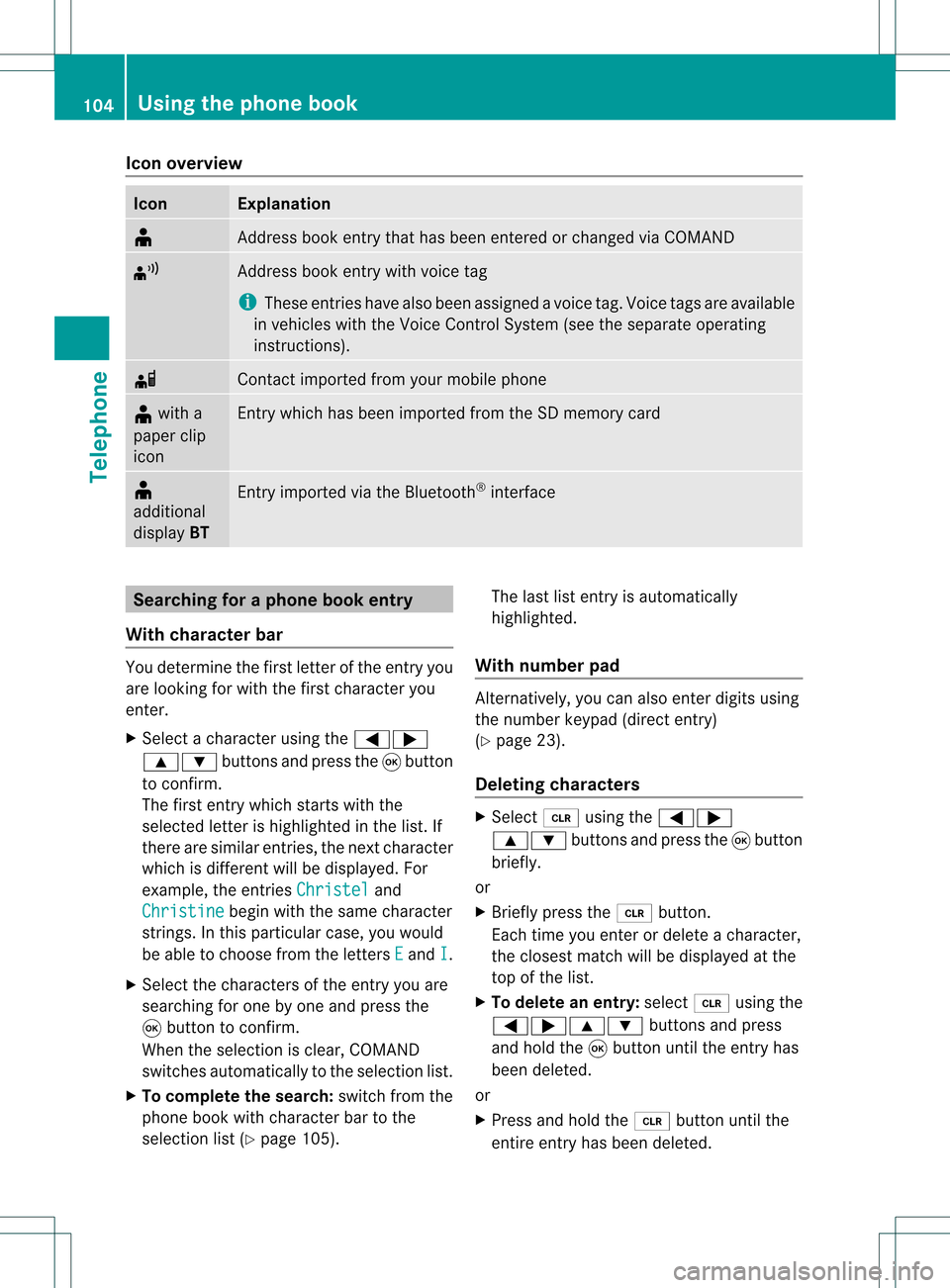
Icon
overview Icon Exp
lanation ¥
Ad
dre ssbook entry th at has been entered orchang edvia COMA ND ¦
Ad
dre ssbook entry wit hvoi ce tag
i Thes een tries have alsobeen assigned avoi cetag .Voice tags areavaila ble
in vehicles withtheVoice Control System (seetheseparate operating
instr uctions). d
Contact
imported fromyourmobile phone ¥
with a
paper clip
icon En
try which hasbeen imported fromtheSDmemory card ¥
additional
display BT En
try imported viathe Bluetooth ®
interf ace Searching
foraphone bookentry
With chara cterbar You
determin ethe first letter ofthe entr yyou
are looking forwith thefirst charact eryou
enter .
X Select acharact erusing the=;
9: buttonsand press the9button
to conf irm.
The first entrywhich startswith the
selected letterishighlighted inthe list. If
there aresimilar entries,thenext charact er
which isdifferent willbedisplay ed.For
example, theentr iesChristel and
Christine begin
withthesame charact er
strin gs.Inthis particular case,youwould
be able tochoose fromtheletters E and
I .
X Select thecharact ersofthe entr yyou are
searching forone byone andpress the
9 button toconf irm.
When theselection isclear, COMAND
switches automatically tothe selection list.
X To complete thesearch: switchfromthe
phone bookwithcharact erbar tothe
selection list(Ypage 105). The
lastlistentr yis automatically
highlighted.
With number pad Alter
natively, youcan also enter digits using
the number keypad(directentry)
(Y page 23).
Dele ting chara cters X
Select 2using the=;
9: buttonsand press the9button
briefly.
or
X Briefly pressthe2 button .
Each timeyouenter ordelete acharact er,
the closest matchwillbedisplay edatthe
top ofthe list.
X To delete anentry: select2using the
=;9: buttonsand press
and hold the9button untiltheentr yhas
been deleted.
or
X Press andhold the2 button untilthe
entir eentr yhas been deleted. 104
Using
thephone bookTelephone
Page 111 of 214

Add
ingaph one num bertoan address
book entry X
Call upacall listand selectan entry
(Y page 107).
X Se lec tOpt ions usin
gth e; buttona nd
pre ssthe 9button toconfi rm.
X Sel ect SaveEnt ry and
pressthe 9
bu tton toconfi rm.
i Sav eEnt ry is
sho wningra yif the
sel ecte dlist entry hasal rea dybeen saved .
X Sel ect Add and
pressthe 9button to
confi rm.
X Sel ect acate goryfor the num ber,e.g .
Hom e ,
and pressthe 9button toconfi rm.
X Sel ect acate goryfor the phone ,e.g .
Mob ile Pho
ne ,
and pressthe 9button to
confi rm.
X Sel ect Save .
The search menu foraddre ssbook entri es
ap pe ars.
X Sea rch forthe desired entry (Ypage 104) .
X Pre ssthe 9button whenyouha ve fini she d
sea rchi ng.
CO MAND storesthe data ifther ear efew er
tha nfive numb ersassign edtothe entryyou
are searc hingforinthe selec tednumb er
cat egory.
You willsee amess agetothis effect .
If five numb ersare stored forthe entryyou
are searc hingfor,a prom ptwill appear
askin gwhet heryou wish toover writeone
of the exis tingnumb ers.
X Selec tYes or
No and
press the9butt on
to con firm .
If you selec tYes ,
a selec tionlistwith the
five existingnumb ersisdisplayed.
If you selec tNo ,
the proc esswillbe
can celed.
X Selec tthe numb erto be over written from
the listusing the9: buttons and
press the9butt ontocon firm .
COMA NDover writesthe selec tednumb er
with thenew data. Deleting
calllists
i The stored calllistsremain inCOMA ND,
even ifyou useCOMA NDwith another
mobile phone.For this reason ,delet ethe
call listsbefor esellin gor transf errin g
owner shipofyour vehic le.
X Selec tCall Lists in
the telep honebasic
men uusing the:=; buttons
and press the9butt ontocon firm .
X Selec tDele teCall Lists and
press the
9 butt ontocon firm .
Aq uery appear sask ing ifall call listsare to
be delet ed.
X Se lec tYes or
No and
pressthe9 button
to confirm .
If you selectYes ,
th ecall listsare delet ed.
If you selectNo ,
th epro ces swill be
can celed. Using
thead dress book Int
rod uction G
Wa
rning!
Pleas edev oteyour attentio nfirst and
for emost tothe traffic situat ionyou arein.
Bef ore your journey, please familiar ize
yourself withtheaddress bookfunctions.
Only usetheCOMA NDwhen roadandtraffic
con dition sperm ityou todo so. Oth erwise you
could beinvolved inan acc ident inwhich you
or oth ers could beinjured.
The address bookorgan izesandstores
ent ries fromd ifferen tsources (mobile phone,
SD memory card,COMAND telephone book,
navigation system).
You canusethese entriestomake telephone
calls andfornavigation.
i Address bookentriesare not deleted
when themobile phoneisremoved. Forthis
reason, youshould deleteyourpersonal
data using thereset functionbefore selling
your vehicle, forexample (Ypage 43). Using
theaddress book
109Telephone Z
Page 116 of 214

List
ening toav oice tag X
Sear chfor anaddre ssbook entrywith a
voic etag (Ypage 110).
X Sele ctOpt ions usin
gth e; buttonand
pres sth e9 butt ontocon firm.
X Sele ctVoi ceName and
pres sth e9
butt ontocon firm.
X Sele ctLis ten and
pres sth e9 butt onto
con firm.
You hear thevoic etag . Imp
orting conta cts
Condit ions You
canimpo rtcon tactsto theaddre ssbook
fr om anext ern alBluet ooth®
devic eor an SD
mem orycard.
The Bluet ooth®
devic enee dstobe inside the
veh icle and hastobe swit chedon ,act ivat ed,
and auth orized. Itmust beable totrans mit
con tactsand/ orvCard sviaBluet ooth®
.
Imp orting conta cts X
Start the data exchang eon the extern al
devic e(see theextern aldevic e'soperat ing
inst ruct ions ).
or
X Insert anSD memo rycard .
X Selec tAddr essBook in
the address book
using the:=; buttons and
press the9butt ontocon firm .
X Selec tDown load Contacts and
press the
9 butt ontocon firm .
Am enu appears. X
Select FromMobile Phone ,
From The Memory
Card or
Receive Business Card(s) and
press the9button to
con firm.
The contact sare import ed.
Deleting contacts X
With theaddress bookshown, select
Address Book and
press the9button to
con firm.
Am enu appears.
X Select Delete Contacts and
press the
9 button tocon firm.
X Select oneofthe following options:
R Interna lContact s R
From Mobile Phone R
From TheMemory Card R
Receive dBusines sCards R
Delete All Ap
rompt correspo ndingtoyou rselection
appears.
X Select Yes or
No and
press the9button
to con firm.
If you select Yes ,
the contact sare deleted
accor dingtoyour select ion.
If you select No ,
the process willbe
canc eled. 114
Using
theadd ress bookTelephone
Page 126 of 214

i
SIRIUS XMRadio offe rsmore than130
di gital -qu ality rad iocha nnel spro viding
100% comme rcial-fre emus ic,spo rt,new s
and enter tainment.
SIR IUS XMRadio emp loys afle et ofhigh-
pe rfor mance satel lites tobro adcas taround
the clock through outtheUSA andCanada .
The SatRa dioprogra misavail able fora
monthly fee.Details areavail able from the
SIRIUS XMService Centerandat
htt p://www .sirius.com (USA)or
htt p://www .siriuscanada. com
(Ca nada). Registering
Registering SatRadio Switching
toSatRadio mode:
X From another mainfunction: select
Audio using
the9:=;
buttons andpress the9button toconfirm.
X Select Audio and
press the9button to
confirm.
X Select SatRadio and
press the9button
to confirm.
i Ifradio mode wasthelast active mode,
you only need toselect Audio .
X When inaudio mode: selectAudio using
the 9:=; buttonsand
press the9button toconfirm.
X Select SatRadio and
press the9button
to confirm.
The satellite radiomainmenu appears
showing theweather channel. Youcannot
select anyother stations.
X Select SatRadio (in
the submenu) using
the 9:=; buttonsand
press the9button toconfirm.
X Select Service and
press the9button to
confirm.
The service information screenappears. Service
information screen
1 Provider's phonenumber (SIRIUSXM)
2 SIRIUS IDofyour satellite receiver
= SIRIUS IDofyour traffic tuner
X Cal lthe phone number ofyour satellite
radio provider shownonthe screen.
i You canalso have thesatellite service
activated online.Todo so, visit theSIRIUS
XM Radi owebsite at
htt p://www .sirius.com (USA)or
htt p://www .siriuscanada. com
(Canad a).
Once theconn ection hasbeen established :
X Follow theinstruct ionsofthe service staff.
The activation processmaytake uptoten
minutes. Ifthe activation iscompleted
successfully ,the NoService message
appea rsinthe displa y,followed bythe
SatRadio mainmenu.
i Ifregistration isnot included when
purchasing thesystem, yourcredit card
details willberequired toactivate your
account. SatRa
diomode
i You canalso usethemultifunction
steering wheeltotune inchannels orscroll
through lists,e.g.bypressing
the ;=9: buttons.124
Satellite
radioAudio
Page 133 of 214

Eject
ingallCDs/DVDs X
Pres sth eV load/eject butt on.
The magaz inemen uappear s.
X Sele ctEje ct All .
The DVDc hanger ejectsthe last disc
selected. YouseetheEjecting Disc
X Take thedisc outofthe disc slotwhen you
see thePlease RemoveDisc
The DVD changer switches tothe next
loaded magazine trayandeject sthe disc.
X Repea tthe last step until themagazine is
empty.
X To cancel ejecting: presstheV eject/
load button againorpress thek button. Inserting
andejecting anSD memory
card
General informat ion COMAND
supports16-bitfull-size typeIand
II SD mem orycards.
Me rced es-Benzreco mme ndsusing SD
mem orycardswith astor agecap acityof up
to 4GB.
SD mem orycardsfea turethe following logo: This
logo isaregistered trademark ofSanDisk
Corporation.
i COMAND doesnotsupport the"SD-H C
2.0 Standard" SDcard format. NotallSD
memory cardsandstorage mediaare
designed forthe temperatures whichmay
be reached inthe vehicle.
Due tothe wide range ofSD memory cards
availa bleonthe market, playback cannot
be guaranteed forallbrands ofSD memory
card.
Inserting anSD memory card X
Insert theSDmemory cardintotheslot.
The side with thecont acts must face
downwards andpoint towards theslot.
COMAND loadsthememory cardand
shows amessage tothis effect .Ifn oMP3
track scan befound, youwillsee amessage
to this effect .
Ejecting anSD memor ycard X
Press theSDmemory card.
The SDmemory cardiseject ed.
X Remove theSDmemory cardfrom theslot. Switching
onaudio CD/DVDorMP3
mode
Option 1 X
Insert aCD/D VD(Ypage 128)oran SD
memory card(Ypage 131).
COMAND loadsthemedium insertedand
start sto play it. CD/
DVD audioand MP3 mode
131Audio Z
Page 134 of 214

Opt
ion 2 X
Press theh functionbutton oneormore
times.
i Bypressing theh function button
repeatedly, youcan change theoperatin g
mode inthe following order:
R Audio CD/DVD,video DVDorMP3 disc
in the DVD changer
R SD memory cardmode
R MUSIC REGISTE R
R Media Interface mode
X Ifdesired, selectanaudio medium fromthe
media list(Ypage 134).
Opt ion 3 X
Select Audio in
the main functionbarusing
the =;9: buttonsand
press the9button tocon firm.
If disc mode wasthelast mode selected,it
will now beactive.
If anoth eraudio source isswitched on,you
can now switch todisc mode inthe audio
menu.
X Select Audio using
the9=;
button sand press the9button tocon firm.
The audio menu appears.
X Select Disc or
Memory Card and
press the
9 button tocon firm.
The desired discmode isactivat ed.
X Ifdesired, selectanaudio medium fromthe
media list(Ypage 134). Examp
ledispla yin aud ioCD mode :
Type ofdata medium
; Track number
= CD orDVD insert ed
? Track name (onlyifstor edon the disc as
CD textor ifGracenot e®
data isavailable)
A Track time
B Visual timeandtrackdisplay
C Curren tplayback settings (no icon for
"Norm altrack sequen ce")
D Soun dset tings
E Media selection
F Disc name (onlyifstored onthe disc as
CD textor ifGracen ote®
data isavailable)
G Tocall upthe track list
H Datamedium positioninthe media list
I Playback options
Exam pledisp layinaud ioDVD mode :
Type ofdata medium
; Trac knumb er
= CD orDV Dinse rted 132
CD/DVD
audio and MP3 modeAudio
Page 136 of 214

X
To sto pplay back:wh ile play ba ck is
inte rrupte d,sel ect ±againa nd pre ssthe
9 button toconfi rm.
M ishighl ighted .
X To res tart playback:sel ect Mand press
the 9button toconfi rm.
Pl ay ba ck sta rts atthe beginning ofthe
DVD. Se
lecti ng CD/au dioDVD /MP3 discs
Se lecti ng viat he media list X
In audio CD/DVD and MP3 mode: select
Media or
Change r usi
ng
the :=; buttonsandpress the
9 button toconfirm.
or
X In audio CD/DVD mode only:press the
9 button whenthe displa y/selection
window isactive.
The media listappea rs.The #dot
indicates thecurrent medium beingplayed. Media
list
The media listshows thediscs current ly
availa ble.Reada blediscs areaudi oCDs, MP3
CDs orMP3 DVDs,audi oDVD sand video
DVD s.
i Ifadata medium isnot readabl e,an entr y
appea rsbehind themagazine trayora
message indicating theselected memory
card appea rs. Positions
inthe media list For
DVD changer Media
Interface, position 0 Magazine
trays,positions 1to6 SD
memory card,position 7 MUSIC
REGISTER, position8 X
Select adisc using the9: buttons
and press the9button toconf irm.
i Ifyou select avideo DVD,the system
switches tovideo DVDmode
(Y page 152).
Selecting atrac kusing thenumber pad X
Press anumber key,e.g.n, whenthe
<0004000900130010000C0001001C002400130005000C0005000300140009000F
000E> windowisactive.
The medium atthe corr espondin gposition
in the media listisloaded andthen played. Selecting
atrac k
Se lecti ng byskippin gto atrac k X
To skipfo rwa rds orbac kwards toa
trac k:pre ssthe = or; button.
or
X Pre ssthe E orF button.
Skip ping forwa rdski ps tothe next track.
Skip ping backw ards res tartsthe curre nt
tra ck (ifi th as been playin gfor mor eth an
eigh tsecon ds)orstart sthe previous track
(if the curren ttrack hasonly been playing
for ashorter time).
If the Random Tracks or
Random Folder
pla
yba ckoption hasbeen selected, the
track order israndom. 134
CD
/DVD audio andMP3 modeAudio