2011 MERCEDES-BENZ E550 4MATIC Cornering
[x] Cancel search: CorneringPage 9 of 400

Switching the residual heat
function on/off .............................. 143
Switching the ZONE function on/
off .................................................. 141
Coat hooks ......................................... 283
Cockpit ................................................. 27
Collapsible spare wheel Inflating ......................................... 335
see Emergency spare wheel
Combination switch .......................... 120
Combined cargo cover and net ........ 282
Compass ............................................ 303
Consumption statistics (on-board
computer) .......................................... 220
Convenience closing feature .............. 93
Convenience opening feature ............ 93
Coolant (engine) Checking the level .........................311
Display message ............................ 246
Notes ............................................. 392
Temperature (on-board computer) . 221
Temperature gauge ........................ 216
Warning lamp ................................. 269
Cooling
see Climate control
Cornering light (display message) ... 243
Crash-responsive emergency
lighting ............................................... 124
Cruise control Cruise control lever .......................178
Display message ............................ 255
Function/notes ............................. 177
Cup holder ......................................... 288
Center console .............................. 288
Rear compartment .........................288
Current fuel consumption (on-
board computer) ............................... 220
Customer Assistance Center (CAC) ............................................... 23
Customer Relations Department ....... 23D
Dashboard see Cockpit
Daytime running lamps
Display message ............................ 245
Switching on/off (on-board
computer) ...................................... 230
Delayed switch-off
Exterior lighting (on-board
computer) ...................................... 231
Interior lighting (on-board
computer) ...................................... 231
Diesel particle filter .......................... 173
Digital speedometer ......................... 220
DIRECT SELECT lever see Automatic transmission
Display (cleaning instructions) ........ 318
Display messages Brakes ........................................... 241
Calling up (on-board computer) .....234
Clearing (on-board computer) ........234
Driving systems ............................. 250
Engine ............................................ 246
KEYLESS-GO .................................. 260
Lamps ............................................ 243
Safety systems .............................. 235
Service interval display ..................313
SmartKey ....................................... 260
Tires ............................................... 255
Vehicle ........................................... 258
Distance recorder ............................. 220
Distance warning lamp ..................... 270
DISTRONIC PLUS Deactivating ................................... 186
Display message ............................ 254
Displays in the multifunction
display ........................................... 185
Driving tips .................................... 187
Function/notes ............................. 179
Setting the specified minimum
distance ......................................... 185
Warning lamp ................................. 270
Door
Automatic locking ............................ 85
Automatic locking (on-board
computer) ...................................... 231
Display message ............................ 259Index7BA 212 USA, CA Edition B 2011; 1; 5, en-USdimargiVersion: 3.0.3.62010-05-20T13:33:46+02:00 - Seite 7
Page 13 of 400

Starting the engine ........................151
Unlocking ......................................... 77
Key positions
KEYLESS-GO .................................. 150
SmartKey ....................................... 149
Kickdown ................................... 158, 161
Knee bag .............................................. 40
L
Lane-change assistant see Active Blind Spot Assist
see Blind Spot Assist
Lane Keeping Assist
Activating/deactivating (on-
board computer) ............................ 229
Display message ............................ 251
Function/information ....................207
Lane Tracking package ..................... 205
LATCH-type (ISOFIX) child seat
anchors ................................................ 61
License plate lamp (display
message) ............................................ 244
Light Setting ambient lighting (on-board
computer) ...................................... 230
Lights
Activating/deactivating the
interior lighting delayed switch-off
(on-board computer) ......................231
Automatic headlamp mode ............119
Cornering light function .................122
Daytime running lamps ..................119
Driving abroad ............................... 118
Fog lamps ...................................... 120
Hazard warning lamps ...................122
High-beam headlamps ...................120
Light switch ................................... 118
Low-beam headlamps ....................119
Rear fog lamp ................................ 120
Switching the Adaptive Highbeam
Assist on/off (on-board
computer) ...................................... 230
Switching the daytime driving
lights on/off (on-board computer) . 230
Switching the exterior lighting
delayed switch-off on/off (on-
board computer) ............................ 231
Switching the surround lighting
on/off (on-board computer) ..........231
Light sensor (display message) ....... 246
Loading guidelines ............................ 274
Locking Automatic ........................................ 85
Emergency locking ........................... 86
From inside the vehicle (central
locking button) ................................. 84
Locking verification signal (on-
board computer) ............................... 232
Low-beam headlamp (display
message) ............................................ 243
Luggage holder (EASY-PACK load-
securing kit) ....................................... 284
Luggage net ....................................... 276
Lumbar support 4-way lumbar support ....................108
Luxury head restraints ..................... 105
M
M+S tires ............................................ 175
Main-beam headlamps (display
message) ............................................ 244
Malfunction message see Display messages
Malfunctions relevant to safety
Reporting ......................................... 23
Manual drive program ...................... 160
Massage function (PULSE) ............... 107
Matte finish (cleaning
instructions) ...................................... 316
mbrace Call priority .................................... 299
Display message ............................ 235
Downloading destinations
(COMAND) ..................................... 299
Emergency call .............................. 296
Important safety notes ..................295
Locating a stolen vehicle ...............300
MB info call button ........................298
Remote vehicle locking ..................300
Roadside Assistance button ..........297
Self-test ......................................... 295
Index11BA 212 USA, CA Edition B 2011; 1; 5, en-USdimargiVersion: 3.0.3.62010-05-20T13:33:46+02:00 - Seite 11
Page 124 of 400

the headlamp range is set automatically
depending on the distance between the
vehicle and other road users.
if you are driving at speeds above
approximately 35 mph (55 km/h) and no
other road users have been detected:
the high-beam headlamps are switched on
automatically. The K indicator lamp in
the instrument cluster also lights up.
if you are driving at speeds below
approximately 30 mph (45 km/h) and other
road users have been detected or the roads
are illuminated sufficiently:
the high-beam headlamps are switched off
automatically. The K indicator lamp in
the instrument cluster goes out. The _
indicator lamp in the instrument cluster
stays on.
XTo deactivate: move the combination
switch back to its normal position.
The _ indicator lamp in the instrument
cluster goes out.
High-beam flasher
XTo switch on: turn the key in the ignition
lock to position 1 or 2 or start the engine.
XPull the combination switch briefly in the
direction of arrow =.
Hazard warning lamps
The hazard warning lamps automatically
switch on:
Rif an air bag is deployed
Rthe vehicle decelerates rapidly from a
speed of more than 45 mph (70 km/h) and
comes to a standstill.
XTo switch on the hazard warning lamps:
press button :.
All turn signals flash. If you now switch on
a turn signal using the combination switch,
only the turn signal lamp on the
corresponding side of the vehicle will flash.
XTo switch off the hazard warning
lamps: press button :.
The hazard warning lamp switches off
automatically after full brake application if the
vehicle then reaches a speed above
6 mph (10 km/h) again.
iThe hazard warning lamps still operate if
the ignition is switched off.
Headlamp cleaning system
The headlamps are cleaned automatically if
the "Wipe with washer fluid" function is
operated ten times while the lights are on and
the engine is running (Y page 128). When you
switch off the ignition, the automatic
headlamp cleaning system is reset and
counting is resumed from 0.
Cornering light function
122Exterior lightingLights and windshield wipers
BA 212 USA, CA Edition B 2011; 1; 5, en-USdimargiVersion: 3.0.3.62010-05-20T13:33:46+02:00 - Seite 122
Page 125 of 400

The cornering light function improves the
illumination of the road over a wide angle in
the direction you are turning, enabling better
visibility in tight bends, for example. It can
only be activated when the low-beam
headlamps are switched on.
Active: if you are driving at speeds below
25 mph (40 km/h) and switch on the turn
signals or turn the steering wheel.
Not active: if you are driving at speeds above
25 mph (40 km/h) or switch off the turn
signal or turn the steering wheel to the
straight-ahead position.
The cornering light function may remain lit for
a short time, but is automatically switched off
after no more than three minutes.
Headlamps fogged up on the inside
The headlamps may fog up on the inside if
there is high atmospheric humidity.
XDrive with the headlamps switched on.
The headlamps clear up after a short
distance.
If the moisture does not disappear, the
headlamp casing is not sealed correctly and
moisture has been able to enter.
XHave the headlamps checked at a qualified
specialist workshop.Interior lighting
Overview of interior lighting
Front overhead control panel
:u To switch the rear interior lighting
on/off
;| To switch the automatic interior
lighting control on/off
=p To switch the right-hand front
reading lamp on/off
?c To switch the front interior lighting
on/off
Ap To switch the left-hand front reading
lamp on/off
Rear-compartment overhead control panel
:p To switch the right-hand reading
lamp on/off
;p To switch the left-hand reading lamp
on/off
Interior lighting123Lights and windshield wipersBA 212 USA, CA Edition B 2011; 1; 5, en-USdimargiVersion: 3.0.3.62010-05-20T13:33:46+02:00 - Seite 123Z
Page 127 of 400

Never use a bulb which has been dropped.
Such a bulb may break or even explode and
injure you.
Halogen bulbs are pressurized and can
explode when you change them, particularly
if they are very hot. You should therefore wear
eye protection and gloves when you are
changing them.
There are bulbs other than the Xenon bulbs
that you cannot replace. Replace only the
bulbs listed (Y page 125). Have the bulbs that
you cannot replace yourself changed at a
qualified specialist workshop.
Mercedes-Benz recommends that you use an
authorized Mercedes-Benz Center for this
purpose. In particular, work relevant to safety
or on safety-related systems must be carried
out at a qualified specialist workshop.
If you require assistance changing bulbs,
consult a qualified specialist workshop.
Do not touch the glass tube of new bulbs with
your bare hands. Even minor contamination
can burn into the glass surface and reduce
the service life of the bulbs. Always use a lint-
free cloth or only touch the base of the bulb
when installing.
Only use bulbs of the correct type.
If the new bulb still does not light up, consult
a qualified specialist workshop.
Bulbs and lamps are an important aspect of
vehicle safety. You must therefore make sure
that these function correctly at all times.
Have the headlamp setting checked regularly.
Overview: changing bulbs/bulb types
You can change the following bulbs. The bulb
type can be found in the legend.
Halogen headlamps
:Low-beam headlamps11: H7 55 W;High-beam headlamp: H7 55 W=Parking lamp/standing lamp: W 5 W?Turn signal lamp: 3457A
Bi-Xenon headlamps
:Cornering lamp: H7 55 W;Infrared light (Night View Assist Plus):
H11 55 W11Due to their location, have the bulbs in the left-hand headlamp changed at a qualified specialist workshop,e.g. an authorized Mercedes-Benz Center.
Changing bulbs125Lights and windshield wipersBA 212 USA, CA Edition B 2011; 1; 5, en-USdimargiVersion: 3.0.3.62010-05-20T13:33:46+02:00 - Seite 125Z
Page 128 of 400
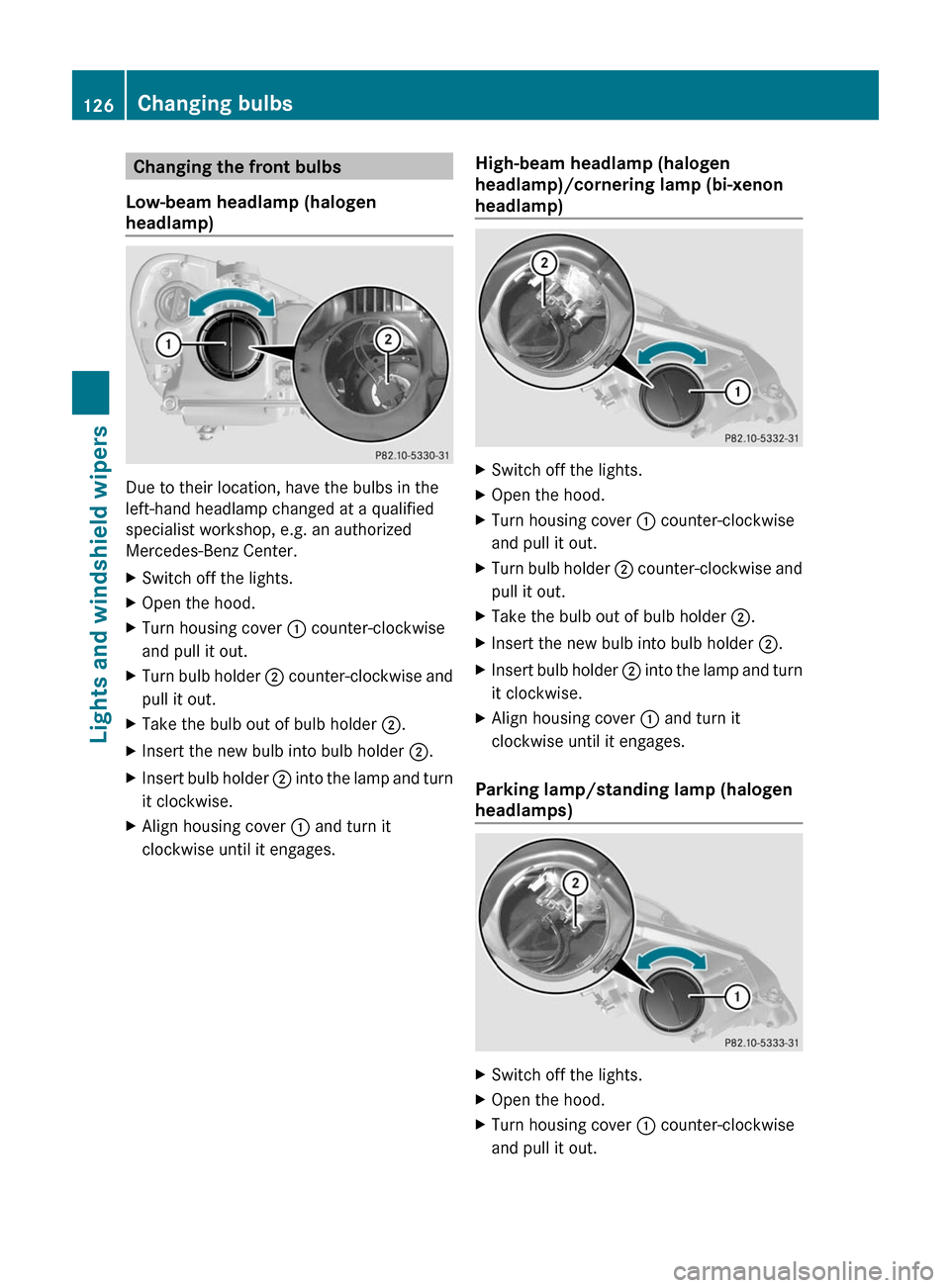
Changing the front bulbs
Low-beam headlamp (halogen
headlamp)
Due to their location, have the bulbs in the
left-hand headlamp changed at a qualified
specialist workshop, e.g. an authorized
Mercedes-Benz Center.
XSwitch off the lights.XOpen the hood.XTurn housing cover : counter-clockwise
and pull it out.
XTurn bulb holder ; counter-clockwise and
pull it out.
XTake the bulb out of bulb holder ;.XInsert the new bulb into bulb holder ;.XInsert bulb holder ; into the lamp and turn
it clockwise.
XAlign housing cover : and turn it
clockwise until it engages.
High-beam headlamp (halogen
headlamp)/cornering lamp (bi-xenon
headlamp)
XSwitch off the lights.XOpen the hood.XTurn housing cover : counter-clockwise
and pull it out.
XTurn bulb holder ; counter-clockwise and
pull it out.
XTake the bulb out of bulb holder ;.XInsert the new bulb into bulb holder ;.XInsert bulb holder ; into the lamp and turn
it clockwise.
XAlign housing cover : and turn it
clockwise until it engages.
Parking lamp/standing lamp (halogen
headlamps)
XSwitch off the lights.XOpen the hood.XTurn housing cover : counter-clockwise
and pull it out.
126Changing bulbsLights and windshield wipers
BA 212 USA, CA Edition B 2011; 1; 5, en-USdimargiVersion: 3.0.3.62010-05-20T13:33:46+02:00 - Seite 126
Page 189 of 400

passenger door or one of the rear doors is
open.
Rthe vehicle has skidded.
If DISTRONIC PLUS is deactivated, you will
hear a warning tone. You will see the
DISTRONIC PLUS Off message in the
multifunction display for approximately five
seconds.
Tips for driving with DISTRONIC PLUS
Important safety guidelines
The following contains descriptions of certain
road and traffic conditions in which you must
be particularly attentive. In such situations,
brake if necessary. DISTRONIC PLUS is then
deactivated.
GWarning!
The DISTRONIC PLUS works to maintain the
speed selected by the driver unless a moving
obstacle proceeding directly ahead of it in the
same travel direction is detected (e.g.
following another vehicle ahead of you at your
set distance).
This means that:
RYour vehicle can pass another vehicle after
you have changed lanes.
RWhile in a sharp turn or if the preceding
vehicle is in a sharp turn, the DISTRONIC
PLUS could lose sight of the preceding
vehicle. Your vehicle could then accelerate
to the previously selected speed.
The DISTRONIC PLUS regulates only the
distance between your vehicle and those
directly ahead of it. It may not register
stationary objects in the road, e.g.:
Ra stopped vehicle in a traffic jam
Ra disabled vehicle
Ran oncoming vehicle
The driver must always be alert, observe all
traffic and intercede as required by means of
steering or braking the vehicle.
GWarning!
The DISTRONIC PLUS should not be used in
snowy or icy road conditions.
Cornering, going into and coming out of a
bend
The ability of DISTRONIC PLUS to detect
vehicles when cornering is limited. Your
vehicle may brake unexpectedly or late.
Vehicles traveling on a different line
DISTRONIC PLUS may not detect vehicles
traveling on a different line. The distance to
the vehicle in front will be too short.
Driving systems187Driving and parkingBA 212 USA, CA Edition B 2011; 1; 5, en-USdimargiVersion: 3.0.3.62010-05-20T13:33:46+02:00 - Seite 187Z
Page 203 of 400
Rat night, or if you are parking/maneuvering
your vehicle in a very dark area
R if very bright white light is shining on the
camera
R if the surrounding area is lit by fluorescent
light (the COMAND system display may
flicker)
R if the temperature changes suddenly, for
example if you drive into a heated garage
after being in the cold (condensation on the
lens)
R if the camera lens is dirty or covered
R if the rear of your vehicle is damaged
In this case, have the camera position and
setting checked at a qualified specialist
workshop. Mercedes-Benz recommends
that you use an authorized Mercedes-Benz
Center for this purpose.
Do not use the rear view camera in these
types of situation. Otherwise, you could injure
yourself and others and/or cause damage,
even to your own vehicle, when parking/
maneuvering.
Activating the rear view cameraXMake sure that the SmartKey is in
position 2 in the ignition lock.XMake sure that the "rear view camera"
function is selected in COMAND (see the
separate operating instructions for
COMAND).XEngage reverse gear.
The area behind the vehicle is shown in the
COMAND display.
ATTENTION ASSIST
Important safety notes
ATTENTION ASSIST helps you during long,
monotonous journeys, such as on highways
and arterial roads. It is active at speeds
between 50 mph (80 km/h) and 112 mph
(180 km/h).
If ATTENTION ASSIST detects fatigue or
increasing lapses in concentration on the part
of the driver, it suggests taking a break.GWarning!
The ATTENTION ASSIST is only an aid to the
driver. It might not recognize fatigue or
increasing inattentiveness in time or fail to
recognize them at all. The system cannot
substitute a rested and attentive driver.
Fatigue can cause you to recognize dangers
too late, to misjudge potential dangers, or to
react slower. Therefore, make sure to be
rested before and during your trip. Take rests
early enough and regularly, especially during
long trips. Failure to do so could cause you to
recognize dangers too late which could result
in an accident and serious injury to you and/
or others.
ATTENTION ASSIST assesses your level of
fatigue or lapses in concentration by taking
the following criteria into account:
R your personal driving style, e.g. steering
characteristics
R journey details, e.g. time of day and length
of journey
The functionality of ATTENTION ASSIST is
restricted and warnings may be delayed or
not occur at all:
R if the road condition is poor, e.g. if the
surface is uneven or if there are potholes
R if there is a strong side wind
R if you have adopted a sporty driving style
with high cornering speeds or high rates of
acceleration
R if you predominantly drive at speeds under
50 mph (80 km/h) or over 112 mph
(180 km/h)
R if you are currently using COMAND or
making a telephone call with it
R if the time has been set incorrectly
R in active driving situations, such as when
you change lanes or change your speed
Driving systems201Driving and parkingBA 212 USA, CA Edition B 2011; 1; 5, en-USdimargiVersion: 3.0.3.62010-05-20T13:33:46+02:00 - Seite 201Z