Page 128 of 400
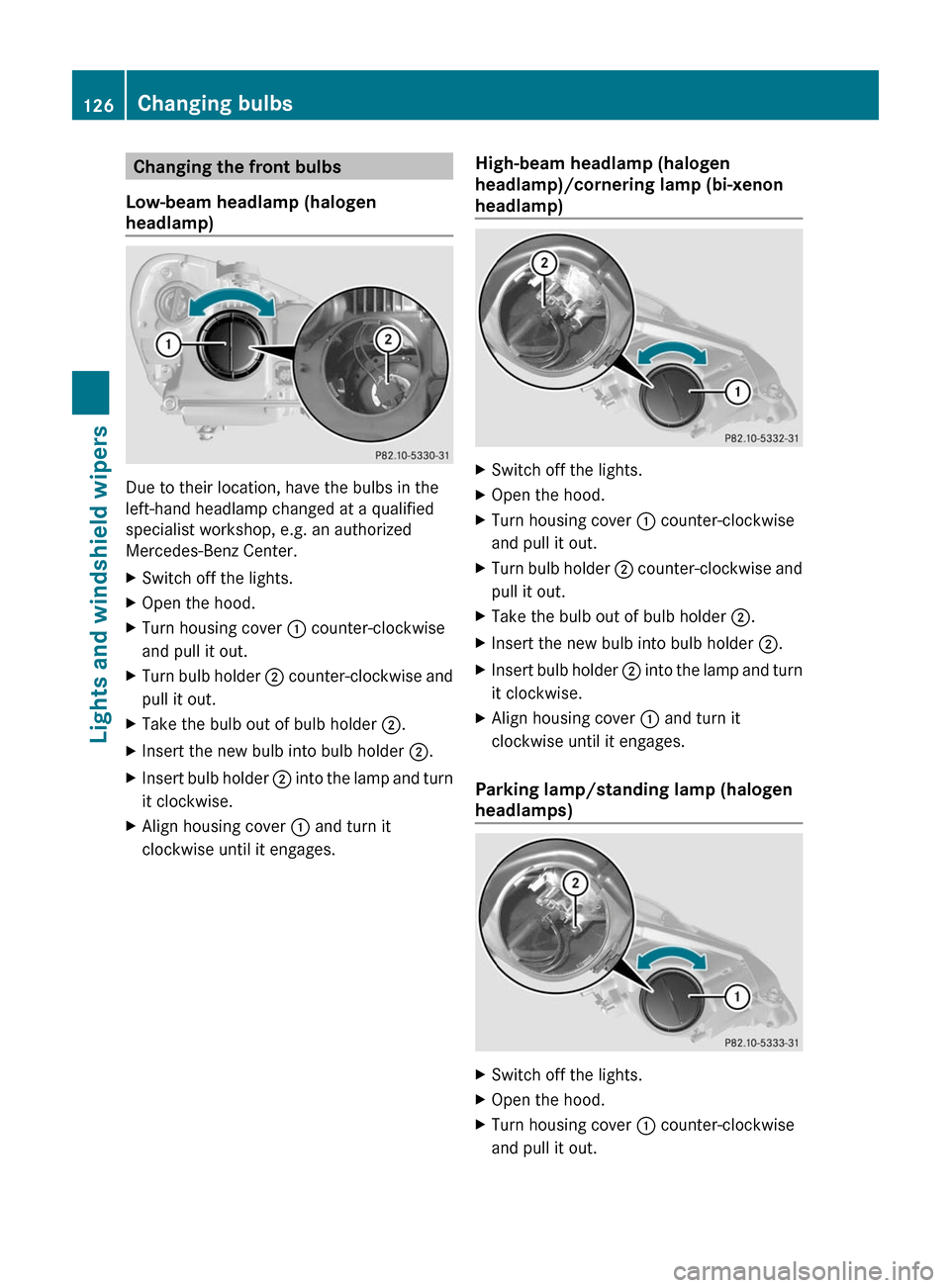
Changing the front bulbs
Low-beam headlamp (halogen
headlamp)
Due to their location, have the bulbs in the
left-hand headlamp changed at a qualified
specialist workshop, e.g. an authorized
Mercedes-Benz Center.
XSwitch off the lights.XOpen the hood.XTurn housing cover : counter-clockwise
and pull it out.
XTurn bulb holder ; counter-clockwise and
pull it out.
XTake the bulb out of bulb holder ;.XInsert the new bulb into bulb holder ;.XInsert bulb holder ; into the lamp and turn
it clockwise.
XAlign housing cover : and turn it
clockwise until it engages.
High-beam headlamp (halogen
headlamp)/cornering lamp (bi-xenon
headlamp)
XSwitch off the lights.XOpen the hood.XTurn housing cover : counter-clockwise
and pull it out.
XTurn bulb holder ; counter-clockwise and
pull it out.
XTake the bulb out of bulb holder ;.XInsert the new bulb into bulb holder ;.XInsert bulb holder ; into the lamp and turn
it clockwise.
XAlign housing cover : and turn it
clockwise until it engages.
Parking lamp/standing lamp (halogen
headlamps)
XSwitch off the lights.XOpen the hood.XTurn housing cover : counter-clockwise
and pull it out.
126Changing bulbsLights and windshield wipers
BA 212 USA, CA Edition B 2011; 1; 5, en-USdimargiVersion: 3.0.3.62010-05-20T13:33:46+02:00 - Seite 126
Page 129 of 400

XPull out bulb holder ;.XTake the bulb out of bulb holder ;.XInsert the new bulb into bulb holder ;.XInsert bulb holder ;.XAlign housing cover : and turn it
clockwise until it engages.
Infrared light (Night View Assist Plus)
XSwitch off the lights.XOpen the hood.XTurn housing cover : counter-clockwise
and pull it out.
XTurn bulb ; counter-clockwise and pull it
out.
XInsert new bulb ; and turn it clockwise.XAlign housing cover : and turn it
clockwise until it engages.
Turn signals (halogen headlamps)
Due to their location, have the bulbs in the
left-hand headlamp changed at a qualified
specialist workshop, e.g. an authorized
Mercedes-Benz Center.
XSwitch off the lights.XOpen the hood.XTurn bulb holder : counter-clockwise and
pull it out.
XTurn the bulb counter-clockwise, applying
slight pressure, and remove it from bulb
holder :.
XInsert the new bulb into bulb holder : and
turn it clockwise.
XInsert bulb holder : into the lamp and turn
it clockwise.
Windshield wipers
Important safety notes
GWarning!
Wiper blades are components that are subject
to wear and tear. Replace the wiper blades
twice a year, preferably in the spring and fall.
Otherwise the windows will not be wiped
properly. As a result, you may not be able to
observe surrounding traffic conditions and
could cause an accident.
! Do not operate the windshield wipers
when the windshield is dry, as this could
damage the wiper blades. Moreover, dust
that has collected on the windshield/rear
window can scratch the glass if wiping
takes place when the windshield/rear
window is dry.
If it is necessary to switch on the windshield
wipers in dry weather conditions, always
use washer fluid when operating the
windshield wipers.
Windshield wipers127Lights and windshield wipersBA 212 USA, CA Edition B 2011; 1; 5, en-USdimargiVersion: 3.0.3.62010-05-20T13:33:46+02:00 - Seite 127Z
Page 135 of 400

Control panel for the dual-zone automatic climate control
For Canada only
FunctioniNotes/tips:Activates/deactivates air-
recirculation mode
Only use "air-recirculation" mode briefly, e.g. if there
are unpleasant outside odors or when in a tunnel. The
windows could otherwise fog up as, in air-
recirculation mode, no fresh air is drawn into the
vehicle.
;Defrosts the windshieldOnly use the "defrosting" function briefly until the
windshield is clear again.
=Switches the ZONE function
on/off
Use the ZONE function to adopt the temperature
settings on the driver's side for the front-passenger
side as well. The indicator lamp above the á
button goes out.
?DisplayASets climate control to
automatic
Activate climate control using the à and ¿
buttons. The indicator lamps above the à and
¿ buttons light up.
BSwitches cooling with air
dehumidification on/off
Activate climate control using the à and ¿
buttons. The indicator lamps above the à and
¿ buttons light up.
CSwitches the rear window
heating on/off
DSwitches climate control on/
off
ESets the temperature, rightSet the temperature to 72 ‡ (22 †).FSets the air distributionOverview of climate control systems133Climate controlBA 212 USA, CA Edition B 2011; 1; 5, en-USdimargiVersion: 3.0.3.62010-05-20T13:33:46+02:00 - Seite 133Z
Page 136 of 400
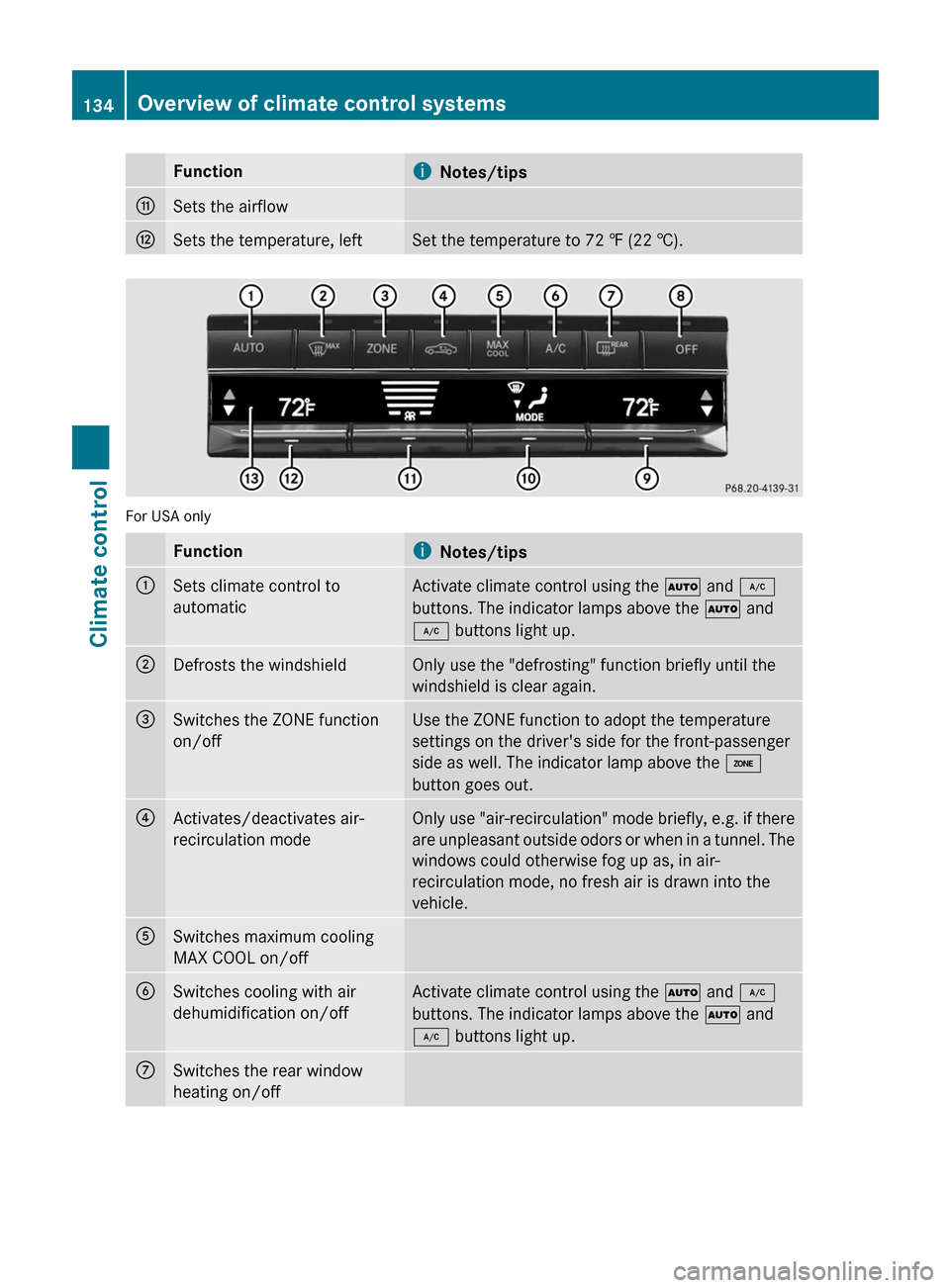
FunctioniNotes/tipsGSets the airflowHSets the temperature, leftSet the temperature to 72 ‡ (22 †).
For USA only
FunctioniNotes/tips:Sets climate control to
automaticActivate climate control using the à and ¿
buttons. The indicator lamps above the à and
¿ buttons light up.;Defrosts the windshieldOnly use the "defrosting" function briefly until the
windshield is clear again.=Switches the ZONE function
on/offUse the ZONE function to adopt the temperature
settings on the driver's side for the front-passenger
side as well. The indicator lamp above the á
button goes out.?Activates/deactivates air-
recirculation modeOnly use "air-recirculation" mode briefly, e.g. if there
are unpleasant outside odors or when in a tunnel. The
windows could otherwise fog up as, in air-
recirculation mode, no fresh air is drawn into the
vehicle.ASwitches maximum cooling
MAX COOL on/offBSwitches cooling with air
dehumidification on/offActivate climate control using the à and ¿
buttons. The indicator lamps above the à and
¿ buttons light up.CSwitches the rear window
heating on/off134Overview of climate control systemsClimate control
BA 212 USA, CA Edition B 2011; 1; 5, en-USdimargiVersion: 3.0.3.62010-05-20T13:33:46+02:00 - Seite 134
Page 137 of 400
FunctioniNotes/tipsDSwitches climate control on/
off
Activate climate control using the à and ¿
buttons. The indicator lamps above the à and
¿ buttons light up.
ESets the temperature, rightSet the temperature to 72 ‡ (22 †).FSets the air distributionGSets the airflowHSets the temperature, leftSet the temperature to 72 ‡ (22 †).IDisplay
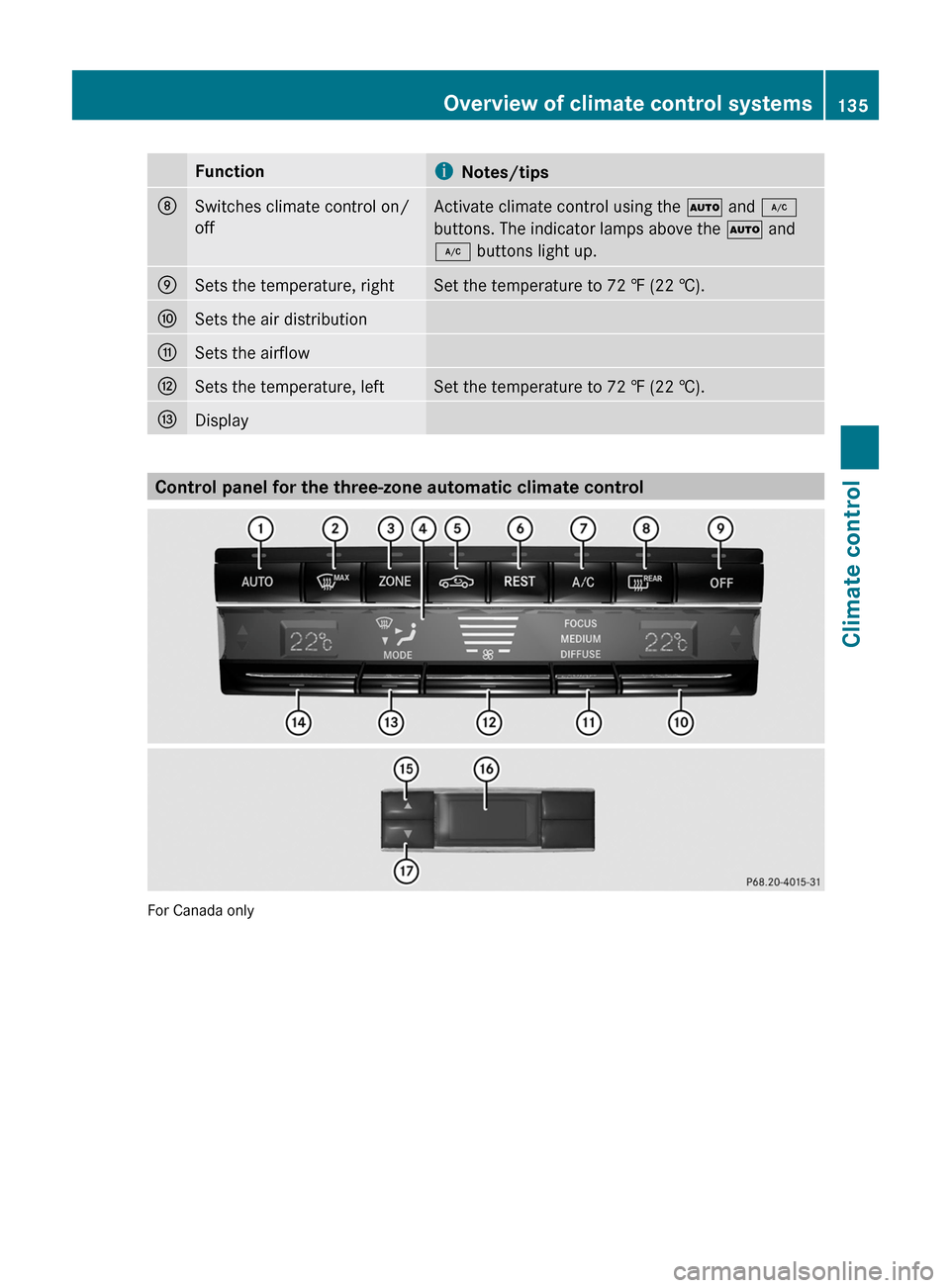
Control panel for the three-zone automatic climate control
For Canada only
Overview of climate control systems135Climate controlBA 212 USA, CA Edition B 2011; 1; 5, en-USdimargiVersion: 3.0.3.62010-05-20T13:33:46+02:00 - Seite 135Z
Page 138 of 400

FunctioniNotes/tipsFront control panel:Sets climate control to
automatic
Activate climate control using the à and ¿
buttons. The indicator lamps above the à and
¿ buttons light up. You can also set the airflow
and air distribution of the automatic climate control
to one of three levels (FOCUS/MEDIUM/DIFFUSE).
You can set the desired level using button G. The
MEDIUM level is recommended.
;Defrosts the windshieldOnly use the "defrosting" function briefly until the
windshield is clear again.
=Switches the ZONE function
on/off
Use the ZONE function to adopt the temperature
settings on the driver's side for the front-passenger
side and the rear compartment as well. The indicator
lamp above the á button goes out.
?DisplayAActivates/deactivates air-
recirculation mode
Only use "air-recirculation" mode briefly, e.g. if there
are unpleasant outside odors or when in a tunnel. The
windows could otherwise fog up as, in air-
recirculation mode, no fresh air is drawn into the
vehicle.
136Overview of climate control systemsClimate control
BA 212 USA, CA Edition B 2011; 1; 5, en-USdimargiVersion: 3.0.3.62010-05-20T13:33:46+02:00 - Seite 136
Page 139 of 400

FunctioniNotes/tipsBSwitches the residual heat
function on/offUse the residual heat function if you want to heat or
ventilate the vehicle interior when the ignition is
switched off. The "residual heat" function can only be
activated or deactivated with the ignition switched
off.CSwitches cooling with air
dehumidification on/offActivate climate control using the à and ¿
buttons. The indicator lamps above the à and
¿ buttons light up. You can also set the airflow
and air distribution of the automatic climate control
to one of three levels (FOCUS/MEDIUM/DIFFUSE).
You can set the desired level using button G. The
MEDIUM level is recommended.DSwitches the rear window
heating on/offESwitches climate control on/
offActivate climate control using the à and ¿
buttons. The indicator lamps above the à and
¿ buttons light up. You can also set the airflow
and air distribution of the automatic climate control
to one of three levels (FOCUS/MEDIUM/DIFFUSE).
You can set the desired level using button G. The
MEDIUM level is recommended.FSets the temperature, rightSet the temperature to 72 ‡ (22 †).GSets the climate control to
automatic (FOCUS/MEDIUM/
DIFFUSE)Activate climate control using the à and ¿
buttons. The indicator lamps above the à and
¿ buttons light up. You can also set the airflow
and air distribution of the automatic climate control
to one of three levels (FOCUS/MEDIUM/DIFFUSE).
You can set the desired level using button G. The
MEDIUM level is recommended.HSets the airflowISets the air distributionJSets the temperature, leftSet the temperature to 72 ‡ (22 †).Rear control panelKIncreases the temperatureSet the temperature to 72 ‡ (22 †).LDisplayMIncreases the airflowOverview of climate control systems137Climate controlBA 212 USA, CA Edition B 2011; 1; 5, en-USdimargiVersion: 3.0.3.62010-05-20T13:33:46+02:00 - Seite 137Z
Page 140 of 400

FunctioniNotes/tipsNReduces the airflowOReduces the temperatureSet the temperature to 72 ‡ (22 †).Operating the control systems
Switching the control on/off
Important information
GWarning!
When the climate control system is
deactivated, the outside air supply and
circulation are also deactivated. Only choose
this setting for a short time. Otherwise the
windows could fog up, impairing visibility and
endangering you and others.
i Activate climate control primarily using
the à button ( Y page 139).
Activating/deactivating
XTurn the SmartKey to position 2 in the
ignition lock.XTo activate: press the à button.
The indicator lamp above the à button
lights up. Airflow and air distribution are set
to automatic mode.
or
XPress the ^ button.
The indicator lamp above the ^ button
goes out. The previously selected settings
come into effect again.XTo deactivate: press the ^ button.
The indicator lamp above the ^ button
lights up.Switching cooling with air
dehumidification on/off
Important information
The cooling with air dehumidification function
is only available when the engine is running.
The air inside the vehicle is cooled and
dehumidified according to the temperature
selected.
GWarning
If you switch off the cooling function, the
vehicle will not be cooled when weather
conditions are warm. The windows can fog up
more quickly. Window fogging may impair
visibility and endanger you and others.
Condensation may drip from the underside of
the vehicle when automatic climate control is
in cooling mode. This is normal and not a sign
that there is a malfunction.
i The cooling with air dehumidification
function uses refrigerant R134a. This
coolant does not contain
chlorofluorocarbons, and therefore does
not damage the ozone layer.
Activating/deactivating
XTo switch on: press the ¿ button.
The indicator lamp above the ¿ button
lights up.XTo switch off: press the ¿ button.
The indicator lamp above the ¿ button
goes out. The cooling with air
dehumidification function has a delayed
switch-off feature.138Operating the control systemsClimate control
BA 212 USA, CA Edition B 2011; 1; 5, en-USdimargiVersion: 3.0.3.62010-05-20T13:33:46+02:00 - Seite 138