2011 MERCEDES-BENZ E300 BLUETEC Smartkey
[x] Cancel search: SmartkeyPage 97 of 400

Problem: a side window cannot be closed
because objects in the guide rail are
preventing the window from being raised.XRemove the objects.XClose the side window.
Problem: a side window cannot be closed,
and you cannot see the cause.
GWarning!
Closing the side windows with increased force
or without the anti-entrapment feature could
lead to serious or even fatal injury. Make sure
that nobody can become trapped when
closing the side windows.
If a side window is obstructed during closing
and reopens again slightly:
XImmediately after the window blocks, pull
on the corresponding switch again until the
side window has closed.
The side window is closed with increased
force.
If a side window is obstructed again during
closing and reopens again slightly:
XImmediately after the window blocks, pull
on the corresponding switch again until the
side window has closed.
The side window is closed without the anti-
entrapment feature.GWarning!
Pulling and holding the switch to close the
door window immediately after it had been
blocked two times will cause the door window
to close without the anti-entrapment feature
for as long as you hold the switch.
Sliding sunroof
Important safety notes
GWarning!
When leaving the vehicle, always remove the
SmartKey from the starter switch. Always
take the SmartKey with you and lock the
vehicle. Do not leave children unattended in
the vehicle, even if they are secured in a child
restraint system, or with access to an
unlocked vehicle. A child's unsupervised
access to a vehicle could result in an accident
and/or serious personal injury. The children
could
R injure themselves on parts of the vehicle
R be seriously or fatally injured through
excessive exposure to extreme heat or cold
R injure themselves or cause an accident with
vehicle equipment that can be operated
even if the SmartKey is removed from the
starter switch or removed from the vehicle,
such as seat adjustment, steering wheel
adjustment, or the memory function
If children open a door, they could injure other
persons or get out of the vehicle and injure
themselves or be injured by following traffic.
Do not expose the child restraint system to
direct sunlight. The child restraint system's
metal parts, for example, could become very
hot, and the child could be burned by these
parts.
GWarning
Do not transport heavy and hard objects in the
vehicle interior or in the trunk/cargo
compartment if they are unsecured.
Unsecured or improperly stowed cargo
increases the risk of injury for a child in the
event of:
R strong braking maneuvers
R sudden changes of direction
R an accident
Sliding sunroof95Opening and closingBA 212 USA, CA Edition B 2011; 1; 5, en-USdimargiVersion: 3.0.3.62010-05-20T13:33:46+02:00 - Seite 95Z
Page 99 of 400

or open a side window slightly to reduce or
eliminate these noises.
Operating the tilt/sliding sunroof
Opening and closing
i You can still operate the tilt/sliding
sunroof even if you switch off the engine or
remove the SmartKey. This function
remains active for five minutes or until one
of the front doors is opened.
Overhead control panel
:To raise;To open=To closeXSwitch on the ignition.XPush or pull the 3 switch in the
corresponding direction.
i If you press the 3 switch beyond the
point of resistance, an automatic opening/
closing process is started in the
corresponding direction. You can stop
automatic operation by pressing again.
Automatic opening/raising is only available
if the tilt/sliding sunroof is in the closed
position.
You can open/close the cover for the
sunblind manually when the tilt/sliding
sunroof is raised/closed.
Resetting
Reset the tilt/sliding sunroof if it does not
open smoothly.
! Contact a qualified specialist workshop if
the tilt/sliding sunroof cannot be closed
fully or reset.
XSwitch on the ignition.XRaise the tilt/sliding sunroof fully at the
rear ( Y page 97).XKeep the 3 switch pressed for another
second.XMake sure that the tilt/sliding sunroof can
be opened or closed fully again using the
opening/closing process ( Y page 97).XIf the tilt/sliding sunroof can be raised fully
at the rear it is set correctly. If this is not
the case, you must repeat the previously
described steps.
Operating the panorama sliding
sunroof
Opening and closing
Overhead control panel
:To raise;To open=To close
The panorama roof with power tilt/sliding
panel can only be moved when the roller
sunblinds are open.
Sliding sunroof97Opening and closingBA 212 USA, CA Edition B 2011; 1; 5, en-USdimargiVersion: 3.0.3.62010-05-20T13:33:46+02:00 - Seite 97Z
Page 115 of 400
iThe steering wheel only moves upwards if
it has not already reached the upper end
stop.
The steering wheel is moved to the last
selected position when:
Rthe driver's door is closed, and
Ryou insert the key into the ignition lock.
or
Rin vehicles with KEYLESS-GO, you press the
Start/Stop button once.
When you close the driver's door with the
ignition switched on, the steering wheel is
also automatically moved to the previously
set position.
The last position of the steering wheel is
stored after each manual setting or when you
store the setting with the memory function
(Y page 115).
You can activate and deactivate the EASY-
ENTRY/EXIT feature in the on-board
computer (Y page 232).
GWarning
Let the system complete the adjustment
procedure before setting the vehicle in
motion. All steering wheel adjustment must
be completed before setting the vehicle in
motion. Driving off with the steering wheel
still adjusting could cause the driver to lose
control of the vehicle.
iIf the crash-responsive EASY-EXIT feature
is triggered in an accident, the steering
column will move upwards when the
driver's door is opened. This occurs
irrespective of the position of the key in the
ignition lock. This makes it easier to exit the
vehicle and rescue the occupants.
The crash-responsive EASY-EXIT feature is
only operational after an accident if the
EASY-EXIT/ENTRY feature is activated in
the on-board computer.
Mirrors
Rear-view mirror
Rear-view mirror (manual anti-glare)
XAnti-glare mode: flick anti-glare
switch : forwards or back.
Exterior mirrors
Adjusting the exterior mirrors
GWarning
Exercise care when using the passenger-side
exterior rear view mirror. The mirror surface
is convex (outwardly curved surface for a
wider field of view). Objects in mirror are
closer than they appear. Check your interior
rear view mirror and glance over your
shoulder before changing lanes.
The exterior mirrors are automatically heated
if the rear window heating is switched on and
the outside temperature is low.
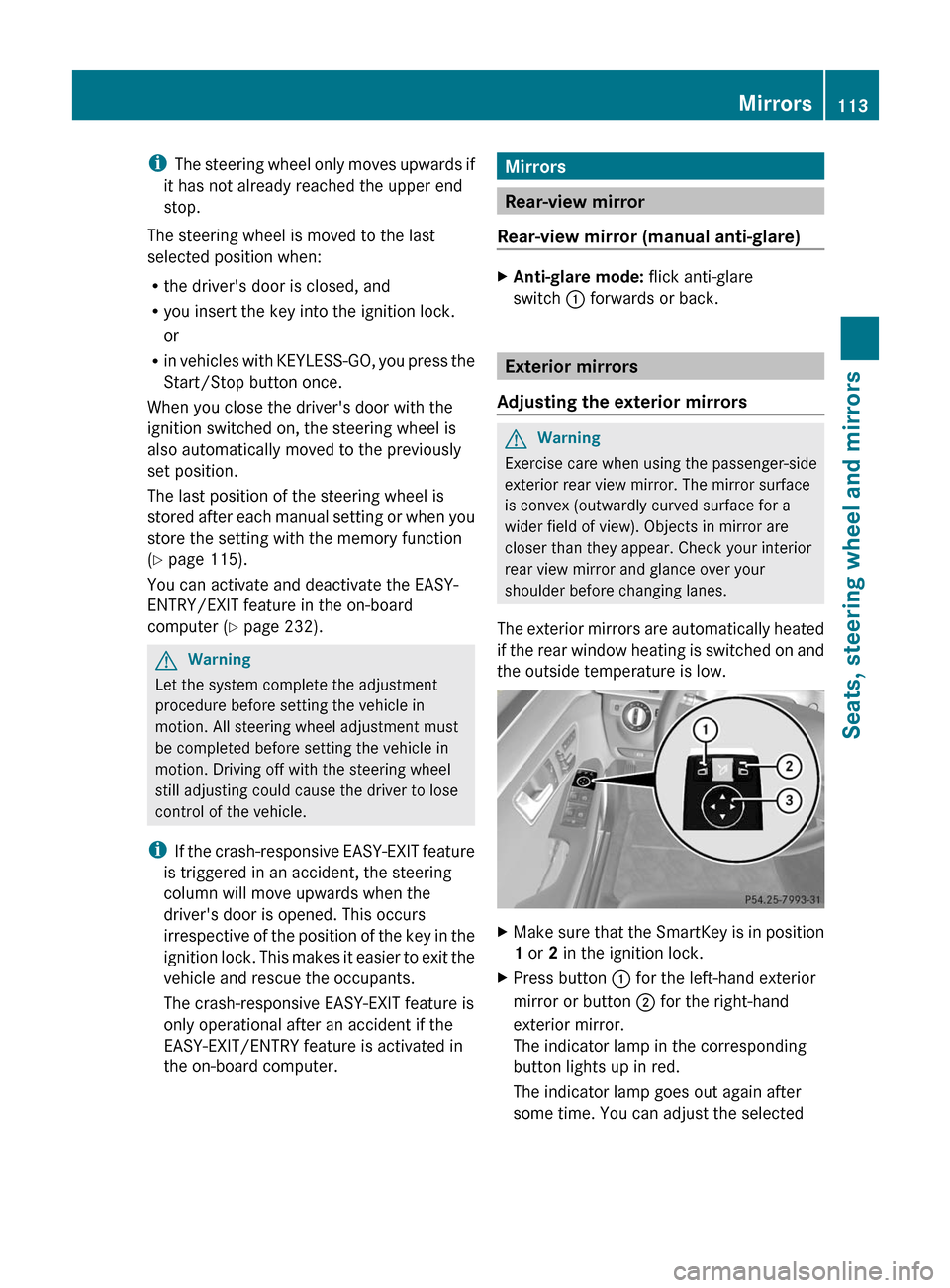
XMake sure that the SmartKey is in position
1 or 2 in the ignition lock.
XPress button : for the left-hand exterior
mirror or button ; for the right-hand
exterior mirror.
The indicator lamp in the corresponding
button lights up in red.
The indicator lamp goes out again after
some time. You can adjust the selected
Mirrors113Seats, steering wheel and mirrorsBA 212 USA, CA Edition B 2011; 1; 5, en-USdimargiVersion: 3.0.3.62010-05-20T13:33:46+02:00 - Seite 113Z
Page 121 of 400

Low-beam headlampsXTo switch on the low-beam headlamps:
turn the key in the ignition lock to position
2 or start the engine.XTurn the light switch to L.
The L indicator lamp in the instrument
cluster lights up.
Daytime running lamps
Daytime running lamps in Canada
In Canada, the "daytime running lamps"
function is required by law. It can therefore
not be deactivated.
XTurn the light switch to c.
With the engine running: depending on the
ambient light, either the daytime running
lamps or the low-beam headlamps are
switched on.
If the low-beam headlamps are switched
on, the L indicator lamp in the
instrument cluster lights up.
With the engine running while the vehicle is
stationary: the daytime running lamps/low-
beam headlamps switch off after 3 minutes if
you shift the selector lever to P from a driving
position.
With the engine running, the vehicle
stationary and bright ambient light: if you set
the light switch to T, the daytime running
lamps and the parking lamps switch on.
If you set the light switch to L while the
engine is running, the manual setting
overrides the daytime running lamps.
Daytime running lamps in the USA
The daytime running lamps are deactivated
ex works on vehicles for the USA.
XTo switch on the daytime running
lamps: switch on the "daytime runninglamps" function via the on-board computer
( Y page 230).XTurn the light switch to c.
With the engine running: depending on the
ambient light, either the daytime running
lamps or the low-beam headlamps are
switched on.
If the low-beam headlamps are switched
on, the L indicator lamp in the
instrument cluster lights up.
If you set the light switch to T or L
while the engine is running, the manual
setting overrides the daytime running lamps.
Automatic headlamps
GRisk of accident
If the light switch is set to c, the low-beam
headlamps will not come on automatically if
it is foggy. This could endanger you and
others. Therefore, turn the light switch to
L in fog.
The automatic headlamp feature is only an
aid. The driver is responsible for the vehicle's
lighting at all times.
XTo switch on automatic headlamp
mode: turn the light switch to c.
SmartKey in position 1 in the ignition lock:
the parking lamps are switched on or off
automatically depending on the brightness
of the ambient light.
With the engine running: depending on the
brightness of the ambient light, the daytime
running lamps 10
or the low-beam
headlamps are switched on or off
automatically.
When the low-beam headlamps are
switched on, the L indicator lamp in the
instrument cluster lights up.10 Only if daytime running lamps have been activated via the on-board computer.Exterior lighting119Lights and windshield wipersBA 212 USA, CA Edition B 2011; 1; 5, en-USdimargiVersion: 3.0.3.62010-05-20T13:33:46+02:00 - Seite 119Z
Page 134 of 400

Vehicle equipment
i This manual describes all the standard
and optional equipment of your vehicle
which was available at the time of
purchase. Country-specific differences are
possible. Bear in mind that your vehicle
may not feature all functions described
here. This also refers to safety-related
systems and functions.
Overview of climate control systems
Important safety notes
GWarning
Severe conditions (e.g. strong air pollution)
may require replacement of the filter before
its scheduled replacement interval. A clogged
filter will reduce the air volume to the interior
and the windows could fog up, impairing
visibility and endangering you and others.
Have a clogged filter replaced as soon as
possible at an authorized Mercedes-Benz
Center.
GWarning
Follow the recommended settings for heating
and cooling given on the following pages.
Otherwise, the windows could fog up,
impairing visibility and endangering you and
others.
Dual-zone automatic climate control/3-zone
automatic climate control controls the
temperature and the humidity of the vehicle
interior and filters out undesirable
substances from the air.
Dual-zone automatic climate control/3-zone
automatic climate control is only operational
when the engine is running 14
. It only works
optimally if you drive with the side windows
and tilt/sliding sunroof/panorama roof with
power tilt/sliding panel closed.
i Ventilate the vehicle for a brief period
during warm weather, e.g. using the
convenience opening feature ( Y page 93).
This will speed up the cooling process and
the desired vehicle interior temperature
will be reached more quickly.
i The integrated filter can filter out most
particles of dust and completely filters out
pollen. A clogged filter reduces the amount
of air supplied to the vehicle interior. For
this reason, you should always observe the
interval for replacing the filter, which is
specified in the Service Booklet. As it
depends on environmental conditions, e.g.
heavy air pollution, the interval may be
shorter than stated in the Service Booklet.
i It is possible that the "residual heat"
function may be activated automatically an
hour after the SmartKey is removed. The
vehicle is then ventilated for 30 minutes to
dry the air-conditioning system.14 3-zone automatic climate control: the "residual heat" function can only be activated or deactivated when the
ignition is switched off.132Overview of climate control systemsClimate control
BA 212 USA, CA Edition B 2011; 1; 5, en-USdimargiVersion: 3.0.3.62010-05-20T13:33:46+02:00 - Seite 132
Page 140 of 400

FunctioniNotes/tipsNReduces the airflowOReduces the temperatureSet the temperature to 72 ‡ (22 †).Operating the control systems
Switching the control on/off
Important information
GWarning!
When the climate control system is
deactivated, the outside air supply and
circulation are also deactivated. Only choose
this setting for a short time. Otherwise the
windows could fog up, impairing visibility and
endangering you and others.
i Activate climate control primarily using
the à button ( Y page 139).
Activating/deactivating
XTurn the SmartKey to position 2 in the
ignition lock.XTo activate: press the à button.
The indicator lamp above the à button
lights up. Airflow and air distribution are set
to automatic mode.
or
XPress the ^ button.
The indicator lamp above the ^ button
goes out. The previously selected settings
come into effect again.XTo deactivate: press the ^ button.
The indicator lamp above the ^ button
lights up.Switching cooling with air
dehumidification on/off
Important information
The cooling with air dehumidification function
is only available when the engine is running.
The air inside the vehicle is cooled and
dehumidified according to the temperature
selected.
GWarning
If you switch off the cooling function, the
vehicle will not be cooled when weather
conditions are warm. The windows can fog up
more quickly. Window fogging may impair
visibility and endanger you and others.
Condensation may drip from the underside of
the vehicle when automatic climate control is
in cooling mode. This is normal and not a sign
that there is a malfunction.
i The cooling with air dehumidification
function uses refrigerant R134a. This
coolant does not contain
chlorofluorocarbons, and therefore does
not damage the ozone layer.
Activating/deactivating
XTo switch on: press the ¿ button.
The indicator lamp above the ¿ button
lights up.XTo switch off: press the ¿ button.
The indicator lamp above the ¿ button
goes out. The cooling with air
dehumidification function has a delayed
switch-off feature.138Operating the control systemsClimate control
BA 212 USA, CA Edition B 2011; 1; 5, en-USdimargiVersion: 3.0.3.62010-05-20T13:33:46+02:00 - Seite 138
Page 141 of 400
Problems with the "cooling with air
dehumidification" function
If the indicator lamp in the ¿ button does
not go out when switched off, the cooling with
air dehumidification function is switched off
due to a malfunction. You can no longer
activate the cooling with air dehumidification
function.
XConsult a qualified specialist workshop.
Setting climate control to automatic
GWarning
If you switch off the cooling function, the
vehicle will not be cooled when weather
conditions are warm. The windows can fog up
more quickly. Window fogging may impair
visibility and endanger you and others.
In automatic mode, the set temperature is
maintained automatically at a constant level.
The system automatically regulates the
temperature of the dispensed air, the airflow
and the air distribution.
Automatic mode will achieve optimal
operation if cooling with air dehumidification
is also activated. If desired, cooling with air
dehumidification can be deactivated.
XTurn the SmartKey to position 2 in the
ignition lock.XSet the desired temperature.XTo activate: press the à button.
The indicator lamp above the à button
lights up. Automatic air distribution and
airflow are activated.X3-zone automatic climate control: press
switch G up or down and select the
desired level ( Y page 135).FOCUSAir flow high/air distribution via
the center and side ventsMEDIUMAir flow medium/air distribution
via the center and side ventsDIFFUSEAir flow low/air distribution via the
center, side and defroster ventsi This setting is especially effective in
automatic mode when outside
temperatures are high.XTo deactivate: press the air distribution
button.
Dual-zone automatic climate control: press
button F (Y page 133).
3-zone automatic climate control: press
button I (Y page 135).
The indicator lamp above the à button
goes out.
or
XPress the airflow button.
Dual-zone automatic climate control: press
button G (Y page 133).
3-zone automatic climate control: press
button H (Y page 135).
The indicator lamp above the à button
goes out.
Setting the temperature
Dual-zone automatic climate control
Different temperatures can be set for the
driver's and front-passenger sides.
XTurn the SmartKey to position 2 in the
ignition lock.XTo increase/reduce: press button E or
H up or down ( Y page 133).
Only change the temperature setting in
small increments. Start at 72 ‡ (22 †).Operating the control systems139Climate controlBA 212 USA, CA Edition B 2011; 1; 5, en-USdimargiVersion: 3.0.3.62010-05-20T13:33:46+02:00 - Seite 139Z
Page 142 of 400
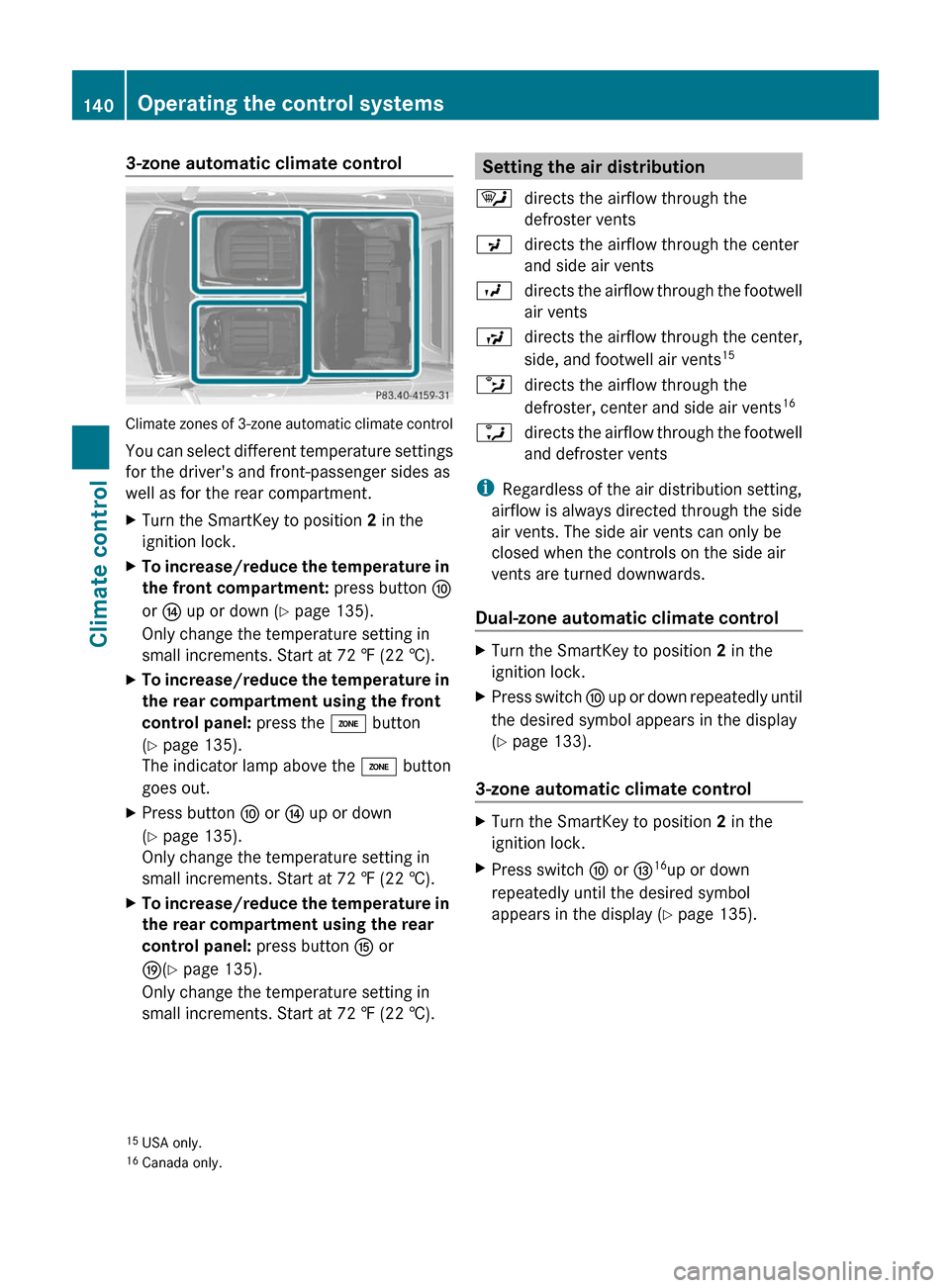
3-zone automatic climate control
Climate zones of 3-zone automatic climate control
You can select different temperature settings
for the driver's and front-passenger sides as
well as for the rear compartment.
XTurn the SmartKey to position 2 in the
ignition lock.
XTo increase/reduce the temperature in
the front compartment: press button F
or J up or down (Y page 135).
Only change the temperature setting in
small increments. Start at 72 ‡ (22 †).
XTo increase/reduce the temperature in
the rear compartment using the front
control panel: press the á button
(Y page 135).
The indicator lamp above the á button
goes out.
XPress button F or J up or down
(Y page 135).
Only change the temperature setting in
small increments. Start at 72 ‡ (22 †).
XTo increase/reduce the temperature in
the rear compartment using the rear
control panel: press button K or
O(Y page 135).
Only change the temperature setting in
small increments. Start at 72 ‡ (22 †).
Setting the air distribution¯directs the airflow through the
defroster vents
Pdirects the airflow through the center
and side air vents
Odirects the airflow through the footwell
air vents
Sdirects the airflow through the center,
side, and footwell air vents15bdirects the airflow through the
defroster, center and side air vents16adirects the airflow through the footwell
and defroster vents
iRegardless of the air distribution setting,
airflow is always directed through the side
air vents. The side air vents can only be
closed when the controls on the side air
vents are turned downwards.
Dual-zone automatic climate control
XTurn the SmartKey to position 2 in the
ignition lock.
XPress switch F up or down repeatedly until
the desired symbol appears in the display
(Y page 133).
3-zone automatic climate control
XTurn the SmartKey to position 2 in the
ignition lock.
XPress switch F or I16up or down
repeatedly until the desired symbol
appears in the display (Y page 135).
15USA only.16Canada only.
140Operating the control systemsClimate control
BA 212 USA, CA Edition B 2011; 1; 5, en-USdimargiVersion: 3.0.3.62010-05-20T13:33:46+02:00 - Seite 140