2011 MERCEDES-BENZ E-Class WAGON phone
[x] Cancel search: phonePage 135 of 234

Tex
tmessag e(SMS ) Infor
mation andrequiremen ts
The function scan be used ifth eB luet ooth®
mobil ephon esuppor tstheM AP(Mess age
Acc essPro file) Bluet ooth®
prof ile.
When them obilephon eisc onnec ted, the3 0
mos trecen ttext messages whichare
curren tlystor edon the phone areloaded to
the COMAND 'stex tm essage inboxand
displayed.
i COMAND maynotload allthe most
recen ttext messages:
This ispossible inexc eption alcases, such
as with certainmobile phones, orwhen
ther earealot oftex tm essages inthe
phone's inbox.
If the above conditions arefulfilled, new
incom ingtextm essages appearinthe
COMAND textm essage inbox.Inaddition, a
ton esounds andthe/ iconappears. The
symbol disappears onceyou have readthe
tex tm essage. Theú mailsymbol is
displayed whenthetextm essage memory is
full. Thesymbol disappears onceyou delete
at least onetextm essage. Displaying
thetext message (SMS)
inbox
Overview X
Press the% function button .
X Select TextMessage in
the telephon e
basic menu byturn ingcVd theCOMAND
con troller andpress Wtocon firm.
The textm essage inboxappears. Text
message (SMS)inbox
The short ened textorsender ofthe select ed
tex tm essage (depending onthe settings) as
well asthe date andtime atwhich the
select edtextm essage wasreceived are
displayed atthe top and inthe middle. The
0 symbol appears ifat extm essage has
not yetbeen read.
Read ingatext mes sage (SMS) X
Sele ctat ext messa geinthet extm essage
inbo xbyturning cVd theC OMA ND
co ntroller andpressW toconfirm .
The text mes sage appears .
X To scr ollthrough thed ispla yorselect
ph one num bersinat extmess age:turn
cVd theC OMA NDcontroller .
The display scrolls upordown linebyline ,
or skips tothen exto rp reviou stelep hone
number andautomatical lyhigh lights it.
X To return tothe list:press Wand select
Back .
Lis tenin gtoat extmes sage You
cansetthel ang uage (Ypage 45)and the
spe edofthe read-aloud functio n
(Y page 42) .
X Pre ssW whileat extmes sage isbe ing
di spl ayed ,select ReadAloud and
press
W toconfi rm.
CO MAND readsoutthe text message. Text
message (SMS)
133Telephone Z
Page 136 of 234

X
To can celthe read- aloudfun ction:pre ss
the 8 button.
or
X Pre ssW,s elect Cancel Read-Alou d Fun
ction and
pressW toconfi rm.
Sw itchin gthe display Yo
uc an switch betwe endispl aying the text
mes sage send eror the text message conte nt.
The send erdispl aysho wsthe send erofthe
text message .Ift he send erisstor edinthe
CO MAND phone book, the nam eisd ispl ay ed .
The text displ aysho wsthe first few words of
at ext mes sage .
X Sel ect atext mes sage inthe text message
inb oxby turning cVd theCOMAND
contro ller.
X To switcht othe tex tdisplay :sel ect the
li st symbo ltot he right ofthe text message
by slid ing VY theCOMAND controller and
pre ssW toconfi rm.
X Sel ect DisplayText and
pressW to
confi rm.
The viewc hange s.
X To switcht othe sende rdisplay :sel ect
the list symbo ltot he right ofthe text
mes sage byslid ing VY theCOMAND
contro ller and pressW toconfi rm.
X Sel ect DisplaySender and
pressW to
confi rm.
The viewc hange s.
Di spl aying detai lsand phonenumb ers CO
MAND canalso sho was hortene dsend er
di spl ayinfull.
X Sel ect atext mes sage inthe text message
inb oxby turning cVd theCOMAND
contro ller.
X Sel ect the list symbo ltot he rightofthe text
mes sage byslid ing VY theCOMAND
contro ller and pressW toconfi rm. X
Sel ect Details and
pressW toconfi rm.
The detai ledd ispl ay appe ars.
X To clos et he deta iled view :sl id eXVY the
CO MAND controller.
Retu rning tothe teleph oneb asic menu X
Press the% backbutton. Managi
ngtext messag es
Cal lingat extmes sage (SMS)send er X
Pres sW theC OMA NDcontroller while the
te xt mes sage isbein gdisplayed .
X Sele ctCal lS ender and
pres sW to
con firm.
The telepho nemak esthec alltothes ender.
Using phone num bers inthet ext You
canusenum bers that are red and
unde rlinedintext mes sages (SMS).
i Itis poss iblethat ah ighl ight ednum erical
sequen cemay notc ont ain atelephone
number.
X Select ausable number whenthetext
message isdisplay ed. :
Usable numerical sequence
X Press Wthe COMAND controller and
select Use .
X Select Call .
The telephone makesthecall. 134
Text
message (SMS)Telephone
Page 137 of 234

i
You canusethe"New entry" or"Add no."
func tionstos ave this telep honenumber or
to add itto an exis tinge ntry.
Stor ingthes ender asan ew address
book entry This
function isnot possible ifthe sender’s
telep honenumbe risa lrea dystored inthe
address book.
X Press Wthe COMAND controller while the
text message isbeing displayed.
X Select SaveNumber and
press Wto
confirm.
X Select New entry and
press Wtoconfirm.
X Proceed asdescribed inthe "Storing asa
new entry inthe address book"section
(Y page 130).
Storing atext mes sage senderinan
exist ingaddress book entry X
Pres sW theC OMA NDcontroller while the
te xt mes sage isbein gdisplayed .
X Sele ctSav eN umber and
pres sW to
con firm.
X Sele ctAdd PhoneNo. and
pres sW to
con firm.
X Proc eedfrom thes tep" Sele ctan um ber
cat egor y"inthe" Add ingtelepho ne
num bers toan existing phon ebook entry"
sec tion(Ypage 128).
Deleting atext mes sage (SMS) X
Sele ctat extm essage inthet extm essage
inbo xbyturning cVd theC OMA ND
co ntro ller .
X Se lec tthe list symbol tothe right ofthe text
message bysliding VYtheCOMAND
cont roller andpress Wtoconfirm .
X Select Delete and
press Wtoconfirm .
Ad eletion prompt appears.
X Select Yes or
No and
press Wtocon firm.
If you select Yes ,t
he tex tm essage is
deleted. If
you select No ,t
he process willbeaborted.
i This delete function isnot supported by
all mobile phones. TheDeletio n Procedu
reFailed message
appears. Using
theaddress book Introd
uction G
WARN
ING
Please devote youratten tionfirst and
foremo stto the traff icsituation youarein.
Befor eyour journ ey,please familiarize
yourself withtheaddress bookfunctions.
Only usetheCOMAND whenroadandtraffic
con ditions permityoutodo so. Other wiseyou
could beinvolved inan acciden tinw hich you
or others couldbeinjured.
The address bookorganizes andstores
entr ieswhich areentered fromdifferent
sources (mobilephone,memory card,USB
device, COMAND telephone book,navigation
system).
You canusethese entriestomake telephone
calls andfornavigation.
i Num berofcontacts inthe addr ess
book: theaddress bookcanstore atotal of
4000 contacts. 1500 entriesare reserved
in the address bookformobile phone
cont acts and1500 forcont acts youcreate
in COMAND orimport fromother sources.
The remaining 1000entriesare assigned
by COMAND asnecessary.
i Display ofmobile phonecontacts:
cont acts downloaded fromthemobile
phone remain inthe address bookevenif
the mobile phoneisdisconnec tedfrom
COMAND. Thismeans thatcontacts which
have previously beenavaila blecan be
displa yedassoon asthe mobile phoneis
reconn ected.Thecont acts aredownloaded
again sothat anynew contacts thathave
been added tothe mobile phonecanbe
displa yed. Using
theaddress book
135Telephone Z
Page 138 of 234

When
anew mobile phoneiscon nect edto
COMAND ,allthe contact sfrom the
previous mobilephonearedeleted fromthe
address book.
If am obile phone isnot (yet) connect edto
COMAND ,the con tact sfrom that mobile
phone willnot(yet) beshown inthe address
book.
Address bookentries remain storedwhen
the mobile phoneisdisconn ected.
Therefor e,you should deleteyourpersonal
data using thereset function before selling
your vehicle, forexample (Ypage 47). Calling
upthe address book
Option 1:
X Press the% function button .
You seethetelephon ebasic menu orthe
address bookifit was open previously.
X When thetelephon ebasic menu is
displayed, pressthe% function button
again.
Option 2:
X With thetelephon ebasic menu shown,
select Phone by
sliding VZtheCOMAND
con troller andpress Wtocon firm.
X Select Address Book from
themenu and
press Wtocon firm. Address
bookwithaddress bookentry¥ and
navigable data¤
i Anaddress bookentrycan contain the
following information :surn ame, first nam e, co
mpan y,two addr esses, geo- coord inat es
and uptofivet eleph onen um ber s.
X To browse inthea ddress book: turn
cVd theC OMA NDcontrol ler.
X To close thea ddress book: pressthe
% button. Sea
rching foranaddress book entry
X Call upthea ddr ess book (Ypage 136).
X Se lec tSea rch in
thea ddr ess book by
slidi ngVÆ andturnin gcVd theC OMA ND
co ntrol ler and pressW toconfirm .
If th ere aremor ethane ightentrie s,the
sear chmen uand thec harac terb arappear . Sea
rchm enuw ithc harac terb ar
: ¥Sym bolforaddre ssbook entry
; ¤Sym bolforcomple teaddre ssdat a
fr om then avigat ionsyst em
= Charac terb ar
? d Sym bolforphon ebook entryf romt he
mob ilephon e
A Entryw ithv oic etag
Ad dition alsymb olsare desc ribedint he
"Symbol overview" section(Ypage 126).
X Proceed asdescribed under"Searching for
ap hone book entry"(Y page 126). 136
Using
theaddress bookTelephone
Page 139 of 234

Crea
tingan ewentryinthea ddress
book
You canentera ddress datadirect lyint ot he
address book.Ifyou storetelephon e
numbers inthe COMAND phonebook,these
are also saved inthe address book.Ifyou
stor ean avigat iondestin ation, COMAND
creat esan address bookentrywhich includes
the complet enavigable addressdata.
X Call upthe address book(Ypage 136).
X Select New in
the address bookbysliding
VÆ andturningcVd theCOMAND
con troller and press Wtocon firm.
An input menu withdata fields appears. Input
menu withdata fields
: Select eddata fieldwithcursor
; Character bar
X En ter charac tersandsave theentry.
Procee dasdescr ibed under "Entering
charac ters"int he "Ent ering charac tersin
the address andphone books" section
(Y page 31). Deleting
anadd ress book entry
X Opt ion1:select Delete by
sliding VÆand
turn ingcVd theCOMAND controller and
press Wtocon firm. X
Opt ion2:search foranaddress bookentry
(Y page 136).
X Select thelistsymbol tothe right ofthe
ent ryby sliding VYtheCOMAND
con troller and press Wtocon firm.
X Select Delete and
press Wtocon firm.
Irres pectiveofthe option chosen ,aprompt
will appear.
X Select Yes or
No and
press Wtocon firm.
If you select Yes ,t
he ent rywill bedeleted.
If you select No ,t
he proces swillbe
canc eled. Displaying
thedeta iledview foran
add ress book entry
Selecting anentr y X
Searc hfor an address bookentryand turn
cVd theCOMAND controller toselect itin
the select ionlist(Ypage 136).
or
X Select anaddress bookentryby browsing
(Y page 136).
X In both cases, pressW.
The detailed viewappears. Det
ailed display forbusiness details
: Return stot he previous menu
; \Symbol forbusiness details
= Calls upoption s Using
thea ddres sbook
137Teleph one Z
Page 140 of 234
Star
ting route guidance toan add ress X
Select theaddress datafieldbyturnin g
cVd theCOMAND controller andpress
W toconf irm.
The route tothe destination addressis
calculated androute guidancestarts
(Y page 57).
Calling ateleph onenum ber X
Sele ctthep hon enum ber data fieldby
tur nin gcVd theC OMA NDcontroller and
pres sW tocon firm.
This initiate sdialin gand you can then mak e
your call(Ypage 122).
Showing thed etails ofan address book
entr y X
Sele ctthel ist symbo ltot he righ tofthe
entr ybysliding VYtheCOMAND
cont roller andpress Wtoconfirm .
X Select Details and
press Wtoconfirm .
The displa yiss hown infull.
X To close thedetailed display:pressthe
% button. Changing
anadd ress book entry
Changing anentry X
Option 1:search foranaddress bookentry
and turn cVd theCOMAND controller to
select itin the selection list(Ypage 136).
X Select thelistsymbol tothe right ofthe
entr ybysliding VYtheCOMAND
cont roller andpress Wtoconfirm .
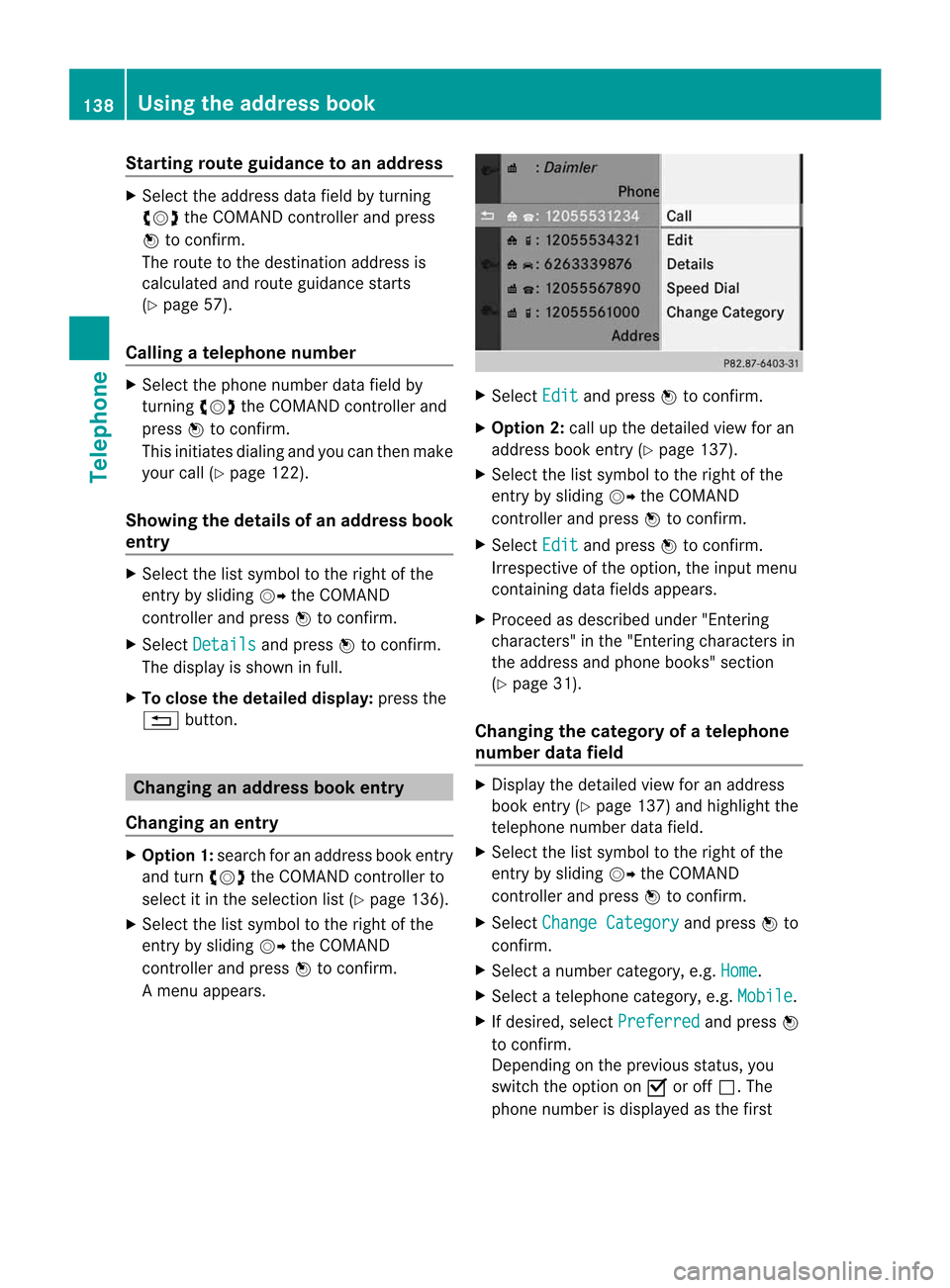
Am enu appears. X
Select Edit and
press Wtocon firm.
X Opt ion 2:call upthe detailed viewforan
address bookentry(Y page 137).
X Select thelistsymbol tothe right ofthe
ent ryby sliding VYtheCOMAND
con troller andpress Wtocon firm.
X Select Edit and
press Wtocon firm.
Irrespec tiveofthe option ,the input menu
con tainin gdata fields appears.
X Proceed asdescribed under"Entering
charact ers"inthe "Ent ering charact ersin
the address andphone books" section
(Y page 31).
Changing thecategory ofat elephone
number datafield X
Display thedetailed viewforanaddress
book entry(Y page 137)and highlight the
telephon enumber datafield.
X Select thelistsymbol tothe right ofthe
ent ryby sliding VYtheCOMAND
con troller andpress Wtocon firm.
X Select Change Categor y and
press Wto
con firm.
X Select anumber categor y,e.g. Home .
X Select atelephon ecategor y,e.g. Mobile .
X Ifdesired, selectPreferr ed and
press W
to con firm.
Depen dingonthe previous status,you
switch theoption onO oroff ª.T he
phone number isdispla yedasthe first 138
Using
theaddress bookTelephone
Page 141 of 234

num
berint he phone bookandcanbe
diale dimmediately.
X Select Save and
press Wtoconfirm .
The new category isstored. Calling
anumber storedinan entry
Co nditio ns The
mobi lephone mustbeconnected viathe
Blue tooth ®
interface .
Option 1 X
Displ aydetai lsfor anadd ress book entry
(Y pag e137).
X Select thephone numbe rdata fieldb y
tur nin gcVd theC OMA NDcontroll erand
pres sW toconfirm .
The telepho nemak esthec all. The displ ay
swit ches totelepho nemod e.
Opt ion 2 X
Dis play details foranaddre ssbook entry.
X Sel ect thep hon enum ber datafieldb y
tur nin gcVd theC OMA NDcontroll er.
X Sel ect thel ist symb olto ther igh tofthe
data fieldbysliding VYtheCOMAND
cont roller andpress Wtoconfirm .
X Select Call and
press Wtoconfirm .
The telephone makesthecall. Storing
thephone number asas pee d
dial numb er
X Disp layd etails for anaddre ssboo kentry .
X Sel ect the phone num berd ata fieldb y
tur nin gcVd theC OMA NDcontroll er. X
Sel ect thel ist symb olto ther igh tofthe
data fieldbysliding VYtheCOMAND
cont roller andpress Wtoconfirm .
X Select Speed Dial and
press Wto
confirm .
You cannow store thenumber inone ofthe
ten speed dialpresets. Star
ting route guidance toan entry
Note This
funct ionisavaila bleassoon asyou have
stored adestination inthe destination
memory (Ypage 95).COMAND alsosaves
destinations inthe address booktogether
with allthe data required forroute guidance.
Option 1 X
Search foranaddress bookentry
(Y page 136)withtheLicon andselect it
from thelist.
X Display detailsforanaddress bookentry
(Y page 138).
X Select theaddress datafieldbyturning
cVd theCOMAND controller andpress
W toconfirm .
Option 2 X
Search foranaddress bookentry
(Y page 136)withtheLicon andselect it
from thelist.
X Select thelistsymbol tothe right ofthe
entr ybysliding VYtheCOMAND
cont roller andpress Wtoconfirm .
X Select Navigate and
press Wtoconfirm .
Irrespect iveofthe option chosen, route
guida ncestarts.
Option 3 Route
guidancecanalso bestarted foran
address bookentrywithout the¤symbol. If
the address dataordesignations donot Using
theaddress book
139Telephone Z
Page 142 of 234

match
thedigitalmap, COMAND promptsyou
to re-enter theaddress.
i Itis best then tostore thenew address
under theaddress book entry. Thiswill
provid eyou with anadd ress book entry that
is sui table fornaviga tion.
X Enter thedestina tionaddress (Ypag e54).
X Select Save from
theaddress entry menu
and press Wtoconfirm.
X Assigning adestina tiontoan add ress book
entry (Ypag e96). Voic
etags
Adding orchang ingavoice tag You
canentervoic etagsv iatheV oiceC ont rol
Syst em(see thes epar ateoper ating
ins truct ions).Onceyou have assign edavoic e
tag toan addre ssbook entry,you can callup
th is ent rywith avoic ec om man dand dial a
phon enum ber, forexam ple.You canadd one
voic etag per addre ssbook entry.
X Sear chfor anaddre ssbook entrywith or
with outavoic etag (¦ symbo l)
(Y page 136).
X Sele ctthel ist symbo ltot he righ tofthe
entr ybysliding VYtheCOMAND
cont roller andpress Wtoconfirm .
X Select Voice Name and
press Wto
confirm .
X Select Add or
Change and
press Wto
confirm .
Subsequent operationisvoice-con trolled.
The Voice Control System guidesyou
through thedialo gs.
Dele ting avoice tag X
Sear chfor anaddre ssbook entrywith a
voic etag (Ypage 136).
X Sele ctthel ist symbo ltot he righ tofthe
entr ybysliding VYtheCOMAND
cont roller andpress Wtoconfirm . X
Select Voice Name and
press Wto
confirm .
X Select Delete and
press Wtoconfirm .
Ad eletion prompt appears.
X Select Yes or
No and
press the9button
to con firm.
If you select Yes ,C
OMAND deletesthe
voice tag.
If you select No ,t
he process willbeaborted.
Listening toav oice tag X
Sear chfor anaddre ssbook entrywith a
voic etag (Ypage 136).
X Sele ctthel ist symbo ltot he righ tofthe
entr ybysliding VYtheCOMAND
cont roller andpress Wtoconfirm .
X Select Voice Name and
press Wto
confirm .
X Select Listen and
press Wtoconfirm .
You hear thevoice tag. Storing
aphone book entry fromthe
mobile phoneinthe address book
Using thisfunct ionyou can save imported
phone bookentriesinthe address book.
The following canbeused asas ource:
R the mobile phone
R the memory card
R the USB device
R the Bluetooth ®
Int erface
Imported phonebookentriesare indicated in
the phone bookbydifferent icons
(Y page 126). 140
Using
theaddress bookTelephone