2011 MERCEDES-BENZ E-Class WAGON ad blue
[x] Cancel search: ad bluePage 178 of 234
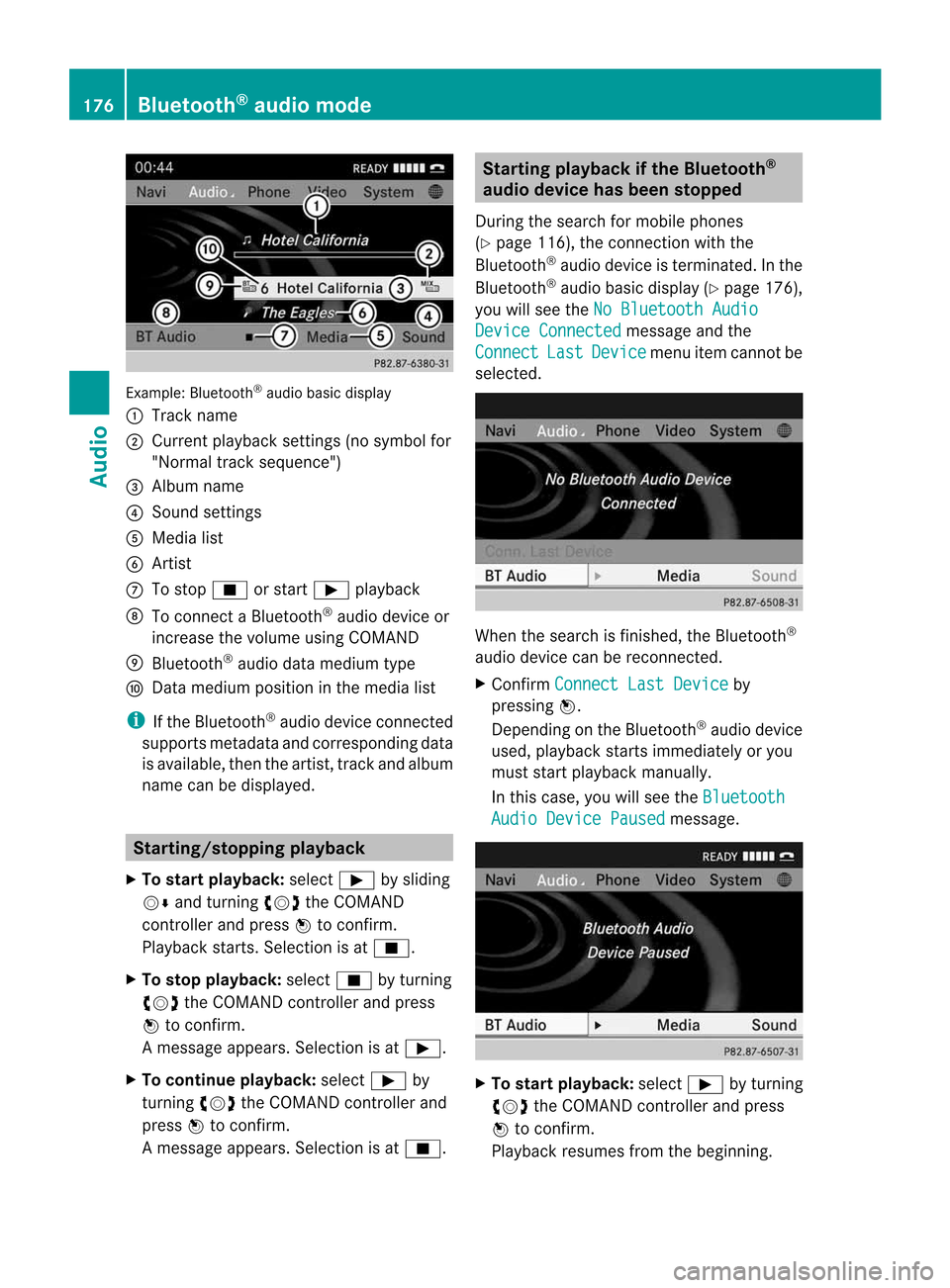
Exam
ple: Blu etoo th®
au diob asic disp lay
: Trac kn ame
; Curren tplayback settings (no symbol for
"Norm altrack sequen ce")
= Album name
? Soun dsettin gs
A Media list
B Artis t
C Tostop É orstart Ì playback
D Tocon nectaB luetooth®
audio deviceor
inc rease thevolume usingCOMA ND
E Bluet ooth®
audio datamedium type
F Datam edium positioninthe media list
i Ifthe Bluet ooth®
audio deviceconnec ted
support smetadata andcorrespo ndingdata
is available, thenthe artist, trackandalbu m
name canbedispla yed. Star
ting/stopping playback
X To star tplayback: selectÌbysliding
VÆ andturning cVdtheCOMAND
cont roller andpress Wtoconfirm .
Play back starts. Selection isat É.
X To stop playback: selectÉbyturning
cVd theCOMAND controller andpress
W toconfirm .
Am essage appears. Selectionisat Ì.
X To continue playback:select Ìby
turn ingcVd theCOMAND controller and
press Wtocon firm.
Am essage appears. Selectionisat É. Sta
rting playba ckifthe Bluet ooth®
aud iodevice hasbeen stopp ed
Durin gthe search formobile phones
(Y page 116),the connection with the
Bluetoot h®
audio device isterm inated. Inthe
Bluetoot h®
audio basicdisplay (Ypage 176),
you willsee theNoBluetoo thAudio Device
Connected message
andthe
Connect Last Device menu
itemcannotbe
select ed. When
thesearch isfinished, theBluetoot h®
audio device canberecon nected.
X Confirm Connect LastDevice by
pressing W.
Depen dingonthe Bluetoot h®
audio device
used, playback startsimmediately oryou
must startplayback manually.
In this case, youwillsee theBluetoo th Audio
Device Paused message.
X
To star tplayba ck:select Ìbyturn ing
cVd theCOMAND controller andpress
W tocon firm.
Playback resumesfromthebeginn ing. 176
Bluetooth®
aud iomod eAudio
Page 179 of 234

Selec
tingatrac k
Th isfunctio nisn otsupported byall
Bluetooth ®
audi odevices.
X To skip forwards orbackwards toa
tra ck: press theE orF button on
COMAND.
or
X Press the9 or: button brieflyon
the multifunction steeringwheel.
X Rapid scroll: pressandhold the9
or : button onthe multifunction
steering wheeluntilthedesired trackis
reached.
If you hold down the9 or: button,
the system runsthrough thelistmore
quickly. Selec
tingplayback options
If the Bluetooth ®
audi odevice supports the
corresponding function,the followi ngoptions
are avail able:
R Normal TrackSequence The
tracks areplay edinthe normal order
(e.g. track 1,2,3, etc. ).
Audio dataplayback isdetermined bythe
order inwhich thetracks arewritten tothe
data carrier. Alphabetical orderisthe most
common. Onceallthe tracks inaf older
have been played,the tracks inthe next
folder areplay ed.
R Random Tracks All
the tracks onthe medium areplay edin
random order(e.g.track 3,8,5e tc.). X
Select BT Audio by
sliding VÆandturning
cVd theCOMAND controller andpress
W toconfirm.
The #dot indicates theoption selected.
X Select theoption byturning cVdthe
COMAND controller andpress Wto
confirm.
If you select Random Tracks ,y
ou will see
ac orresponding symbolinthe displa y/
selection window. Adjusting
thesound settings
The sound settings aredescribed usingradio
mode asan example inthe "Basic function s
of COMAND" section(Ypage 34). Increasin
gthe volume usingCOMAND
X Select BT Audio by
sliding VÆandturning
cVd theCOMAND controller andpress
W toconfirm.
X Select Volume and
press Wtoconfirm.
Am enu appears. The#dot indicat esthe
curren tsett ing. X
Select Standar d or
Boost and
press Wto
con firm.
You willfind furth erinfor mation inthe "Audio
AUX mode" section(Ypage 182). Bluet
ooth®
aud iomod e177Audio Z
Page 180 of 234

Media
Interface mode Co
nne ctio noption s
Overvi ew The
connection socketsareloca tedinthe
stowa gecompartme ntinthe center console.
Device-spe cificadapter cables,inclu dedwith
the Medi aInterface, arerequ iredtoconnect
external devicestothe Medi aInterface.
i Store individualparts inas afe plac e.
On lyuse genuine Mercedes-Ben z
co nn ect ion cabl es.
You canconn ect thef ollowin gdatam ediato
COMA NDviatheM edia Inte rface:
R iPod ®
R cer tain MP3 player s
i iPod ®
is ar egist ere dtrademar kofApple
Inc .,Cupertino ,California, USA.
Supp orted devices For
details andalist ofsupported devices,
visit http://www .mbusa- mobile.com.
Alt ernat ively, calltheMercede s-Benz
Customer AssistanceCente rat
1-800-FOR-MERC edes(1-800-367-6372)
(for USA) orCu stomer Relatio nsat
1-800-387-0100 (forCanada ). Co
nne ctin gane xte rnal device
i Donot leaveexternal devicesinthe
vehi cle,astheir correct function cannotbe
gua ranteed ifthey aresubjected to
extreme temperatures,e.g.from expos ure
to dire ctsunl ight orvery lowoutsi de
tempera tures(seetheoper ating
instructio nsofthe respe ctivedevice).
Merced es-Benz USA,LLCaccep tsno
lia bil ity for dam agetoexternal devices.
Never connect morethanonedeviceata
time. Youwillotherw isenot beabletop lay
back fromtheexternal device. :
Four-p insocket for⅛inch stereo jack,
e.g. forMP3 players (audi oa nd vide o)
; iPod®
plu gfor connecting aniPo d®
= USB socket forconnecting anMP3 player
? Exampl eofdevi ce: iPod®
X Connect theexternal devicewith sui tabl e
socket :,;or=.
COM AND activa testhe devi ce;am essa ge
app ears .
If you remove adevice, the NoDevice Connec
ted messa
geapp ears .
i Aconnected iPod®
or MP3 players hould
not besimultaneously operatedviathe
Media Interface andtheremote control
(e.g. Bluetooth ®
remote control)ordirectly
on the device itselfasthis may cause
unforeseen technicaldifficulties.
i Connect ingafully discharged iPod®
or
MP3 playercan result inan exten ded
initialization period.
Malfunction messagesappearwhile the
device isbeing activated if:
R COMAND doesnotsupport thedevice
conn ected (External Device Unavailable message).
R the conn ected device consumes toomuch
power.
R the Media Interface connection isfaulty.
R am ass storage device(e.g.USBstick or
USB hard disk) isconn ected tothe Media
Int erface (Please Connect The Device
To
The Other USBPort message).178
Media
Interface modeAudio
Page 181 of 234

i
The separate USBconn ection ensures
quick access andexpanded mediacontent
options.
i Consult anauthorized Mercedes-Benz
Center ifyou have further questions. Switching
toMedia Interfa cemode
General information In
extr eme cases, startingupindividual
funct ionscantake uptoseveral minutes –
this depends onthe exter naldevice andits
cont ent(e.g. video podcasts).
Only usetheoriginal software tosave fileson
iPods orMP3 players. Otherwise, someorall
funct ionsmay notbeavailab le.
Option 1 X
Connec tane xter naldevice (Ypage 178).
COMAND activatesthe device. Thebasic
display thenappears.
Option 2 The
exter naldevice isconn ected tothe Media
Int erface.
X Press theh functionbutton oneormore
times.
By pressing thefunct ionbutton repeatedly,
you can change theoperating modeinthe
following order:
R audio CD/DVD/MP3 (disc)
R memory cardmode
R MUSIC REGISTE R
R USB storage device
R Media Interface oraudio AUXmode
R Bluetoot h®
audio mode
Option 3 X
Press thei number button.
This selects theconn ected externalaudio
device directly. Option
4 X
In the media list(Ypage 159), select the
ent ryat position 0byturnin gcVd the
COMAND controller andpress Wto
conf irm.
COMAND activatesthe conn ected device.
You willsee amessage tothis effect .The
basic displa ythen appea rs.
If no device isconn ected, youwillsee the
Media Int. entr
yinstead ofad evice
name. Media
Interface mode (iPod®
mode) when
equippe dwithaD VD changer
: Type ofdata medium
; Track number
= Elapsed tracktime(also informat
00:0 0:00 foraudi obooks)
? Track name
A Graphic timedispla y
B Graphic trackdispla y
C Sound settings
D Media list
E Album name(ifavaila ble)
F Music search
G Position inthe media list
H Artist (ifavaila ble)
I Play back options
Type ofdevice :conn ected isindicated by
the corresponding symbolforiPod ®
or MP3
play er. Media
Interface mode
179Audio Z
Page 205 of 234

Weather
mapwithinform ationonacyclone
(example)
The following informationisshown (if
availabl e):
R categor yofthe tropic alstorm
R date andtime ofobservation (timestamp)
R direct ionalmovemen tspeed andpath
i The direct ionalmovem entspeed isthe
speed atwhich thestor mcellmoves.
Weat herfront s
The Atmosph ericPressur e display
layeris
activat ed(Ypage 201)and weather datais
available. Weather
mapshowing theposition ofhigh andlow-
pressure areas(H,L),weather frontsand isobars
(example)
i Isobars arelines thatshow where theair
pressure isthe same. Weather
fronts(legend)
: Cold front(blue linewith blue triangles)
; Warm front(red line with redsemi-circl es)
= Stationary front(red-b lueline with red
semi-circl esand bluetriangl es)
? Occlusi on(vio letline with aviolet semi-
circle andtriangl es) Weather
front Explan
ation Col
dfront If
ac old front moves in,the
wea ther remai nschangea ble
and there areoften rain
show ersand thunderstorms .
The airtempera ture
decrea ses. Warm
front This
canmean longer periods
of rain andcanleadtoa n
increase inclou dcover anda
slow increase intempera ture. Stationary
front The
weather front moves
minima lly.T he weather
remains changeable inthis
area. Occlusion This
occurs whenafaster cold
front reaches anadvancing
warm frontandcombines
with it.The weather remains
changeable andrainy within
an occlusion. SIRIUS
Weather
203Weatherservices