2011 MERCEDES-BENZ E-Class SEDAN phone
[x] Cancel search: phonePage 119 of 234
mobil
ephone (Ypag e119). IfCOMAND
does notfind yourmobile phone, external
authorization (Ypage 118)maybe
necessary.
i Ifyou callupthe telephone listagain, the
unauthorized devicesareremoved fromthe
list. Inthis case, startanew search to
update theBluetooth ®
telephone list.
Authoriz ing(registering) amobile
ph one Opt
ion1:usin gthe passkey (access code)
X In theB luet ooth®
te lepho neslist,selec tthe
not yetauthorized mobilephonebyturning
cVd theCOMAND controller.
X Select thelistsymbol tothe right ofthe
entr ybysliding VYtheCOMAND
cont roller andpress Wtoconfirm .
X Select Authorize and
press Wtoconfirm .
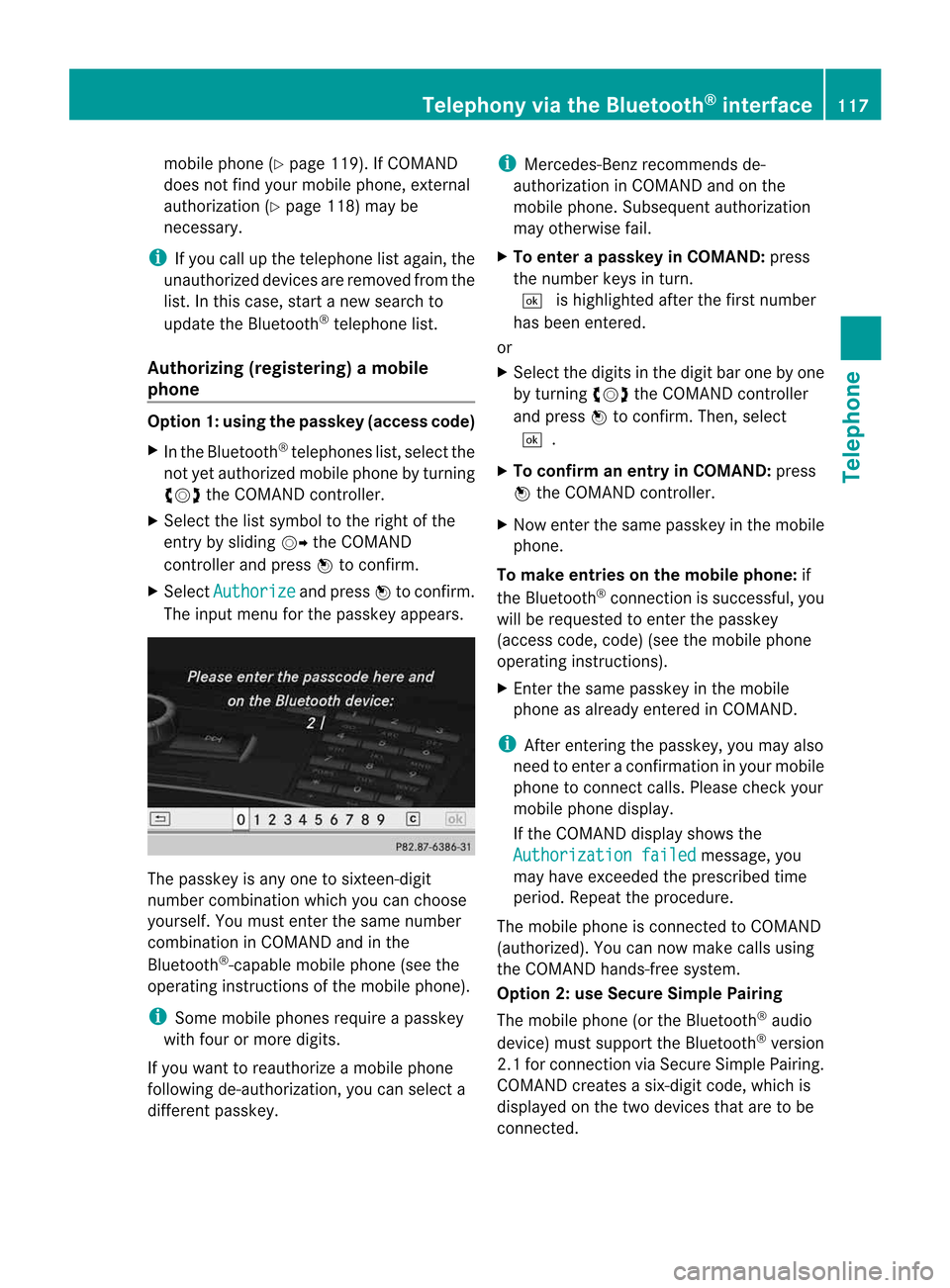
The input menu forthe passkey appears. The
passkey isany one tosixteen- digit
number combination whichyoucan choose
yourself. Youmust enter thesame number
combination inCOMAND andinthe
Bluetooth ®
-capable mobilephone(seethe
operating instructionsofthe mobile phone).
i Some mobile phones requireapasskey
with fourormore digits.
If you want toreauthorize amobile phone
following <0025002400460033002E0021001B0030001F002C002A00330021002C00300031
0052V youcan select a
different passkey. i
Mercedes-Ben zrecomm endsde-
authorization inCOMAND andonthe
mobile phone. Subsequent authorization
may other wisefail.
X To enter apassk eyinCOMAND: press
the number keysinturn .
¬ ishighlighted afterthefirst number
has been entered.
or
X Select thedigits inthe digit barone byone
by turn ingcVd theCOMAND controller
and press Wtocon firm. Then, select
¬.
X To confirm anentry inCOMAND: press
W the COMAND controller.
X Now enterthe same passkey inthe mobile
phone.
To mak eentries onthe mobile phone:if
the Bluetoot h®
con nection issuccess ful,you
will berequested toent erthe passkey
(access code,code) (seethemobile phone
operatin ginst ruct ions).
X En ter the same passkey inthe mobile
phone asalready entered inCOMAND .
i Afterent ering thepasskey, youmay also
need toent erac onfirmat ioninyour mobile
phone tocon nectcalls. Pleas echeck your
mob ilephon edispl ay.
If th eC OMA NDdispl aysho wsthe
Aut horizatio nf ailed mes
sage, you
may have excee ded thep res cribed time
peri od.Repeat thep roced ure.
The mob ilephon eisc onnec ted toCOMA ND
(auth orized). Youcannowm ake calls using
th eC OMA NDhands-free syst em.
Opt ion 2:use Secur eSimple Pairing
The mob ilephon e(or theB luetoot h®
audio
devi ce)must suppo rttheB luetooth®
ver sion
2. 1f or conn ection viaSecure SimplePairing.
COMAND createsasix-digit code,which is
display edon the two devices thataretobe
conn ected. Telephony
viathe Bluetooth ®
interfa ce117Telephone Z
Page 120 of 234

X
Ifthe numeric codeonboth devices
matches, confirmYes by
pressi ngW.
If you select Yes ,t
he authori zationprocess
is completed andthemobil ephone is
connect ed.
If you select No ,t
he process willbe
canceled.
X Confirm themessag eonthe mobil ephone. External
authorization
If COMAND doesnotdetect yourmobile
phone, thismay bedue toparticular security
sett ings onyour mobile phone. Inthis case,
you can test ifyour mobile phonecanfind
COMAND. TheBluetooth ®
device nameof
COMAND isMB Bluetooth .
Please notethefollowi ng:some mobile
phones requirethatyouestablish the
conn ection toCOMAND againonceyouhave
enter edthe passkey (seethemobile phone
operating instructions). Themobile phone
cann ototherwise beauthorized.
X Press the% functionbutton on
COMAND.
X Select Phone in
the telephone basicmenu
by sliding VÆandturnin gcVd the
COMAND controller andpress Wto
conf irm.
X Select Bluetooth Phones and
press Wto
conf irm.
X Select Update .X
Select thelistsymbol tothe right ofthe
entr ybysliding VYtheCOMAND
cont roller andpress Wtoconf irm.
X Select External Authorizatio n and
press Wtoconf irm.
X Start theBluetooth ®
search onthe mobile
phone (seethemobile phoneoperating
instr uctions).
X Select COMAND (MBBluetooth )o
nt he
mobile phone.
X Option 1:when requested todo so, enter
the passkey firstonthe mobile phoneand
then inCOMAND.
X Option 2:conf irmthedisplay edcodes on
the mobile phoneandinCOMAND (Secure
Simple Pairing). Connec
tinganother mobilephone
If you have authorized morethanonemobile
phone, youcan switch between theindividual
phones.
i You canonly switch toanother authorized
phone ifyou arenot current lymaking acall.
X Select themobile phoneinthe Bluetooth ®
telephones listbyturnin gcVd the
COMAND controller andpress Wto
conf irm.
The selected mobilephoneissearched for
and conn ected ifit is within Bluetooth ®
range andifBluetooth ®
is activated.
Only onemobile phonecanbeconn ected
at any one time. Thecurrent lyconn ected
mobile phoneisindicated bythe #dot in
the Bluetooth ®
telephones list
(Y page 116). 118
Telephony viathe Bluetooth ®
interfa ceTelephone
Page 121 of 234

Disp
laying details
X Press the% function buttono n
COM AND.
X Se lec tPho ne in
thet eleph oneb asicm enu
by sliding VÆandturningcVd the
COMAND controller andpress Wto
con firm.
X Select Bluetoo th Phones and
press Wto
con firm.
X Select thedesired mobilephoneinthe
Bluetoot h®
telephon eslist.
X Select thelistsymbol tothe right ofthe
ent ryby sliding VYtheCOMAND
con troller andpress Wtocon firm.
X Select Details and
press Wtocon firm.
The following information concern ingthe
select edmobile phoneisshown:
R Bluetoot h®
name
R Bluetoot h®
address
R availabili tystat us(shown afteranew
search)
R authoriz ationstatus
X To close thedeta iledview: turncVd or
slide XVY theCOMAND controller. De-register
ing(de-au thorizing) a
mobile phone
i Mercedes- BenzUSA,LLC recom mends
de-author izationonboth COMAND andon
the mobile phone. Subsequent
authoriz ationmayother wisefail.
X Press the% function button on
COMAND .
X Select Phone in
the telephon ebasic menu
by sliding VÆandturningcVd the
COMAND controller andpress Wto
con firm.
X Select Bluetoo th Phones and
press Wto
con firm.
X Select thedesired mobilephoneinthe
Bluetoot h®
telephon eslist. X
Select thelistsymbol tothe right ofthe
ent ryby sliding VYtheCOMAND
con troller andpress Wtocon firm.
X Select Delete and
press Wtocon firm.
Ap rompt appears asking whethe ryou
really wishtode-authorize thisdevice.
X Select Yes or
No .
If you select Yes ,t
he device willbedeleted
from theBluetooth ®
telephones list.
If you select No ,t
he process willbe
canceled.
i Before re-authoriz ingthe mobile phone,
you should alsodelete thedevice nameMB Bluetooth from
yourmobile phone's
Bluetooth ®
list. Telephone
basicmenu (Bluetooth ®
interfa ce)
X Press the% functionbutton .
If the mobile phoneisready foruse, the
following displayappears: Telephone
basicmenu (Bluetooth ®
interf ace)
: Telephone status
; Signal strengthofmobile phonenetwork
Ä
= Receiver icon¢or¡
? Todisplay calllists
A Character bar
B Bluetooth ®
name ofthe current ly
conn ected mobile phone
C Todisplay theCOMAND phonebook Telephony
viathe Bluetooth ®
interfa ce119Telephone Z
Page 122 of 234

i
Display ; mayvary, de pe ndi ng on the
mob ilep hone conne cted.
Bar s: disp layt he cur rent signa lstre ngth
of the mob ilep hone netw ork.Ifallb arsa re
fil led, youh aveo ptim um receptio n.
If no bars ares hown, receptio nise ither
very poor orthere isnone atall.
Receiver icon=shows whether acallis
active/being connected ¡ornot ¢. Text
message (SMS)display in
telephone basicmenu
The Text Message menu
itemisavail able if
the Bluetooth ®
telephone supportstheMAP
Bluetooth ®
profile (Message AccessProfile)
and thetext message hasbeen download ed
from theBluetooth ®
telephone. Themenu
item isotherwise grayedoutand isnot
avail able.
The 1mail icon isdispla yedwhen youhave
an unread textmessage. Thesymbol
disapp earsonce youhave readthetext
message. Theú mailsymbol isdispla yed
when thetext message memoryisfull. The
symbol disappearsonce youdelete atleast
one text message.
Further information canbefound inthe "Text
messages (SMS)"section (Ypage 133). Reception
andtransmission volume
Once themobile phonehasbeen authorized,
you can optimize thetransmission and
reception volumesettings. Findinformation
on the optimal settingforyour mobile phone
on the Intern etat
htt p://www .mbusa-mobile.com.O rcall
the Mercedes-Benz CustomerAssistance
Center at1-80 0-FOR-ME RCedes
(1-800 -367-637 2)(for theUSA) orCustomer
Rela tions at1-80 0-38 7-0100(for Canada ).
i Incorr ectsettings mayhave asignificant
impact onthe qual ityofcalls. X
Press the% function button.
X Select Phone in
the telephone basicmenu
by turning cVdtheCOMAND controller
and press Wtoconfirm.
X Select Bluetooth Phones and
press Wto
confirm.
X Select anauthorized mobilephonefrom
the listbyturning cVd.
X Select thelistsymbol tothe right ofthe
entry bysliding VYtheCOMAND
cont roller andpress Wtoconfirm.
X Select Reception Volume or
Transmission Volume and
press Wto
confirm. :
Scale withindicator showingcurrent
volume
X Select avolume setting byturning cVdthe
COMAND controller.
X To clos ethe setting scale:pressWor
slide XVY. Telephone
operation Inco
ming call
Rejecting oraccepting acall When
thereisan incomi ngcall ,you see a
corresp ondingwindow inthe displa y. 120
Tele
phone operationTele
phone
Page 123 of 234

X
To reje ct:select Reject by
turning cVd
the COMAND controller and pressW to
confi rm.
or
X Pre ssthe ~ button onCOMAND oron
the multifu nctio nstee ring wheel.
X To acce pt: conf irm Acc ept by
pre ssing
W.
or
X Pre ssthe 6 button onCOMAND oron
the multifu nctio nstee ring wheel. Mu
ltifu ncti ondisp lay( exam ple)
i Youc an also acc eptthe call byvoice
command usingtheVoice Control System
(see theseparate operating instructions).
Once youhave accepted thecall, youcan use
hands-free mode.Thecallvolume canbe
adjusted (Ypage 34).Formore information ,
see the"Function sduring asingle call
conn ection" section (Ypage 122).
The displa yshows thephone number orthe
name andphone number (ifthe entr yiss tored in
the address book)orshows theUnknown (phone
number withheld) message.
i You canalso accept acallasdescribed
above whenanother mainfunctionis
switched oninCOMAND. Onceyouhave
accepted thecall, thedispla yswitches to
telephone mode.Afterthe call isfinished,
you seethedispla yofthe previous main
appli cation again.
The displa ydoes notswitch totelephone
mode ifyou:
R hide thewindow withthe% button
next tothe COMAND controller andthen
R accept thecall with the; button on
the multifunction steeringwheel Making
acall
Entering ateleph onenum berusin gthe
num berkeyp ad X
Call upthet elep ho ne basic menu
(Y page 119).
X En tert he digits usingthenumber keypad.
X To conne ctac all: press the6 button
on COM AND oron the multifunctio n
steeri ngwhe el.
Ente ring ateleph onenum berusin gthe
telep hone basicmenu X
Call upthet elep ho ne basic menu
(Y page 119).
X Sele ctthed igitsone byoneb yturnin g
cVd andslidin gZVÆ theC OMA ND
con troller andpres sW tocon firm.
X To connect acall: select °inthe
chara cterbarand press Wtoconfirm.
or
X Press the6 button onCOM AND oron
the multifunctio nstee ring wheel. Tel
eph oneo peratio n
121Tel eph on
e Z
Page 124 of 234

Redi
aling On
COMAND
X Ca llup the telepho nebasic menu
(Y page 119).
X Sel ect °inthe characte rbarand press
W toconfi rm.
or
X Ifthe telepho nebasic menu isdispl ayed,
pre ssthe 6 button inCO MAND.
In both cases, the callsdialed list appea rs.
The most recentlydialed numb erisat the
top.
X To select ac all: turn cVd theCOM AND
controller.
X To conne ctthe call:press Wthe
COM AND controller.
Co nne ctin gac alltoan entry inac all list
or inthe COM AND phone book X
Open acalllista nd select anentry
(Y page 129) .
or
X Ca llup the COMAND phone book and
sel ect anentry (Ypage 126) .
X To conn ectac all:press Wthe COM AND
controlle rorthe 6 button.
Making acallv ia spee ddial The
spee ddiallistc ont ains stored phone
book entries(Ypage 131).
Option 1:
X Hold down oneofthe number keysfor
longer thantwoseconds.
Option 2:
X Call upthe telephone basicmenu
(Y page 119).
X Select CallLists by
sliding VÆand
turnin gcVd theCOMAND controller and
press Wtoconf irm.
The speed diallistappears. X
Select Speed DialPreset List by
turnin gcVd theCOMAND controller and
press Wtoconf irm.
The speed diallistappears.
X Select thestorage location andpress Wto
conf irm.
Irrespect iveofthe option chosen, the
telephone basicmenu appears and
display sthe selected entry.This initiates
dialing. Functions
availableduring acall
Ove rview Tel
epho neoper ationwithasing lecall
: Perso nyou are calling
; Icon foractive telephone connection
= Toswitch hands-fr eemicrophon eon/of f
? Tosend DTMF tones(not possible withall
mobile phones)
A Toend acall
The following functions:
R acceptin gawaiting call
R making afurther call
R call waiting
are availa bleifthey aresupported bythe
network (onlypossible withaGSM network )
and your Bluetooth ®
mobile phone. 122
Telephone
operationTelephone
Page 125 of 234

Switching
thehands- freemicrophone
on/off This
funct ionisalso availa bleduring anactive
phone call.
X Call upthe telephone basicmenu
(Y page 119).
X To switch off:select MikeOff and
press
W toconf irm.
If the microphone isswitched off,the
display showstheQicon andtheThe microphone is off message
appearsfor
as hort period.
X To switch on:select MikeOn and
press
W toconf irm.
The Qsymbol disappea rs.You willbriefly
see theThe microphone is on message.
Ending anactive call X
Select ¢inthe telephone basicmenu and
press Wtoconf irm.
or
X Press the~ button onCOMAND oron
the multifunct ionsteering wheel.
The callonhold isactivated.
Rejecting oraccepting awaitin gcall The
callwaiting function mustbesup ported
by the mobi lephone network providerand be
enab led.Depending onthe mobile phone
used, thesystem behavior differswhen
accept ingacall(option 1and 2).
If yo uh aveac allinp rogre ssand rece ive
ano ther call,an ew windo wappears inthe
di spl ay.Y ou also hear aton e.You canaccept
or rejec tthe call.
X To reject: selectReject and
press Wto
conf irm.
or
X Press the~ button onCOMAND oron
the multifunct ionsteerin gwheel. X
To accept: selectAccept and
press Wto
conf irm.
or
X Press the6 button onCOMAND oron
the multifunct ionsteerin gwheel.
Option 1:ifyou accept thewaiting call,the
active callisended.
The active callwillalso beended ifyou
accept thewaiting callusing theVoice
Control System (seetheseparate
operating instructions).
Option 2:ifyou accept thewaiting call,the
active callisput onhold. Youcanthen
switch backandforthbetween bothcalls
(toggling) (Ypage 124).
i The second optionisavaila bleifyour
mobile phonesupports thetoggling
funct ion(via Bluetooth ®
).
Valid forboth options: ifyou accept the
waiting callusing themobile phone, theactive
call isput onhold. Youthen have twocalls.
The callyou have justaccepted isactive.
The COMAND displaychanges. Ifyou
cont inue tooperate functionsonthe mobile
phone, theCOMAND displaymaydiffer from
that ofthe mobile phone.
Making afurther call You
canmake asecond callwhile onthe
phone withsomeone else.Thisaction puts
the previous callonhold. Thefunct ionis
availa bleifyour mobile phonesupports this
funct ionviaBluetooth ®
. :
Symbol formaking asecond call Telephone
operation
123Telephone Z
Page 126 of 234

X
Sel ect symbo l: byturni ngcVd the
CO MAND controllera nd pre ssW to
confi rm.
or
X Pre ssthe ; button onCOMAND.
X Enter thephone num ber:
R ma nua lly( Ypa ge121)
R us ing the phone book (Ypage 125)
R from thecalllists (Y page 129)
R us ing speeddial (Y page 122)
Cal lwaiting Yo
uc an switch back and forth betwe encalls
wi th thisfun ctio n.The functio nisa vail able if
your mobile phonesupports thetoggling
function (viaBluetooth ®
).
You canusethefunction ifyou areanswering
as econd callormaking asecond call.
Switching betweenthe active calland the
call onhold :
Active call
; Callonh old
X Confirm symbol;bypressing W.
or
X Press the; button onCOMAND oron
the multifunction steeringwheel.
The previous callonhold isactivated. Ends
anactive call
X Select ¢inthe telephone basicmenu and
press Wtoconfirm.
or
X Press the~ button onCOMAND oron
the multifunction steeringwheel.
The callonhold isactivated.
Confe rence call You
canintercon nectcalls (active andon
hold) onthe mobile phone. Thispermits
several partiestohear oneanother andspeak
with oneanother.
You canalso make afurther callinCOMAND
(Y page 123).
Sending DTMFtones This
function isnot supported byallmobile
phones.
Answering machinesorother devices canbe
cont rolled byDTMF tones, e.g.forremote
query function s.
X Ifyou woul dlike tolisten tothe messages
on your answering machine,forexample,
select thecorresponding number.
X To transmit individual characters: once
ac onn ection hasbeen established tothe
answering machine,selectthedesired
characters inthe character barand press
W toconfirm.
or
X Press thecorresponding keyonthe
COMAND numberkeypad.
Every character selectedwillbe
transmitt edimmediately .
X To send aphone book entry asaD TMF
sequence :select Name by
turning cVdthe
COMAND controller andpress Wto
confirm.
X Select thedesired phonebookentry and
press Wtoconfirm.
The entry issent asaD TMF character
string. 124
Telephone
operationTelephone