2011 MERCEDES-BENZ E-Class COUPE buttons
[x] Cancel search: buttonsPage 137 of 344

Control panel for the dual-zone automatic climate control
For Canada only
FunctioniNotes/tips:Activates/deactivates air-
recirculation mode
Only use "air-recirculation" mode briefly, e.g. if there
are unpleasant outside odors or when in a tunnel. The
windows could otherwise fog up as, in air-
recirculation mode, no fresh air is drawn into the
vehicle.
;Defrosts the windshieldOnly use the "defrosting" function briefly until the
windshield is clear again.
=Switches the ZONE function
on/off
Use the ZONE function to adopt the temperature
settings on the driver's side for the front-passenger
side as well. The indicator lamp above the á
button goes out.
?DisplayASets climate control to
automatic
Activate climate control using the à and ¿
buttons. The indicator lamps above the à and
¿ buttons light up.
BSwitches cooling with air
dehumidification on/off
Activate climate control using the à and ¿
buttons. The indicator lamps above the à and
¿ buttons light up.
CSwitches the rear window
heating on/off
DSwitches climate control on/
off
ESets the temperature, rightSet the temperature to 72 ‡ (22 †).FSets the air distributionOverview of climate control systems135Climate controlBA 207 USA, CA Edition B 2011; 1; 3, en-USd2sboikeVersion: 3.0.3.62010-05-20T10:38:09+02:00 - Seite 135Z
Page 138 of 344
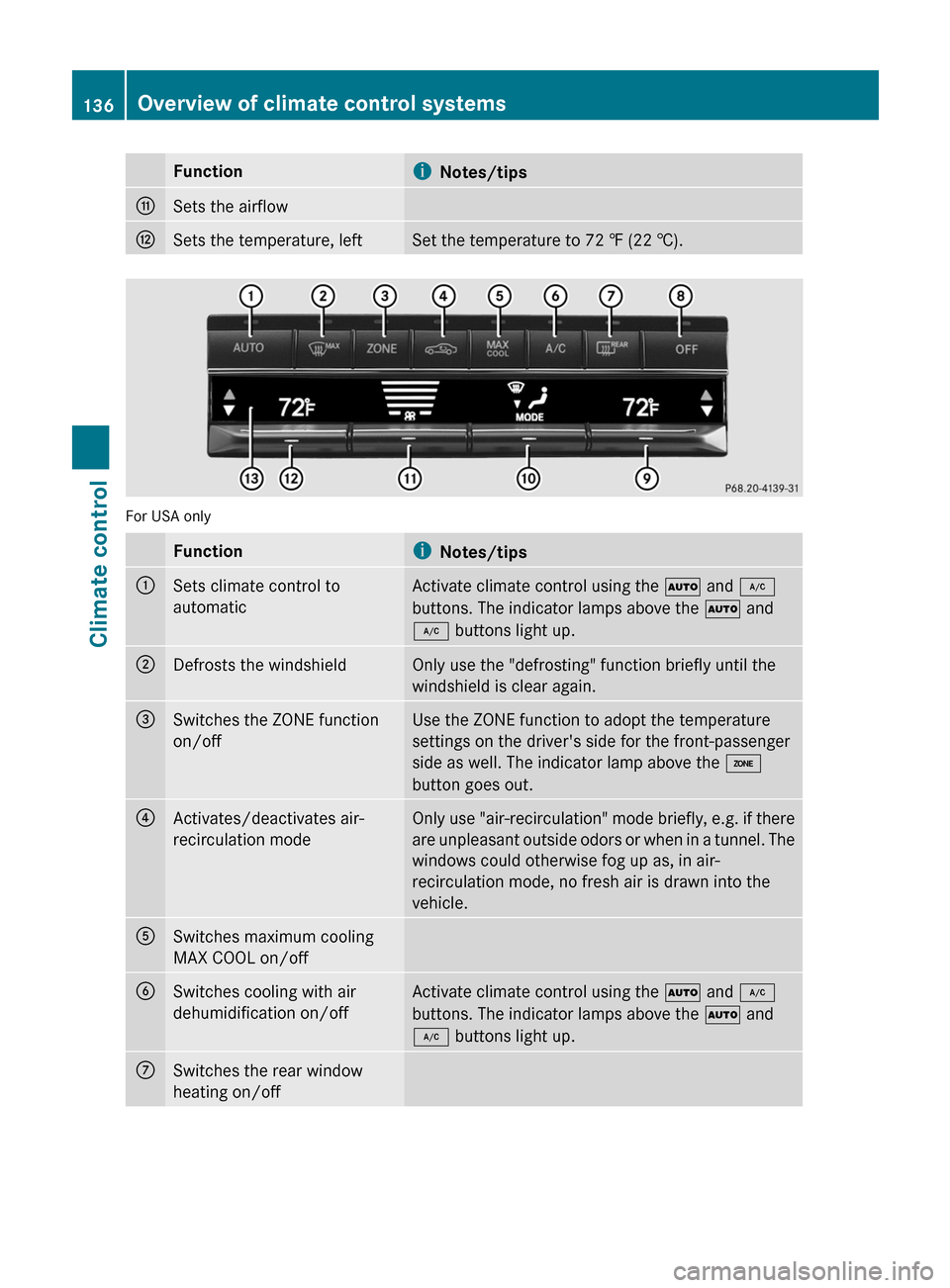
FunctioniNotes/tipsGSets the airflowHSets the temperature, leftSet the temperature to 72 ‡ (22 †).
For USA only
FunctioniNotes/tips:Sets climate control to
automaticActivate climate control using the à and ¿
buttons. The indicator lamps above the à and
¿ buttons light up.;Defrosts the windshieldOnly use the "defrosting" function briefly until the
windshield is clear again.=Switches the ZONE function
on/offUse the ZONE function to adopt the temperature
settings on the driver's side for the front-passenger
side as well. The indicator lamp above the á
button goes out.?Activates/deactivates air-
recirculation modeOnly use "air-recirculation" mode briefly, e.g. if there
are unpleasant outside odors or when in a tunnel. The
windows could otherwise fog up as, in air-
recirculation mode, no fresh air is drawn into the
vehicle.ASwitches maximum cooling
MAX COOL on/offBSwitches cooling with air
dehumidification on/offActivate climate control using the à and ¿
buttons. The indicator lamps above the à and
¿ buttons light up.CSwitches the rear window
heating on/off136Overview of climate control systemsClimate control
BA 207 USA, CA Edition B 2011; 1; 3, en-USd2sboikeVersion: 3.0.3.62010-05-20T10:38:09+02:00 - Seite 136
Page 139 of 344
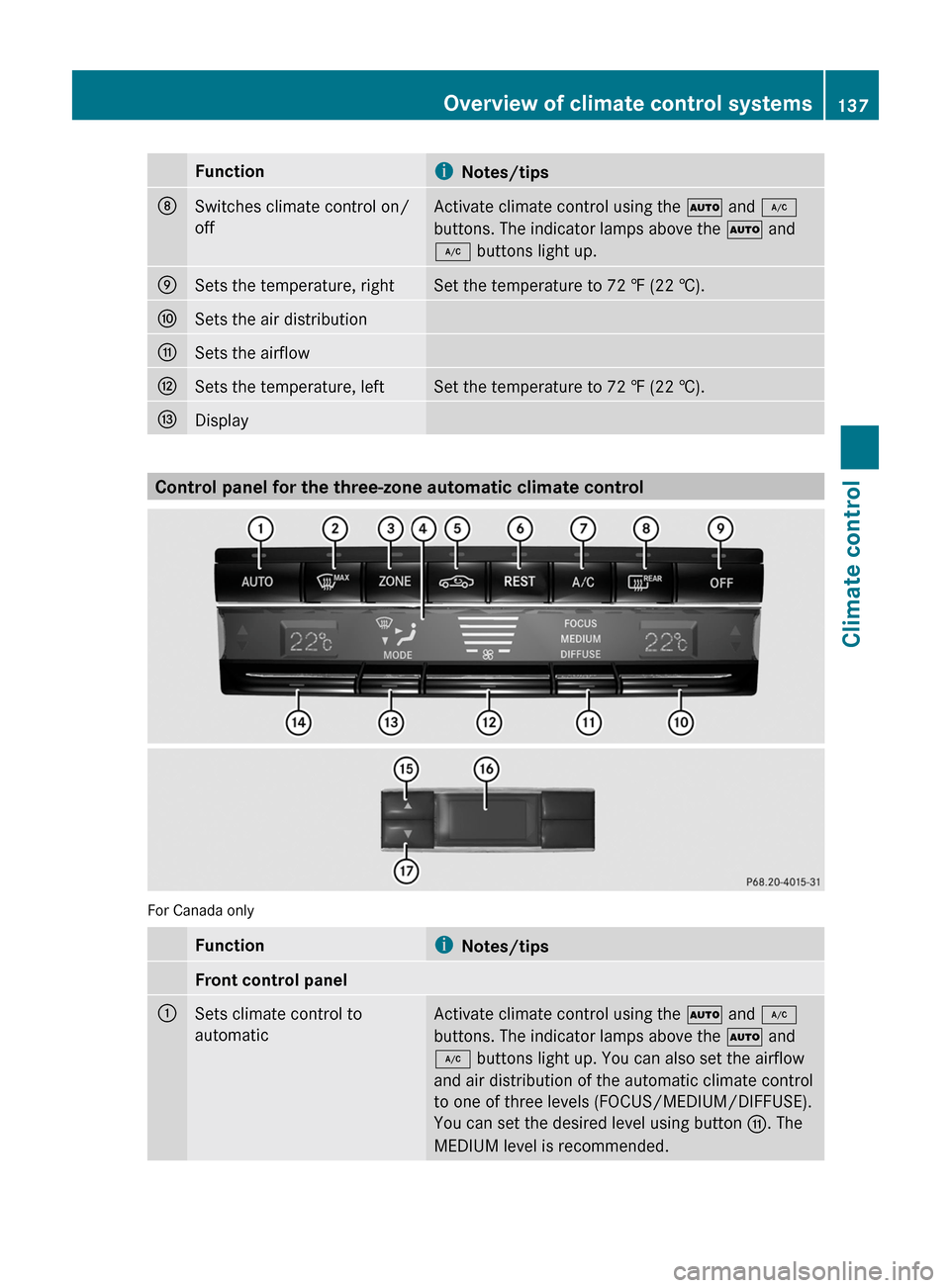
FunctioniNotes/tipsDSwitches climate control on/
off
Activate climate control using the à and ¿
buttons. The indicator lamps above the à and
¿ buttons light up.
ESets the temperature, rightSet the temperature to 72 ‡ (22 †).FSets the air distributionGSets the airflowHSets the temperature, leftSet the temperature to 72 ‡ (22 †).IDisplay
Control panel for the three-zone automatic climate control
For Canada only
FunctioniNotes/tipsFront control panel:Sets climate control to
automatic
Activate climate control using the à and ¿
buttons. The indicator lamps above the à and
¿ buttons light up. You can also set the airflow
and air distribution of the automatic climate control
to one of three levels (FOCUS/MEDIUM/DIFFUSE).
You can set the desired level using button G. The
MEDIUM level is recommended.
Overview of climate control systems137Climate controlBA 207 USA, CA Edition B 2011; 1; 3, en-USd2sboikeVersion: 3.0.3.62010-05-20T10:38:09+02:00 - Seite 137Z
Page 140 of 344
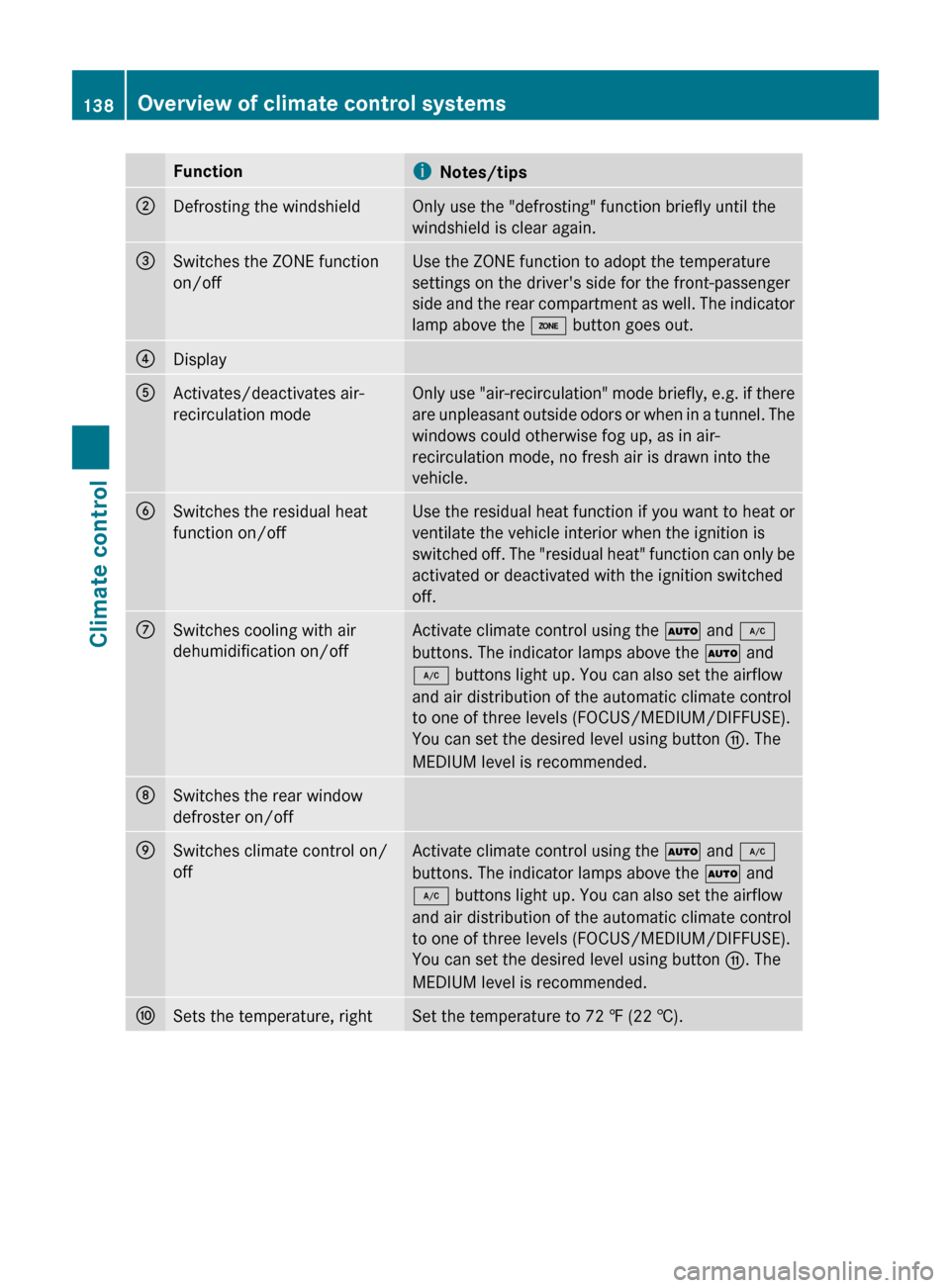
FunctioniNotes/tips;Defrosting the windshieldOnly use the "defrosting" function briefly until the
windshield is clear again.=Switches the ZONE function
on/offUse the ZONE function to adopt the temperature
settings on the driver's side for the front-passenger
side and the rear compartment as well. The indicator
lamp above the á button goes out.?DisplayAActivates/deactivates air-
recirculation modeOnly use "air-recirculation" mode briefly, e.g. if there
are unpleasant outside odors or when in a tunnel. The
windows could otherwise fog up, as in air-
recirculation mode, no fresh air is drawn into the
vehicle.BSwitches the residual heat
function on/offUse the residual heat function if you want to heat or
ventilate the vehicle interior when the ignition is
switched off. The "residual heat" function can only be
activated or deactivated with the ignition switched
off.CSwitches cooling with air
dehumidification on/offActivate climate control using the à and ¿
buttons. The indicator lamps above the à and
¿ buttons light up. You can also set the airflow
and air distribution of the automatic climate control
to one of three levels (FOCUS/MEDIUM/DIFFUSE).
You can set the desired level using button G. The
MEDIUM level is recommended.DSwitches the rear window
defroster on/offESwitches climate control on/
offActivate climate control using the à and ¿
buttons. The indicator lamps above the à and
¿ buttons light up. You can also set the airflow
and air distribution of the automatic climate control
to one of three levels (FOCUS/MEDIUM/DIFFUSE).
You can set the desired level using button G. The
MEDIUM level is recommended.FSets the temperature, rightSet the temperature to 72 ‡ (22 †).138Overview of climate control systemsClimate control
BA 207 USA, CA Edition B 2011; 1; 3, en-USd2sboikeVersion: 3.0.3.62010-05-20T10:38:09+02:00 - Seite 138
Page 141 of 344
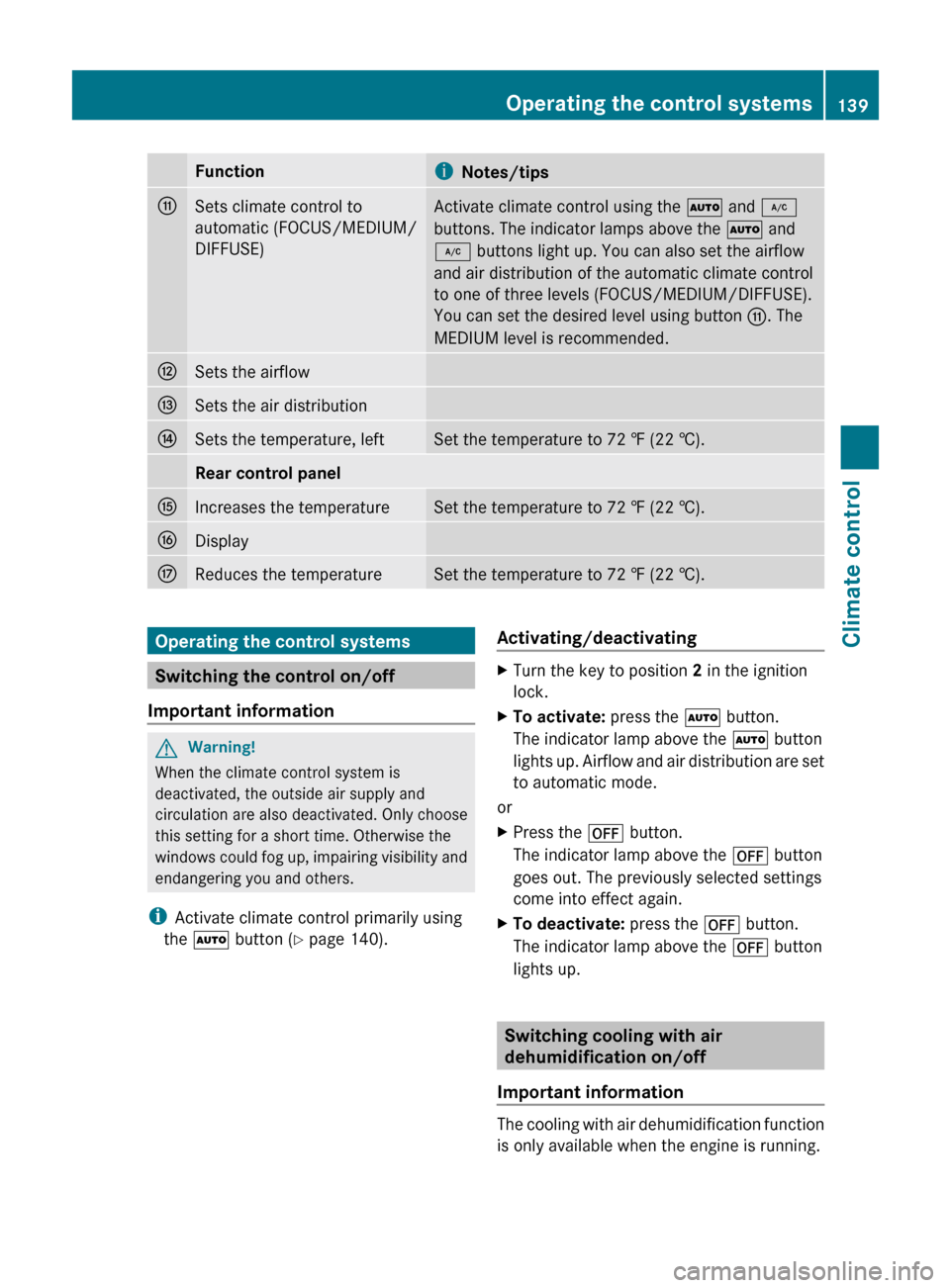
FunctioniNotes/tipsGSets climate control to
automatic (FOCUS/MEDIUM/
DIFFUSE)Activate climate control using the à and ¿
buttons. The indicator lamps above the à and
¿ buttons light up. You can also set the airflow
and air distribution of the automatic climate control
to one of three levels (FOCUS/MEDIUM/DIFFUSE).
You can set the desired level using button G. The
MEDIUM level is recommended.HSets the airflowISets the air distributionJSets the temperature, leftSet the temperature to 72 ‡ (22 †).Rear control panelKIncreases the temperatureSet the temperature to 72 ‡ (22 †).LDisplayMReduces the temperatureSet the temperature to 72 ‡ (22 †).Operating the control systems
Switching the control on/off
Important information
GWarning!
When the climate control system is
deactivated, the outside air supply and
circulation are also deactivated. Only choose
this setting for a short time. Otherwise the
windows could fog up, impairing visibility and
endangering you and others.
i Activate climate control primarily using
the à button ( Y page 140).
Activating/deactivatingXTurn the key to position 2 in the ignition
lock.XTo activate: press the à button.
The indicator lamp above the à button
lights up. Airflow and air distribution are set
to automatic mode.
or
XPress the ^ button.
The indicator lamp above the ^ button
goes out. The previously selected settings
come into effect again.XTo deactivate: press the ^ button.
The indicator lamp above the ^ button
lights up.
Switching cooling with air
dehumidification on/off
Important information
The cooling with air dehumidification function
is only available when the engine is running.
Operating the control systems139Climate controlBA 207 USA, CA Edition B 2011; 1; 3, en-USd2sboikeVersion: 3.0.3.62010-05-20T10:38:09+02:00 - Seite 139Z
Page 144 of 344
bdirects the airflow through the
defroster, center and side air vents 12adirects the airflow through the footwell
and defroster vents
i Regardless of the air distribution setting,
airflow is always directed through the side
air vents. The side air vents can only be
closed when the controls on the side air
vents are turned downwards.
Dual-zone automatic climate control
XTurn the key to position 2 in the ignition
lock.XPress switch F up or down repeatedly until
the desired symbol appears in the display
( Y page 135).
3-zone automatic climate control
XTurn the key to position 2 in the ignition
lock.XPress switch F11
or I12
up or down
repeatedly until the desired symbol
appears in the display ( Y page 137).
Setting the airflow
Dual-zone automatic climate control
XTurn the SmartKey to position 2 in the
ignition lock.XTo increase/reduce: press switch G up
or down ( Y page 135).
3-zone automatic climate control
XTurn the SmartKey to position 2 in the
ignition lock.XTo increase/reduce: press switch H up
or down ( Y page 137).Switching the ZONE function on/offXTo switch on: press the á button
( Y page 135), ( Y page 137).
The indicator lamp above the á button
lights up.
Dual-zone automatic climate control: the
temperature setting for the driver's side is
not adopted for the front-passenger side.
3-zone automatic climate control: the
temperature setting on the driver's side is
not adopted for the front-passenger side or
the rear compartment.
When the buttons for temperature, airflow or
air distribution are activated, the temperature
setting on the driver's side is not adopted for
the other climate control zones.
XTo switch off: press the á button
( Y page 135), ( Y page 137).
The indicator lamp above the á button
goes out.
Dual-zone automatic climate control: the
temperature setting for the driver's side is
not adopted for the front-passenger side.
3-zone automatic climate control: the
temperature setting on the driver's side is
not adopted for the front-passenger side or
the rear compartment.
Defrosting the windshield
You can use this function to defrost the
windshield or to defrost the inside of the
windshield and the side windows.
i You should only select the defrosting
function until the windshield is clear again.
XTurn the SmartKey to position 2 in the
ignition lock.XTo activate: press the ¬ button.
The indicator lamp above the ¬ button
lights up.12 Canada only.
11 USA only.142Operating the control systemsClimate control
BA 207 USA, CA Edition B 2011; 1; 3, en-USd2sboikeVersion: 3.0.3.62010-05-20T10:38:09+02:00 - Seite 142
Page 201 of 344
If the coolant temperature rises above
248 ‡(120 †), do not drive any further as
this could damage the engine.
Tachometer
The red band in the tachometer indicates the
engine's overrevving range.
! Do not drive in the overrevving range, as
this could damage the engine.
The fuel supply is interrupted to protect the
engine when the red band is reached.
Outside temperature display
The outside temperature display is in the
multifunction display.
GWarning!
The outside temperature indicator is not
designed to serve as an ice-warning device
and is therefore unsuitable for that purpose.
Indicated temperatures just above the
freezing point do not guarantee that the road
surface is free of ice. The road may still be icy,
especially in wooded areas or on bridges.
Changes in the outside temperature are
displayed after a short delay.
Speedometer with segments
The segments in the speedometer indicate
which speed range is available.
Cruise control mode:
The segments light up from the stored speed
to the maximum speed.
DISTRONIC PLUS mode:
One or two segments around the stored
speed light up.
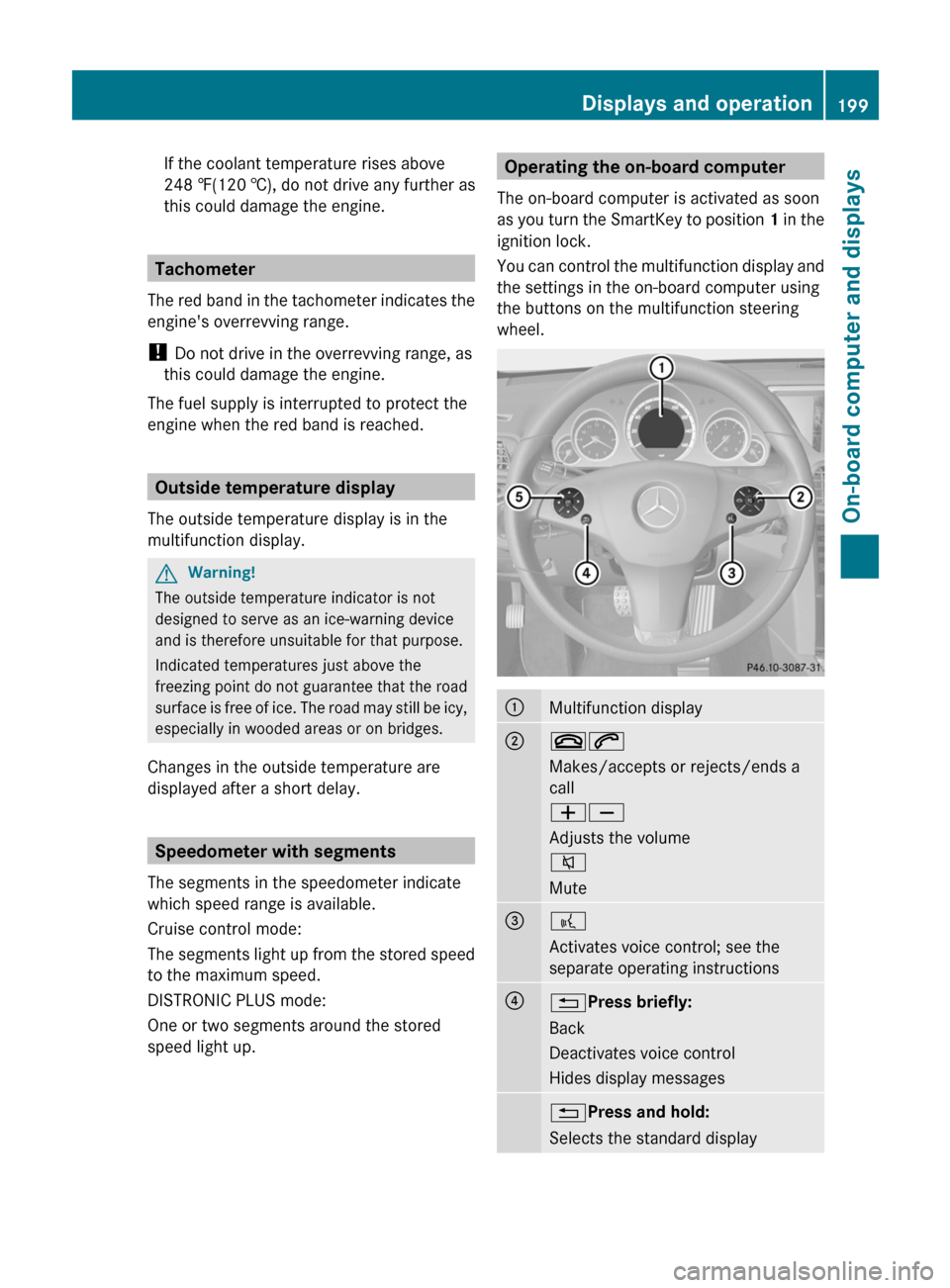
Operating the on-board computer
The on-board computer is activated as soon
as you turn the SmartKey to position 1 in the
ignition lock.
You can control the multifunction display and
the settings in the on-board computer using
the buttons on the multifunction steering
wheel.:Multifunction display;~6
Makes/accepts or rejects/ends a
call
WX
Adjusts the volume
8
Mute=?
Activates voice control; see the
separate operating instructions?% Press briefly:
Back
Deactivates voice control
Hides display messages% Press and hold:
Selects the standard displayDisplays and operation199On-board computer and displaysBA 207 USA, CA Edition B 2011; 1; 3, en-USd2sboikeVersion: 3.0.3.62010-05-20T10:38:09+02:00 - Seite 199Z
Page 213 of 344

XPress the : or 9 button to select the
Acoustic Lock Feedback: function.
You will see the selected setting: Enabled
or Disabled .XPress the a button to save the setting.
Activating/deactivating the radar sensor
system
The following systems are switched off when
the radar sensor system is deactivated:
R DISTRONIC PLUS ( Y page 174)
R BAS PLUS ( Y page 65)
R PRE-SAFE ®
Brake ( Y page 68)
R Blind Spot Assist ( Y page 194)
i USA only: This device has been approved
by the FCC as a “Vehicular Radar System”.
The radar sensor is intended for use in an
automotive radar system only. Removal,
tampering, or altering of the device will void
any warranties, and is not permitted by the
FCC. Do not tamper with, alter, or use in
any non-approved way.
Any unauthorized modification to this
device could void the user’s authority to
operate the equipment.
i Canada only:
This device complies with RSS-210 of
Industry Canada. Operation is subject to
the following two conditions:
1. This device may not cause interference,
and
2. This device must accept any interference
received, including interference that may
cause undesired operation of the device.
Any unauthorized modification to this
device could void the user’s authority to
operate the equipment.
XPress the = or ; button on the
steering wheel to select the Settings
menu.XPress the : or 9 button to select the
Vehicle submenu.XPress the a button to confirm.XPress the 9 or : button to select
Radar Sensor (See Oper. Manual) .
You will see the selected setting: Enabled
or Disabled .XPress the a button to save the setting.
Convenience
Activating/deactivating the EASY-
ENTRY/EXIT feature
You can use the Easy Entry/Exit: function
to activate or deactivate the easy-entry/exit
feature ( Y page 113).
GWarning!
You must make sure no one can become
trapped or injured by the moving steering
wheel when the easy-entry/exit feature is
activated.
To stop steering wheel movement, move
steering wheel adjustment lever or press one
of the memory position buttons.
Do not leave children unattended in the
vehicle, or with access to an unlocked vehicle.
Children could open the driver's door and
unintentionally activate the easy-entry/exit
feature, which could result in an accident
and/or serious personal injury.
XPress the = or ; button on the
steering wheel to select the Settings
menu.XPress the : or 9 button to select the
Convenience submenu.XPress the a button to confirm.XPress the : or 9 button to select the
Easy Entry/Exit: feature.
You will see the selected setting: Enabled
or Disabled .XPress the a button to save the setting.
Switching the belt adjustment on/off
Further information on belt adjustment
( Y page 56).
Menus and submenus211On-board computer and displaysBA 207 USA, CA Edition B 2011; 1; 3, en-USd2sboikeVersion: 3.0.3.62010-05-20T10:38:09+02:00 - Seite 211Z