2011 MERCEDES-BENZ CL-Class phone
[x] Cancel search: phonePage 21 of 480

MB info call button ........................394
Remote vehicle locking ..................396
Roadside Assistance button ..........393
Self-test ......................................... 392
System .......................................... 391
Vehicle remote unlocking ..............396
Telephone
Accepting a call ............................. 338
Calling voicemail ............................ 185
Call waiting .................................... 185
Conference connection .................. 185
Ending an active call ......................185
Entering phone numbers ................ 184
Incoming call ................................. 184
Keypad ........................................... 110
Menu (on-board computer) ............338
Number from the phone book ........ 338
Outgoing call ................................. 184
redialing ......................................... 184
Redialing ........................................ 339
Rejecting/ending a call .................338
Sending DTMF tones ...................... 187
Single call ...................................... 185
Switching hands-free microphone
on/off ............................................ 185
Toggling ......................................... 185
Telephone basic menu
Bluetooth ®
interface ...................... 183
Telephone compartment .................. 385
Telephone number Entering ......................................... 184
Temperature
Coolant .......................................... 328
Engine oil (on-board computer) ...... 335
Outside temperature ...................... 329
Setting ........................................... 259
Setting (COMAND) .........................234
Theft deterrent locking system
Immobilizer ...................................... 68
Tilt/sliding sunroof
see Sliding sunroof
Time
Setting ........................................... 129
Time format
Setting ........................................... 130
Timer (on-board computer) .............. 336Time zone
Setting ........................................... 130
Tiredness assistant
see ATTENTION ASSIST
Tire pressure
Calling up (on-board computer) .....445
Checking manually ........................444
Display message ............................ 369
Maximum ....................................... 444
Notes ............................................. 442
Recommended ............................... 441
Tire pressure monitoring system
Function/notes ............................. 445
Restarting ...................................... 447
Warning lamp ................................. 381
Tires
Aspect ratio (definition) .................459
Average weight of the vehicle
occupants (definition) ....................458
Bar (definition) ............................... 458
Characteristics .............................. 457
Checking ........................................ 438
Definition of terms .........................457
Direction of rotation ......................461
Distribution of the vehicle
occupants (definition) ....................460
DOT, Tire Identification Number
(TIN) ............................................... 457
DOT (Department of
Transportation) (definition) ............458
Flat tire .......................................... 421
GAWR (Gross Axle Weight Rating)
(definition) ..................................... 458
GVW (Gross Vehicle Weight)
(definition) ..................................... 458
GVWR (Gross Vehicle Weight
Rating) (definition) .........................458
Increased vehicle weight due to
optional equipment (definition) ......458
Kilopascal (kPa) (definition) ...........459
Labeling (overview) ........................453
Load bearing index (definition) ......460
Load index ..................................... 456
Load index (definition) ...................459
Maximum loaded vehicle weight
(definition) ..................................... 459
Maximum load on a tire
(definition) ..................................... 459Index19
Page 22 of 480

Maximum permissible tire
pressure (definition) ....................... 459
Maximum tire load .........................452
Maximum tire load (definition) .......459
Optional equipment weight
(definition) ..................................... 460
PSI (pounds per square inch)
(definition) ..................................... 459
Replacing ....................................... 460
Service life ..................................... 440
Sidewall (definition) .......................460
Speed index (definition) .................458
Storing ........................................... 461
Structure and characteristics
(definition) ..................................... 457
Temperature .................................. 453
TIN (Tire Identification Number)
(definition) ..................................... 460
Tire bead (definition) ......................459
Tire pressure (definition) ................459
Tire pressures (recommended) ......458
Tire size (data) ............................... 461
Tire size designation, load-bearing
capacity, speed index ....................454
Tire tread ....................................... 439
Tire tread (definition) .....................459
Total load limit (definition) .............460
Traction ......................................... 453
Traction (definition) .......................460
Tread wear ..................................... 453
Uniform Tire Quality Grading
Standards ...................................... 452
Uniform Tire Quality Grading
Standards (definition) ....................458
Unladen weight (definition) ............459
Wear indicator (definition) .............460
Wheel rim (definition) ....................458
Tires and wheels (important safety
information) ....................................... 438
Toggling .............................................. 185
Tone settings Balance and fader ..........................125
Treble and bass ............................. 125
Top Tether ............................................ 59
Towing Important safety guidelines ...........430
Installing the towing eye ................431
Removing the towing eye ...............432Traffic jam function ........................... 155
Traffic Program Switching off .................................. 124
Traffic report
Real-time traffic report ..................161
Traffic report read-aloud function ... 159
Traffic reports .................................... 159
Transfer case ..................................... 281
Transmission position display ......... 276
Transmission positions .................... 276
Treble and bass Adjusting ....................................... 125
Trip computer (on-board
computer) .......................................... 332
Trip odometer Calling up ....................................... 332
Resetting (on-board computer) ......333
True Image™ ...................................... 127
Trunk Automatic opening ..................... 82, 83
Emergency release ..........................84
Important safety guidelines .............81
Limiting the opening angle ............. 234
Locking separately ...........................83
Trunk lid
Display message ............................ 372
Trunk lid opening height
restriction .......................................... 234
trunk load (maximum) ...................... 474
Turn signal (display message) ......... 356
Turn signals ....................................... 246
Type plate see Vehicle identification plate
U
Unlocking Emergency unlocking .......................80
From inside the vehicle (central
unlocking button) ............................. 79
Using the telephone .......................... 184
20Index
Page 23 of 480

V
Vanity mirror Sun visor ........................................ 388
Vehicle
Data acquisition ............................... 27
Emergency unlocking .......................80
Equipment ....................................... 23
Exterior view .................................... 30
Individual settings (on-board
computer) ...................................... 341
Loading .......................................... 448
Lowering ........................................ 425
Maintenance .................................... 24
Parking up ..................................... 286
Raising ........................................... 422
Reporting problems .........................26
Towing away .................................. 430
Tow-starting ................................... 430
Transporting .................................. 433
Vehicle data
see Technical data
Vehicle dimensions ........................... 474
Vehicle identification number see VIN
Vehicle identification plate .............. 467
Vehicle level ...................................... 304
Active Body Control .......................305
Vehicle level (display message) ....... 364
Vehicle tool kit .................................. 420
Vehicle weights ................................. 474
Video (DVD) ........................................ 335
Video DVD Fast forward/rewind ...................... 225
Operation ....................................... 223
Pause function ............................... 226
Selecting ........................................ 225
Selecting a film/title ...................... 226
Selecting a scene/chapter ............226
Stop function ................................. 226
Video DVD (on-board computer) ...... 335
Video DVD mode Switching to ................................... 224
VIN ...................................................... 467
Voice Control System Settings ................................. 130, 131Volume
Adjusting ....................................... 124
Navigation announcements ...........124
Phone calls .................................... 124
W
Warning and indicator lamps ABS ................................................ 377
Brakes ........................................... 375
Check Engine ................................. 380
ESP ®
.............................................. 378
ESP ®
OFF ....................................... 379
Fuel tank ........................................ 380
Overview .......................................... 33
Reserve fuel ................................... 380
Seat belt ........................................ 376
SRS ................................................ 379
Tire pressure monitor ....................381
Warranty ............................................ 466
Waveband Switching (radio) ............................ 196
Wheel bolt tightening torque ........... 425
Wheel chock ...................................... 422
Wheels Changing/replacing .......................460
Changing a wheel .......................... 421
Checking ........................................ 438
Cleaning ......................................... 412
Mounting a wheel .......................... 424
Removing a wheel ..........................424
Storing ........................................... 461
Tightening torque ........................... 425
Wheel size/tire size .......................461
Window curtain air bag
Display message ............................ 347
Operation ......................................... 46
Windows
see Side windows
Windows (cleaning instructions) ..... 413
Windshield Defrosting ...................................... 260
Infrared reflective .......................... 400
Windshield washer fluid (display
message) ............................................ 373
Windshield washer system Adding washer fluid .......................408
Notes ............................................. 473
Index21
Page 37 of 480

Center consoleFunctionPage:Function button for the
radio and CD/DVD/SD
card109
;Back button109=Hazard warning lamps248?Lumbar support237Multicontour seat238AFunction button for the
telephone and navigation
system137
BSwitches COMAND on/off123FunctionPageCAdjusts the volume124DProgrammable button109ETelephone keypad110FRear window roller sunblind389GRetracts the rear seat head
restraints95
HSelects the drive program277ICOMAND controller108Center console35At a glance
Page 38 of 480

Overhead control panelFunctionPage:Eyeglasses compartment385;p Switches the left-
hand reading lamp on/off249
=v Switches the rear
interior lighting on/off250
?c Switches the front
interior lighting on/off250
A3 Opens/closes the
sliding sunroof89
BG SOS button (mbrace
system)392
C| Switches the
automatic interior lighting
control on/off249
FunctionPageDp Switches the right-
hand reading lamp on/off249
ERear-view mirrorFButtons for the garage door
opener398
GMicrophone for mbrace
(emergency call system),
telephone and Voice
Control System3
3Observe the additional operating instructions.36Overhead control panelAt a glance
Page 70 of 480
Anti-theft systems
Immobilizer
The immobilizer prevents your vehicle from
being started without the correct key.
When leaving the vehicle, always take the
SmartKey with you and lock the vehicle. The
engine can be started by anyone with a valid
key that is left inside the vehicle.
XTo activate with the SmartKey: remove
the SmartKey from the ignition lock.
XTo activate with KEYLESS-GO: switch the
ignition off and open the driver's door.
XTo deactivate: switch on the ignition.
iThe immobilizer is always deactivated
when you start the engine.
In the event that the engine cannot be
started when the starter battery is fully
charged, the immobilizer may be faulty.
Contact an authorized Mercedes-Benz
Center or call 1-800-FOR-MERCedes (in
USA) or 1-800-387-0100 (in Canada).
ATA (Anti-Theft Alarm system)
A visual and audible alarm is triggered if the
alarm system is armed and you open:
Ra door
Rthe vehicle with the mechanical key
Rthe trunk lid
Rthe hood
The alarm is not switched off, even if you
close the open door that has triggered it, for
example.
iIf the alarm stays on for more than 30
seconds, the emergency call system
mbrace (USA only) or TELEAID (Canada
only) initiates a call to the Customer
Assistance Center automatically. The
emergency call system initiates the call
provided that:
Ryou have subscribed to the mbrace/
TELEAID service.
Rthe mbrace/TELEAID service has been
activated properly.
Rthe required mobile phone, power supply
and GPS are available.
XTo arm: lock the vehicle with the SmartKey
or KEYLESS-GO.
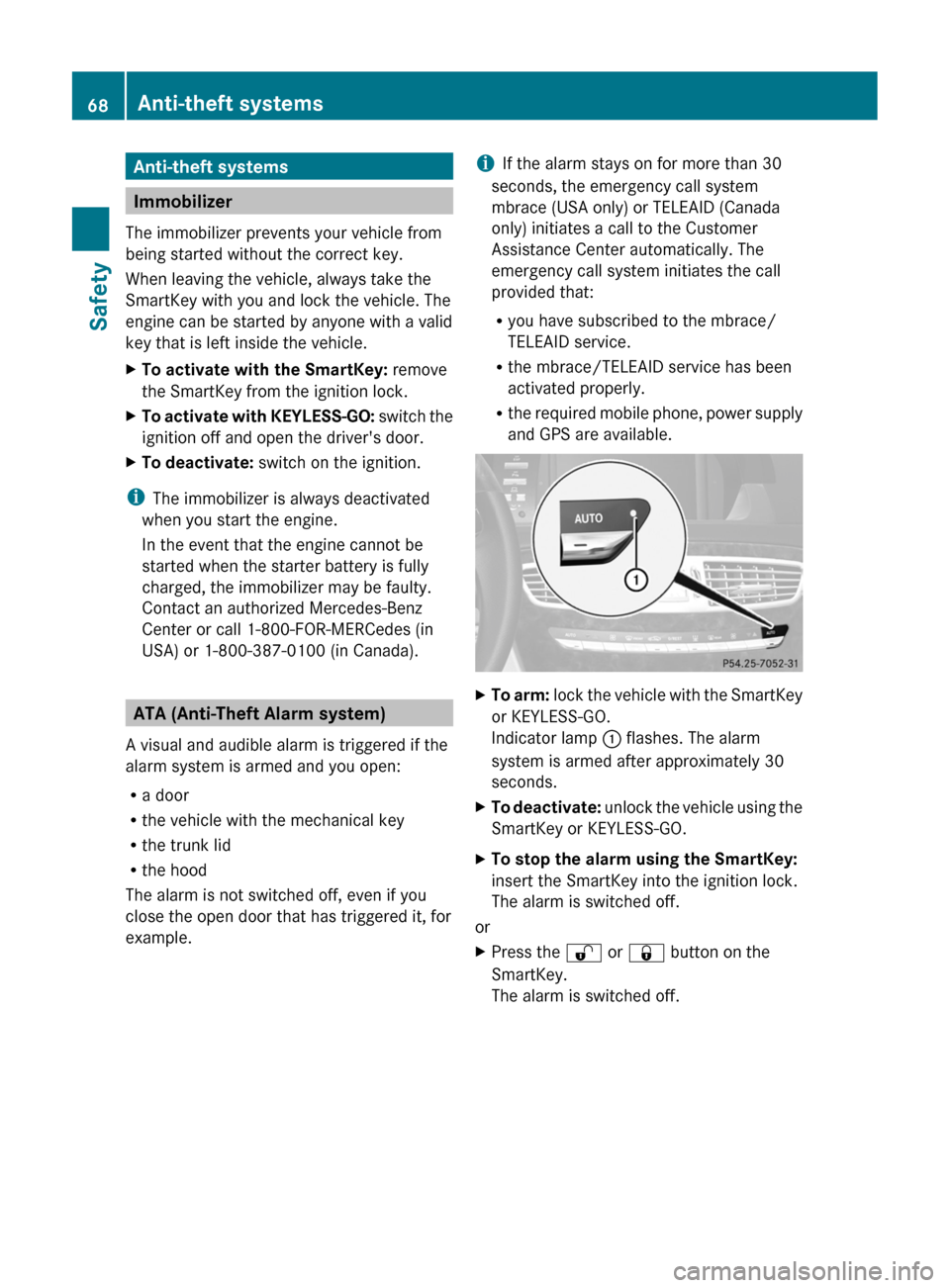
Indicator lamp : flashes. The alarm
system is armed after approximately 30
seconds.
XTo deactivate: unlock the vehicle using the
SmartKey or KEYLESS-GO.
XTo stop the alarm using the SmartKey:
insert the SmartKey into the ignition lock.
The alarm is switched off.
or
XPress the % or & button on the
SmartKey.
The alarm is switched off.
68Anti-theft systemsSafety
Page 76 of 480

Important information about using
KEYLESS-GO
RYou can use the KEYLESS-GO key as a
conventional SmartKey.
RYou can combine KEYLESS-GO functions
with those of a conventional SmartKey, e.g.
you can open the vehicle with KEYLESS-GO
and close it with the & button.
RAlways carry your KEYLESS-GO key on your
person.
RNever store the KEYLESS-GO key together
with:
-electronic devices, such as a mobile
phone or other SmartKey
-metal objects, such as coins or metal foil
Doing so may impair the function of
KEYLESS-GO.
RTo open or close the vehicle, the KEYLESS-
GO key should not be more than 3 ft (1 m)
from the door or trunk.
RIf the vehicle is parked for more than
72 hours, the KEYLESS-GO function is
deactivated. Pull an outer door handle and
switch on the ignition to reactivate the
KEYLESS-GO function.
RIf the KEYLESS-GO key is removed from the
vehicle, the system may not be able to
recognize the SmartKey anymore. The
vehicle can then no longer be locked or
started with KEYLESS-GO.
RIf the KEYLESS-GO key has been removed
from the vehicle, e.g. when another vehicle
occupant with a KEYLESS-GO key leaves
the vehicle:
-when the Start/Stop button is pressed,
or when trying to lock the vehicle using
the locking button on the outside door
handle, the Key Not Detected message
appears in the multifunction display.
-when the engine is running, the red Key
Not Detected message appears in the
multifunction display as you pull away.
Look for the KEYLESS-GO key and place
it somewhere else in the vehicle. Place
the KEYLESS-GO key on the front-
passenger seat, for example, or in your
shirt pocket.
RIf you have switched on the engine with the
Start/Stop button, you can switch it off
again by:
-pressing the Start/Stop button
-inserting the KEYLESS-GO key into the
ignition lock while the vehicle is at a
standstill and the automatic
transmission is in park position P.
RYou may inadvertently unlock the vehicle if
the KEYLESS-GO key is less than 3 ft (1 m)
from the vehicle and:
-an exterior door handle is hit by a jet of
water, or
-you clean an exterior door handle
RPlease note that any vehicle occupant can
start the engine when there is a KEYLESS-
GO key in the vehicle.
Scenario 1: There is a KEYLESS-GO key in
the vehicle and a second one outside the
vehicle. If you leave the KEYLESS-GO key
in the vehicle when you leave and lock the
vehicle, no message appears in the
multifunction display.
Scenario 2: There is a KEYLESS-GO key in
the vehicle, but none outside the vehicle. If
you get out of the vehicle and attempt to
lock it, the Key Detected In Vehicle
message appears in the multifunction
display. The vehicle is not then locked.
When starting the engine and whilst driving,
KEYLESS-GO also checks whether a valid
SmartKey is in the vehicle by periodically
establishing radio contact.
74SmartKeyOpening and closing
Page 107 of 480
Vehicle equipment ............................106
Introduction ...................................... 106
At a glance ......................................... 108
System settings ................................ 128
Navigation ......................................... 136
Telephone .......................................... 178
Audio .................................................. 195
Video .................................................. 222
Vehicle ............................................... 229105COMAND