2011 MERCEDES-BENZ CL-Class light
[x] Cancel search: lightPage 319 of 480

accordance with traffic conditions. You could
otherwise put yourself and others in danger.
The system may be impaired or unavailable if:
Rthere is poor visibility, e.g. due to snow,
rain, fog or heavy spray.
Rthe windshield is dirty, fogged up or
covered, for instance by a sticker, in the
vicinity of the camera.
Ryou are driving on bends, uphill gradients
or downhill gradients.
Light from the headlamps of oncoming
vehicles does not affect the Night View Assist
Plus display in the multifunction display. This
is also the case if you cannot switch on the
high-beam headlamps because of oncoming
traffic.
GWarning!
The Night View Assist Plus cannot record
objects immediately in front of or next to the
vehicle. When maneuvering, continue to look
through the windshield. Make sure no
persons or animals are in the area in which
you are maneuvering. You could otherwise
injure them.
iInfrared light is not visible to the human
eye and therefore does not glare. Night
View Assist Plus can therefore remain
switched on even if there is oncoming
traffic.
:Night View Assist cameraSwitching on Night View Assist Plus
You can only activate Night View Assist Plus
if:
Rthe SmartKey is in position 2 in the ignition
lock.
Rit is dark.
Rthe light switch is in the c or L
position.
Rreverse gear has not been engaged.
XPush rocker switch : up.
The Night View Assist Plus display appears
in the multifunction display.
:Night View Assist Plus display;Pedestrian recognized=Framing?Symbol for active pedestrian recognitionASpeed display
iThe infrared headlamps only switch on
when the vehicle is driving at speeds of at
least 6 mph (10 km/h). This means that you
do not have the full visual range while
Driving systems317Driving and parkingZ
Page 320 of 480

stationary and cannot check whether Night
View Assist Plus is working.
When you activate Night View Assist Plus,
speed display A in the multifunction display
changes. Speed display A is shown as a bar
at the bottom edge of the multifunction
display. This line is no longer available for
basic menus. You have to deactivate Night
View Assist Plus if you wish to change a
setting using the buttons on the multifunction
steering wheel.
Pedestrian recognition
The Night View Assist Plus recognizes
pedestrians using typical characteristics, i.e.
a silhouette in the shape of a person.
Pedestrian recognition is then switched on
automatically if:
RNight View Assist Plus is activated.
Ryou are driving above
approximately 6 mph (10 km/h).
Rthe surroundings are dark, e.g. when
driving outside built-up areas without
street lighting.
If pedestrian recognition is active,
symbol ? appears. If a pedestrian is now
recognized, they are framed = and thereby
highlighted. If the pedestrian recognition
system has brought a pedestrian to your
attention, look through the windshield to
evaluate the situation. The actual distance to
objects and pedestrians cannot be gauged
accurately by looking at a screen.
It may be the case that objects are highlighted
as well as pedestrians.
GWarning!
The pedestrian detection may be impaired or
unavailable when
Rpedestrians are obstructed fully or in part
by other objects such as parking vehicles
Rthe silhouette in the Night View Assist Plus
image is displayed incomplete or
interrupted, e.g. by significant light
reflection
Ra pedestrian's silhouette is not rich enough
in contrast compared to the background
Rpedestrians are not in erected position but,
for example, sit, crouch down, or lie
iAnimals are not identified by pedestrian
recognition.
Setting the brightness of the
multifunction display
XTo make brighter or dimmer: make sure
that Night View Assist Plus is activated.
XTurn control : counterclockwise or
clockwise.
Fogged up or dirty windshield
If the windshield in front of the camera is
fogged up or dirty on the inside or outside, the
Night View Assist Plus display is affected.
GWarning!
Please do not forget that your primary
responsibility is to drive the vehicle. A driver's
attention to the road must always be his/her
primary focus when driving. For your safety
and the safety of others, stop before trying to
remove window fogging or cleaning the
windshield in front of the Night View Assist
Plus camera.
Bear in mind that at a speed of just 30 mph
(approximately 50 km/h), your vehicle is
covering a distance of 44 feet
(approximately 14 m) every second.
318Driving systemsDriving and parking
Page 324 of 480

Information and warning display:Yellow indicator lamp/red warning lamp
When Active Blind Spot Assist is activated,
indicator lamp : in the exterior mirrors lights
up in yellow at speeds of up to
20 mph (30 km/h). At speeds above
20 mph (30 km/h), the indicator lamp goes
out and Active Blind Spot Assist is
operational.
If a vehicle is detected within the monitoring
range of Blind Spot Assist at speeds above
20 mph (30 km/h), warning lamp : on the
corresponding side lights up in red. This
warning is always emitted when a vehicle
enters the blind spot monitoring range from
behind or from the side. When you overtake
a vehicle, the warning only occurs if the
difference in speed is less than 7 mph
(12 km/h).
The yellow indicator lamp goes out if reverse
gear is engaged. Active Blind Spot Assist is
then no longer active.
The brightness of the indicator/warning
lamps is adjusted automatically according to
the ambient light.
GWarning
Active Blind Spot Assist is not active at speeds
lower than 20 mph (30 km/h). The indicator
lamps in the exterior mirrors are yellow.
Vehicles in the monitoring range are then not
indicated.
Always pay attention to traffic conditions and
your surroundings. Otherwise, you may fail to
recognize dangers in time, cause an accident
and injure yourself and others.
Optical and acoustic collision warning
When you switch on the appropriate turn
signals to change lanes, and a vehicle is
detected in the side monitoring range of
Active Blind Spot Assist, you receive an
optical and acoustic collision warning. You
then hear a double warning tone, and red
warning lamp : flashes. If the turn signal
remains on, detected vehicles are indicated
by the flashing of red warning lamp :. There
are no further warning tones.
Course-correcting brake application
If Active Blind Spot Assist detects a risk of
collision in the monitoring range, under
certain circumstances it will brake the vehicle
briefly on one side. This is designed to help
you avoid a collision.
This function is available in the range between
20 mph and 120 mph (30 km/h and
200 km/h).
When a course-correcting brake application
occurs, red warning lamp : flashes in the
exterior mirror and the following message, for
example, appears in the multifunction
display:
GWarning
Active Blind Spot Assist is only an aid
designed to assist driving. It is not a substitute
for attentive driving. In some cases, the
course-correcting brake application is not
sufficient to avoid a collision. In such a case,
you must steer, brake or accelerate.
In very rare cases, the system may
erroneously detect a danger of collision in the
area of crash barriers or similar lane borders
322Driving systemsDriving and parking
Page 325 of 480

and apply the brakes. Active Blind Spot Assist
does not detect all traffic situations and road
users. Always make sure that there is
sufficient distance to the side for other traffic
or obstacles. An inappropriate brake
application may be interrupted at any time if
you steer slightly in the opposite direction or
accelerate.
You are responsible for the vehicle's speed,
braking in good time, and steering correctly.
Always adapt your driving style to suit the
prevailing road and weather conditions.
Always pay attention to traffic conditions and
your surroundings. Otherwise, you may fail to
recognize dangers in time, cause an accident
and injure yourself and others.
Either a very slight course-correcting brake
application, or none at all, may occur if:
Rthere are other vehicles and/or obstacles,
such as crash barriers, close to the vehicle.
Ra vehicle approaches you too closely at the
side.
Ryou have adopted a sporty driving style with
high cornering speeds.
Ryou brake or accelerate decisively.
Ra driving safety system intervenes, e.g.
ESP® or PRE-SAFE® Brake.
RESP® is deactivated.
Ra loss of tire pressure or a defective tire has
been detected and displayed
Activating Active Blind Spot Assist
XMake sure that the radar sensor system
(Y page 342) and Active Blind Spot Assist
are activated in the on-board computer.
XTurn the SmartKey to position 2 in the
ignition lock.
Warning lamps : light up red in the
exterior mirrors for approximately 1.5
seconds and then turn yellow.
Active Lane Keeping Assist
Important safety guidelines
Active Lane Keeping Assist monitors the area
in front of your vehicle by means of a camera
at the top of the windshield. Active Lane
Keeping Assist detects lane markings on the
road and warns you before you leave your
lane unintentionally. If you do not react to the
warning, a lane-correcting application of the
brakes can bring the vehicle back into the
original lane.
:Active Lane Keeping Assist camera
If you select km on the on-board computer in
the Display unit Speed-/odometer:
(Y page 341) function, Active Lane Keeping
Assist is activated starting at a speed of
60 km/h. If the mph display unit is selected,
the assistance range begins at 40 mph.
GWarning
Active Lane Keeping Assist does not keep
your vehicle in its lane. It is only an aid and
may detect the lane markings on the road
incorrectly or not at all.
The system may be impaired or may not
function if:
Rseveral or no lane markings for a single lane
are present.
Rthere is poor visibility, e.g. due to
insufficient illumination of the road, or due
to snow, rain, fog or spray.
Rthere is glare, e.g. from oncoming traffic,
the sun, or reflection from other vehicles.
Driving systems323Driving and parkingZ
Page 326 of 480

Rthe windshield is dirty, fogged up or
covered, for instance by a sticker, in the
vicinity of the camera.
Rthe lane markings are worn away, dark or
covered up, e.g. by dirt or snow.
Rthe distance to the vehicle in front is too
small and the lane markings thus cannot be
detected.
Rthe lane markings on the road are unclear,
e.g. near roadworks.
Rthe lane markings change quickly, e.g.
lanes branch off, cross one another or
merge.
Rthe road is narrow and winding.
Active Lane Keeping Assist cannot detect
road and traffic conditions. It is not a
substitute for attentive driving. You are
responsible for the vehicle's speed, braking in
good time, and steering correctly. Always
adapt your driving style to suit the prevailing
road and weather conditions. Always pay
attention to traffic conditions and your
surroundings. Otherwise, you may fail to
recognize dangers in time, cause an accident
and injure yourself and others.
Warning vibration in the steering wheel
A warning can be given when a front wheel
passes over a lane marking. It will warn you
by means of intermittent vibration in the
steering wheel for up to 1.5 seconds.
In order that you are warned only when
necessary and in good time if you cross the
lane marking, the system recognizes certain
conditions and warns you accordingly.
The warning vibration occurs earlier if:
Ryou approach the outer lane marking on a
bend.
Rthe road has very wide lanes, e.g. a
freeway.
Rthe system recognizes solid lane markings.
The warning vibration occurs later if:
Rthe road has narrow lanes.
Ryou cut the corner on a bend.
No warning vibration occurs if:
Ryou clearly and actively steer, brake, or
accelerate.
Ryou cut the corner on a sharp bend.
Ra driving safety system intervenes, such as
ABS, BAS or ESP®.
Ryou switch on the turn signals. In this event,
the warnings are suppressed for a certain
period of time.
Lane-correcting brake application
If you leave your lane, under certain
circumstances the vehicle will brake briefly
on one side. This is designed to help you bring
the vehicle back into the original lane.
This function is available in the range between
40 mph and 120 mph (60 km/h and
200 km/h).
A lane-correcting brake application can only
be made after driving over a solid,
recognizable lane marking. Before this, a
warning must be emitted by means of
intermittent vibration in the steering wheel.
In addition, a lane with lane markings on both
sides must be recognized. The brake
application also slightly reduces driving
speed.
If a lane-correcting brake application occurs,
the following message appears in the
multifunction display:
iA further lane-correcting brake
application can only occur after your
vehicle has returned to the original lane.
GWarning
Active Lane Keeping Assist does not keep
your vehicle in its lane. It is only an aid
designed to assist driving. It is not a substitute
for attentive driving. In some cases, the lane-
324Driving systemsDriving and parking
Page 327 of 480

correcting brake application is not sufficient
to bring your vehicle back to the original lane.
In such cases, you must steer the vehicle
yourself to ensure that it does not leave the
lane.
Active Lane Keeping Assist does not detect
road and traffic conditions. Always make sure
that there is sufficient distance to the side for
other traffic or obstacles. In rare cases,
unclear markings or particular structures on
the roadway can be recognized as solid lane
markings. An inappropriate brake application,
e.g. after intentionally driving over a solid lane
marking, may be interrupted at any time by
steering slightly in the opposite direction.
Active Lane Keeping Assist cannot take
account of weather conditions.
You are responsible for the vehicle's speed,
braking in good time, and steering correctly.
Always adapt your driving style to suit the
prevailing road and weather conditions.
Always pay attention to traffic conditions and
your surroundings. Otherwise, you may fail to
recognize dangers in time, cause an accident
and injure yourself and others.
No lane-correcting brake application occurs
if:
Ryou clearly and actively steer, brake, or
accelerate.
Ryou cut the corner on a sharp bend.
Ryou switch on the turn signals.
Ra driving safety system intervenes, such as
ESP®, PRE-SAFE® Brake or Active Blind
Spot Assist.
Ryou have adopted a sporty driving style with
high cornering speeds or high rates of
acceleration.
RESP® is deactivated.
Rthe transmission is not in position D.
Ra loss of tire pressure or a defective tire has
been detected and displayed.
Active Lane Keeping Assist does not detect
road and traffic conditions. An inappropriate
brake application may be interrupted at any
time if you:
Rsteer slightly in the opposite direction
Ruse a turn signal
Rclearly brake or accelerate
A lane-correcting brake application is
interrupted automatically if:
Ra driving safety system intervenes, such as
ESP®, PRE-SAFE® Brake or Active Blind
Spot Assist.
Rlane markings can no longer be recognized.
Activating Active Lane Keeping Assist
XActivate Active Lane Keeping Assist using
the on-board computer .
Symbol : appears in the instrument
cluster.
If you drive at speeds above
40 mph (60 km/h) and lane markings are
detected, symbol : is displayed in green.
Active Lane Keeping Assist is ready for use.
Driving systems325Driving and parkingZ
Page 332 of 480
9:Press briefly:
Selects a function or scrolls through
lists
In the Audio menu: selects a stored
station, an audio track or a video
scene
In the Telephone menu: switches to
the phone book and selects a name
or a telephone number.
9:Press and hold:
In the Audio menu: selects a station
from the alphabetical list of stations,
starts station search or starts rapid
scrolling through an audio/video
disc.
In the Telephone menu: starts rapid
scrolling through the phone book.
a
Confirms selections and hides
display messages
In the Telephone menu: switches to
the phone book and starts dialing.
In the Audio menu: stops the station
search function at the desired
station.
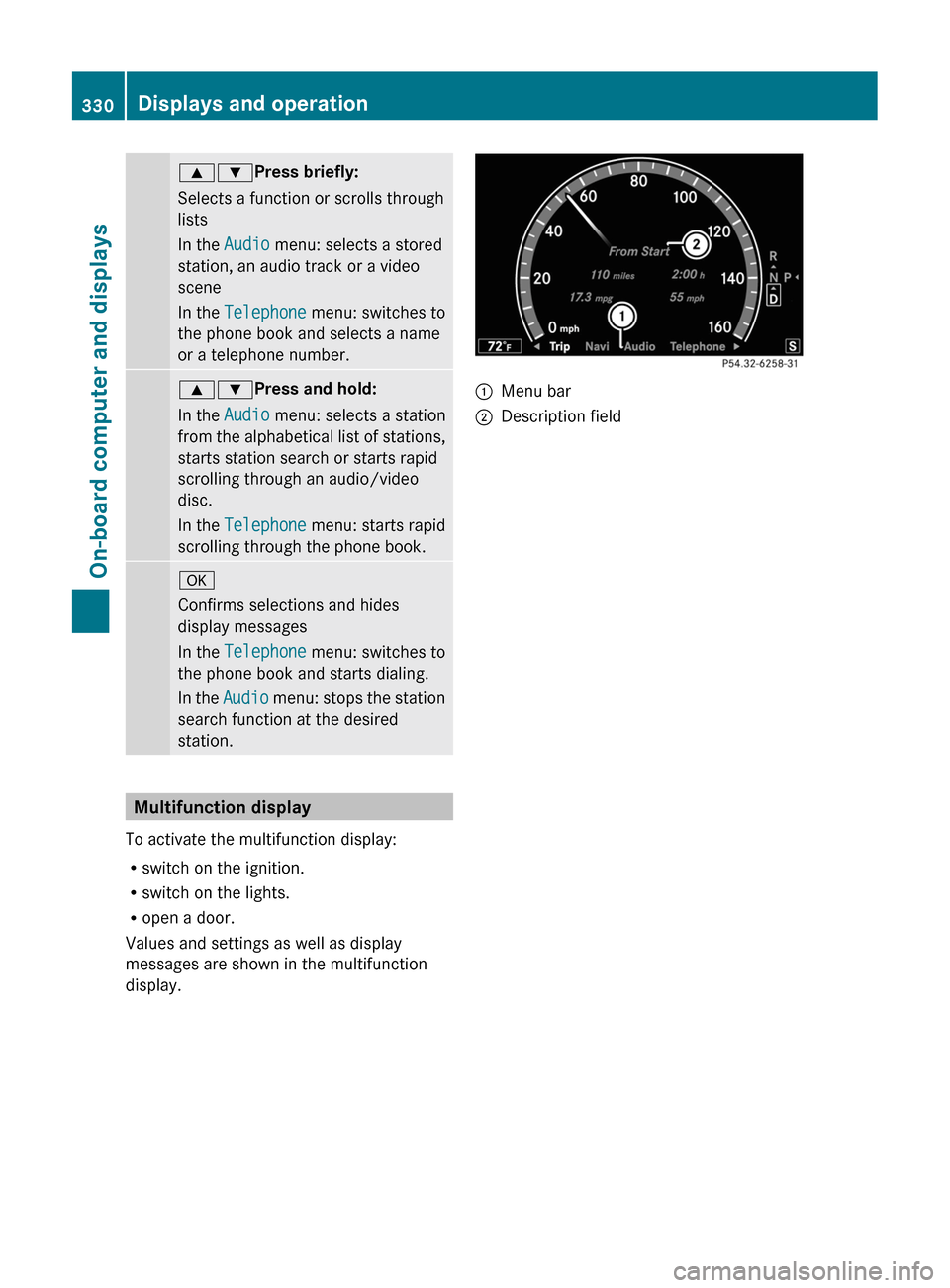
Multifunction display
To activate the multifunction display:
Rswitch on the ignition.
Rswitch on the lights.
Ropen a door.
Values and settings as well as display
messages are shown in the multifunction
display.
:Menu bar;Description field330Displays and operationOn-board computer and displays
Page 343 of 480

Rcall up display messages ( Y page 343)
R check the tire pressure electronically
( Y page 445)
R call up the service due date ( Y page 410)
R check the oil level ( Y page 405)
Menu settings
Introduction
In the Settings menu, you have the following
options:
R switching the daytime running lamps on/
off
R switching Adaptive Highbeam Assist on/
off
R showing or hiding the additional
speedometer
R selecting the units for speed and distance
R activating/deactivating the radar sensor
system
Switching the daytime running lamps
on/off
This function is not available in Canada.
If you have activated the Day Running
Lights function and the light switch is set to
$ or c , the daytime running lamps are
switched on automatically when the engine is
running.
In the dark, the following also light up:
R the side lamps
R the tail lamps
R the license plate lamp
R the side marker lamp
If you turn the light switch to a different
position, the corresponding lights are
switched on. If you switch off the daytime
running lamps at night, make sure that the
light switch is set to L or c .
The factory setting is Enabled.
XPress the = or ; button on the
steering wheel to select the Settings
menu.XPress the 9 or : button to select
Day Running Lights .XPress the a button to confirm.XTo activate/deactivate: press a
again.
Switching Adaptive Highbeam Assist
on/off
XPress the = or ; button on the
steering wheel to select the Settings
menu.XPress the : or 9 button to select
Adapt. High-beam Asst. .XPress the a button to confirm.XTo activate/deactivate: press a
again.
Switching the additional speedometer
on or off
An additional digital speedometer can be
shown in the multifunction display.
Vehicles with a kilometer speedometer: the
digital speedometer has mph units.
Vehicles with a miles speedometer: the digital
speedometer has km/h units.
XPress the = or ; button on the
steering wheel to select the Settings
menu.XPress 9 or : to select Add.
Speedometer .XPress the a button to confirm.XPress the a button to save the setting.
Selecting the unit of measurement for
distance
The Display Unit Speed-/Odometer
function allows you to choose whether
certain displays appear in km/h or mph.
Menus and submenus341On-board computer and displaysZ