2011 MAZDA MODEL 3 4-DOOR Ac vents
[x] Cancel search: Ac ventsPage 237 of 514

Black plate (237,1)
qSelecting the Airflow Mode
Type A
Dashboard Vents
Dashboard and Floor Vents
Floor Vents Defroster and Floor Vents
Defroster Vents
Interior Comfort
Climate Control System
6-5
Mazda3_8BM5-EA-10F_Edition3 Page237
Tuesday, October 5 2010 9:6 AM
Form No.8BM5-EA-10F
Page 238 of 514
Black plate (238,1)
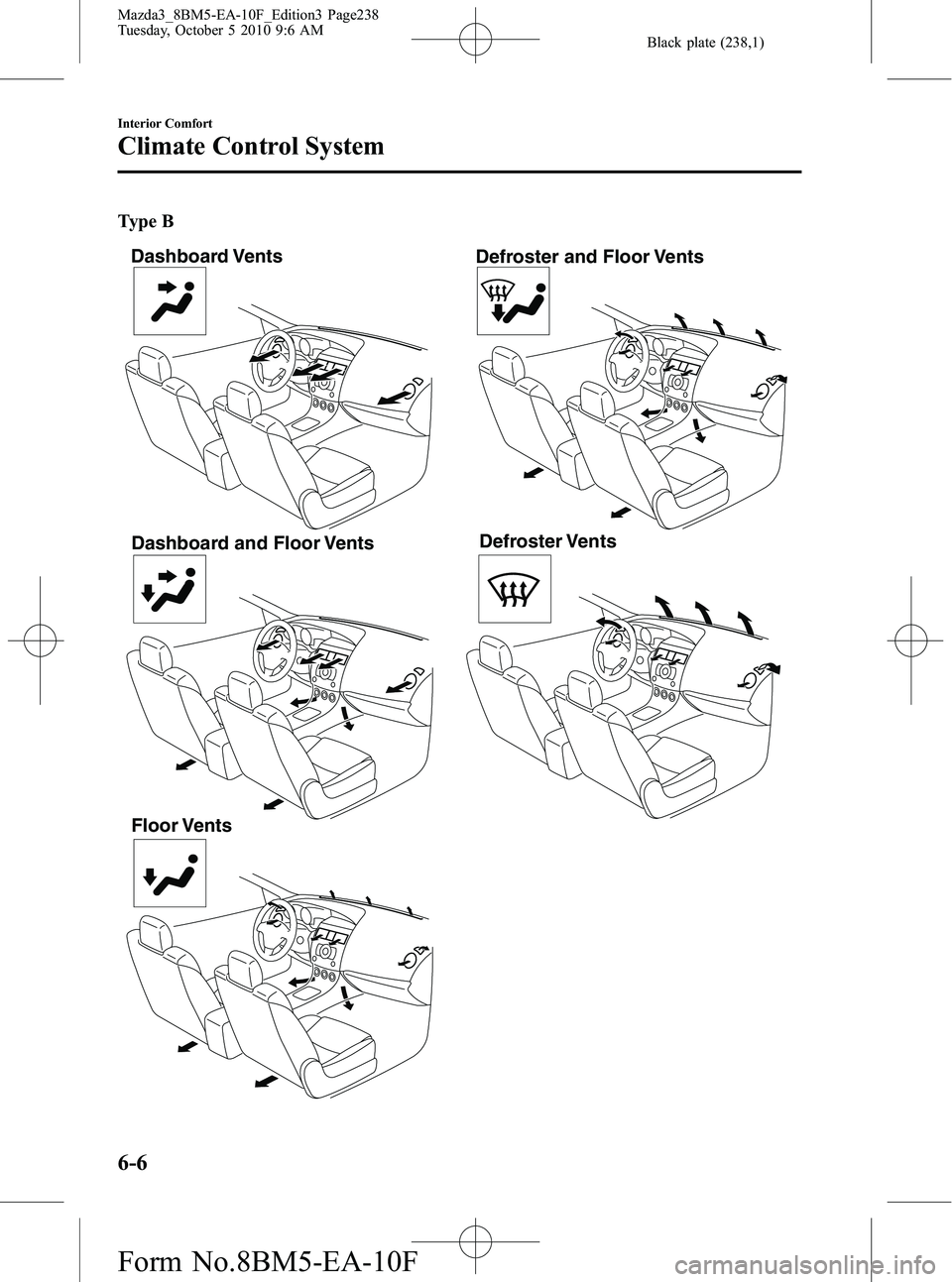
Type B
Dashboard VentsDashboard and Floor Vents
Floor Vents Defroster and Floor Vents
Defroster Vents
6-6
Interior Comfort
Climate Control System
Mazda3_8BM5-EA-10F_Edition3 Page238
Tuesday, October 5 2010 9:6 AM
Form No.8BM5-EA-10F
Page 246 of 514

Black plate (246,1)
Mode selector switch
The desired airflow mode can be selected
(page 6-5).
NOTE
lWith the airflow mode set to the
position and the temperature control dial
set at a medium temperature, heated air is
directed to the feet and a comparably lower
air temperature will flow through the
central, left and right vents.
lTo set the air vent to, press the
windshield defroster switch.
lIn theorposition, the air
conditioner is automatically turned on and
the outside air mode is automatically
selected to defrost the windshield. In the
orposition, the outside air mode
cannot be changed to the recirculated air
mode.
A/C switch
Pressing the A/C switch while the AUTO
switch is turned on will turn off the air
conditioning (cooling/dehumidifying
functions). The air conditioning can be
turned on and off by pressing the A/C
switch while the fan control dial is on.
NOTE
lThe air conditioning operates when the A/C
switch is pressed even if the fan is off.
lThe air conditioner may not function when
the outside temperature approaches 0 °C
(32 °F). (Indicator light remains on even
when system is off.)
Air intake selector
Outside or recirculated air positions can
be selected. Press the switch to select
outside/recirculated air positions.
Recirculated air position (indicator
light illuminated)
Use this position when going through
tunnels, driving in congested traffic (high
engine exhaust areas) or when quick
cooling is desired.
Outside air position (indicator light
turned off)
Use this position for normal conditions
and defogging.
6-14
Interior Comfort
Climate Control System
Mazda3_8BM5-EA-10F_Edition3 Page246
Tuesday, October 5 2010 9:6 AM
Form No.8BM5-EA-10F
Page 248 of 514

Black plate (248,1)
2. Use the temperature control dial toselect a desired temperature.
Press the DUAL switch or turn the
front passenger temperature control
dial to control the set temperature
individually for the driver and front
passenger.
To turn off the system, press the OFF
switch.
NOTE
lSetting the temperature to the maximum
high or low will not provide the desired
temperature at a faster rate.
lWhen selecting heat, the system will restrict
airflow until it has warmed to prevent cold
air from blowing out of the vents.
qWindshield Defrosting and Defogging
Press the windshield defroster switch.
In this position, the outside air position is
automatically selected, and the air
conditioner automatically turns on. The
air conditioner will directly dehumidify
the air to the front windshield and side
windows (page 6-5). Airflow amount will
be increased.
WARNING
Set the temperature control to the hot
or warm position when defogging (
position):
Using the
position with the
temperature control set to the cold
position is dangerous as it will cause
the outside of the windshield to fog
up. Your vision will be hampered,
which could lead to a serious
accident.
NOTE
Use the temperature control dial to increase
the air flow temperature and defog the
windshield more quickly.
6-16
Interior Comfort
Climate Control System
Mazda3_8BM5-EA-10F_Edition3 Page248
Tuesday, October 5 2010 9:6 AM
Form No.8BM5-EA-10F
Page 405 of 514

Black plate (405,1)
Body Lubrication
All moving points of the body, such as
door and hood hinges and locks, should
be lubricated each time the engine oil is
changed. Use a nonfreezing lubricant on
locks during cold weather.
Make sure the hood's secondary latch
keeps the hood from opening when the
primary latch is released.
Wiper Blades
CAUTION
ØHot waxes applied by automatic
car washers have been known to
affect the wiper's ability to clean
windows.
Ø To prevent damage to the wiper
blades, do not use gasoline,
kerosene, paint thinner, or other
solvents on or near them.
Ø When the wiper lever is in the
AUTO position and the ignition is
switched ON, the wipers may
move automatically in the
following cases:
ØIf the windshield above the rain
sensor is touched.
ØIf the windshield above the rain
sensor is wiped with a cloth.
ØIf the windshield is struck with
a hand or other object.
ØIf the rain sensor is struck with
a hand or other object from
inside the vehicle.
Be careful not to pinch hands or
fingers as it may cause injury, or
damage the wipers. When
washing or servicing your Mazda,
make sure the wiper lever is in the
OFF position.
Contamination of either the windshield or
the blades with foreign matter can reduce
wiper effectiveness. Common sources are
insects, tree sap, and hot wax treatments
used by some commercial car washes.
If the blades are not wiping properly,
clean the window and blades with a good
cleaner or mild detergent; then rinse
thoroughly with clean water. Repeat if
necessary.
Maintenance and Care
Owner Maintenance
8-27
Mazda3_8BM5-EA-10F_Edition3 Page405
Tuesday, October 5 2010 9:7 AM
Form No.8BM5-EA-10F
Page 442 of 514

Black plate (442,1)
qRepairing Damage to the Finish
Deep scratches or chips on the finish
should be repaired promptly. Exposed
metal quickly rusts and can lead to major
repairs.
CAUTION
If your Mazda is damaged and needs
metal parts repaired or replaced,
make sure the body shop applies
anti-corrosion materials to all parts,
both repaired and new. This will
prevent them from rusting.
qBright-Metal Maintenance
lUse tar remover to remove road tar and
insects. Never do this with a knife or
similar tool.
lTo prevent corrosion on bright-metal
surfaces, apply wax or chrome
preservative and rub it to a high luster.
lDuring cold weather or in coastal areas,
cover bright-metal parts with a coating
of wax or preservative heavier than
usual. It would also help to coat them
with noncorrosive petroleum jelly or
some other protective compound.
CAUTION
Don't use steel wool, abrasive
cleaners, or strong detergents
containing highly alkaline or caustic
agents on chrome-plated or anodized
aluminum parts. This may result in
damage to the protective coating and
cause discoloration or paint
deterioration.
qUnderbody Maintenance
Road chemicals and salt used for ice and
snow removal and solvents used for dust
control may collect on the underbody. If
not removed, they will speed up rusting
and deterioration of such underbody parts
as fuel lines, frame, floor pan, and exhaust
system, even though these parts may be
coated with anti-corrosive material.
Thoroughly flush the underbody and
wheel housings with lukewarm or cold
water at the end of each winter. Try also
to do this every month.
Pay special attention to these areas
because they easily hide mud and dirt. It
will do more harm than good to wet
down the road grime without removing
it.
The lower edges of doors, rocker panels,
and frame members have drain holes that
should not be clogged. Water trapped
there will cause rusting.
WARNING
Dry wet brakes by driving very slowly
and applying the brakes lightly until
brake performance is normal: Driving with wet brakes is
dangerous. Increased stopping
distance or the vehicle pulling to one
side when braking could result in a
serious accident. Light braking will
indicate whether the brakes have
been affected.
8-64
Maintenance and Care
Appearance Care
Mazda3_8BM5-EA-10F_Edition3 Page442
Tuesday, October 5 2010 9:8 AM
Form No.8BM5-EA-10F
Page 445 of 514

Black plate (445,1)
NOTElBecause genuine leather is a natural
material, its surface is not uniform and it
may have natural scars, scratches, and
wrinkles.
lTo maintain the quality for as long as
possible, periodical maintenance, about
twice a year, is recommended.
lSand and dust on the seat surface may
damage the overcoat of the genuine leather
surfaces and accelerate wear.
lGreasy soiling on genuine leather may
cause molding and stains.
lRubbing hard with a stiff brush or cloth
may cause damage.
lDo not wipe the leather using alcohol,
chlorine bleach, or organic solvents such as
thinner, benzene, or gasoline. Otherwise, it
may cause discoloration or stains.
lIf the seats get wet, promptly remove
moisture with a dry cloth. Remaining
moisture on the surface may cause
deterioration such as hardening and
shrinkage.
lExposure to direct sunlight for long periods
may cause deterioration and shrinkage.
When parking the car under direct sunlight
for long periods, shade the interior using
sunshades.
lDo not leave vinyl products on the seats for
long periods as they may affect the leather
quality and coloring. If the cabin
temperature becomes hot, the vinyl may
deteriorate and adhere to the genuine
leather.
Fabric
Remove dust and loose dirt from fabric
with a whisk broom or vacuum cleaner.
Clean it with a mild soap solution good
for upholstery and carpets. Remove fresh
spots immediately with a fabric spot
cleaner.To keep the fabric looking clean and
fresh, take care of it. Otherwise its color
will be affected, it can be stained easily,
and its fire-resistance may be reduced.
CAUTION
Use only recommended cleaners and
procedures. Others may affect
appearance and fire-resistance.
Multi information display edge panelí,
Panel beside the multi information
displayí
Multi information display edge panel and
panel beside the multi information display
are fitted with panels that have been
treated with a special coating that resists
scratching.
When the panel needs to be cleaned, use a
soft cloth to wipe off dirt from the surface.
NOTE
Scratches or nicks on the panels resulting from
the use of a hard brush or cloth may not be
repairable.
q
Cleaning the Lap/Shoulder Belt
Webbing
Clean the webbing with a mild soap
solution recommended for upholstery or
carpets. Follow instructions. Don't bleach
or dye the webbing; this may weaken it.
After cleaning the belts, thoroughly dry
the belt webbing and make sure there is
no remaining moisture before retracting
them.
Maintenance and Care
Appearance Care
8-67íSome models.
Mazda3_8BM5-EA-10F_Edition3 Page445
Tuesday, October 5 2010 9:8 AM
Form No.8BM5-EA-10F
Page 504 of 514

Black plate (504,1)
Personalization Features
The following“Personalization Features ”are available. These settings can only be changed by an Authorized
Mazda Dealer.
Setting Available customization Initial Setting After Setting Change
Auto headlight on/off The headlight illumination on/off timing based
on the surrounding lightness/darkness can be
changed. 2000
―4000 lx 1000 ―2000 lx
Turn indicator The volume level of the turn indicator can be
changed. High Low/Deactivated
Key reminder
warning alarm The volume of the key reminder warning alarm
can be changed.
High Low
Lights-on reminder
warning alarm
*1The volume of the lights-on reminder warning
alarm can be changed. High Low/Deactivated
Illumination entry The time required for the interior lamp to turn
off automatically after all the doors are closed
can be changed.
15 seconds 7.5/30/60 seconds
The function allowing the interior lamp to
illuminate automatically when the ignition is
switched off can be deactivated. Activated Deactivated
The function allowing the interior lamp to
illuminate automatically when the doors are
unlocked can be deactivated. Activated Deactivated
The time required for the interior lamp to turn
off automatically can be changed
(prevents battery depletion when a door is
open/ajar). 30 minutes 10/60 minutes
The time required for the interior lamp to
illuminate after unlocking any door can be
changed. 30 seconds 7.5/15/60 seconds
The function allowing the interior lamp to turn
off automatically when any door is opened
(or not securely closed) can be changed. Activated Deactivated
Smart turn The function allowing the turn signal lights to
flash three times with a momentary turn switch
operation (when changing lanes) can be
activated. Deactivated Activated
10-12
Personalization Features
Mazda3_8BM5-EA-10F_Edition3 Page504
Tuesday, October 5 2010 9:8 AM
Form No.8BM5-EA-10F