Page 1 of 347
Introduction 4
Instrument Cluster 18
Warning lights and chimes 18
Gauges 25
Message center 36
Entertainment Systems 52
AM/FM stereo with CDX6/MP3 52
Auxiliary input jack (Line in) 60
USB port 62
Satellite radio information 64
Navigation system 66
SYNC�66
Climate Controls 67
Dual automatic temperature control 67
Navigation system based climate control 70
Rear window defroster 74
Lights 75
Headlamps 75
Turn signal control 80
Bulb replacement 82
Driver Controls 87
Windshield wiper/washer control 87
Steering wheel adjustment 88
Power windows 93
Mirrors 95
Speed control 96
Moon roof 99
Table of Contents
1
2011 MKZ Hybrid(hkz)
Owners Guide, 2nd Printing
USA(fus)
Page 16 of 347
These are some of the symbols you may see on your vehicle.
Vehicle Symbol Glossary
Safety Alert
See Owner’s Guide
Fasten Safety BeltAirbag - Front
Airbag - SideChild Seat Lower
Anchor
Child Seat Tether
AnchorBrake System
Anti-Lock Brake SystemParking Brake System
Brake Fluid -
Non-Petroleum BasedParking Aid System
Stability Control SystemSpeed Control
Master Lighting SwitchHazard Warning Flasher
Fog Lamps-FrontFuse Compartment
Fuel Pump ResetWindshield Wash/Wipe
Windshield
Defrost/DemistRear Window
Defrost/Demist
Introduction
16
2011 MKZ Hybrid(hkz)
Owners Guide, 2nd Printing
USA(fus)
Page 17 of 347
Vehicle Symbol Glossary
Power Windows
Front/Rear
Power Window Lockout
Child Safety Door
Lock/UnlockInterior Luggage
Compartment Release
Panic AlarmEngine Oil
Engine CoolantEngine Coolant
Temperature
Do Not Open When HotBattery
Avoid Smoking, Flames,
or SparksBattery Acid
Explosive GasFan Warning
Power Steering FluidMaintain Correct Fluid
LevelMAX
MIN
Service Engine SoonEngine Air Filter
Passenger Compartment
Air FilterJack
Check Fuel CapLow Tire Pressure
Warning
Introduction
17
2011 MKZ Hybrid(hkz)
Owners Guide, 2nd Printing
USA(fus)
Page 39 of 347

The setup menu operates by use of
the INFO, SETUP, and RESET
buttons:
•SETUP: Press to enter the setup menu. Press SETUP to scroll through
the list in the active window. The list wraps back to the first item
when the end of the list is reached. An arrow at the top or bottom (or
both) of the list indicates that additional entries are available.
•RESET: Selects the currently highlighted list item and moves the
selection to the right. The currently selected options are indicated by
a check mark. Press SETUP to scroll through the list of options and
then press RESET to select that item. A check mark will appear next
to the selected item.
•INFO: Used to move left in the menu and to exit out.
Display settings
Press SETUP to reach Display Settings.
While Display Settings is highlighted, press RESET to select it and move
right to display the following:
Display mode
Choosing display mode allows you to select which instrument cluster
level you would like displayed. While Display Mode is highlighted, press
RESET to select it and move right to display to the following:
•Inform
•Enlighten (default level)
•Engage
•Empower
Press SETUP to scroll through the list and highlight one of the choices.
Press RESET to pick the highlighted item.
Instrument Cluster
39
2011 MKZ Hybrid(hkz)
Owners Guide, 2nd Printing
USA(fus)
Page 67 of 347
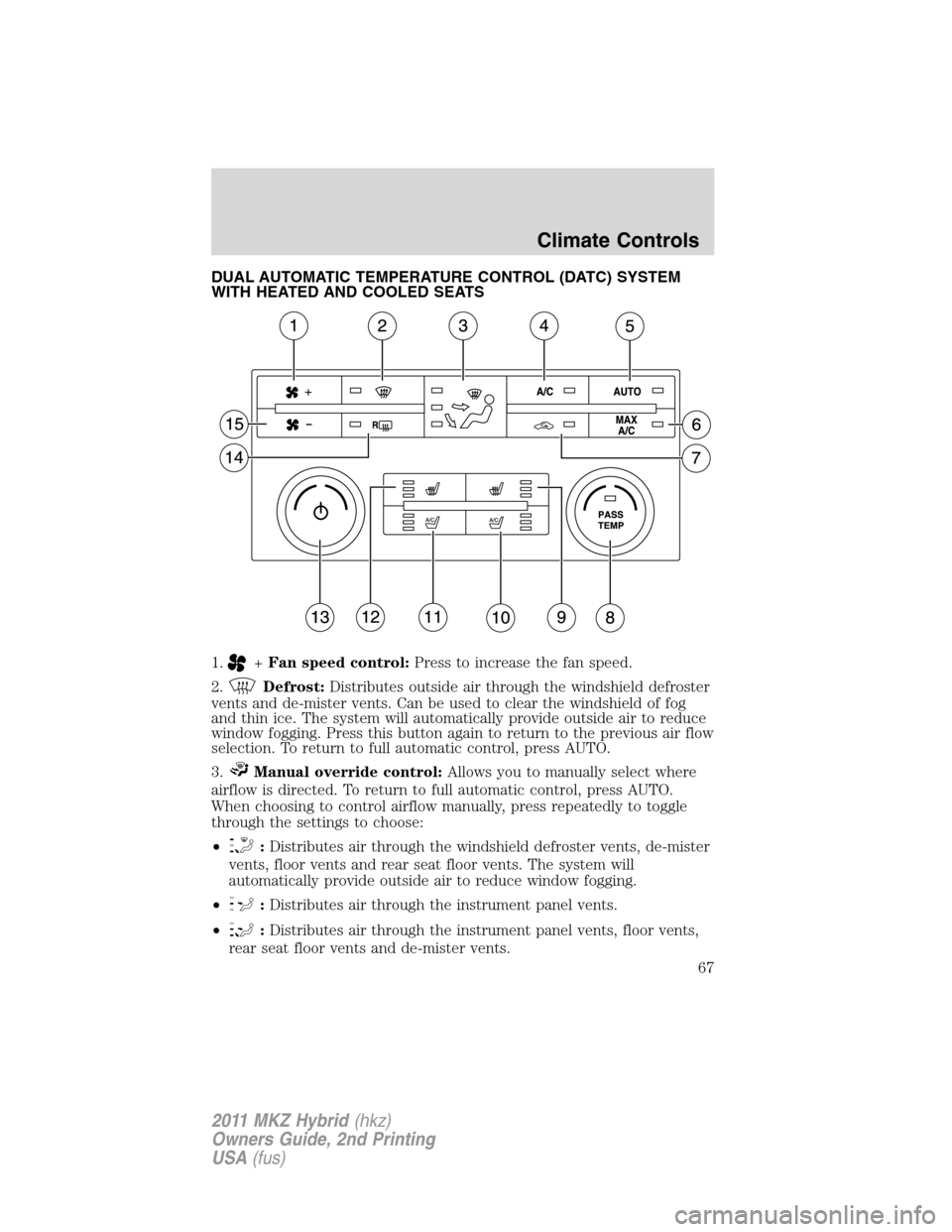
DUAL AUTOMATIC TEMPERATURE CONTROL (DATC) SYSTEM
WITH HEATED AND COOLED SEATS
1.
+Fan speed control:Press to increase the fan speed.
2.
Defrost:Distributes outside air through the windshield defroster
vents and de-mister vents. Can be used to clear the windshield of fog
and thin ice. The system will automatically provide outside air to reduce
window fogging. Press this button again to return to the previous air flow
selection. To return to full automatic control, press AUTO.
3.
Manual override control:Allows you to manually select where
airflow is directed. To return to full automatic control, press AUTO.
When choosing to control airflow manually, press repeatedly to toggle
through the settings to choose:
•
:Distributes air through the windshield defroster vents, de-mister
vents, floor vents and rear seat floor vents. The system will
automatically provide outside air to reduce window fogging.
•
:Distributes air through the instrument panel vents.
•
:Distributes air through the instrument panel vents, floor vents,
rear seat floor vents and de-mister vents.
Climate Controls
67
2011 MKZ Hybrid(hkz)
Owners Guide, 2nd Printing
USA(fus)
Page 69 of 347

To disable the smart-zone feature:Press and hold PASS TEMP for
more than four seconds. Both temperature displays will begin flashing to
signify that the feature has been disabled. The system will remain in dual
zone mode.
To re-enable the smart-zone feature:Press and hold PASS TEMP for
more than four seconds. The driver’s temperature display will begin
flashing to signify that the feature has been re-enabled. The system will
return to the previous mode after PASS TEMP is released.
9.
Passenger heated seat:Press to activate/deactivate the
passenger heated seat. Refer toHeated and cooled seatsin theSeating
and Safety Restraintschapter for more information.
10.
Passenger cooled seat:Press to activate/deactivate the
passenger cooled seat. Refer toHeated and cooled seatsin theSeating
and Safety Restraintschapter for more information.
11.
Driver cooled seat:Press to activate/deactivate the driver
cooled seat. Refer toHeated and cooled seatsin theSeating and
Safety Restraintschapter for more information.
12.
Driver heated seat:Press to activate/deactivate the driver
heated seat. Refer toHeated and cooled seatsin theSeating and
Safety Restraintschapter for more information.
13.
Power/Driver temperature:Press to activate/deactivate the
climate control system. When the system is off, outside air is prevented
from entering the vehicle. Turn to increase/decrease the air temperature
on the driver side of the vehicle. The control also adjusts the passenger
side temperature when PASS TEMP is disengaged or anytime the
passenger seat is not occupied. The recommended initial setting is
between 72°F (22°C) and 75°F (24°C), then adjust for comfort. The
driver side temperature setting will appear in the upper left corner of the
display.
14.
RRear defroster:Press to activate/deactivate the rear window
defroster. This button will also activate/deactivate the heated mirrors (if
equipped). Refer toRear window defrosterlater in this chapter for
more information.
15.
–Fan speed control:Press to decrease the fan speed.
Outside temperature:The outside temperature will appear in the
display and is label as EXT TEMP.
Temperature conversion:To switch between Fahrenheit and Celsius,
refer toMessage centerin theInstrument Clusterchapter.
Climate Controls
69
2011 MKZ Hybrid(hkz)
Owners Guide, 2nd Printing
USA(fus)
Page 70 of 347

DUAL ZONE AUTOMATIC TEMPERATURE CONTROL WITH
HEATED AND COOLED SEATS
(NAVIGATION SYSTEM BASED–IF EQUIPPED)
Temperature conversion:To switch between Fahrenheit and Celsius,
refer toMessage centerin theInstrument Clusterchapter.
1.Climate:Press to control the climate control system through the
touch display screen. SeeTouchscreen functionslater in this section.
2.Passenger temperature:Press to activate separate passenger
temperature control and turn the knob to increase/decrease the air
temperature on the passenger side of the vehicle.
3.
Passenger heated seat:Press to heat the passenger heated seat.
Refer toHeated and cooled seatsin theSeating and Safety Restraints
chapter for more information.
4.A/C:Press to activate/deactivate air conditioning. Use with
recirculated air to improve cooling performance and efficiency. A/C
engages automatically in MAX A/C,
(defrost) and
(floor/defrost).
5.
RRear defroster:Press to activate/deactivate the rear window
defroster. Refer toRear window defrosterlater in this chapter for more
information. This button will also activate the heated mirrors.
6.
Defrost:Distributes outside air through the windshield defroster
vents and de-mister vents. Can be used to clear the windshield of fog
A/C
Climate Controls
70
2011 MKZ Hybrid(hkz)
Owners Guide, 2nd Printing
USA(fus)
Page 71 of 347

and thin ice. The system will automatically provide outside air to reduce
window fogging. Press this button again to return to the previous air flow
selection.
7.
Power:Press to activate/deactivate the climate control system.
When the system is off, outside air is prevented from entering the
vehicle. The climate status in the touchscreen will also be turned off.
8.
Driver heated seat:Press to heat the driver heated seat. Refer to
Heated and cooled seatsin theSeating and Safety Restraintschapter
for more information.
9.Driver temperature:Press to increase/decrease the air temperature
on the driver side of the vehicle. This control also adjusts the passenger
side temperature when dual zone operation is disengaged.
10.
Driver cooled seat:Press to cool the driver cooled seat. Refer
toHeated and cooled seatsin theSeating and Safety Restraints
chapter for more information.
11.AUTO:Press to engage full automatic operation. Select the desired
temperature using the temperature control. The system will
automatically determine fan speed, airflow location, A/C on or off, and
outside or recirculated air, to heat or cool the vehicle to reach the
desired temperature.
12. –
+Fan speed control:Press (- / +) to decrease/increase the
fan speed.
13.
Recirculated air:Press to activate/deactivate air recirculation
in the vehicle. Recirculated air may reduce the amount of time needed to
cool down the interior of the vehicle when used with A/C and may also
help reduce undesired odors from reaching the interior of the vehicle.
Recirculated air engages automatically when MAX A/C is selected or can
be engaged manually in any airflow mode except
(defrost).
Recirculation may turn off automatically in all airflow selections
except MAX A/C.
14.
Passenger cooled seat:Press to cool the passenger cooled
seat. Refer toHeated and cooled seatsin theSeating and Safety
Restraintschapter for more information.
Outside temperature:The outside temperature will appear in the
display and is labeled as EXT XX.
Climate Controls
71
2011 MKZ Hybrid(hkz)
Owners Guide, 2nd Printing
USA(fus)


