Page 441 of 821
371
3-4. Using the hands-free phone system (for mobile phones)
3
Interior features
“Setup”
“Security”
“Set PIN”Setting a PIN code
“Phbk Lock”Locking the phone book
“Phbk Unlock”Unlocking the phone book
“Phone
Setup”
“Pair Phone”Registering the mobile phone
to be used
“Connect”Selecting a mobile phone to be
used
“Change Name”Changing a registered name of
a mobile phone
“List Phones”Listing the registered mobile
phones
“Set Passkey”Changing the passkey
“Delete Phone”Deleting a registered mobile
phone
“System
Setup”
“Guidance Vol”Setting voice guidance volume
“Device Name”Displaying the Bluetooth®
device address and name
“Initialize”Initializing the system
First menuSecond
menuThird menuOperation detail
Page 455 of 821
385
3-4. Using the hands-free phone system (for mobile phones)
3
Interior features
Security and system setup
nSecurity setting items and operation procedures
To enter the menu for each function, follow the steps below using a
voice command or :
lSetting or changing the PIN (Personal Identification Number)
1. “Setup” → 2. “Security” → 3. “Set PIN”
lLocking the phone book
1. “Setup” → 2. “Security” → 3. “Phonebook Lock (Phbk Lock)”
lUnlocking the phone book
1. “Setup” → 2. “Security” → 3. “Phonebook Unlock (Phbk
Unlock)”
nSystem setup items and operation procedures
To enter the menu for each function, follow the steps below using
:
lSetting voice guidance volume
1. “Setup” → 2. “System Setup” → 3. “Guidance Vol”
lDisplaying the Bluetooth® device address and name
1. “Setup” → 2. “System Setup” → 3. “Device Name”
lInitializing the system
1. “Setup” → 2. “System Setup” → 3. “Initialize”
Page 490 of 821

420
3-7. Other interior features
Floor mat
CAUTION
Observe the following precautions.
Failure to do so may cause the driver's floor mat to slip, possibly interfering with the
pedals while driving. An unexpectedly high speed may result or it may become diffi-
cult to stop the vehicle, leading to a serious accident.
nWhen installing the driver's floor mat
lDo not use floor mats designed for other models or different model year vehicles,
even if they are Lexus Genuine floor mats.
lOnly use floor mats designed for the driver's seat.
lAlways install the floor mat securely using the retaining hooks (clips) provided.
lDo not use two or more floor mats on top of each other.
lDo not place the floor mat bottom-side up or upside-down.
nBefore driving
Use only floor mats designed specifically for vehicles of the same model
and model year as your vehicle. Fix them securely in place onto the carpet.
Fix the floor mat in place using
the retaining hooks (clips) pro-
vided.
The shape of the retaining hooks
(clips) and the fixing procedure
of the floor mat for your vehicle
may differ from those shown in
the illustration. For details, refer
to the floor mat retention clip
installation instructions supplied
with the clips.
lCheck that the floor mat is securely fixed in
the right place with all the provided retain-
ing hooks (clips). Be especially careful to
perform this check after cleaning the floor.
lWith the engine stopped and the shift lever
in P, fully depress each pedal to the floor to
make sure it does not interfere with the
floor mat.
Page 491 of 821
421
3-7. Other interior features
3
Interior features
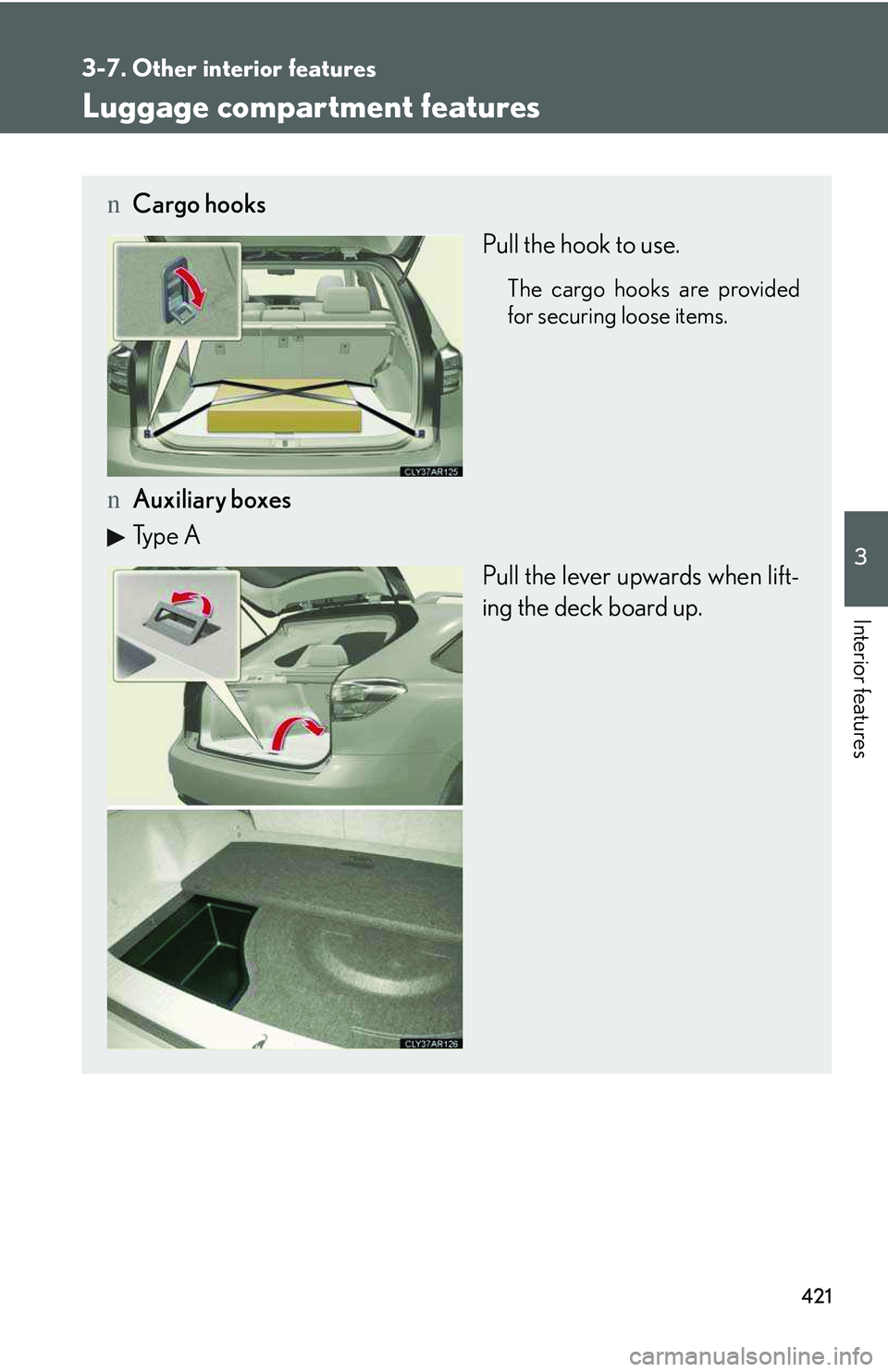
Luggage compartment features
nCargo hooks
Pull the hook to use.
The cargo hooks are provided
for securing loose items.
nAuxiliary boxes
Type A
Pull the lever upwards when lift-
ing the deck board up.
Page 495 of 821
425
3-7. Other interior features
3
Interior features
Detach the inner clips of the rear
luggage cover from the back door.
STEP2
nInstalling the rear luggage cover
lEnsure that the luggage cover is in the proper installation position.
Push the clips of the rear luggage cover into the indentions on the back door
until they are locked into place.
lCheck that the rear luggage cover is securely attached.
CAUTION
nWhen the cargo hooks are not in use
To avoid injury, always return the cargo hooks to their stowed positions.
Page 496 of 821
426
3-7. Other interior features
Garage door opener
The garage door opener (HomeLink® Universal Transceiver) is manufactured
under license from HomeLink®.
Programming the HomeLink® (for U.S.A. owners)
The HomeLink® compatible transceiver in your vehicle has 3 buttons
which can be programmed to operate 3 different devices. Refer to the
programming method below appropriate for the device.
Indicator
Buttons
nProgramming the HomeLink®
Point the remote control transmit-
ter for the device 1 to 3 in. (25 to
75 mm) from the HomeLink®
control buttons.
Keep the HomeLink® indicator
light in view while programming.
The garage door opener can be programmed to operate garage doors,
gates, entry doors, door locks, home lighting systems, security systems, and
other devices.
STEP1
Page 499 of 821

429
3-7. Other interior features
3
Interior features
Test the operation of the HomeLink® by pressing the newly pro-
grammed button. Check to see if the gate/device operates cor-
rectly.
Repeat the steps above to program another device for each of
the remaining HomeLink® buttons.
nProgramming other devices
To program other devices such as home security systems, home door
locks or lighting, contact your authorized Lexus dealer for assistance.
nReprogramming a button
The individual HomeLink® buttons cannot be erased but can be
reprogrammed. To reprogram a button, follow the “Reprogramming a
HomeLink® button” instructions.
Operating HomeLink®
Press the appropriate HomeLink® button. The HomeLink® indicator
light should turn on.
The HomeLink® compatible transceiver in your vehicle continues to send a
signal for up to 20 seconds as long as the button is pressed.
Reprogramming a HomeLink® button
Press and hold the desired HomeLink® button. After 20 seconds, the
HomeLink® indicator light will start flashing slowly. Next, while still press-
ing and holding the HomeLink® button, press and hold the button on the
transmitter until the HomeLink® indicator light changes from a slow to a
rapid flash.
STEP5
STEP6
Page 505 of 821

435
3-7. Other interior features
3
Interior features
nConditions unfavorable to correct operation
The compass may not show the correct direction in the following conditions:
lThe vehicle is stopped immediately after turning.
lThe vehicle is on an inclined surface.
lThe vehicle is in a place where the earth's magnetic field is subject to interfer-
ence by artificial magnetic fields (underground car park/parking lot, under a
steel tower, between buildings, roof car park/parking lot, near an intersection,
near a large vehicle, etc.).
lThe vehicle has become magnetized. (There is a magnet or metal object near
the inside rear view mirror.)
lThe battery has been disconnected.
lA door is open.
CAUTION
nWhile driving the vehicle
Do not adjust the display. Adjust the display only when the vehicle is stopped.
nWhen doing the circling calibration
Secure a wide space, and watch out for people and vehicles in the vicinity. Do not
violate any local traffic rules while performing circling calibration.
NOTICE
nTo avoid compass malfunctions
Do not place magnets or any metal objects near the inside rear view mirror.
Doing this may cause the compass sensor malfunction.
nTo ensure normal operation of the compass
lDo not perform a circling calibration of the compass in a place where the earth's
magnetic field is subject to interference by artificial magnetic fields.
lDuring calibration, do not operate electric systems (moon roof, power windows,
etc.) as they may interfere with the calibration.