Page 289 of 821

217
2-4. Using other driving systems
2
When driving
CAUTION
nCautions regarding the driving assist systems
Observe the following precautions.
Failure to do so may cause an accident resulting in death or serious injury.
lAssisting the driver to measure following distance
The dynamic radar cruise control is only intended to help the driver in determin-
ing the following distance between the driver's own vehicle and a designated
vehicle traveling ahead. It is not a mechanism that allows careless or inattentive
driving, and it is not a system that can assist the driver in low-visibility conditions. It
is still necessary for driver to pay close attention to the vehicle's surroundings.
lAssisting the driver to judge proper following distance.
The dynamic radar cruise control determines whether the following distance
between the driver's own vehicle and a designated vehicle traveling ahead is
appropriate or not. It is not capable of making any other type of judgement.
Therefore, it is absolutely necessary for the driver to remain vigilant and to deter-
mine whether or not there is a possibility of danger in any given situation.
lAssisting the driver to operate the vehicle
The dynamic radar cruise control has no capability to prevent or avoid a collision
with a vehicle traveling ahead. Therefore, if there is ever any danger, the driver
must take immediate and direct control of the vehicle and act appropriately in
order to ensure the safety of all involved.
nTo avoid inadvertent dynamic radar cruise control activation
Switch the cruise control off using the “ON-OFF” button when not in use.
Page 290 of 821

218
2-4. Using other driving systems
CAUTION
nSituations unsuitable for dynamic radar cruise control
Do not use dynamic radar cruise control in any of the following situations.
Doing so may result in inappropriate speed control and could cause an accident
resulting in death or serious injury.
lIn heavy traffic
lOn roads with sharp bends
lOn winding roads
lOn slippery roads, such as those covered with rain, ice and snow
lOn steep downhills, or where there are sudden changes between sharp up and
down gradients
lAt entrances to expressways
lWhen weather conditions are bad enough that they may prevent the sensors
from functioning correctly (fog, snow, sandstorm, heavy rain, etc.)
lWhen a buzzer is heard often
lWhen your vehicle is towing anything
nWhen the sensor may not be correctly detecting the vehicle ahead
Apply the brakes as necessary when any of the following types of vehicles are in
front of you.
As the sensor may not be able to correctly detect these types of vehicles, the
approach warning (→P. 213) will not be activated, and an accident may result.
lVehicles that cut in suddenly
lVehicles traveling at low speeds
lVehicles that are not moving
lVehicles with small rear ends (trailers with no load on board etc.)
lMotorcycles traveling in the same lane
Page 291 of 821

219
2-4. Using other driving systems
2
When driving
CAUTION
nConditions under which the vehicle-to-vehicle distance control may not function
correctly
Apply the brakes as necessary in the following conditions as the radar sensor may
not be able to correctly detect vehicles ahead, and an accident may result:
lWhen water or snow thrown up by the surrounding vehicles hinders the function-
ing of the radar sensor
lWhen your vehicle is pointing upwards (caused by a heavy load in the luggage
compartment etc.)
lWhen the road curves or when the lanes are narrow
lWhen steering wheel operation or your position in the lane is unstable
lWhen the vehicle ahead of you decelerates suddenly
nTo ensure the radar sensor functions correctly
Do not do the following to the sensor or grille as doing so may cause the sensor not
to function correctly and could result in an accident:
lSticking or attaching anything to them
lLeaving them dirty
lDisassembling or subjecting them to strong shocks
lModifying or painting them
lReplacing them with non-genuine parts
nHandling the radar sensor
Observe the following to ensure the cruise control system can function effectively:
lKeep the sensor and front grille clean at all times.
Clean the sensor and front grille with a soft cloth so you do not mark or damage
them.
lDo not subject the sensor or surrounding area to a strong impact.
If the sensor moves even slightly off position, the system may malfunction. If the
sensor or surrounding area is subject to a strong impact, always have the area
inspected and adjusted by your Lexus dealer.
lDo not disassemble the sensor.
lDo not attach accessories or stickers to the sensor, grille or surrounding area.
lDo not modify or paint the sensor and grille.
Page 339 of 821
267
2-5. Driving information
2
When driving
CAUTION
nTrailer towing precautions
lFollow all the instructions described in this section. Failure to do so could cause
an accident resulting in death or serious injury.
lExceeding the towing capacity, GVWR or GAWR can cause an accident result-
ing in death or serious personal injuries.
nTo avoid accident or injury
lDo not exceed the trailer hitch assembly weight, gross vehicle weight, gross axle
weight and trailer tongue load capacities.
lNever load more weight in the back than in the front of the trailer. About 60% of
the load should be in the front half of the trailer, and the remaining 40% in the
rear.
lDo not use cruise control when you are towing.
lThe tow hitch receiver installed on your vehicle must never be used on another
vehicle.
lDo not exceed 45 mph (72 km/h) or the posted towing speed limit, whichever is
lower. As instability (swaying) of the towing vehicle-trailer combination increases
as speed increases, exceeding 45 mph (72 km/h) may cause loss of control.
lSlow down and downshift before descending steep or long downhill grades. Do
not make sudden downshifts.
lAvoid holding the brake pedal down too long or applying the brakes too fre-
quently. This could cause the brakes to overheat and result in reduced braking
efficiency.
lDo not tow the vehicle with the compact spare tire installed.
Page 574 of 821

504
4-3. Do-it-yourself maintenance
35AFS7. 5 AAdaptive front-lighting system
36BK/UP LP7. 5 ABack-up lights
37HEATER NO. 27. 5 AAir conditioning system, AWD system
38ECU IG110 A
Adaptive front-lighting system, head-
light cleaner, cooling fan, cruise con-
trol, vehicle stability control, vehicle
dynamics integrated management
39EFI NO. 210 A
Multiport fuel injection system/
sequential multiport fuel injection sys-
tem
40F/ P U M P15 A
Multiport fuel injection system/
sequential multiport fuel injection sys-
tem
41DEICER25 AWindshield wipers and washer
42STOP7. 5 A
Vehicle stability control, vehicle
dynamics integrated management,
high mounted stoplight
43TOW I N G BAT T20 ATrailer battery
44TOW I N G30 ATrailer lights
45FILTER10 ACondenser
46IG1 MAIN30 AECU IG1, BK/UP LP,
HEATER NO. 2, AFS
47H-LP RH HI15 ARight-hand headlight (high beam)
48H-LP LH HI15 ALeft-hand headlight (high beam)
49BIXENON10 ADischarge headlight
50H-LP RH LO15 ARight-hand headlight (low beam)
51H-LP LH LO15 ALeft-hand headlight (low beam)
FuseAmpereCircuit
Page 618 of 821
5
When trouble arises
549
5-2. Steps to take in an emergency
(Flashes)
or
(Flashes)
(If equipped)
Indicates a malfunction in the radar cruise control
system
Press the “ON-OFF” button once to deactivate the
system, and then press the button again to reactivate
the system.
(If equipped)
Indicates a malfunction in the automatic headlight
leveling system
Indicates a malfunction in:
Page 623 of 821
554
5-2. Steps to take in an emergency
(If equipped)
Indicates that intuitive
parking assist is dirty or
covered with ice
A buzzer also sounds.
Clean the sensor.
(Flashes)
(If equipped)
Indicates that the radar
cruise control sensor is
dirty or covered with ice
A buzzer also sounds.
Clean the sensor.
(Flashes)
(If equipped)
Indicates that the radar
cruise control system is
unable to judge vehicle-
to-vehicle distance
A buzzer also sounds.
If the windshield wipers
are on, turn them off or set
them to a mode other than
“AUTO” or high speed
wiper operation.
(Flashes)
(If equipped)
Indicates that your vehi-
cle is nearing the vehicle
ahead (in radar cruise
mode)
At the same time,
will appear on
the head-up display.
Slow the vehicle by apply-
ing the brakes.
Wa r n i n g m e s s a g eDetailsCorrection procedure
Page 632 of 821
5
When trouble arises
563
5-2. Steps to take in an emergency
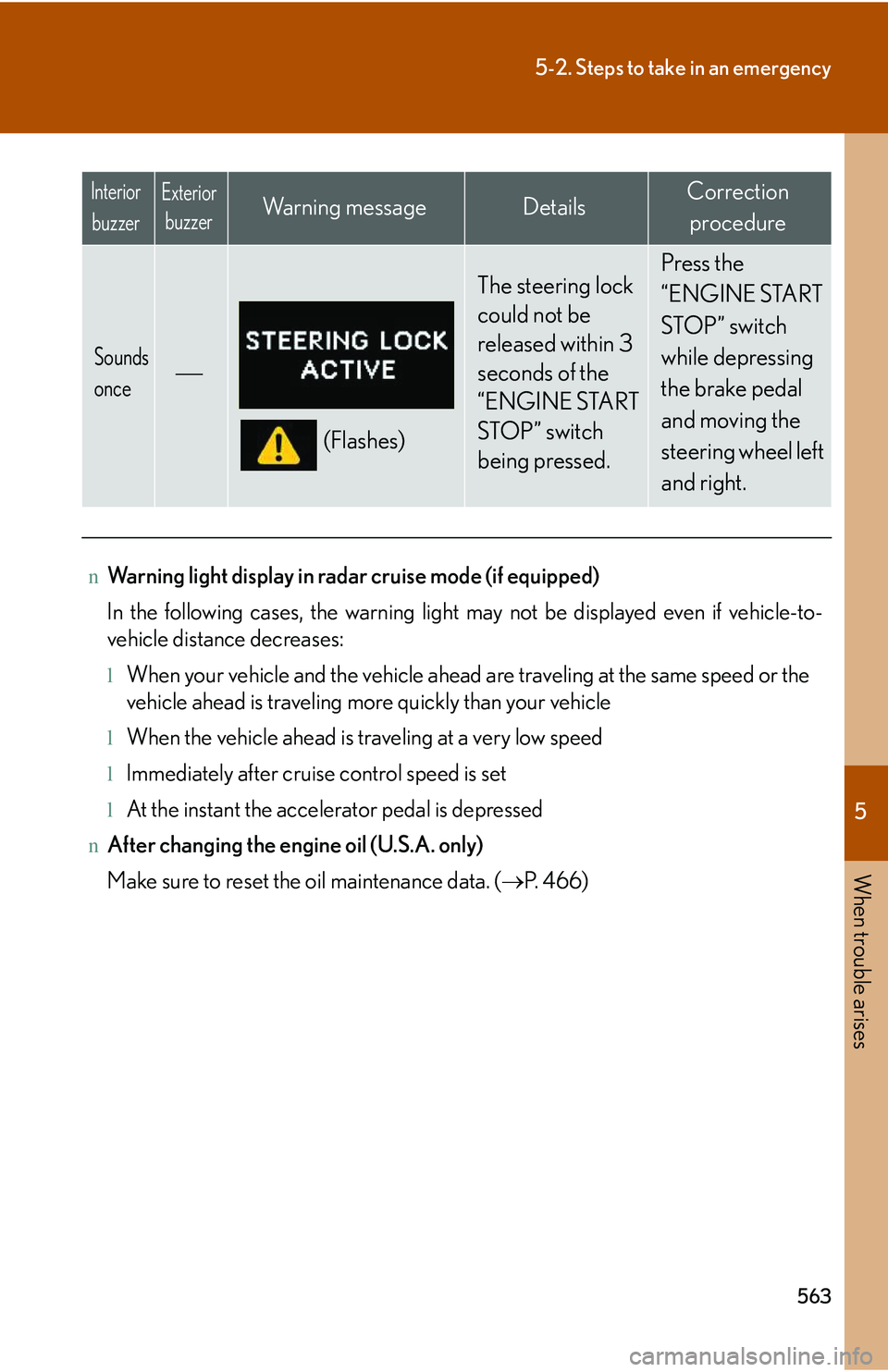
Sounds
once
⎯
(Flashes)
The steering lock
could not be
released within 3
seconds of the
“ENGINE START
STOP” switch
being pressed.
Press the
“ENGINE START
STOP” switch
while depressing
the brake pedal
and moving the
steering wheel left
and right.
nWarning light display in radar cruise mode (if equipped)
In the following cases, the warning light may not be displayed even if vehicle-to-
vehicle distance decreases:
lWhen your vehicle and the vehicle ahead are traveling at the same speed or the
vehicle ahead is traveling more quickly than your vehicle
lWhen the vehicle ahead is traveling at a very low speed
lImmediately after cruise control speed is set
lAt the instant the accelerator pedal is depressed
nAfter changing the engine oil (U.S.A. only)
Make sure to reset the oil maintenance data. (→P. 4 6 6 )
Interior
buzzer Exterior
buzzer
Wa r n i n g m e s s a g eDetailsCorrection
procedure