2011 Lexus IS250 sound
[x] Cancel search: soundPage 7 of 578
TABLE OF CONTENTSIndex
IS350/250_U
6
5-1. Essential informationEmergency flashers.................... 450
If your vehicle needs to be towed............................................... 451
If you think something is wrong ............................................. 457
Fuel pump shut off system ....... 458
Event data recorder .................... 459
5-2. Steps to take in an emergency If a warning light turns on or a warning buzzer
sounds... ......................................... 461
If a warning message is displayed ....................................... 470
If you have a flat tire...................... 481
If the engine will not start ......... 489
If the shift lever cannot be shifted from P ............................... 491
If you lose your keys .................... 492
If the electronic key does not operate properly ............... 493
If the vehicle battery is discharged .................................. 498
If your vehicle overheats ............ 501
If the vehicle becomes stuck............................................... 504
If your vehicle has to be stopped in an emergency ..... 506 6-1. Specifications
Maintenance data (fuel, oil level, etc.).................... 508
Fuel information ............................ 525
Tire information............................ 528
6-2. Customization Customizable features.............. 540
6-3. Initialization Items to initialize ........................... 546
Reporting safety defects for U.S. owners.......................... 548
Seat belt instructions for Canadian owners
(in French) .................................... 549
SRS airbag instructions for Canadian owners
(in French) ..................................... 551
5When trouble arises6Vehicle specifications
7For owners
Page 20 of 578

IS350/250_U
19
For your information
Main Owner’s Manual
Please note that this manual applies to all models and explains all equipment, includ-
ing options. Therefore, you may find some explanations for equipment not installed
on your vehicle.
All specifications provided in this manual are current at the time of printing. How-
ever, because of the Lexus policy of continual product improvement, we reserve the
right to make changes at any time without notice.
Depending on specifications, the vehicle shown in the illustration may differ from
your vehicle in terms of color and equipment.
Noise from under vehicle after turning off the engine
Approximately five hours after the engine is turned off, you may hear sound coming
from under the vehicle for several minutes. This is the sound of a fuel evaporation
leakage check and, it does not indicate a malfunction.
Accessories, spare parts and modification of your Lexus
A wide variety of non-genuine spare parts and accessories for Lexus vehicles are
currently available in the market. You should know that Toyota does not warrant
these products and is not responsible for their performance, repair, or replacement,
or for any damage they may cause to, or adverse effect they may have on, your
Lexus vehicle.
This vehicle should not be modified with non-genuine Lexus products. Modification
with non-genuine Lexus products could affect its performance, safety or durability,
and may even violate governmental regulations. In addition, damage or perfor-
mance problems resulting from the modification may not be covered under war-
ranty.
Page 33 of 578

32
1-2. Opening, closing and locking the doors and trunk
IS350/250_U
■Operation signals
A buzzer sounds and the emergency flashers flash to indicate that the doors have
been locked/unlocked. (Locked: Once; Unlocked: Twice)
■Conditions affecting operation
The smart access system with push-button start uses weak radio waves. In the fol-
lowing situations, the communication between the electronic key and the vehicle
may be affected, preventing the smart access system with push-button start from
operating properly:
(Ways of coping: →P. 4 9 3 )
●When the electronic key battery is depleted
●Near a TV tower, electric power plant, gas station, radio station, large display,
airport or other facility that generates strong radio waves or electrical noise
●When carrying a portable radio, cellular phone, cordless phone or other wire-
less communication devices
●When the electronic key is in contact with, or is covered by the following metal-
lic objects
• Cards to which aluminum foil is attached
• Cigarette boxes that have aluminum foil inside
• Metallic wallets or bags
•Coins
• Hand warmers made of metal
• Media such as CDs and DVDs
●When multiple electronic keys are in the vicinity
●When another wireless key (that emits radio waves) is being used nearby
●When carrying or using the electronic key together with the following devices
that emit radio waves
• Another vehicle's electronic key or a wireless key that emits radio waves
• Personal computer or personal digital assistant (PDA)
• Digital audio player
• Portable game system
●If window tint with a metallic content or metallic objects are attached to the rear
window
Page 35 of 578

34
1-2. Opening, closing and locking the doors and trunk
IS350/250_U
■Battery-saving function
In the following circumstances, the entry function is disabled in order to prevent the
vehicle and electronic key batteries from discharging.
●When the entry function has not been used for a month or more
●When the electronic key has been left within approximately 3 ft. (1 m) of the
vehicle for 10 minutes or more
The system will resume operation when
●The vehicle is locked using the door handle lock switch.
●The vehicle is locked/unlocked using the wireless remote control function.
( → P. 4 0 )
●The vehicle is locked/unlocked using the mechanical key. ( →P. 4 9 3 )
■Electronic key battery depletion
●The standard battery life is 1 to 2 years. (The card key battery life is about a year
and a half.)
●If the battery becomes low, an alarm will sound in the cabin when the engine
stops. ( →P. 477)
●The battery becomes depleted even if the electronic key is not used because
the key always transmits radio waves. If the smart access system with push-but-
ton start or the wireless remote control does not operate, or the detection area
becomes smaller, the battery may be depleted. Replace the battery when nec-
essary.
(→ P. 4 2 1 )
●To avoid serious deterioration, do not leave the electronic key within 3 ft. (1 m) of
the following electrical appliances that produce a magnetic field.
•TVs
• Personal computers
• Cellular phones, cordless phones and battery chargers
• Recharging cellular phones or cordless phones
•Glass top ranges
•Table lamps
Page 37 of 578

36
1-2. Opening, closing and locking the doors and trunk
IS350/250_U
■When the vehicle is not driven for extended periods
To prevent theft of the vehicle, do not leave the electronic key within 6 ft. (2 m) of
the vehicle.
■Security feature
If a door is not opened within approximately 60 seconds after the vehicle is
unlocked, the anti-theft system automatically locks the vehicle again.
■Alarms and warning indicators
A combination of exterior and interior alarms as well as warnings displayed on the
multi-information display is used to prevent theft of the vehicle and unforeseeable
accidents resulting from erroneous operation. Take appropriate measures in
response to any warning indications on the multi-information display. (→P. 4 7 0 )
The following table describes circumstances and correction procedures when only
alarms are sounded.
AlarmSituationCorrection procedure
Exterior alarm
sounds once for 2
seconds
Tried to lock the doors using
the entry function while the
electronic key is still inside
the passenger compartmentRetrieve the electronic
key from the passenger
compartment and lock
the doors again.
Closed the trunk while the
electronic key is still inside
and all doors are lockedRetrieve the electronic
key from the trunk and
close the trunk lid.
Exterior alarm
sounds once for 60
seconds
Tried to exit the vehicle with
the electronic key and lock
the doors without first turning
the “ENGINE START STOP”
switch OFFTu r n t h e “ E N G I N E
START STOP” switch
OFF and lock the doors
again.
Exterior alarm
sounds once for 10
secondsTried to lock the vehicle using
the entry function while a
door is openClose all of the doors
and lock the doors
again.
Interior alarm
sounds continu-
ously
*
Tried to open the door and
exit the vehicle without shift-
ing the shift lever to P
Shift the shift lever to P.
Page 41 of 578
40
1-2. Opening, closing and locking the doors and trunk
IS350/250_U
Wireless remote control
■Operation signals
Doors: A buzzer sounds and the emergency flashers flash to indicate that thedoors have been locked/unlocked. (Locked: Once; Unlocked: Twice)
Trunk: A buzzer sounds to indicate that the trunk has been unlocked.
Windows and moon roof: A buzzer sounds to indicate that the windows and moon roof are operating.
■Door lock buzzer
If a door is not fully closed, a buzzer sounds if an attempt to lock the door is made.
Fully close the door to stop the bu zzer, and lock the vehicle once more.
■Alarm
Using the wireless remote control to lock the doors will set the alarm system.
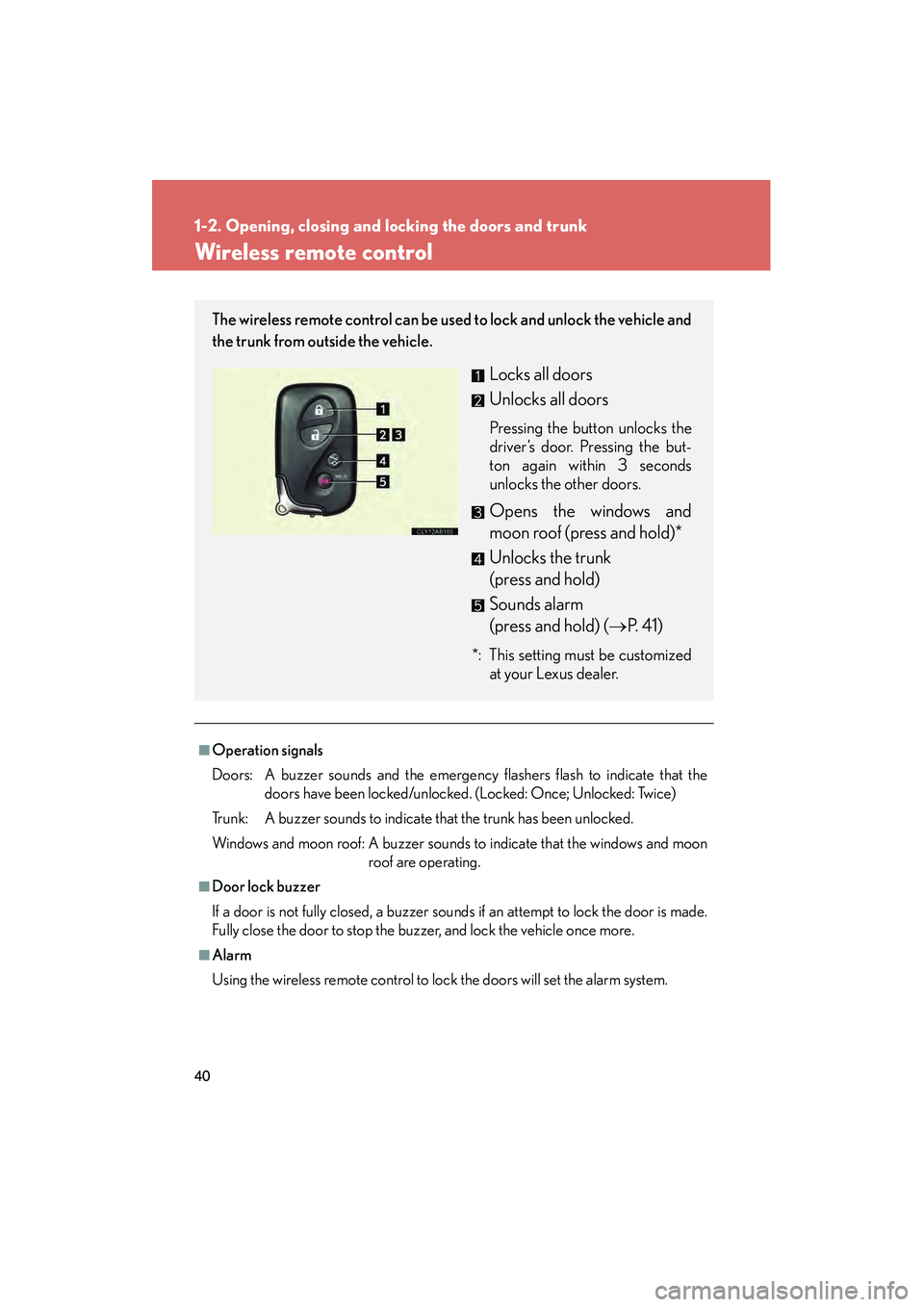
The wireless remote control can be used to lock and unlock the vehicle and
the trunk from outside the vehicle.
Locks all doors
Unlocks all doors
Pressing the button unlocks the
driver’s door. Pressing the but-
ton again within 3 seconds
unlocks the other doors.
Opens the windows and
moon roof (press and hold)*
Unlocks the trunk
(press and hold)
Sounds alarm
(press and hold) (→P. 4 1 )
*: This setting must be customized
at your Lexus dealer.
Page 42 of 578

41
1-2. Opening, closing and locking the doors and trunk
1
Before driving
IS350/250_U
■Pa n i c m o d e
■Electronic key battery depletion
→P. 3 4
■Security feature
→P. 3 6
■When the electronic key battery is fully depleted
→P. 4 2 1
■Conditions affecting operation
→P. 3 2
■Customization that can be configured at Lexus dealer
Settings (e.g. trunk unlocking function) can be changed.
(Customizable features →P. 5 4 0 ) When is pushed for longer than about
one second, an alarm will sound for about 60
seconds and the vehicle lights will flash to
deter any person from trying to break into or
damage your vehicle.
To stop the alarm, push any button on the
wireless remote control.
Page 61 of 578

60
1-3. Adjustable components (seats, mirrors, steering wheel)
IS350/250_U
Seat belts
Make sure that all occupants are wearing their seat belts before driving the
vehicle.
■Correct use of the seat belts
●Extend the shoulder belt so
that it comes fully over the
shoulder, but does not come
into contact with the neck or
slide off the shoulder.
● Position the lap belt as low as
possible over the hips.
● Adjust the position of the
seatback. Sit up straight and
well back in the seat.
● Do not twist the seat belt.
■ Fastening and releasing the seat belt
Fastening the belt
Push the tab into the buckle until
a clicking sound is heard.
Releasing the belt
Press the release button.
Release button