Page 337 of 609

320
3-3. Using the Bluetooth® audio system
IS250/220d/200d_EE
Registering a portable player
Select “Pair Audio” using , and , and perform
the procedure for registering a portable player. (P. 314)
Selecting a portable player to be used
Select “Select Audio” using , and .
Select the portable player to be used using , and
.
Select “From Car” or “From Audio” using ,
and .
If “From Car” is selected, the portable player will be automati-
cally connected whenever the “ENGINE START STOP” switch
is in either ACCESSORY or IGNITION ON mode.
Changing the registered name of a portable player
Select “Change Name” using , and .
Select the desired portable player name to be changed using
, and .
Select “Record Name” using , and , and
say the new name after the beep.
The name to be registered will be repeated aloud.
Select “Confirm” using , and .
Listing the registered portable players
Select “List Audios” using , and . The list of reg-
istered portable players will be read aloud.
When listing is complete, the system returns to “BT•A Setup”.
STEP1
STEP2
STEP3
STEP1
STEP2
STEP3
STEP4
Page 338 of 609
321
3-3. Using the Bluetooth® audio system
3
Interior features
IS250/220d/200d_EE
Changing the passkey
Select “Set Passkey” using , and .
Select a 4 to 8-digit number using , and .
The number should be input 1 digit at a time.
When the entire number to be registered as a passkey has
been input, press again.
If the number to be registered has 8 digits, pressing is not
necessary.
Deleting a registered portable player
Select “Delete Audio” using , and .
Select the desired portable player to be deleted using ,
and .
If the portable player to be deleted is paired as a Bluetooth
® phone,
the registration of the mobile phone can be deleted at the same
time.
When “Del Phone?” is displayed, select “Yes” or “No”
using , and . (Bluetooth
® phone P.
326)
The number of portable players that can be registered
Up to 2 portable players can be registered in the system.
STEP1
STEP2
STEP3
STEP1
STEP2
STEP3
Page 343 of 609

326
3-4. Using the hands-free phone system (for mobile phones)
IS250/220d/200d_EE
Conditions under which the system will not operate
If using a mobile phone that does not support Bluetooth®
If the mobile phone is switched off
If you are outside service range
If the mobile phone is not connected
If the mobile phone's battery is low
If the mobile phone is behind the seat or in the glove box or console box
If metal is covering or touching the phone
When using the hands-free system
The audio system and voice guidance are muted when making a call.
If both parties speak at the same time, it may be difficult to hear.
If the incoming call volume is overly loud, an echo may be heard.
Try to face toward the microphone as much as possible when speaking.
In the following circumstances, it may be difficult to hear the other
party:
• When driving on unpaved roads
• When driving at high speeds
• When a window is open
• When the air conditioning is blowing directly on the microphone
• When the air conditioning is set to high
Page 350 of 609
333
3-4. Using the hands-free phone system (for mobile phones)
3
Interior features
IS250/220d/200d_EE
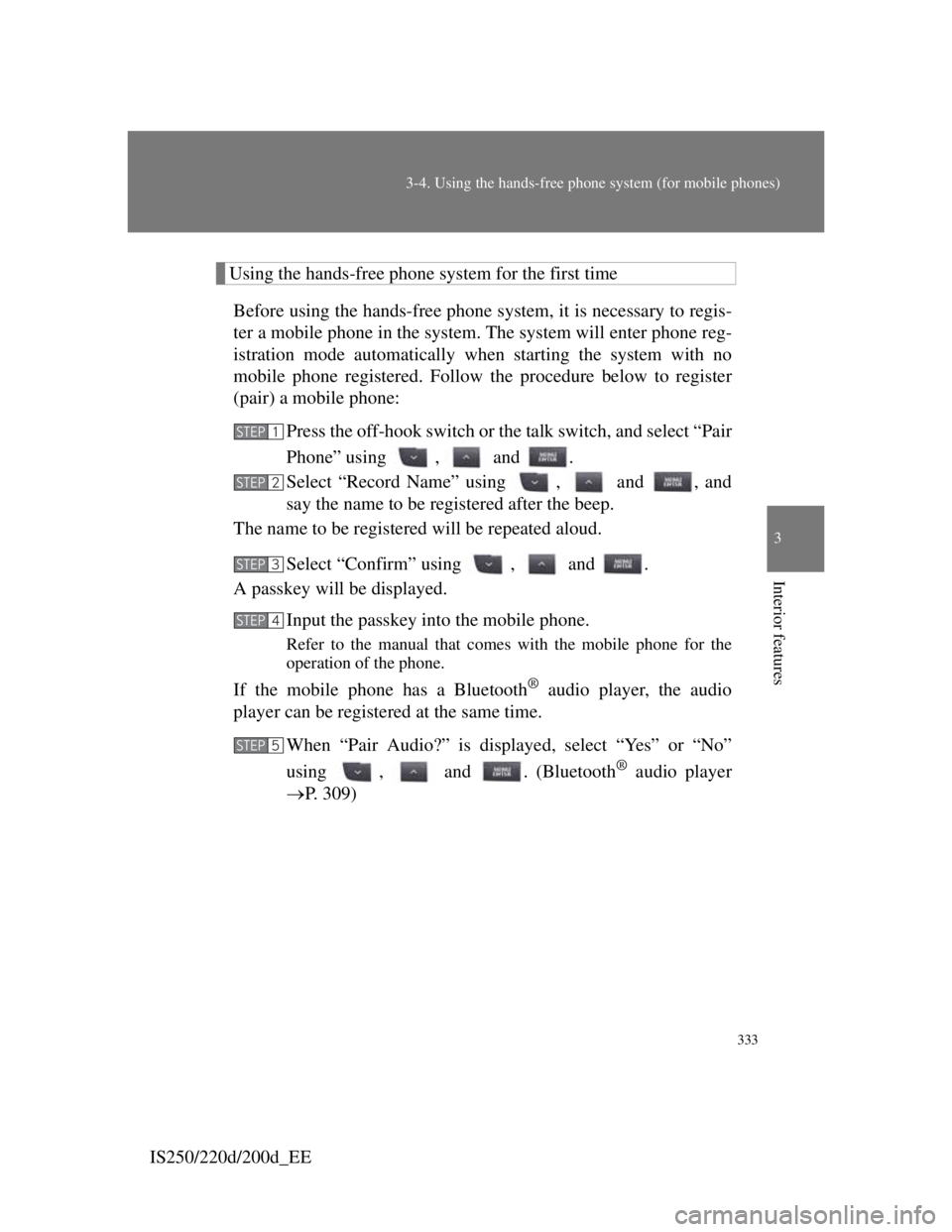
Using the hands-free phone system for the first time
Before using the hands-free phone system, it is necessary to regis-
ter a mobile phone in the system. The system will enter phone reg-
istration mode automatically when starting the system with no
mobile phone registered. Follow the procedure below to register
(pair) a mobile phone:
Press the off-hook switch or the talk switch, and select “Pair
Phone” using , and .
Select “Record Name” using , and , and
say the name to be registered after the beep.
The name to be registered will be repeated aloud.
Select “Confirm” using , and .
A passkey will be displayed.
Input the passkey into the mobile phone.
Refer to the manual that comes with the mobile phone for the
operation of the phone.
If the mobile phone has a Bluetooth® audio player, the audio
player can be registered at the same time.
When “Pair Audio?” is displayed, select “Yes” or “No”
using , and . (Bluetooth
® audio player
P. 309)
STEP1
STEP2
STEP3
STEP4
STEP5
Page 352 of 609
335
3-4. Using the hands-free phone system (for mobile phones)
3
Interior features
IS250/220d/200d_EE
“Setup”
“Security”
“Set PIN”Setting a PIN code
“Phbk Lock”Locking the phone book
“Phbk Unlock”Unlocking the phone book
“Phone
Setup”
“Pair Phone”Registering a mobile phone
“Select Phone”Selecting a mobile phone to
be used
“Change Name”Changing the registered
name of a mobile phone
“List Phones”Listing the registered mobile
phones
“Set Passkey”Changing the passkey
“Delete Phone”Deleting a registered mobile
phone
“System
Setup”
“Guidance Vol”Setting voice guidance vol-
ume
“Device Name”Displaying the Bluetooth®
device address and name
“Initialize”Initializing the system
First menuSecond
menuThird menuOperation detail
Page 358 of 609
341
3-4. Using the hands-free phone system (for mobile phones)
3
Interior features
IS250/220d/200d_EE
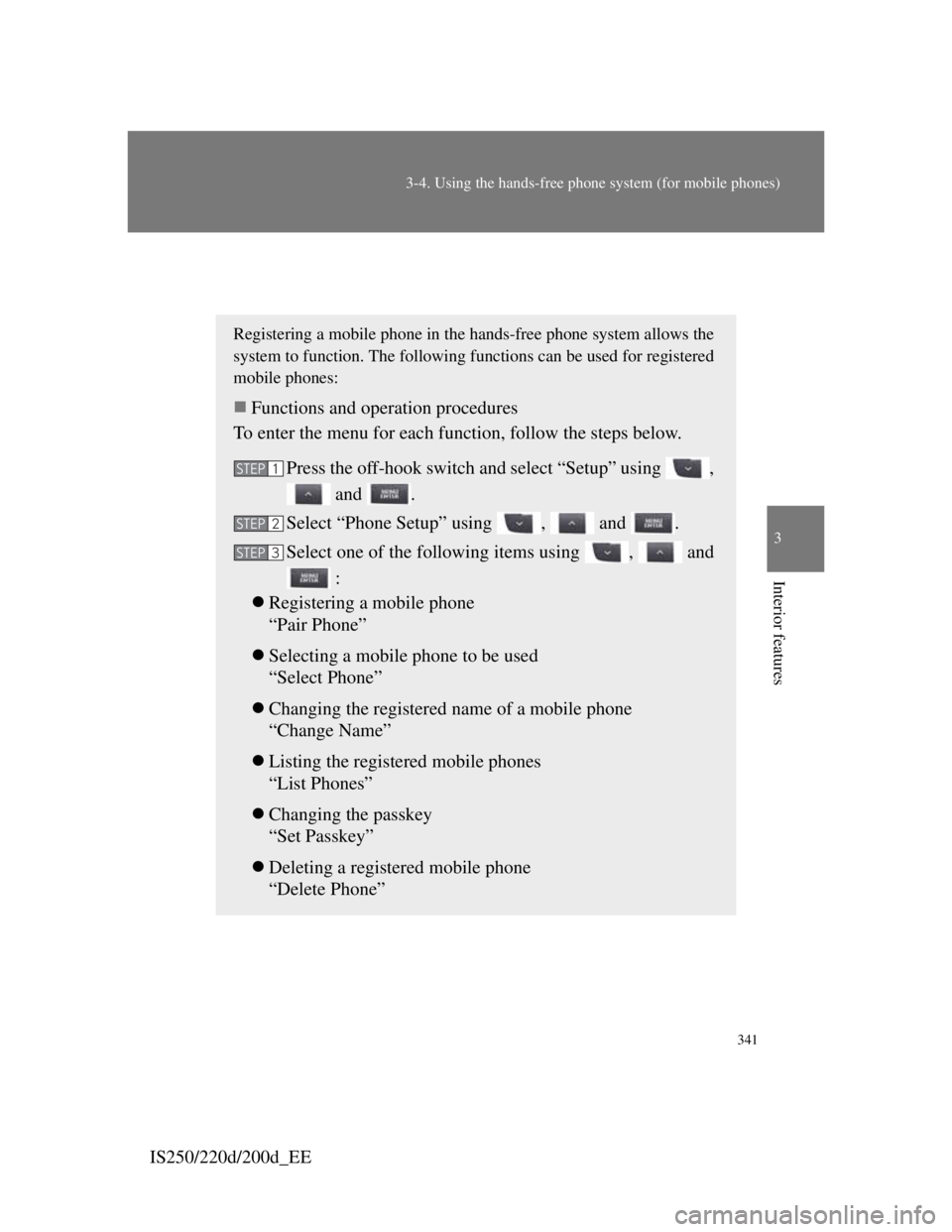
Setting a mobile phone
Registering a mobile phone in the hands-free phone system allows the
system to function. The following functions can be used for registered
mobile phones:
Functions and operation procedures
To enter the menu for each function, follow the steps below.
Press the off-hook switch and select “Setup” using ,
and .
Select “Phone Setup” using , and .
Select one of the following items using , and
:
Registering a mobile phone
“Pair Phone”
Selecting a mobile phone to be used
“Select Phone”
Changing the registered name of a mobile phone
“Change Name”
Listing the registered mobile phones
“List Phones”
Changing the passkey
“Set Passkey”
Deleting a registered mobile phone
“Delete Phone”
STEP1
STEP2
STEP3
Page 359 of 609
342
3-4. Using the hands-free phone system (for mobile phones)
IS250/220d/200d_EE
Registering a mobile phone
Select “Pair Phone” using , and , and perform
the procedure for registering a mobile phone. (P. 333)
Selecting a mobile phone to be used
Select “Select Phone” using , and .
Select the mobile phone to be used using , and
.
Changing the registered name of a mobile phone
Select “Change Name” using , and .
Select the desired mobile phone name to be changed using
, and .
Select “Record Name” using , and , and
say the new name after the beep.
The name to be registered will be repeated aloud.
Select “Confirm” using , and .
Listing the registered mobile phones
Select “List Phones” using , and . The list of reg-
istered mobile phones will be read aloud.
When listing is complete, the system returns to “Phone Setup”.
STEP1
STEP2
STEP1
STEP2
STEP3
STEP4
Page 360 of 609
343
3-4. Using the hands-free phone system (for mobile phones)
3
Interior features
IS250/220d/200d_EE
Changing the passkey
Select “Set Passkey” using , and .
Select a 4 to 8-digit number using , and .
The number should be input 1 digit at a time.
When the entire number to be registered as a passkey has
been input, press again.
If the number to be registered has 8 digits, pressing is not
necessary.
Deleting a registered mobile phone
Select “Delete Phone” using , and .
Select the desired mobile phone to be deleted using ,
and .
If the mobile phone to be deleted is paired as a Bluetooth
® audio
player, the registration of the audio player can be deleted at the
same time.
When “Del Audio?” is displayed, select “Yes” or “No”
using , and . (Bluetooth
® audio player
P. 309)
The number of mobile phones that can be registered
Up to 6 mobile phones can be registered in the system.
STEP1
STEP2
STEP3
STEP1
STEP2
STEP3