Page 160 of 529
150
2-1. Driving procedures
IS F_EE
Automatic transmission
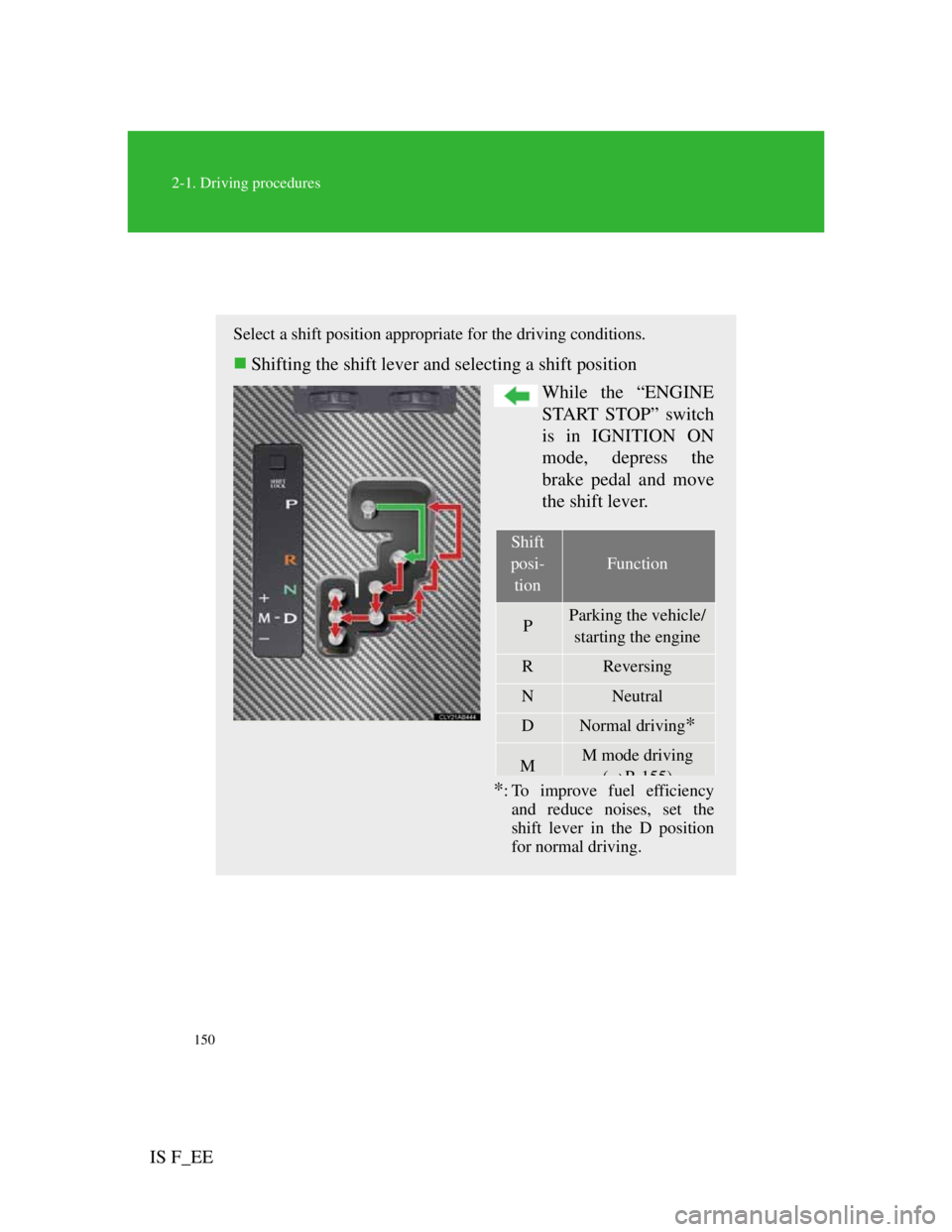
Select a shift position appropriate for the driving conditions.
Shifting the shift lever and selecting a shift position
While the “ENGINE
START STOP” switch
is in IGNITION ON
mode, depress the
brake pedal and move
the shift lever.
*: To improve fuel efficiency
and reduce noises, set the
shift lever in the D position
for normal driving.
Shift
posi-
tion
Function
PParking the vehicle/
starting the engine
RReversing
NNeutral
DNormal driving*
MM mode driving
(P155)
Page 170 of 529
160
2-1. Driving procedures
IS F_EE
Parking brake
Usage in winter time
See “Winter driving tips” for parking brake usage in winter time. (P. 2 2 2 )
NOTICE
Before driving
Fully release the parking brake.
Driving the vehicle with the parking brake set will lead to brake components
overheating, which may affect braking performance and increase brake
wear.
Sets the parking brake*
(Depressing the pedal again
releases the parking brake.)
*: Fully depress the parking
brake pedal with your left
foot while depressing the
brake pedal with your right
foot.
Page 192 of 529
181
2-4. Using other driving systems
2
When driving
IS F_EE
Adjusting the set speed
To change the set speed, operate the lever until the desired set
speed is obtained.
Increases the speed
Decreases the speed
Fine adjustment: Momentar-
ily move the lever in the
desired direction.
Large adjustment: Hold the
lever in the desired direction.
The set speed will be increased or decreased as follows:
Fine adjustment: By approximately 1.6 km/h (1 mph) each time the
lever is operated.
Large adjustment: The set speed can be increased or decreased con-
tinually until the lever is released.
Canceling and resuming the constant speed control
Pulling the lever toward
you cancels the constant
speed control.
The speed setting is also can-
celed when the brakes are
applied.
Pushing the lever up
resumes the constant speed
control.
Resuming is available when
the vehicle speed is more
than approximately 40 km/h
Page 199 of 529
188
2-4. Using other driving systems
IS F_EE
Canceling and resuming the speed control
Pulling the lever toward
you cancels the cruise con-
trol.
The speed setting is also can-
celed when the brakes are
applied.
Pushing the lever up
resumes the cruise control
and returns vehicle speed
to the set speed.
Resuming is available when
the vehicle speed is more
than approximately 40 km/h
Page 200 of 529

189
2-4. Using other driving systems
2
When driving
IS F_EE
Driving in vehicle-to-vehicle distance control mode
This mode employs a radar sensor to detect the presence of vehi-
cles up to approximately 120 m (400 ft.) ahead, determines the cur-
rent vehicle-to-vehicle following distance, and operates to
maintain a suitable following distance from the vehicle ahead.
Note that vehicle-to-vehicle distance will close in when traveling on
long downhill slopes.
Example of constant speed cruising
When there are no vehicles ahead
The vehicle travels at the speed set by the driver. The desired vehicle-
to-vehicle distance can also be set by operating the vehicle-to-vehicle
distance control.
Example of deceleration cruising
When the vehicle ahead is driving slower than the set speed
When a vehicle is detected running ahead of you, the system automat-
ically decelerates your vehicle. When a greater reduction in vehicle
speed is necessary, the system applies the brakes. A warning tone
warns you when the system cannot decelerate sufficiently to prevent
your vehicle from closing in on the vehicle ahead.
Page 201 of 529

190
2-4. Using other driving systems
IS F_EEExample of follow-up cruising
When following a vehicle driving slower than the set speed
The system continues follow-up cruising while adjusting for changes
in the speed of the vehicle ahead in order to maintain the vehicle-to-
vehicle distance set by the driver.
Example of acceleration
When there are no longer any vehicles ahead driving slower than
the set speed
The system accelerates until the set speed is reached. The system then
returns to constant speed cruising.
Approach warning
When your vehicle is too close to a vehicle ahead, and sufficient
automatic deceleration via the cruise control is not possible, the
display will flash and the buzzer will sound to alert the driver. An
example of this would be if another driver cuts in front of you
while you are following a vehicle. Apply the brakes to ensure an
appropriate vehicle-to-vehicle distance.
Warnings may not occur when
In the following instances, there is a possibility that the warn-
ings will not occur:
When the speed of the vehicle ahead matches or exceeds your
vehicle speed
When the vehicle ahead is traveling at an extremely slow
speed
Immediately after the cruise control speed was set
At the instant the accelerator is applied
Page 207 of 529

196
2-4. Using other driving systems
IS F_EE
CAUTION
Before using dynamic radar cruise control
Do not overly rely on vehicle-to-vehicle distance control.
Be aware of the set speed. If automatic deceleration/acceleration is not
appropriate, adjust the vehicle speed, as well as the distance between your
vehicle and vehicles ahead by applying the brakes etc.
Cautions regarding the driving assist systems
Observe the following precautions.
Failure to do so may cause an accident resulting in death or serious injury.
Assisting the driver to measure following distance
The dynamic radar cruise control is only intended to help the driver in
determining the following distance between the driver’s own vehicle and
a designated vehicle traveling ahead. It is not a mechanism that allows
careless or inattentive driving, and it is not a system that can assist the
driver in low-visibility conditions. It is still necessary for driver to pay
close attention to the vehicle’s surroundings.
Assisting the driver to judge proper following distance
The dynamic radar cruise control determines whether the following dis-
tance between the driver’s own vehicle and a designated vehicle traveling
ahead is appropriate or not. It is not capable of making any other type of
judgement. Therefore, it is absolutely necessary for the driver to remain
vigilant and to determine whether or not there is a possibility of danger in
any given situation.
Assisting the driver to operate the vehicle
The dynamic radar cruise control has no capability to prevent or avoid a
collision with a vehicle traveling ahead. Therefore, if there is ever any
danger, the driver must take immediate and direct control of the vehicle
and act appropriately in order to ensure the safety of all involved.
To avoid inadvertent cruise control activation
Switch the cruise control off using the “ON-OFF” button when not in use.
Page 208 of 529

197
2-4. Using other driving systems
2
When driving
IS F_EE
CAUTION
Situations unsuitable for dynamic radar cruise control
Do not use dynamic radar cruise control in any of the following situations.
Doing so may result in inappropriate speed control and could cause an acci-
dent resulting in death or serious injury.
In heavy traffic
On roads with sharp bends
On winding roads
On slippery roads, such as those covered with rain, ice and snow
On steep downhills, or where there are sudden changes between sharp up
and down gradients
At entrances to expressways
When weather conditions are bad enough that they may prevent the sen-
sors from functioning correctly (fog, snow, sandstorm, heavy rain, etc.)
Vehicle speed may exceed the set speed when driving down a steep hill.
When an approach warning buzzer is heard often
When the sensor may not be correctly detecting the vehicle ahead
Apply the brakes as necessary when any of the following types of vehicles
are in front of you.
As the sensor may not be able to correctly detect these types of vehicles, the
approach warning (P. 190) will not be activated, and a fatal or serious
accident may result.
Vehicles that cut in suddenly
Vehicles traveling at low speeds
Vehicles that are not moving
Vehicles with small rear ends (trailers with no load on board etc.)
Motorcycles traveling in the same lane