Page 10 of 94
10
GX460_QG_U (OM60G26U)
Keys
■Electronic key
Smart access system with push-button start
(P. 11, 14)
■Mechanical key
Carry the mechanical key together with the
electronic key. If the electronic key battery
is depleted or the entry function does not
operate properly, you will need the
mechanical key.
To take out the mechanical key, slide the
release lever and take the key out.
■Wireless remote control
Locks all the doors
Unlocks all the doors
Pressing the button unlocks the driver’s
door. Pressing the button again within 3
seconds unlocks the other doors.
Opens the windows and moon roof
(press and hold)*
Opens the glass hatch (press and hold)
The glass hatch can be opened only
when the back door is closed.
Sounds the alarm (press and hold)
*: This setting must be customized at your
Lexus dealer.
Page 16 of 94

16
GX460_QG_U (OM60G26U)
Multi-information Display (Optitron Meters)
●Trip information contents
Displays driving range, fuel consumption and other cruising-related information.
●Electronic features control contents
●Multi-terrain Select display (if equipped)
●Intuitive parking assist display* (if equipped)
●Crawl Control display* (if equipped)
●Dynamic radar cruise control display* (if equipped)
●LDA (Lane Departure Alert) display* (if equipped)
●Wa r n i n g m e s s a g e s
Automatically displayed when a malfunction occurs in one of the vehicles systems.
(Refer to the “Owner’s Manual”.)
●Customization
Settings (e.g.available language) can be changed.
(Customizable features Refer to the “Owner’s Manual”.)
*: Automatically displayed when the system is used
■Switching the display
Menu switch
Changes modes to electronic features
control mode, customization mode or
back to normal display mode.
“ENTER” switch
Changes trip information items. This
switch is also used to turn on/off elec-
tronic features controls and to change
customization settings.
The multi-information display presents the driver with a variety of driving-related data.
Page 17 of 94
17
GX460_QG_U (OM60G26U)
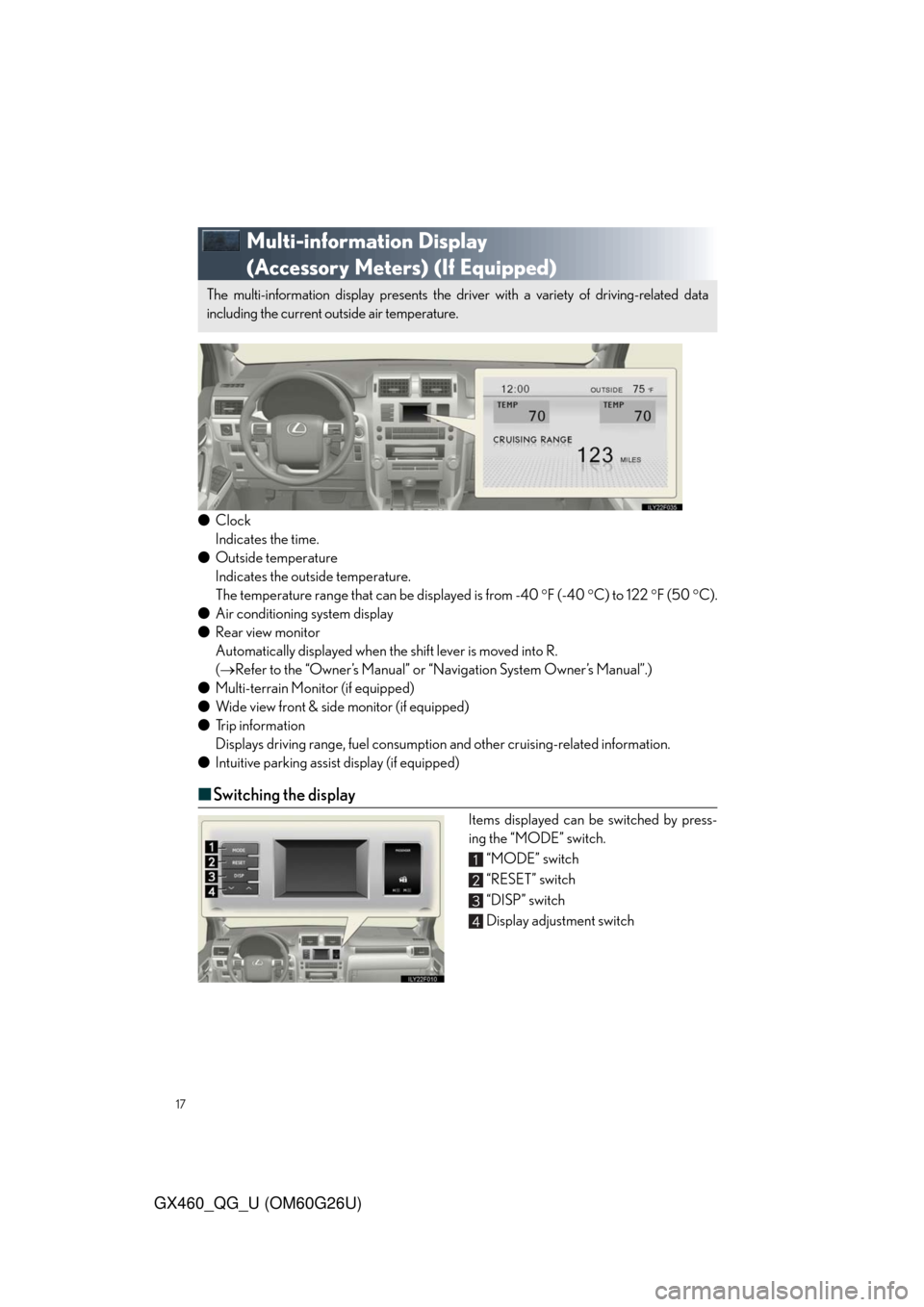
Multi-information Display
(Accessory Meters) (If Equipped)
●Clock
Indicates the time.
●Outside temperature
Indicates the outside temperature.
The temperature range that can be displayed is from -40 F (-40 C) to 122 F (50 C).
●Air conditioning system display
●Rear view monitor
Automatically displayed when the shift lever is moved into R.
(Refer to the “Owner’s Manual” or “Navigation System Owner’s Manual”.)
●Multi-terrain Monitor (if equipped)
●Wide view front & side monitor (if equipped)
●Trip information
Displays driving range, fuel consumption and other cruising-related information.
●Intuitive parking assist display (if equipped)
■Switching the display
Items displayed can be switched by press-
ing the “MODE” switch.
“MODE” switch
“RESET” switch
“DISP” switch
Display adjustment switch
The multi-information display presents the driver with a variety of driving-related data
including the current outside air temperature.
Page 23 of 94

23
GX460_QG_U (OM60G26U)
LDA (Lane Departure Alert)(If Equipped)
■Turning the LDA system on
The system will be activated depending on the recognizability of lane markings and on the
vehicle speed.
Press the “LDA” switch to activate the sys-
tem.
The “LDA” indicator will come on.
Press the switch again to turn the LDA
system off.
■Indication on the multi-information display
While the LDA system is on, a lane line display is shown on the multi-information display to
inform the driver that the LDA system is on.
●When thin lines are shown:
Lane markings are not recognized by
the system, or the LDA system is tempo-
rarily canceled.
●When solid lane lines are shown:
The LDA system is active.
While driving on a freeway or motor highway that has lane markings, this system recog-
nizes the lanes using a camera as a sensor to alert the driver when the vehicle deviates from
its lane.
If the system judges that the vehicle may deviate from its lane, it alerts the driver using rapid
beeping and indications on the multi-information display.
Lane line display
Page 24 of 94

24
GX460_QG_U (OM60G26U)
Intuitive Parking Assist (If Equipped)
Press the menu switch.
The multi-information display will
change modes to electronic features
control mode.
Press the “ENTER” switch upwards or
downwards until the Intuitive parking
assist mark appears in the multi-informa-
tion display.
Press the “ENTER” switch to change to
“ON”.
The Intuitive parking assist indicator will
be displayed.
Each pressing of the switch turns the
Intuitive parking assist on and off.
When on, the buzzer sounds to inform
the driver that the system is operational.
Press the menu switch to change to the nor-
mal display.
Wide View Front & Side Monitor(If Equipped)
On/off
The camera image is displayed when the
wide view front & side monitor switch is
pressed.
The distance from your vehicle to nearby obstacles when parallel parking or maneuver-
ing into a garage is measured by the sensors and communicated via the multi-informa-
tion display and a buzzer. Always check the surrounding area when using this system.
This system can display the wide view front monitor and the side monitor.
The wide view front monitor uses a super-wide angle lens to display on screen the areas to
the left and right of the vehicle and the blind spots to the front of the vehicle. This system
helps the driver check for approaching cars, bicycles and pedestrians when at intersections
with poor visibility.
The side monitor uses a camera installed in the passenger’s side outside rear view mirror to
display on screen the area to the right of the vehicle, helping the driver check this area.
Page 27 of 94
27
GX460_QG_U (OM60G26U)
Multi-terrain Monitor (If Equipped)
Multi-information display
Accessory meter (vehicles without navi-
gation system) or touch screen (vehicles
with navigation system)
“ENTER” switch
Menu switch
The Multi-terrain Monitor displays the vehicle surroundings when driving at low speeds,
thus assisting off-road driving and helping the driver to check the vehicle surroundings.
Page 57 of 94
57
GX460_QG_U (OM60G26U)
Front Air Conditioning System
(With Navigation System)
Vehicles without a rear automatic air conditioning system
“CLIMATE” button
Outside temperature display
Air flow control buttons
Fan speed control buttons
Windshield wiper de-icer button
Micro dust and pollen filter button
“PASSENGER TEMP” button
Air intake control button
Passenger side temperature display“DUAL”
Rear window defogger button
Windshield air flow button
“OFF” button
Driver side temperature display
“A U T O ” b u t t o n s
“TEMP” buttons
“A / C ”
Page 58 of 94
58
GX460_QG_U (OM60G26U)
■Using the automatic mode
Press to turn on the airflow and to adjust the temperature.
■Adjusting the temperature
■To simultaneously adjust the driver’s side and passenger’s side temperature settings
Press to turn the “DUAL” indicator off and then press .
■To individually adjust the driver’s side and passenger’s side temperature settings
Press or to turn the “DUAL” indicator on and then press or .
Vehicles with a rear automatic air conditioning system
“CLIMATE” button
Rear air conditioning control touch-
screen button
“3-ZONE”
Outside temperature display
Air flow control buttons
Fan speed control buttons
Windshield wiper de-icer button
Micro dust and pollen filter button
“PASSENGER TEMP” buttonsAir intake control button
Passenger side temperature display
“REAR” button
Rear window defogger button
Windshield air flow button
“OFF” button
Drive side temperature display
“A U T O ” b u t t o n
“TEMP” button
“A / C ”