Page 262 of 563
260
3-2. Using the audio system
ES350_U
Changing the audio sourcePress when the audio system is turned ON. The audio source
changes as follows each time the switch is pressed. If no discs are inserted
in the player, or if the external device is not connected, that mode will be
skipped.
FM1 →FM2 →SAT1
∗→S AT 2∗→S AT 3∗→CD player →
Bluetooth® audio →AUX →iPod∗ or
USB memory∗→ AM →FM1
∗
: If equipped
Adjusting the volume
Press “+” on to increase the volume and “-” to decrease the vol-
ume.
Hold down the switch to continue increasing or decreasing the volume.
Selecting a radio station
Press to select the radio mode.
Press “∧” or “ ∨” on to select a radio station.
To scan for receivable stations, press and hold “ ∧” or “∨ ” on the switch
until you hear a beep.
Selecting a track/file or song
Press to select CD, Bluetooth
® audio, iPod (if equipped) or
USB memory (if equipped) mode.
Press “ ∧” or “ ∨” on to select the desired track/file or song.
STEP1
STEP2
STEP1
STEP2
Page 268 of 563
266
3-3. Using the Bluetooth® audio system
ES350_U
Operating the system using voice commands
By following voice guidance instructions output from the speaker, voice
commands enable to the operation of the Bluetooth
® audio system with-
out the need to check the display or operate .
■ Operation procedure when using voice commands
Press the talk switch and follow voice guidance instructions.
■ Auxiliary commands when using voice commands
The following auxiliary commands can be used when operating the
system using a voice command:
“Cancel”: Exits the Bluetooth
® audio system
“Repeat”: Repeats the previous voice guidance instruction
“Go back”: Returns to the previous procedure
“Help”: Reads aloud the function summary if a help comment is regis-
tered for the selected function
Page 289 of 563
287
3-4. Using the hands-free system (for mobile phone)
3
Interior features
ES350_U
Operating the system using voice commandsBy following voice guidance instructions output from the speaker, voice
commands enable to the operation of the hands-free system without the
need to check the display or operate .
■ Operation procedure when using voice commands
Press the talk switch and follow voice guidance instructions.
■ Auxiliary commands when using voice commands
The following auxiliary commands can be used when operating the
system using a voice command:
“Cancel”: Exits the hands-free system
“Repeat”: Repeats the previous voice guidance instruction
“Go back”: Returns to the previous procedure
“Help”: Reads aloud the function summary if a help comment is regis-
tered for the selected function
Page 319 of 563
317
3
Interior features
ES350_U
3-6. Using the storage features
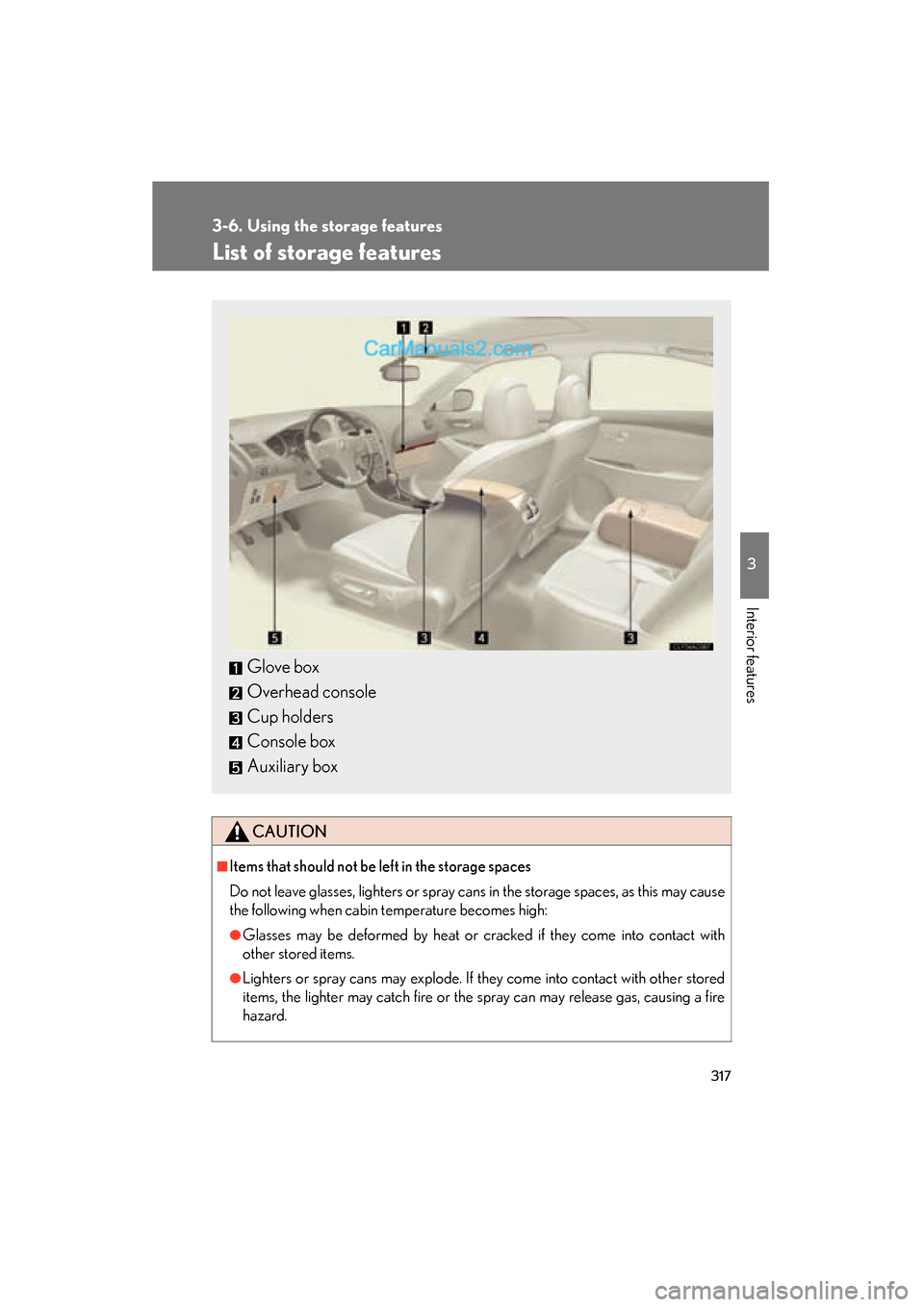
List of storage features
CAUTION
■Items that should not be left in the storage spaces
Do not leave glasses, lighters or spray cans in the storage spaces, as this may cause
the following when cabin temperature becomes high:
●Glasses may be deformed by heat or cracked if they come into contact with
other stored items.
●Lighters or spray cans may explode. If they come into contact with other stored
items, the lighter may catch fire or the spray can may release gas, causing a fire
hazard.
Glove box
Overhead console
Cup holders
Console box
Auxiliary box
Page 325 of 563
323
3-6. Using the storage features
3
Interior features
ES350_U
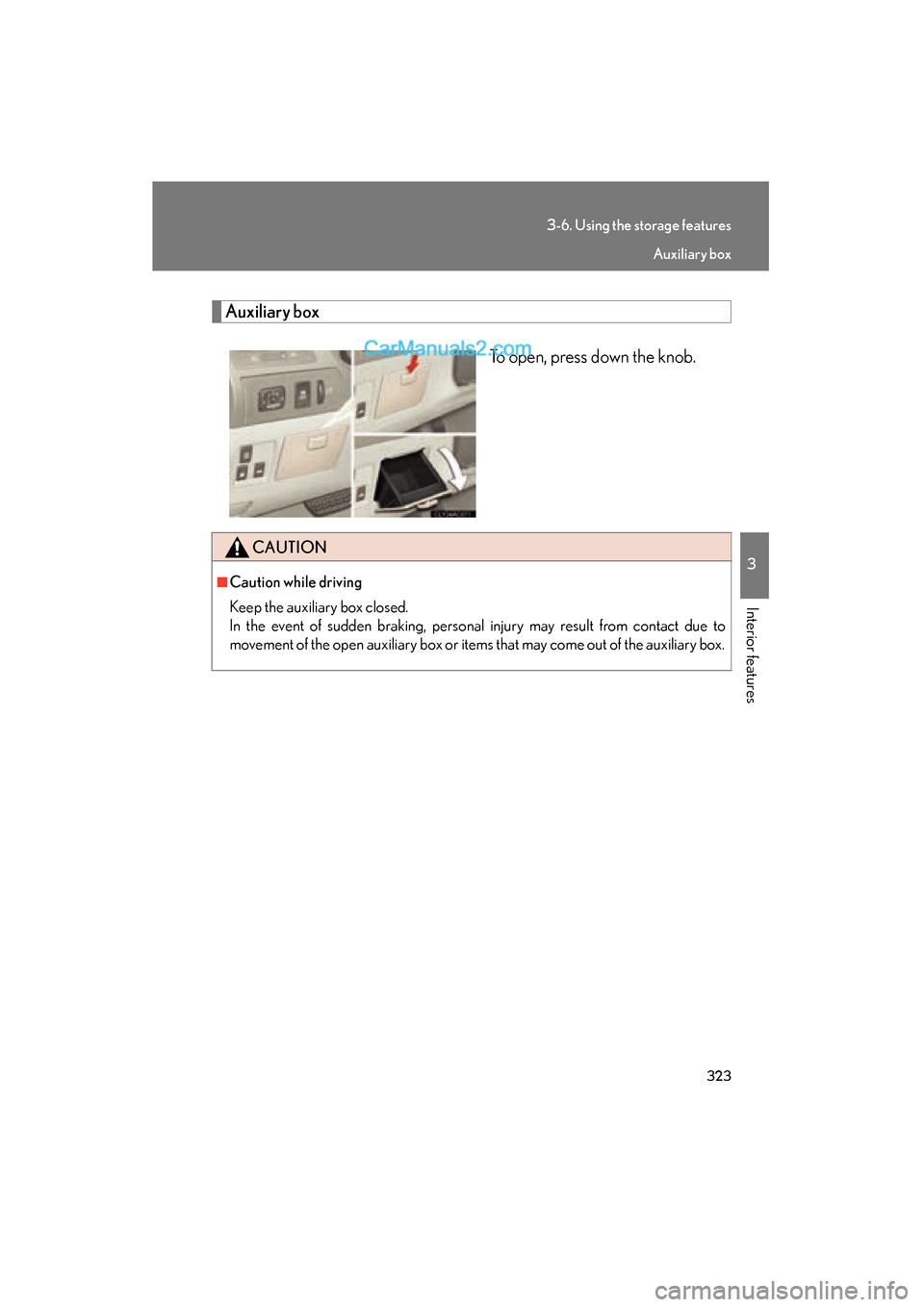
Auxiliary boxTo open, press down the knob.
CAUTION
■Caution while driving
Keep the auxiliary box closed.
In the event of sudden braking, personal injury may result from contact due to
movement of the open auxiliary box or items that may come out of the auxiliary box.
Auxiliary box
Page 533 of 563
531
7
ES350_U
For owners
SRS airbag instructions for Canadian owners (in French)
The following is a French explanation of SRS airbag instructions extracted
from the SRS airbag section in this manual.
See the SRS airbag section for more detailed SRS airbag instructions
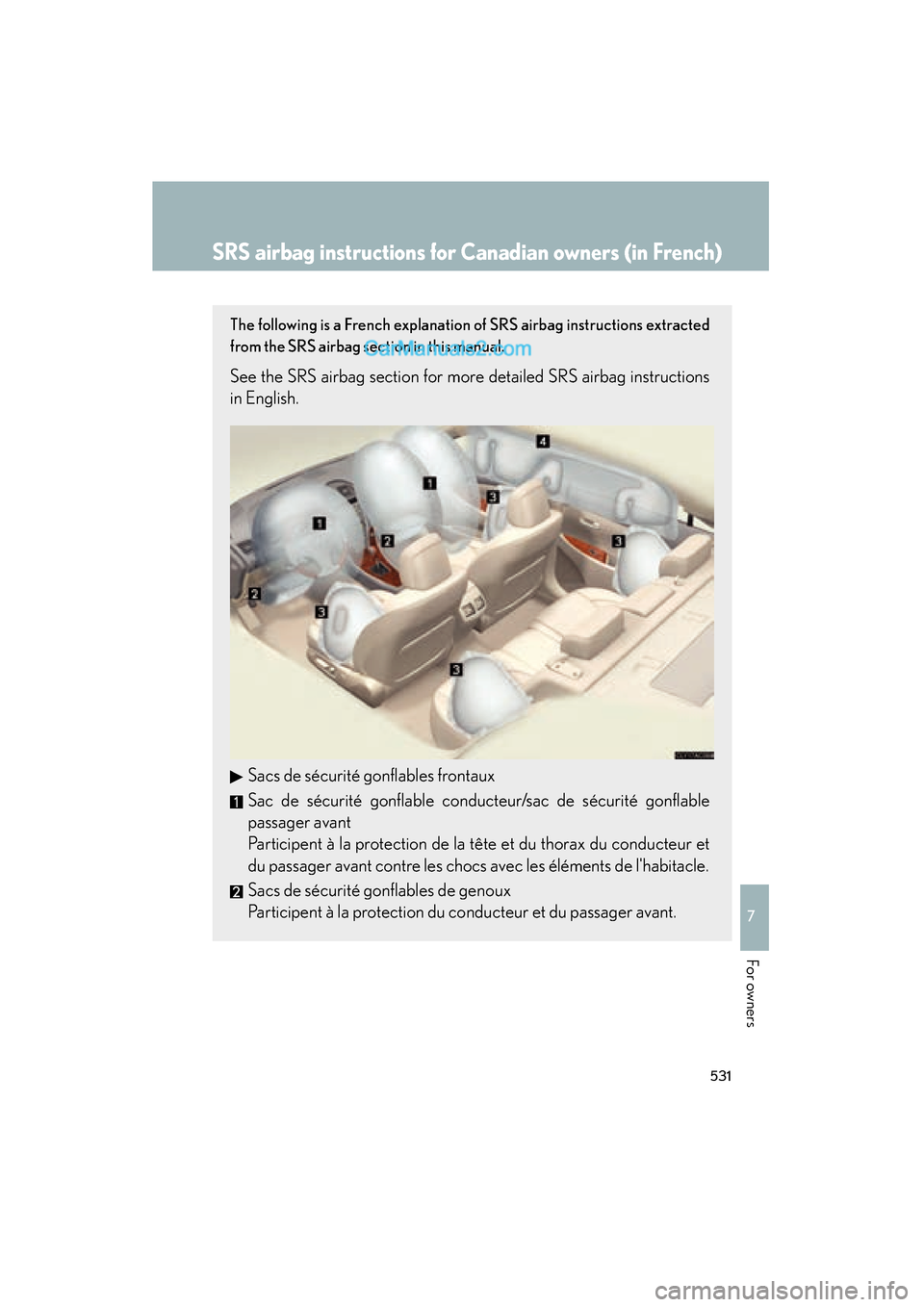
in English.Sacs de sécurité gonflables frontaux
Sac de sécurité gonflable conducteur/sac de sécurité gonflable
passager avant
Participent à la protection de la tête et du thorax du conducteur et
du passager avant contre les chocs avec les éléments de l'habitacle.
Sacs de sécurité gonflables de genoux
Participent à la protection du conducteur et du passager avant.
Page 534 of 563
532
ES350_U
Sacs de sécurité gonflables latéraux et rideau
Sacs de sécurité gonflables latéraux
Participent à la protection du haut du corps des occupants des
sièges avant et arrière extérieures.
Sacs de sécurité gonflables rideau
Participent principalement à la protection de la tête des occupants
assis aux places extérieures.
Page 535 of 563
533
7
ES350_U
For owners
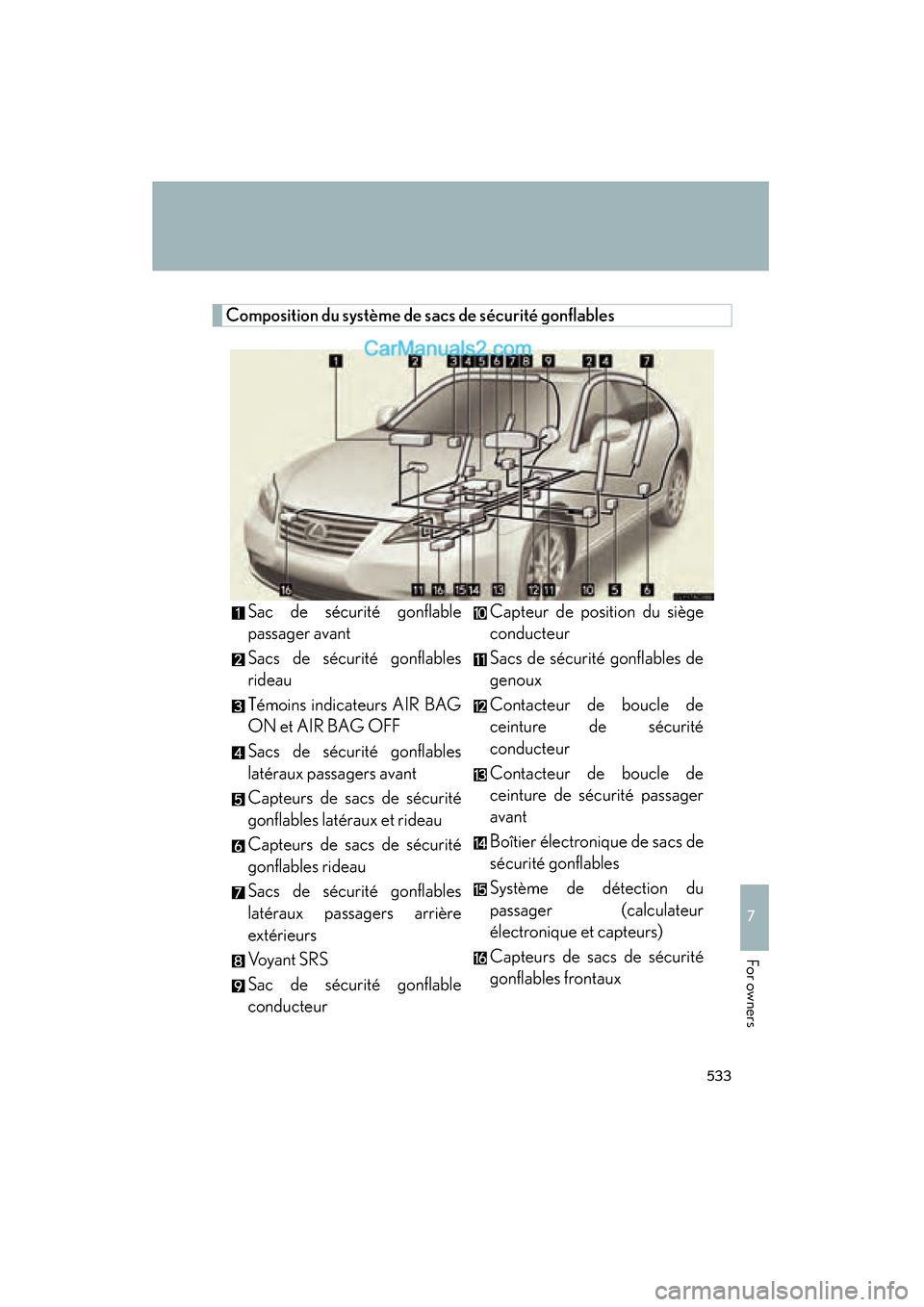
Composition du système de sacs de sécurité gonflablesSac de sécurité gonflable
passager avant
Sacs de sécurité gonflables
rideau
Témoins indicateurs AIR BAG
ON et AIR BAG OFF
Sacs de sécurité gonflables
latéraux passagers avant
Capteurs de sacs de sécurité
gonflables latéraux et rideau
Capteurs de sacs de sécurité
gonflables rideau
Sacs de sécurité gonflables
latéraux passagers arrière
extérieurs
Vo y a n t S R S
Sac de sécurité gonflable
conducteur Capteur de position du siège
conducteur
Sacs de sécurité gonflables de
genoux
Contacteur de boucle de
ceinture de sécurité
conducteur
Contacteur de boucle de
ceinture de sécurité passager
avant
Boîtier électronique de sacs de
sécurité gonflables
Système de détection du
passager (calculateur
électronique et capteurs)
Capteurs de sacs de sécurité
gonflables frontaux