2011 KIA VENGA USB
[x] Cancel search: USBPage 747 of 761
Features of your vehicle
118
4
List Function
With this function you can navigate
through all tracks in the iPOD file sys-tem.
✎ The main menu of the LIST functionconsists of:
✎ PLAYLIST, ARTIST, ALBUM,GENRE, SONG and COMPOSER.
Short press the OKbutton to enter the
selected category or the sub-category.
Short press the button to go to the
previous category.
Short press or button to navi-gate through the list of the selected
category.
The songs in the selected play-list will
be displayed.
Artist : a list of albums of the selected
artist will displayed, the user can then
select an album from this list to view
the songs in the album selected.
Album : the songs in the selected
album will be displayed.
Genre : the list of artists for the select-
ed Genre will be displayed. After the
selection of an artist, a list of albums
for this artist is displayed. The user
can now select an album in this list to
view the songs in the selected album.
Song : all songs in the album will be
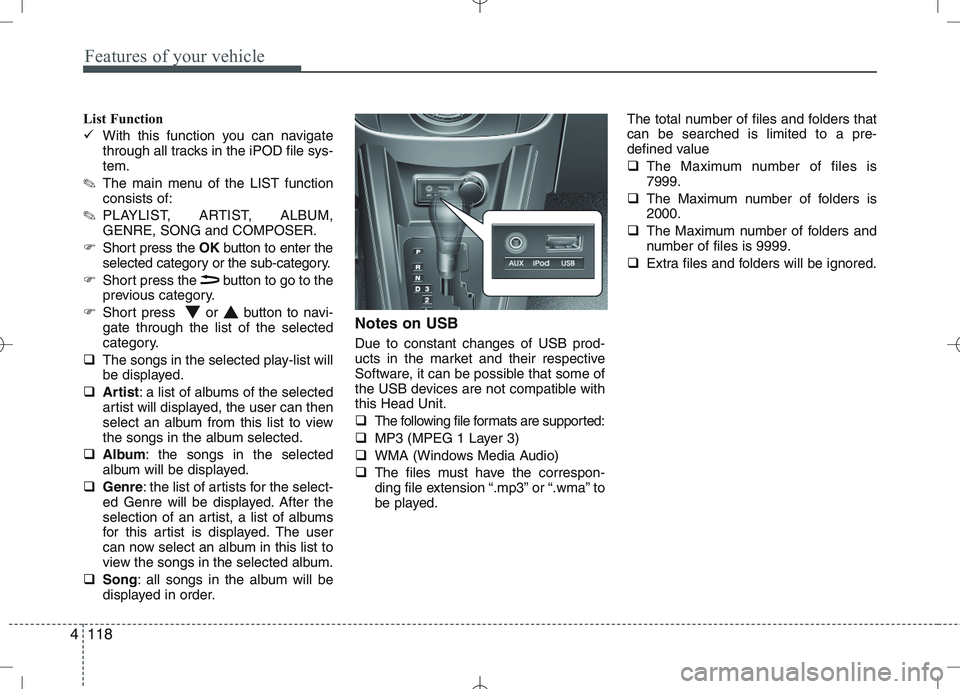
displayed in order. Notes on USB Due to constant changes of USB prod-
ucts in the market and their respective
Software, it can be possible that some of
the USB devices are not compatible withthis Head Unit.
The following file formats are supported:
MP3 (MPEG 1 Layer 3)
WMA (Windows Media Audio)
The files must have the correspon-
ding file extension “.mp3” or “.wma” to
be played. The total number of files and folders thatcan be searched is limited to a pre-
defined value
The Maximum number of files is 7999.
The Maximum number of folders is2000.
The Maximum number of folders and
number of files is 9999.
Extra files and folders will be ignored.
Page 748 of 761
4119
Features of your vehicle
Notes on USB Sticks (Thumb drives)
Only use USB sticks (thumb drives) of
wellknown manufacturers. The use of
other drives may result in malfunction ofthe set.
Do not connect other USB devices such as hard discs or other digital equipment
to the USB hub. Connecting other
devices can cause malfunction or even
destroy the audio equipment.Inserting and removing an USB stick
(thumb drive)
Insert the USB stick into the USB hub The USB hub is located in the con-
sole (also see Car Manual).
✎ Please keep lid closed when not in
use.
Playback of files ✎ Playback starts automatically, in case
there are MP3 or WMA files on the
USB stick,
OR
When the device is inserted but a dif-
ferent source was selected before,press the AUXbutton to start play-
back.
Previous/Next Folder
Press the or buttons to select
previous or next folder.
Previous/Next File
Press the or buttons to select
previous or next song file✽✽
NOTICE
In rare cases it is possible that an USB stick (thumb drive) is not recognized
by the unit or may cause a malfunc-
tion.
This is not a system fault. Some USB
sticks do not comply with the USB
thumb drive specifications.
CAUTION
The USB hub is designed for a
charge and supply current of upto 500 mA.
When using external equipment with a current consumptionexceeding the specified 500 mA,
the unit switches off the USB huband gives a warning.
CAUTION
We strongly recommend only using USB sticks (thumb drives)
of well-known manufacturers.
On no account must other USB devices such as hard discs orother digital equipment be con- nected to the USB hub.
Connecting other devices can cause malfunction or evendestroy the audio equipment.
Page 749 of 761
Features of your vehicle
120
4
Manual Seek – Fast Forward/Fast back-
ward
Press and hold the or button to
go fast forward or fast backward.
During manual seek audio is audible
at reduced volume.
Repeat File/Folder
Short press the RPTbutton to select
Repeat File.
The current file will be repeated.
Long press the RPTbutton to select
Repeat Folder.
All files within the current folder will be repeated.
To cancel the “Repeat File/Folder”
mode, short press the RPTbutton
again. Random Folder/All Files
Short press the RDMbutton to acti-
vate the “Random Folder” option.
All files in the folder will be played at
random.
OR
Long press the RDMbutton to acti-
vate the “Random All” option.
All files on the USB device will be
played at random.
To deactivate the “Random Folder/All
Files” feature, press the RDMbutton
again.
Scan File/Folder
Long press the SCANbutton to acti-
vate the “Scan Folder” option.
✎ The first track of each folder will be
scanned, except the root directory.
OR
Short press the SCANbutton to acti-
vate the “Scan All” option.
All files on the USB device will be scanned.
To deactivate the “Scan Folder/All
Files” feature, short press the SCAN
button again to abort “Scan All” Viewing MP3 Information
With this function text information of the
MP3 files can displayed on the LCD-
Display.
Short press the press INFObutton.
The following information will be shown
in the following sequence.
Filename (“NO INFO” will appear if
the file name contains characters that
do not pertain to the ASCII characterset)
ID3 tag info – Song Title (“NO INFO”
will appear if there is no Song Title
available)
ID3 tag info – Artist name (“NO INFO”
will appear if there is no Artist Name
available)
ID3 tag info – Album name (“NO
INFO” will appear if will appear if there
is no Album Name available).
Directory name
Total no. of files on the USB device
The information will be visible on the
LCD-display for 5 seconds.
Page 754 of 761

4125
Features of your vehicle
Steering wheel remote control
Dual Steering Wheel Remote Control*
Tuner Short press: Preset up/Preset DownLong Press: Fast Seek Up/Fast Seek Down
CD/iPod/USB Short press: Next Track/Previous Track Long Press: Fast Forward/Fast Backward
BT Press to answer an incoming phone call
BT Press to reject an incoming phone call or terminate an ongoing phone call
Press to mute the sound of the system
Short press to increase/decrease the volume by step
Long press to increase the volume continuously as long
as the key is pressed
Head Unit If the Head Unit is off, short press to switch on the Head Unit.
If the Head Unit is on, long press to switch off the HeadUnit.
Tuner If the Head Unit is on, short press to select the next avail- able source (wraparound): FM (last selected band) -> AM
(last selected band) -> CDP -> AUX -> USB/IPOD -> BTA
Page 755 of 761

Features of your vehicle
126
4
Single Steering Wheel Remote Control*
Tuner Short press: Preset up/Preset Down
Long Press: Fast Seek Up/Fast Seek Down
CD/iPod/USB Short press: Next Track/Previous Track Long Press: Fast Forward/Fast Backward
Short press to increase/decrease the volume by 1 step
Long press to increase the volume continuously as long
as the key is pressed
Head Unit If the Head Unit is off, short press to switch on the Head Unit.
If the Head Unit is on, long press to switch off the Head Unit.
Tuner If the Head Unit is on, short press to select the next avail- able source (wraparound): FM (last selected band) -> AM
(last selected band) -> CDP -> AUX -> USB/IPOD -> BTA
Press to mute the sound of the system
Note: To enable the following functions to be controlled by the steering wheel keys,
ensure there is CD inserted and USB/iPod/AUX is connected.
* Only when the car is equipped with a Steering Wheel Remote Control
Page 760 of 761
4131
Features of your vehicle
CD player
Status
CD is rejected by the unit
Distorted sound/ skips during CD
play
CD player does not work.
No sound during CD playback
Problems with new copy-protect- ed audio CDs
Bluetooth
Status
Bluetooth device is not able to connect to the Head unitExplanation / How to check
The CD may be dirty. Clean the CD with a damp cloth. The CD does not comply with the
CD player‘s specifications. See“Notes on audio and MP3 CDs”
Player cannot read CD. CD is damaged or spoiled.
In cold weather conditions, con-
densation may occur on the laser.
With the set on, wait for 5 min-
utes until the condensation evap-
orates.
Some CDs contain multimedia
data which is not recognized by
the unit. Advance the tracks until
music is heard.
See “Notes on audio and MP3 CDs”
Some copy protection procedures
are incompatible with accepted
standards for audio CDs.
This is not a fault of the unit.
Explanation / How to check
Check if Bluetooth device is stored in the Head unit.
Check if “KIA BLUETOOTH” is
stored in the Bluetooth device
Redo Pairing
USB / iPod / AUX
Status
USB device is connected and
selected but no sound is audible
Distorted sound during play iPod
is connected and selected but no
sound is audible
Security Code
Status
Radio is in LOCKED or Security Code Prompt state
Explanation / How to check
The connected USB-device is not
supported by the Head Unit.
The USB device may be defec-
tive.
Your iPod may be defective
Check the functioning of your
iPod without being connected the
interface connector.
The KIA iPod interface cable may
be defective Have the KIA iPod
interface cable checked at the
KIA repair shop See “Notes on
USB and/or iPod”
Explanation / How to check
If the Radio is in LOCKED state,
wait for 1 hour for it to enter the
Security Code Prompt state
Once the Radio enters Security
Code Prompt state, enter the cor-
rect security code.
If you have forgotten the security
code, please contact your dealer.