Page 212 of 761
537
Driving your vehicle
Each of these actions will cancel cruisecontrol operation (the SET indicator lightin the instrument cluster will go off), but itwill not turn the system off. If you wish to
resume cruise control operation, pushthe RES+ switch located on your steeringwheel. You will return to your previously
preset speed.
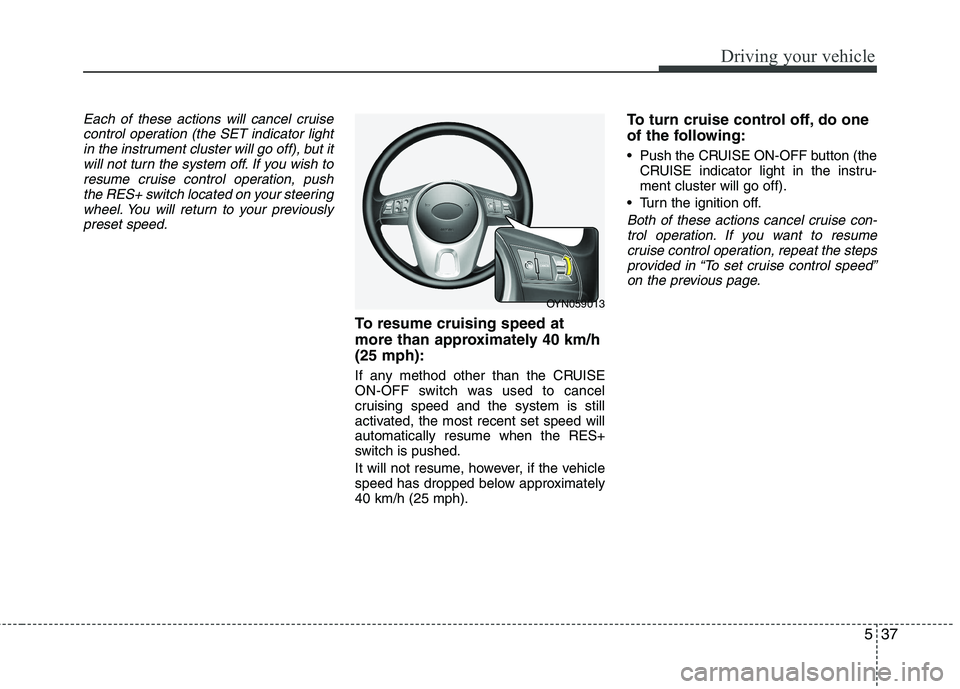
To resume cruising speed at
more than approximately 40 km/h(25 mph):
If any method other than the CRUISE
ON-OFF switch was used to cancel
cruising speed and the system is still
activated, the most recent set speed willautomatically resume when the RES+
switch is pushed.
It will not resume, however, if the vehicle
speed has dropped below approximately40 km/h (25 mph). To turn cruise control off, do one
of the following:
Push the CRUISE ON-OFF button (the
CRUISE indicator light in the instru- ment cluster will go off).
Turn the ignition off.
Both of these actions cancel cruise con- trol operation. If you want to resume cruise control operation, repeat the stepsprovided in “To set cruise control speed” on the previous page.
OYN059013
Page 213 of 761
Driving your vehicle
38
5
You can set the speed limit when you
don’t want to drive over a specific speed.
If you drive over the preset speed limit,
the warning system operates (set speed
limit will blink and chime will sound) until
the vehicle speed returns within thespeed limit.
✽✽
NOTICE
While speed limit control in operation,
the cruise control system cannot be acti-
vated.
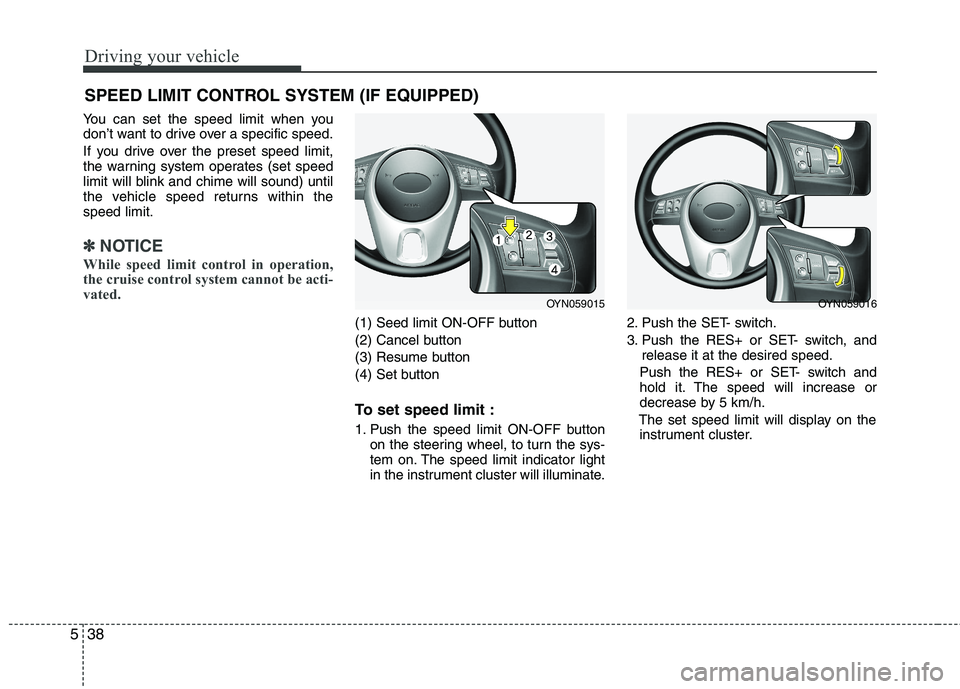
(1) Seed limit ON-OFF button
(2) Cancel button
(3) Resume button
(4) Set button
To set speed limit :
1. Push the speed limit ON-OFF button on the steering wheel, to turn the sys-
tem on. The speed limit indicator light
in the instrument cluster will illuminate. 2. Push the SET- switch.
3. Push the RES+ or SET- switch, and
release it at the desired speed.
Push the RES+ or SET- switch and
hold it. The speed will increase or
decrease by 5 km/h.
The set speed limit will display on the instrument cluster.
SPEED LIMIT CONTROL SYSTEM (IF EQUIPPED)
OYN059015OYN059016
Page 214 of 761
539
Driving your vehicle
If you would like to drive over the preset
speed limit when you depress the accel-
erator pedal less than approximately
50%, the vehicle speed will maintainwithin speed limit.
However if you depress the accelerator
pedal more than approximately 70%, you
can drive over the speed limit. Then the
set speed limit will blink and chime will
sound until return the vehicle speed with-in speed limit.To turn off the speed limit con-
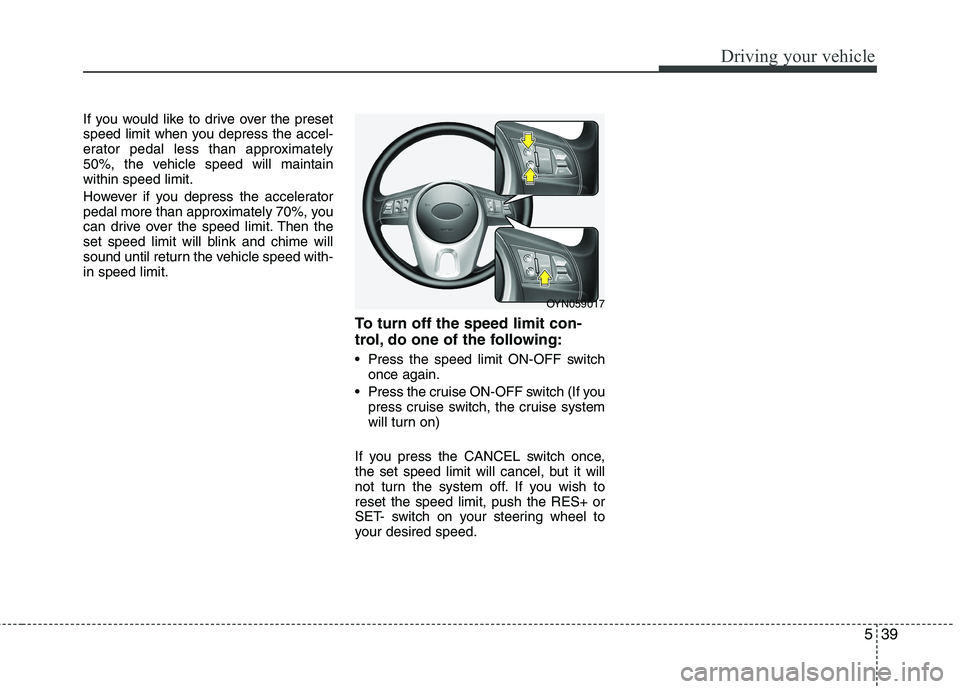
trol, do one of the following:
Press the speed limit ON-OFF switchonce again.
Press the cruise ON-OFF switch (If you press cruise switch, the cruise system
will turn on)
If you press the CANCEL switch once,
the set speed limit will cancel, but it will
not turn the system off. If you wish toreset the speed limit, push the RES+ or
SET- switch on your steering wheel to
your desired speed.
OYN059017
Page 304 of 761

741
Maintenance
Reset items
Items should be reset after the battery
has been discharged or the battery hasbeen disconnected.
Auto up/down window (See section 4)
Sunroof (See section 4)
Trip computer (See section 4)
Climate control system (See section 4)
Clock (See section 4)
Audio (See section 4)
WARNING
Before performing maintenance or recharging the battery, turn off all accessories and stop the
engine.
The negative battery cable must be removed first and installed
last when the battery is discon-nected.WARNING - Recharging
battery
When recharging the battery,
observe the following precautions:
The battery must be removed from the vehicle and placed in an area with good ventilation.
Do not allow cigarettes, sparks, or flame near the battery.
Watch the battery during charg- ing, and stop or reduce the charg-
ing rate if the battery cells begin
gassing (boiling) violently or if
the temperature of the electrolyte
of any cell exceeds 49°C (120°F).
Wear eye protection when check- ing the battery during charging.
Disconnect the battery charger in the following order.
1. Turn off the battery charger main switch.
2. Unhook the negative clamp from the negative battery terminal.
3. Unhook the positive clamp from the positive battery terminal.CAUTION - AGM battery (if equipped)
Absorbent Glass Matt (AGM) bat-
teries are maintenance-free and
should only be serviced by anauthorized KIA dealer. For charg-ing your AGM battery, use only fully automatic battery chargers
that are specially developed forAGM batteries.
When replacing the AGM battery, use only the KIA genuine battery
for the ISG system.
If the AGM battery is reconnected or replaced, ISG function will notoperate immediately.
If you want to use the ISG func-tion, the battery sensor needs to
be calibrated for approximately 4hours with the ignition off.
Page 308 of 761
745
Maintenance
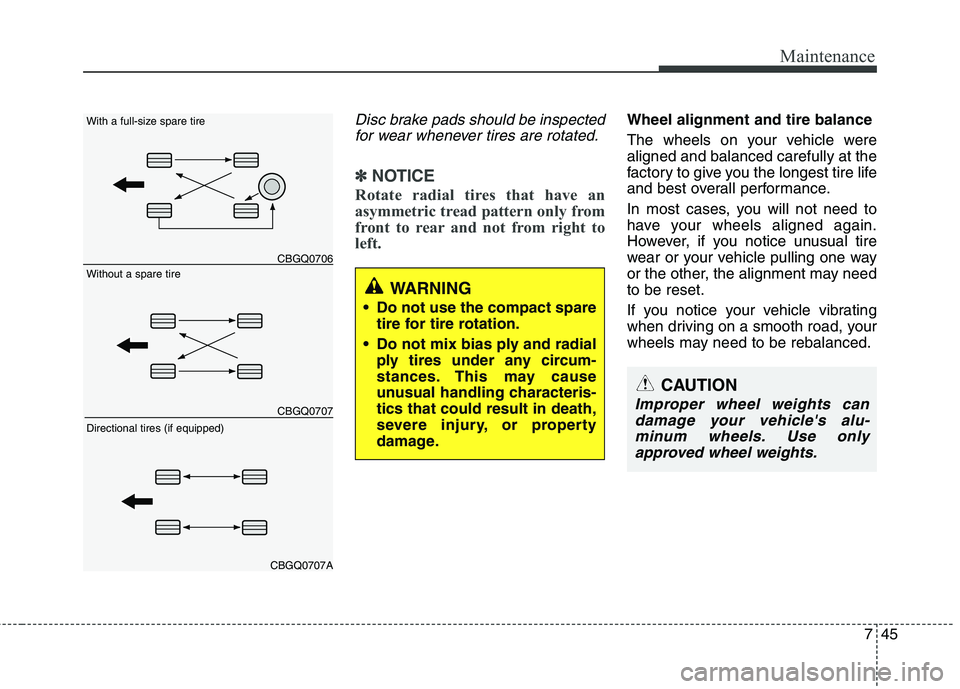
Disc brake pads should be inspectedfor wear whenever tires are rotated.
✽✽ NOTICE
Rotate radial tires that have an
asymmetric tread pattern only from
front to rear and not from right to
left.
Wheel alignment and tire balance
The wheels on your vehicle were aligned and balanced carefully at the
factory to give you the longest tire life
and best overall performance.
In most cases, you will not need to
have your wheels aligned again.
However, if you notice unusual tire
wear or your vehicle pulling one way
or the other, the alignment may needto be reset.
If you notice your vehicle vibrating
when driving on a smooth road, your
wheels may need to be rebalanced.
WARNING
Do not use the compact spare tire for tire rotation.
Do not mix bias ply and radial ply tires under any circum-
stances. This may cause
unusual handling characteris-tics that could result in death,
severe injury, or property
damage.
CAUTION
Improper wheel weights can
damage your vehicle's alu-minum wheels. Use onlyapproved wheel weights.
CBGQ0706
CBGQ0707
CBGQ0707A
Without a spare tire
With a full-size spare tire Directional tires (if equipped)
Page 317 of 761
Maintenance
54
7
Memory fuse
Your vehicle is equipped with a memory
fuse to prevent battery discharge if your
vehicle is parked without being operated
for prolonged periods. Use the following
procedures before parking the vehicle for
prolonged periods.
1. Turn off the engine.
2. Turn off the headlights and tail lights.
3. Open the driver’s side panel cover and
pull up the memory fuse.
✽✽ NOTICE
If the memory fuse is pulled up from the fuse panel, the warning chime,
audio, clock and interior lamps, etc.,
will not operate. Some items must be
reset after replacement. Refer to
“Battery” in this section.
Even though the memory fuse is
pulled up, the battery can still be dis-
charged by operation of the head-
lights or other electrical devices.
Engine compartment panel fuse replacement
1. Turn the ignition switch and all other switches off.
2. Remove the fuse box cover by press- ing the tab and pulling up the cover.
OYN079020
OYN079021/OYN079022
Diesel only
Page 366 of 761

Safety features of your vehicle
4
3
Front seat adjustment
Forward and backward
To move the seat forward or backward:
1. Pull the seat slide adjustment lever
that is under the front edge of the seat cushion up and hold it.
2. Slide the seat to the position you desire.
3. Release the lever and make sure the seat is locked in place.
Adjust the seat before driving, and make
sure the seat is locked securely by trying
to move forward and backward without
using the lever. If the seat moves, it is not
locked properly.
OYN039002/H
(Continued)
When resetting the seatback to the upright position, make sure it
is securely latched by pushing it
forward and backwards.
To avoid the possibility of burns, do not remove the carpet in the
cargo area. Emission control
devices beneath this floor gener-ate high temperatures.WARNING - Rear seatbacks
The rear seatback must be securely latched. If not, passen-
gers and objects could be thrown
forward resulting in serious
injury or death in the event of a
sudden stop or collision.
Luggage and other cargo should be laid flat in the cargo area. If
objects are large, heavy, or must
be piled, they must be secured.
Under no circumstances should
cargo be piled higher than the
seatbacks. Failure to follow thesewarnings could result in serious
injury or death in the event of a
sudden stop, collision or rollover.
No passenger should ride in the cargo area or sit or lie on folded
seatbacks whilst the vehicle is
moving. All passengers must be
properly seated in seats and
restrained properly whilst riding.
(Continued)
WARNING
After adjusting the seat, always
check that it is securely locked into
place by attempting to move the
seat forward or backward without
using the lock release lever.
Sudden or unexpected movement
of the driver's seat could cause you
to lose control of the vehicle result-ing in an accident.
YN RHD 3.QXP 10/20/2009 4:20 PM Page 4
Page 442 of 761
421
Features of your vehicle
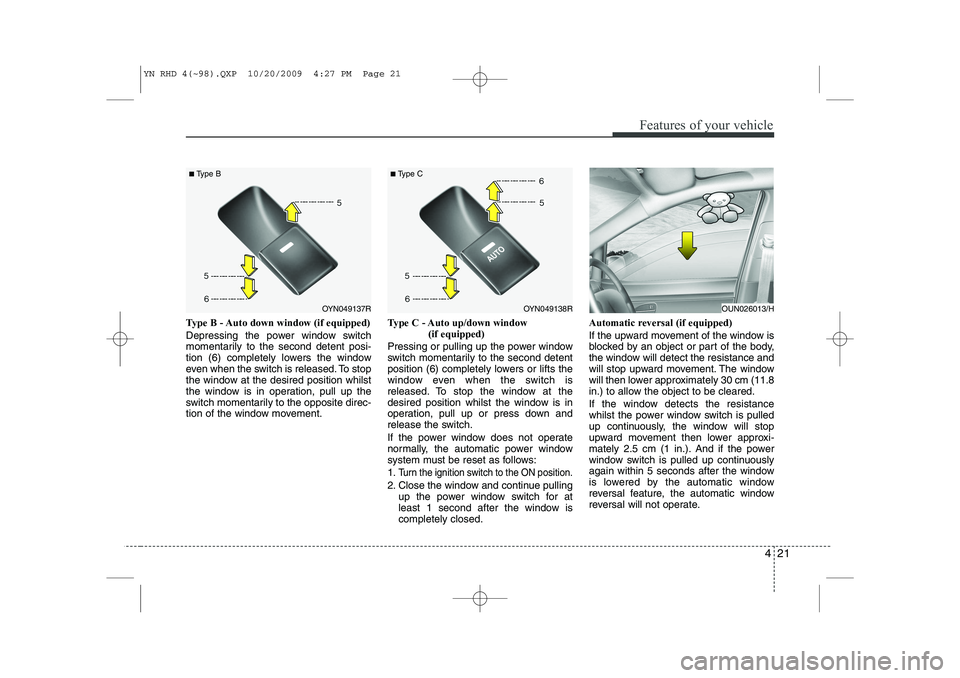
Type B - Auto down window (if equipped)
Depressing the power window switch
momentarily to the second detent posi-
tion (6) completely lowers the window
even when the switch is released. To stop
the window at the desired position whilst
the window is in operation, pull up the
switch momentarily to the opposite direc-
tion of the window movement.Type C - Auto up/down window
(if equipped)
Pressing or pulling up the power window
switch momentarily to the second detent
position (6) completely lowers or lifts the
window even when the switch is
released. To stop the window at the
desired position whilst the window is in
operation, pull up or press down and
release the switch.
If the power window does not operate
normally, the automatic power window
system must be reset as follows: 1.
Turn the ignition switch to the ON position.
2. Close the window and continue pulling up the power window switch for at
least 1 second after the window iscompletely closed. Automatic reversal (if equipped)
If the upward movement of the window is
blocked by an object or part of the body,
the window will detect the resistance and
will stop upward movement. The window
will then lower approximately 30 cm (11.8
in.) to allow the object to be cleared.
If the window detects the resistance
whilst the power window switch is pulled
up continuously, the window will stop
upward movement then lower approxi-
mately 2.5 cm (1 in.). And if the power
window switch is pulled up continuously
again within 5 seconds after the window
is lowered by the automatic window
reversal feature, the automatic window
reversal will not operate.
OYN049137R
■
Type BOYN049138R
■
Type COUN026013/H
YN RHD 4(~98).QXP 10/20/2009 4:27 PM Page 21