Page 82 of 394
411
Features of your vehicle
Avoid trying to start the engine whilethe alarm is activated. The vehicle
starting motor is disabled during the
theft-alarm stage.
If the system is not disarmed with the
transmitter, insert the key into the igni-
tion switch, turn the ignition switch to
the ON position and wait for 30 sec-
onds. Then the system will be dis-
armed.
If you lose your keys, consult your authorized Kia dealer.
If the system is not disarmed with the transmitter, insert the key into the igni-
tion switch and start the engine. Then
the system will be disarmed.
If you lose your keys, consult your authorized Kia dealer.
Page 84 of 394

413
Features of your vehicle
Operating door locks from inside
the vehicle
With the door lock button
To unlock a door, push the door lockbutton (1) to the “Unlock” position. The
red mark (2) on the button will be visi-
ble.
To lock a door, push the door lock but- ton (1) to the “Lock” position. If the door
is locked properly, the red mark (2) on
the door lock button will not show.
To open a door, pull the door handle (3) outward. If the inner door handle of the front
door is pulled when the door lock but-
ton is in the lock position, the button
will unlock and the door will open. (if
equipped)
Front doors cannot be locked if the ignition key is in the ignition switch (or
if the smart key is in the vehicle) and
any front door is opened. (if equipped) If a power door lock ever fails to function
while you are in the vehicle, try one or
more of the following techniques to exit:
Operate the door unlock feature
repeatedly (both electronic and manu-
al) while simultaneously pulling on the
door handle.
Operate the other door locks and han- dles, front and rear.
Lower a front window and use the key to unlock the door from outside.
OTF040011
Lock
Unlock
Page 85 of 394
Features of your vehicle
14
4
With central door lock switch
(if equipped)
Operate by pressing the central door lock
switch.
Press the switch to the "Lock" position (1), all vehicle doors will lock.
Press the switch to the "Unlock" posi- tion (2), all vehicle doors will unlock. If the key is in the ignition switch (or if
the smart key is in the vehicle) and any
front door is opened, the doors will not
lock when the “Lock” position (1) of the
central door lock switch is pressed. (if
equipped)
WARNING
- Unattended children/animals
Never leave children or animals
unattended in your vehicle.
An enclosed vehicle can become
extremely hot, causing death or
severe injury to unattended chil-
dren or animals who cannot escape
the vehicle.
WARNING - Doors
The doors should always be fully
closed and locked while the vehicle
is in motion to prevent accidental
opening of the door.
OTF040012N
OTF040013
Driver's door
Passenger’s door
Page 86 of 394

415
Features of your vehicle
Impact sensing door unlock sys-
tem (if equipped)
All doors will automatically unlock when
an impact causes the air bags to deploy.
Auto door lock/unlock feature
(if equipped)
All doors will automatically lock whenthe transaxle shift lever is shifted out of
P (Park).
All doors will automatically unlock when the transaxle shift lever is shifted
into P (Park).
Speed sensing door lock system
(if equipped)
All doors will be automatically locked
after the vehicle speed exceeds 15 km/h.
And all doors will be automatically
unlocked when you turn the engine off or
when you remove the ignition key. (if
equipped) An authorized Kia dealer can activate or
deactivate some auto door lock/ unlock
features as follows;
Auto door unlock by using the driver's
door lock button
Auto door lock/unlock by shifting the transaxle shift lever out of P (Park) or
into P (Park)
Auto door unlock when the smart key is removed from the smart key holder.
If you want to activate or deactivate a
door lock/unlock feature, refer to the
"vehicle setting" in this chapter.
Child-protector rear door lock
The child safety lock is provided to help
prevent children from accidentally open-
ing the rear doors from inside the vehicle.
The rear door safety locks should be
used whenever children are in the vehi-
cle.
1. Open the rear door.
2. Push the child safety lock (1) located on the rear edge of the door to the
lock position. When the child safety
lock is in the lock position, rear door
will not open even when the inner door
handle is pulled.
OTF040014
Page 92 of 394

421
Features of your vehicle
In cold and wet climates, power windows
may not work properly due to freezing
conditions.
Power windows
The ignition switch must be in the ON
position for power windows to operate.
Each door has a power window switch
that controls the door’s window. The driv-
er has a power window lock switch which
can block the operation of passenger
windows.
The power windows can be operated for
approximately 30 seconds after the igni-
tion key is removed or turned to the ACC
or LOCK position. However, if the front
doors are opened, the power windows
cannot be operated even within the 30
second period.
✽ ✽NOTICE
While driving with the rear windows
down or with the sunroof (if equipped)
in an open (or partially open) position,
your vehicle may demonstrate a wind
buffeting or pulsation noise. This noise
is a normal occurrence and can be
reduced or eliminated by taking the fol-
lowing actions. If the noise occurs with
one or both of the rear windows down,
partially lower both front windows
approximately one inch. If you experi-
ence the noise with the sunroof open,
slightly reduce the size of the sunroof
opening.
Window opening and closing
Type A
The driver’s door has a master power
window switch that controls all the win-
dows in the vehicle.
To open or close a window, press down
or pull up the front portion of the corre-
sponding switch to the first detent posi-
tion (5).
OTF040020
Page 93 of 394
Features of your vehicle
22
4
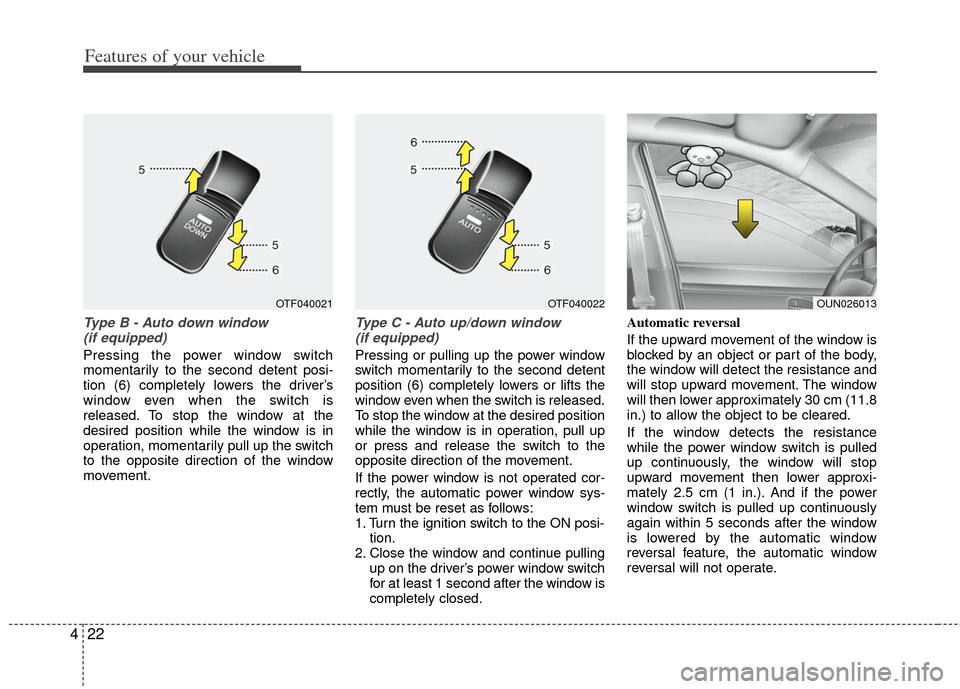
Type B - Auto down window
(if equipped)
Pressing the power window switch
momentarily to the second detent posi-
tion (6) completely lowers the driver’s
window even when the switch is
released. To stop the window at the
desired position while the window is in
operation, momentarily pull up the switch
to the opposite direction of the window
movement.
Type C - Auto up/down window (if equipped)
Pressing or pulling up the power window
switch momentarily to the second detent
position (6) completely lowers or lifts the
window even when the switch is released.
To stop the window at the desired position
while the window is in operation, pull up
or press and release the switch to the
opposite direction of the movement.
If the power window is not operated cor-
rectly, the automatic power window sys-
tem must be reset as follows:
1. Turn the ignition switch to the ON posi- tion.
2. Close the window and continue pulling up on the driver’s power window switch
for at least 1 second after the window is
completely closed. Automatic reversal
If the upward movement of the window is
blocked by an object or part of the body,
the window will detect the resistance and
will stop upward movement. The window
will then lower approximately 30 cm (11.8
in.) to allow the object to be cleared.
If the window detects the resistance
while the power window switch is pulled
up continuously, the window will stop
upward movement then lower approxi-
mately 2.5 cm (1 in.). And if the power
window switch is pulled up continuously
again within 5 seconds after the window
is lowered by the automatic window
reversal feature, the automatic window
reversal will not operate.
OUN026013OTF040021OTF040022
Page 99 of 394
Features of your vehicle
28
4
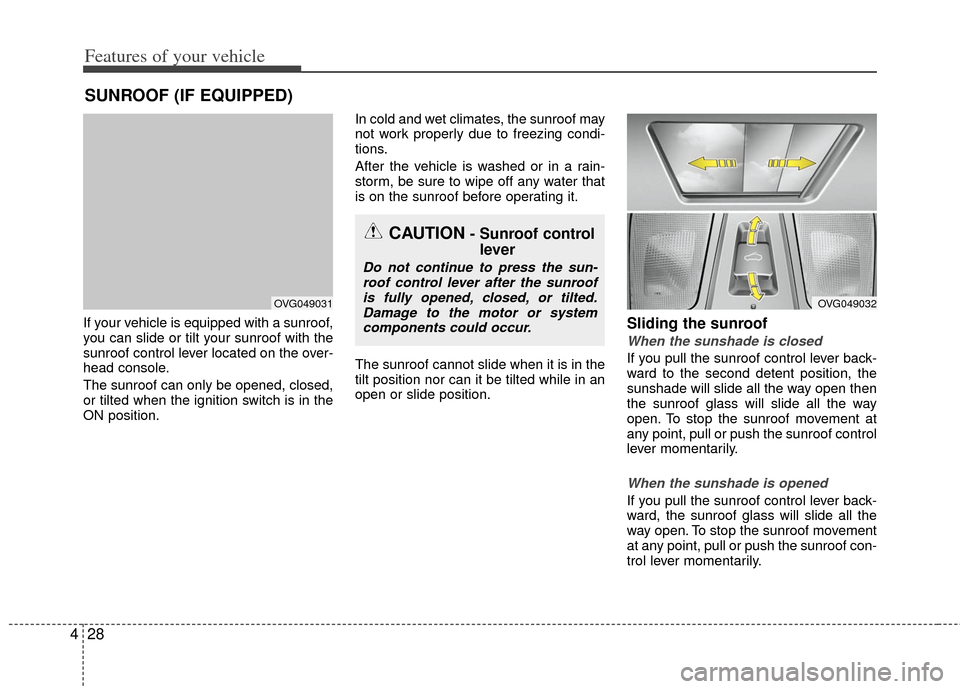
If your vehicle is equipped with a sunroof,
you can slide or tilt your sunroof with the
sunroof control lever located on the over-
head console.
The sunroof can only be opened, closed,
or tilted when the ignition switch is in the
ON position. In cold and wet climates, the sunroof may
not work properly due to freezing condi-
tions.
After the vehicle is washed or in a rain-
storm, be sure to wipe off any water that
is on the sunroof before operating it.
The sunroof cannot slide when it is in the
tilt position nor can it be tilted while in an
open or slide position.Sliding the sunroof
When the sunshade is closed
If you pull the sunroof control lever back-
ward to the second detent position, the
sunshade will slide all the way open then
the sunroof glass will slide all the way
open. To stop the sunroof movement at
any point, pull or push the sunroof control
lever momentarily.
When the sunshade is opened
If you pull the sunroof control lever back-
ward, the sunroof glass will slide all the
way open. To stop the sunroof movement
at any point, pull or push the sunroof con-
trol lever momentarily.
SUNROOF (IF EQUIPPED)
CAUTION- Sunroof control
lever
Do not continue to press the sun-
roof control lever after the sunroofis fully opened, closed, or tilted.Damage to the motor or systemcomponents could occur.
OVG049031OVG049032
Page 102 of 394
431
Features of your vehicle
Resetting the sunroof
Whenever the vehicle battery is discon-
nected or discharged, or related fuse is
blown, you must reset your sunroof sys-
tem as follows:
1. Turn the ignition switch to the ON posi-tion and close the sunroof completely.
2. Release the control lever.
3. Push and hold the control lever forward (for more than 10 seconds) until the
sunroof tilts and slightly moves. Then,
release the lever.
4. Push the sunroof control lever forward in the direction of close until the sun-
roof operates as follows;
SUNSHADE OPEN → TILT OPEN →
SLIDE OPEN → SLIDE CLOSE →
SUNSHADE CLOSE
Then, release the control lever.
When this is complete, the sunroof
system is reset. ❈
For more detailed information, contact
an authorized Kia dealer.
✽ ✽
NOTICE
If the sunroof is not reset when the vehi-
cle battery is disconnected or dis-
charged, or related fuse is blown, the
sunroof may operate improperly.