Page 132 of 390

461
Features of your vehicle
High beam operation
To turn on the high beam headlights, push
the lever away from you. Pull it back for
low beams. The high beam indicator will light when
the headlight high beams are switched on.
To prevent the battery from being dis-
charged, do not leave the lights on for aprolonged time while the engine is not
running.To flash the headlights, pull the lever
towards you. It will return to the normal
(low beam) position when released. The
headlight switch does not need to be on
to use this flashing feature.
Turn signals and lane change sig- nals
The ignition switch must be on for the
turn signals to function. To turn on the
turn signals, move the lever up or down
(A). The green arrow indicators on the
instrument panel indicate which turn sig-
nal is operating. They will self-cancel
after a turn is completed. If the indicator
continues to flash after a turn, manually
return the lever to the O/OFF position.
OED040802OED040801OED040804
ED(FL) ENG 4(~103).QXP 10/28/2010 6:57 PM Page 61
Page 135 of 390

Features of your vehicle
64
4
A : Wiper speed control (front)
· 2 – High wiper speed
· 1 – Low wiper speed
· ---* – Intermittent wipe AUTO* – Auto control wipe
· O – Off
· – Single wipe
B : Intermittent control wipe time adjustment
C : Wash with brief wipes (front)
D : Rear wiper/washer control · – Continuous wipe
· O – Off
E : Wash with brief wipes (rear) Windshield wipers (front)
Operates as follows when the ignition
switch is turned ON.
: For a single wiping cycle, move thelever to this position and release it
with the lever in the OFF position. The
wipers will operate continuously if the
lever is held in this position.
O : Wiper is not in operation
--- : Wiper operates intermittently at the same wiping intervals. Use this mode
in a light rain or mist. To vary the
speed setting, turn the speed control
knob.
1 : Normal wiper speed
2 : Fast wiper speed
✽✽ NOTICE
If there is heavy accumulation of snow
or ice on the windshield, defrost the
windshield for about 10 minutes, or
until the snow and/or ice is removed
before using the windshield wipers to
ensure proper operation.
WIPERS AND WASHERS
OED040900/OED040901
■
■
Front
■
■ Rear (if equipped)
---*(AUTO)
ED(FL) ENG 4(~103).QXP 10/28/2010 6:57 PM Page 64
Page 136 of 390

465
Features of your vehicle
Auto control (if equipped)
The rain sensor located on the upper end of windshield glass senses the amount of
rainfall and controls the wiping cycle for
the proper intervals.
The more it rains, the faster the wiper
operates. When the rain stops, the wiper
stops. To vary the speed setting, turn the
speed control knob (1). If the ignition
switch is turned ON when the wiper
switch is set in AUTO mode, or wiper
switch is set in AUTO mode when the
ignition switch is ON, or the speed con-
trol knob is turned upward when the
wiper switch is in AUTO mode, wiper will
operate once to perform a self-check of
the system. Set the wiper to O (OFF)
position when the wiper is not in use.
OED040905
SensorSensor
CAUTION
When washing the vehicle, set thewiper switch in the O (OFF) position
to stop the auto wiper operation.
Wiper may operate and be damagedif the switch is set in AUTO modewhile washing vehicle.
Do not remove the sensor coverlocated on the upper end of the pas-senger side windshield glass.Damage to system parts could occur and may not be covered by
your vehicle warranty.
When the starting the vehicle in win-ter, set the wiper switch in the O (OFF) position. Otherwise, wipers
may operate and ice may damagethe windshield wiper blades. Always remove all snow and ice and defrostthe windshield properly prior to
operating the windshield wipers.
CAUTION
When the ignition switch is ON and the windshield wiper switch is
placed in the AUTO mode, use cau-tion in the following situations to avoid any injury to the hands orother parts of the body:
Do not touch the upper end of the windshield glass facing the rainsensor.
Do not wipe the upper end of the windshield glass with a damp or
wet cloth.
Do not put pressure on the wind- shield glass.
ED(FL) ENG 4(~103).QXP 10/28/2010 6:57 PM Page 65
Page 139 of 390
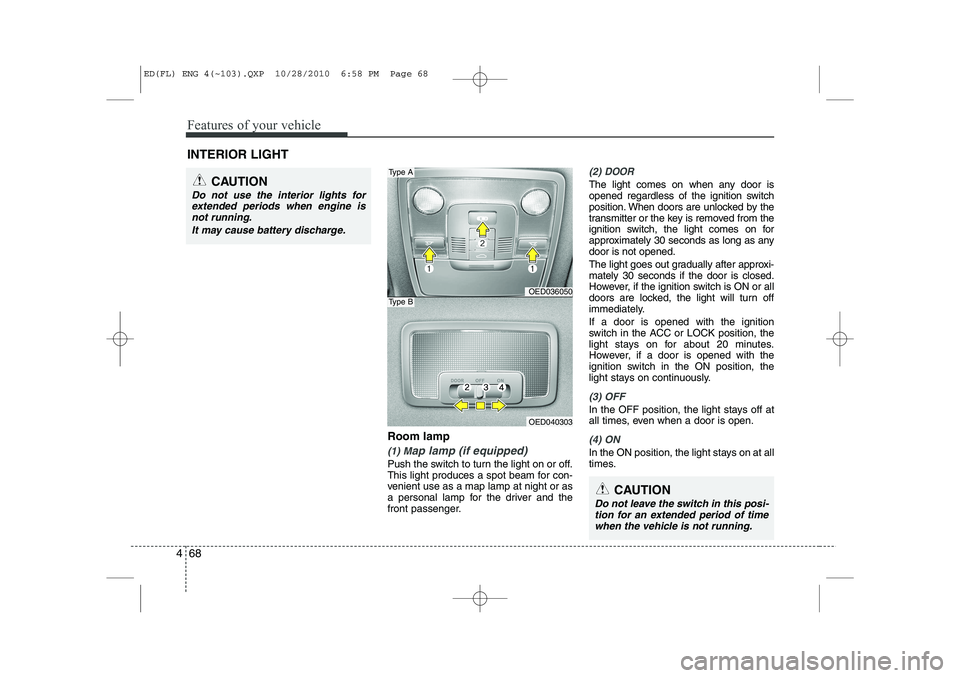
Features of your vehicle
68
4
Room lamp
(1) Map lamp (if equipped)
Push the switch to turn the light on or off.
This light produces a spot beam for con-
venient use as a map lamp at night or as
a personal lamp for the driver and the
front passenger.
(2) DOOR
The light comes on when any door is
opened regardless of the ignition switch
position. When doors are unlocked by the
transmitter or the key is removed from the
ignition switch, the light comes on for
approximately 30 seconds as long as anydoor is not opened.
The light goes out gradually after approxi- mately 30 seconds if the door is closed.
However, if the ignition switch is ON or all
doors are locked, the light will turn off
immediately. If a door is opened with the ignition
switch in the ACC or LOCK position, the
light stays on for about 20 minutes.
However, if a door is opened with the
ignition switch in the ON position, the
light stays on continuously.
(3) OFF
In the OFF position, the light stays off at
all times, even when a door is open.
(4) ON
In the ON position, the light stays on at all
times.
INTERIOR LIGHT
CAUTION
Do not use the interior lights for
extended periods when engine is
not running.
It may cause battery discharge.
OED036050
OED040303
Type A
Type B
CAUTION
Do not leave the switch in this posi-tion for an extended period of timewhen the vehicle is not running.
ED(FL) ENG 4(~103).QXP 10/28/2010 6:58 PM Page 68
Page 140 of 390

469
Features of your vehicle
✽✽NOTICE
If you want to defrost and defog the
front windshield, refer to “Windshield
defrosting and defogging” in this sec-tion.
Rear window defroster
The defroster heats the window to
remove frost, fog and thin ice from the
interior and exterior of the rear window,
while engine is running.
To activate the rear window defroster,
press the rear window defroster button
located in the center facia switch panel. The indicator on the rear window
defroster button illuminates when thedefroster is ON.
If there is heavy accumulation of snow on
the rear window, brush it off before oper-
ating the rear defroster.
The rear window defroster automatically
turns off after approximately 20 minutes
or when the ignition switch is turned off.
To turn off the defroster, press the rear
window defroster button again.
Outside mirror defroster
(if equipped)
If your vehicle is equipped with outside
mirror defrosters, they will operate at the
same time when you turn on the rear
window defroster.
Front windshield deicer (if equipped)
If your vehicle is equipped with front
windshield deicer, they will operate at the
same time when you turn on the rear
window defroster.
DEFROSTER
CAUTION
To prevent damage to the conduc-
tors bonded to the inside surface of
the rear window, never use sharpinstruments or window cleanerscontaining abrasives to clean the window.
OED040043
OED040044B
Type A
Type B
ED(FL) ENG 4(~103).QXP 10/28/2010 6:58 PM Page 69
Page 146 of 390

475
Features of your vehicle
Fan speed control
The ignition switch must be in the ON
position for fan operation.
The fan speed control knob allows you to
control the fan speed of the air flowing
from the ventilation system. To change
the fan speed, turn the knob to the right
for higher speed or left for lower speed.
Setting the fan speed control knob to the
“0” position turns off the fan.
Air conditioning (if equipped)
Press the A/C button to turn the air con- ditioning system on (indicator light will
illuminate). Press the button again to turn
the air conditioning system off.
WARNING
Continuous operation of the cli- mate control system in the recir-
culated air position may allowhumidity to increase inside the
vehicle which may fog the glass
and obscure visibility.
Do not sleep in a vehicle with air conditioning or heating system
on. It may cause serious harm or
death due to a drop in the oxygen
level and/or body temperature.
Continuous operation of the cli- mate control system in the recir-culated air position can cause
drowsiness or sleepiness, and
loss of vehicle control. Set the air
intake control to the outside
(fresh) air position as much as
possible while driving.
OED040047OED040053
ED(FL) ENG 4(~103).QXP 10/28/2010 6:59 PM Page 75
Page 156 of 390

485
Features of your vehicle
Air conditioning
Push the A/C button to turn the air condi- tioning system on (indicator light will illu-minate).
Push the button again to turn the air con-
ditioning system off.
OFF mode
Push the OFF button to turn off the air cli-
mate control system. However you can
still operate the mode and air intake but-
tons as long as the ignition switch is inthe position ON.Climate control air filter (if equipped) The climate control air filter installed
behind the glove box filters the dust or
other pollutants that come into the vehi-cle from the outside through the heating
and air conditioning system. If dust or
other pollutants accumulate in the filter
over a period of time, the air flow from the
air vents may decrease, resulting in
moisture accumulation on the inside of
the windshield even when the outside
(fresh) air position is selected. If this hap-
pens, have the climate control air filter
replaced by an authorized KIA dealer.
OED040410OED040409
ED(FL) ENG 4(~103).QXP 10/28/2010 6:59 PM Page 85
Page 160 of 390
489
Features of your vehicle
Defogging logic
To reduce the possibility of fogging up
the inside of the windshield, the air intakecontrol is set to the outside (fresh) airposition automatically according to cer-
tain conditions such as or posi-
tion. Additionally, the air conditioning will
automatically operate if the mode is
selected to the position. To cancel or
return to the defogging logic, do the fol-
lowing.
Manual climate control system
1. Turn the ignition switch to the ON posi-tion.
2. Turn the mode selection knob to the defrost position ( ).
3. Push the air intake control button ( ) at least 5 times within 3 sec-
onds.
The indicator light in the air intake control
button ( ) will blink 3 times with 0.5
second of interval. It indicates that the
defogging logic is canceled or returned to
the programmed status.
If the battery has been discharged or dis-
connected, it resets to the defog logic
status.
OED040068
ED(FL) ENG 4(~103).QXP 10/28/2010 7:00 PM Page 89
