2011 KIA Carens Ignition key
[x] Cancel search: Ignition keyPage 95 of 338

Features of your vehicle
16
4
D080100BUN
Power windows
The ignition switch must be in the ON
position for power windows to operate.
Each door has a power window switch
that controls the door's window. The driv-
er has a power window lock switch which
can block the operation of passenger
windows. The power windows can be
operated for approximately 30 seconds
after the ignition key is removed or turned
to the ACC or LOCK position. However, if
the front doors are opened, the power
windows cannot be operated within the
30 second period after the ignition key
removal.
✽ ✽
NOTICE
While driving with the rear windows
down or with the sunroof (if equipped) in
an open (or partially open position), your
vehicle may demonstrate a wind buffet-
ing or pulsation noise. This noise is a
normal occurrence and can be reduced
or eliminated by taking the following
actions. If the noise occurs with one or
both of the rear windows down, partially
lower both front windows approximate-
ly one inch. If you experience the noise
with the sunroof open, slightly reduce the
size of the sunroof opening.
D080101AUN
Window opening and closing
The driver’s door has a master power
window switch that controls all the win-
dows in the vehicle.
To open or close a window, press down
or pull up the front portion of the corre-
sponding switch to the first detent posi-
tion (5).
D080102AUN
Auto down window
(Driver’s window)
Depressing the power window switch
momentarily to the second detent posi-
tion (6) completely lowers the driver’s
window even when the switch is
released. To stop the window at the
desired position while the window is in
operation, momentarily pull the switch in
the direction opposite of the window’s
movement.
OUN026012OUN026011
Page 96 of 338

417
Features of your vehicle
D080104AUN
Power window lock button
The driver can disable the power win-dow switches on the passenger doors
by depressing the power window lock
switch located on the driver’s door to
LOCK (pressed).
When the power window lock switch is ON, the driver’s master control
cannot operate the passenger door
power windows.
OUN026014
CAUTION
To prevent possible damage to the power window system, do notopen or close two windows ormore at the same time. This willalso ensure the longevity of the fuse.
Never try to operate the main switch on the driver's door andthe individual door windowswitch in opposing directions atthe same time. If this is done, thewindow will stop and cannot beopened or closed.WARNING - Windows
NEVER leave the ignition key in the vehicle.
NEVER leave any child unattend- ed in the vehicle. Even very
young children may inadvertently
cause the vehicle to move, entan-
gle themselves in the windows,
or otherwise injure themselves or
others.
Always double check to make sure all arms, hands, head and
other obstructions are safely out
of the way before closing a win-
dow.
Do not allow children to play with the power windows. Keep the dri-
ver’s door power window lock
switch in the LOCK position
(depressed). Serious injury can
result from unintentional window
operation by the child.
Do not extend any head or arms outside through the window
opening while driving.
Page 123 of 338

Features of your vehicle
44
4
D150309AUN
Front fog light indicator
(if equipped)
This light comes on when the front fog
lights are ON.
D150312AUN
Shift pattern indicator
The indicator displays to show the auto-
matic transaxle shift lever selection.
D150313AUN
Charging system warning
This warning light indicates a malfunction
of either the generator or electrical charg-
ing system.
If the warning light comes on while the
vehicle is in motion:
1. Drive to the nearest safe location.
2. With the engine off, check the generator drive belt for looseness or breakage.
3. If the belt is adjusted properly, a prob- lem exists somewhere in the electrical
charging system. Have an authorized
KIA dealer correct the problem as soon
as possible.
D150315AUN
Tailgate open warning light
This warning light illuminates when the
tailgate is not closed securely with the
ignition switch in any position.
D150316AUN
Door ajar warning light
This warning light illuminates when a
door is not closed securely with the igni-
tion switch in any position.
D150317AUN
Immobilizer indicator (if equipped)
This light illuminates when the immobiliz-
er key is inserted and turned to the ON
position to start the engine.
At this time, you can start the engine. The
light goes out after the engine is running.
If this light blinks when the ignition switch
is in the ON position before starting the
engine, have the system checked by an
authorized KIA dealer.
D150318AUN
Low fuel level warning
This warning light indicates the fuel tank
is nearly empty. When it comes on, you
should add fuel as soon as possible.
Driving with the fuel level warning light on
or with the fuel level below “E” can cause
the engine to misfire and damage the
catalytic converter.
D150319AUN
Low washer fluid levelwarning indicator(if equipped)
This warning light indicates the washer
fluid reservoir is near empty. Refill the
washer fluid as soon as possible.
Page 125 of 338

Features of your vehicle
46
4
D150325AUN
Cruise indicator (if equipped)CRUISE indicator
The indicator light illuminates when the
cruise control system is enabled.
The cruise indicator light in the instru-
ment cluster is illuminated when the
cruise control ON-OFF button on the
steering wheel is pulled.
The indicator light turns off when the
cruise control ON-OFF button is pulled
again. For more information about the
use of cruise control, refer to “Cruise
control system” in section 5.
Cruise SET indicator
The indicator light illuminates when the
cruise function switch (COAST/SET or
RES/ACCEL) is ON.
The cruise SET indicator light in the
instrument cluster is illuminated when
the cruise control switch (COAST/SET or
RES/ACCEL) is pushed. The cruise SET indicator light does not
illuminate when the cruise control switch
(CANCEL) is pushed or the system is
disengaged.
D150327AUN
Key reminder warning chime
(if equipped)
If the driver’s door is opened while the
ignition key is left in the ignition switch
(ACC or LOCK position), the key
reminder warning chime will sound. This
is to prevent you from locking your keys
in the vehicle. The chime sounds until the
key is removed from the ignition switch or
the driver’s door is closed.
ECOMINDERTMindicator
(if equipped)
The ECOMINDERTMindicator is dis-
played to help you improve fuel efficiency
when you are driving.
The ECOMINDER
TMindicator (green)
will turn on when you drive fuel effi-
ciently in the ECO ON mode. If you
don't want the indicator displayed, you
can turn the ECO ON mode to OFF
mode by pressing the TRIP button.
The fuel efficiency depends on the dri- ver's driving habit and road condition.
The system stops operating when the transaxle is in the P (Park), R
(Reverse), N (Neutral) position or
when the instant fuel consumption
mode is selected.
CRUISE
SET
ECO
ECOMINDERTMWARNING
Don't keep watching the “ECO”
ECOMINDERTMindicator while driv-
ing. It will distract you and cause
an accident that results in severe
personal injury.
Page 129 of 338

Features of your vehicle
50
4
This system is a supplemental system
that shows behind of the vehicle through
the rearview display mirror while back-
ing-up.
The rearview camera may be turned off
by pressing the ON/OFF button (1) when
the rearview camera is activated.
To turn the camera on again, press the
ON/OFF button (1) again when the igni-
tion switch is ON and the shift lever in R
(Reverse) position. Also, the camera will
turn on automatically whenever the igni-
tion switch is turned off and on again.
D180000AUN
The hazard warning flasher should be
used whenever you find it necessary to
stop the car in a hazardous location.
When you must make such an emer-
gency stop, always pull off the road as far
as possible.
The hazard warning lights are turned on
by pushing in the hazard switch. This
causes all turn signal lights to blink. The
hazard warning lights will operate even
though the key is not in the ignition
switch.
To turn the hazard warning lights off,
push the switch a second time.WARNING
This system is a supplementary
function only. It is the responsi-
bility of the driver to always
check the inside/outside rearview
mirror and the area behind the
vehicle before and while backing
up because there is a dead zone
that can't see through the cam-
era.
Always keep the camera lens clean. If lens is covered with for-
eign matter, the camera may not
operate normally.
HAZARD WARNING FLASHER
OUN027218N
Page 130 of 338

451
Features of your vehicle
D190100AUN
Battery saver function
The purpose of this feature is to pre-vent the battery from being dis-
charged. The system automatically
turns off the parking lights when the
driver removes the ignition key and
opens the driver-side door (in that
order).
With this feature, the parking lights will be turned off automatically if the driver
parks on the side of road at night.
If necessary, to keep the lights on
when the ignition key is removed, per-
form the following:
1) Open the driver-side door.
2) Turn the parking lights OFF and ON again using the light switch on the
steering column.
D190400AUN-EC
Lighting control
The light switch has a Headlight and a
Parking light position.
To operate the lights, turn the knob at the
end of the control lever to one of the fol-
lowing positions:
(1) OFF position
(2) Parking light position
(3) Headlight position
D190401AUN
Parking light position ( )
When the light switch is in the parking
light position (1st position), the tail posi-
tion, license and instrument panel lights
are ON.
LIGHTING
OUN028220N
OUN020220N
Type A
Type BOUN028221
OUN020221
Type A
Type B
CAUTION
If the driver gets out of the vehiclethrough other doors (except dri-ver’s door), the battery saver func-tion does not operate. Therefore, itcauses the battery to be dis- charged. In this case, make sure toturn off the lamp before getting outof the vehicle.
Page 201 of 338
Driving your vehicle
45
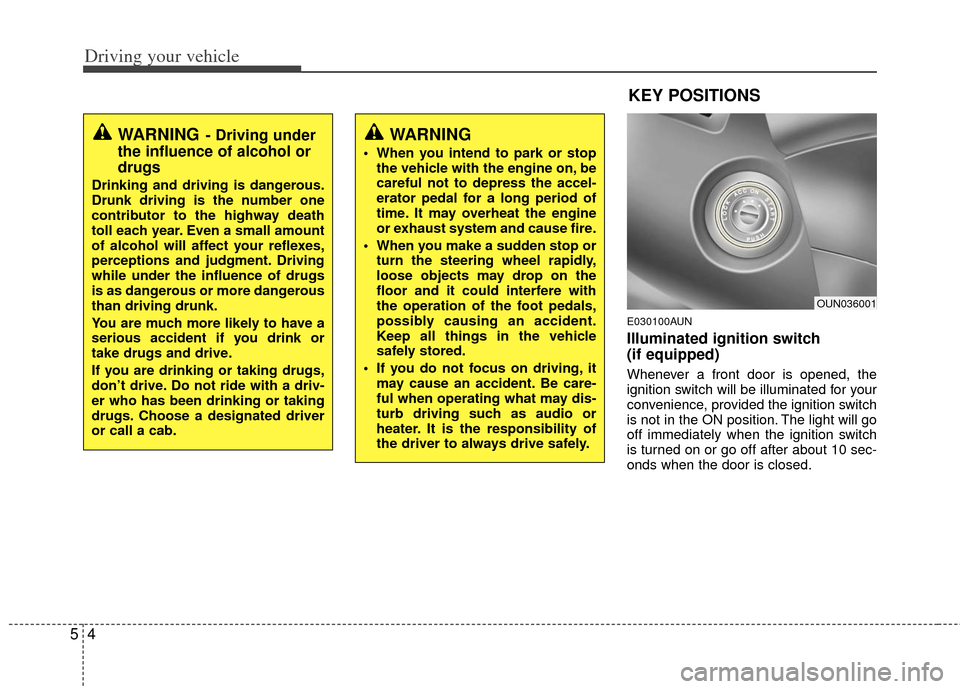
E030100AUN
Illuminated ignition switch
(if equipped)
Whenever a front door is opened, the
ignition switch will be illuminated for your
convenience, provided the ignition switch
is not in the ON position. The light will go
off immediately when the ignition switch
is turned on or go off after about 10 sec-
onds when the door is closed.
WARNING- Driving under
the influence of alcohol or
drugs
Drinking and driving is dangerous.
Drunk driving is the number one
contributor to the highway death
toll each year. Even a small amount
of alcohol will affect your reflexes,
perceptions and judgment. Driving
while under the influence of drugs
is as dangerous or more dangerous
than driving drunk.
You are much more likely to have a
serious accident if you drink or
take drugs and drive.
If you are drinking or taking drugs,
don’t drive. Do not ride with a driv-
er who has been drinking or taking
drugs. Choose a designated driver
or call a cab.
OUN036001
KEY POSITIONS
WARNING
When you intend to park or stop
the vehicle with the engine on, be
careful not to depress the accel-
erator pedal for a long period of
time. It may overheat the engine
or exhaust system and cause fire.
When you make a sudden stop or turn the steering wheel rapidly,
loose objects may drop on the
floor and it could interfere with
the operation of the foot pedals,
possibly causing an accident.
Keep all things in the vehicle
safely stored.
If you do not focus on driving, it may cause an accident. Be care-
ful when operating what may dis-
turb driving such as audio or
heater. It is the responsibility of
the driver to always drive safely.
Page 202 of 338

55
Driving your vehicle
Ignition switch position
E030201AUN
LOCK
The steering wheel locks to protect
against theft (if equipped). The ignition
key can be removed only in the LOCK
position.
When turning the ignition switch to the
LOCK position, push the key inward at
the ACC position and turn the key toward
the LOCK position.
E030202AUN
ACC (Accessory)
The steering wheel is unlocked (if
equipped) and electrical accessories are
operative.
✽ ✽NOTICE (IF EQUIPPED)
If difficulty is experienced turning the
ignition switch to the ACC position, turn
the key while turning the steering wheel
right and left to release the tension.
E030203AUN
ON
The warning lights can be checked
before the engine is started. This is the
normal running position after the engine
is started.
Do not leave the ignition switch ON if the
engine is not running to prevent batterydischarge.
E030204AUN
START
Turn the ignition switch to the START
position to start the engine. The engine
will crank until you release the key; then
it returns to the ON position. The brake
warning lamp can be checked in this
position.
WARNING- Ignition
switch
Never turn the ignition switch to LOCK or ACC while the vehicle is
moving. This would result in loss
of directional control and braking
function, which could cause an
accident.
The anti-theft steering column lock is not a substitute for the parking
brake (if equipped). Before leaving
the driver’s seat, always make sure
the shift lever is engaged in P
(Park) for the automatic transaxle
and set the parking brake fully and
shut the engine off. Unexpected
and sudden vehicle movement
may occur if these precautions are
not taken.
Never reach for the ignition switch, or any other controls through the
steering wheel while the vehicle is
in motion. The presence of your
hand or arm in this area could
cause a loss of vehicle control, an
accident and serious bodily injury
or death.
Do not place any movable objects around the driver’s seat as they
may move while driving, interfere
with the driver and lead to an acci-
dent.
1VQA3018/OED046002 ON
ACC
LOCK START