2011 KIA Borrego battery
[x] Cancel search: batteryPage 191 of 464

4111
Features of your vehicle
D250300AHM
Defogging logic
To reduce the possibility of fogging up
the inside of the windshield, the air intake
or air conditioning are controlled auto-
matically according to certain conditions
such as or position. To cancel or
return to the defogging logic, do the fol-
lowing.
D250301AHM-EE
Manual climate control system
1. Turn the ignition switch to the ON posi-tion.
2. Turn the mode selection knob to the defrost position ( ).
3. Press the air intake control button at least 5 times within 3 seconds.
The indicator light in the air intake control
button will blink 3 times with 0.5 second
of interval. It indicates that the defogging
logic is canceled or returned to the pro-
grammed status.
If the battery has been discharged or dis-
connected, it resets to the defog logic
status.
D250302AHM-EE
Automatic climate control system
1. Turn the ignition switch to the ON posi- tion.
2. Select the defroster position pressing the defroster button ( ).
3. While pressing the air conditioning button (A/C), press the air intake con-
trol button at least 5 times within 3 sec-
onds.
The A/C display blinks 3 times with 0.5
second of interval. It indicates that the
defogging logic is canceled or returned to
the programmed status.
If the battery has been discharged or dis-
connected, it resets to the defog logic
status.
OHM048123LOHM048124L
Page 196 of 464

Features of your vehicle
116
4
D280400BHM
Sunvisor
Use the sunvisor to shield direct light
through the front or side windows.
To use the sunvisor, pull it downward.
To use the sunvisor for the side window,
pull it downward, unsnap it from the
bracket (1) and swing it to the side (2).
To use the vanity mirror, pull down the
visor and slide the mirror cover (3).
Adjust the sunvisor extension forward or
backward (4).
The ticket holder (5) is provided for hold-
ing a tollgate ticket. (if equipped)
OHM048135
OHM048164N
OHM048160
■Center (if equipped)
■Front
■Rear
OEN046157
CAUTION- Vanity mirror
lamp (if equipped)
Close the vanity mirror cover
securely and return the sunvisor toits original position after use. If thevanity mirror is not closed securely,the lamp will stay on and could result in battery discharge and pos-sible sunvisor damage.
WARNING
For your safety, do not obstruct your
vision when using the sunvisor.
Page 198 of 464

Features of your vehicle
118
4
The AC inverter is turned on by pushing
in the switch. To turn the AC inverter off,
push the switch a second time.
✽ ✽
NOTICE
When pushing the AC inverter switch,
the switch indicator illumination is
delayed momentarily while the system
conducts a self-check.
WARNING
The AC inverter can be dangerous!
When using the AC inverter, care-
fully observe the following precau-
tions to avoid serious injuries.
Do not use heated electric prod-
ucts (coffeepot, toaster, heater,
iron, etc.).
Do not insert foreign objects into or touch the AC inverter; you may
get shocked.
Do not let children operate or touch the AC inverter.
When not using the AC inverter, close the cover.
CAUTION
When not using the AC inverter, make sure that the switch isturned off, and is closed the ACinverter cover.
Only use the AC inverter when the engine is running, and removethe plug from the AC inverter afterusing the accessory. Using whenthe engine is not running or leav-ing the accessory plugged in for along time may cause the batteryto discharge.
Do not use electric accessories or equipment with maximum elec-tric power consumption greater than 150W (115VAC).
(Continued)
(Continued) Some electronic devices can cause electronic interferencewhen plugged into the AC invert-er. These devices may causeexcessive audio noise and mal-functions in other electronic sys- tems or devices used in yourvehicle.
Do not use broken electric acces- sories or equipment, as they maydamage the AC inverter and vehi- cle's electrical system.
Do not use two or more electric accessories or equipment at thesame time.
When input voltage is under 11V, the outlet LED and indicator willblink, and will automatically turnoff.
Page 199 of 464

4119
Features of your vehicle
D280600AEN
Digital clock
Whenever the battery terminals or relat-
ed fuses are disconnected, you must
reset the time.
When the ignition switch is in the ACC or
ON position, the clock buttons operate as
follows:
D280601AHM
Hour (1)
Pressing the H button will advance the
time displayed by one hour.
D280602AHM
Minute (2)
Pressing the M button will advance the
time displayed by one minute.
D280603AHM
Reset (3)
To clear away minutes, press the R but-
ton. Then the clock will be set precisely
on the hour.
For example, if the R button is pressed
while the time is between 9:01 and 9:29,
the display will reset to 9:00.
9:01 ~ 9:29 display changed to 9:00
9:30 ~ 9:59 display changed to 10:00
D280604AHM
Display conversion
To change the 12 hour format to the 24
hour format, press the R button until the
display blinks.
For example, if the R button is pressed
while the time is 10:15 p.m., the display
will change to 22:15.
OHM048137
OHM048136
■Type A
■ Type B
WARNING
Do not adjust the clock while driv-
ing. You may lose your steering
control and cause an accident that
results in severe personal injury or
death.
Page 228 of 464
Features of your vehicle
148
4
✽
✽
NOTICE - Using iPod device
• Some iPod models might not support
the communication protocol and the
files will not be played. (iPod models
supported: Mini, 4G, Photo, Nano,
5G)
• The order of search or playback of songs in the iPod can be different
from the order searched in the audio
system.
• If the iPod crashes due to its own trou- ble, reset iPod. (Reset: Refer to iPod
manual)
• iPod may not operate normally on low battery.
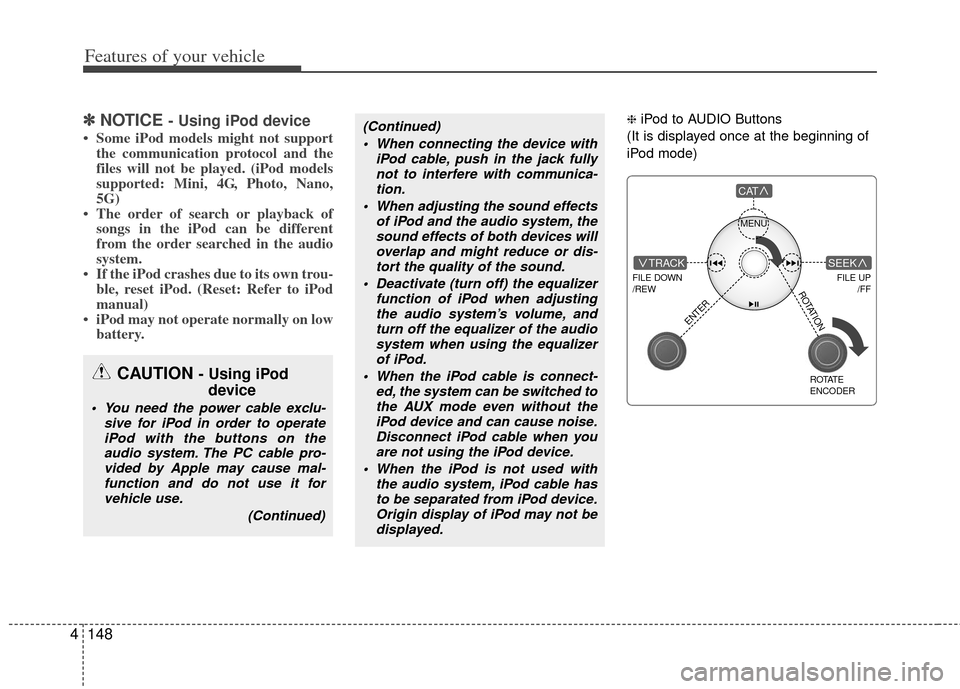
❈ iPod to AUDIO Buttons
(It is displayed once at the beginning of
iPod mode)(Continued) When connecting the device with iPod cable, push in the jack fullynot to interfere with communica-tion.
When adjusting the sound effects of iPod and the audio system, thesound effects of both devices willoverlap and might reduce or dis-tort the quality of the sound.
Deactivate (turn off) the equalizer function of iPod when adjustingthe audio system’s volume, andturn off the equalizer of the audio system when using the equalizerof iPod.
When the iPod cable is connect- ed, the system can be switched tothe AUX mode even without theiPod device and can cause noise.Disconnect iPod cable when you are not using the iPod device.
When the iPod is not used with the audio system, iPod cable hasto be separated from iPod device.Origin display of iPod may not bedisplayed.
CAUTION - Using iPod device
You need the power cable exclu-
sive for iPod in order to operateiPod with the buttons on theaudio system. The PC cable pro-vided by Apple may cause mal-function and do not use it forvehicle use.
(Continued)
MENU
FILE DOWN
/REW
FILE UP /FFTRACK
CAT
ENTER
ROTATE
ENCODER
SEEK
ROTATION
Page 254 of 464

Features of your vehicle
174
4
✽
✽
NOTICE - Using iPod device
• Some iPod models might not support
the communication protocol and the
files will not be played.
• The order of search or playback of songs in the iPod can be different
from the order searched in the audio
system.
• If the iPod crashes due to its own trou- ble, reset the iPod. (Reset: Refer to
iPod manual)
• iPod may not operate normally on low battery.
❈ iPod to AUDIO Buttons
(It is displayed once at the beginning of
iPod mode)(Continued) When connecting the device with an iPod cable, push in the jackfully so as to not cause interferewith communication.
When adjusting the sound effects of an iPod and the audio system,the sound effects of both deviceswill overlap and might reduce ordistort the quality of the sound.
Deactivate (turn off) the equalizer function of an iPod when adjust-ing the audio system’s volume,and turn off the equalizer of the audio system when using theequalizer of an iPod.
When the iPod cable is connected, the system can be switched to theAUX mode even without the iPoddevice and can cause noise.Disconnect the iPod cable when you are not using the iPod device.
When not using iPod with car audio, detach the iPod cable fromiPod. If not, the iPod may remain inaccessary mode, and may notwork properly.
CAUTION IN USING
iPod DEVICE
You need the power cable exclu-
sive for an iPod in order to oper-ate an iPod with the buttons onthe audio system. Connectionthrough standard iPod-USB cableis not supported, so do not use itwith car audio.
(Continued)
MENU
FILE DOWN
/REW
FILE UP /FFTRACK
CAT
ENTER
ROTATE
ENCODER
SEEK
ROTATION
Page 269 of 464

4189
Features of your vehicle
REAR SEAT ENTERTAINMENT SYSTEM (RSE) (IF EQUIPPED)
Important Safety Information
Please read the following for safety pre-
cautions.
✽ ✽NOTICE
Information which the user must
observe in order to prevent vehicle dam-
age or malfunction.
Warnings which must be observed in
the case of vehicle malfunction.
Information which the user must have
prior knowledge.
Information which allows for more con-
venient operation.
Closely observe and comply with the fol-
lowing cautions before using the product.
All problems which occur in violation of
the following will not be the responsibility
of the manufacturer.
For user and passenger safety, please
read the user manual carefully before
using the product.
1. Do not disassemble, assemble, or
modify the AVN system.
2. Set the volume to a level which allows the driver to be aware of external con-
ditions.
3. Do not operate the AVN system for prolonged periods of time with the
vehicle ignition turned off. Such opera-
tions may lead to battery discharge.
4. Be cautious not to spill water or intro- duce foreign objects into the device.
5. Opening the Roof Monitor with exces- sive force may lead to damage.
6. In case of product malfunction, please contact your place of purchase or After
Service center. This device complies with Industry
Canada Standard RSS-210.
Operation is subject to the following two
conditions:
1. This device may not cause harmful
interference, and
2. This device must accept any interfer- ence received, including interference
that may cause undesired operation.
CAUTION
Ignoring the cautions listed withinthis user manual may lead to acci-dents or injury. Cautions indicate matters which may lead to vehicledamage or malfunction.
WARNING
Ignoring the warnings listed within
this user manual may cause fatal or
serious injuries. Warnings indicate
matters which may directly lead to
accidents.
CAUTION
When cleaning this product, makesure to turn off the device and use adry and soft cloth. Never use harsh materials, chemical cloths, or sol-vents (alcohol, benzene, thinners,etc.) as such materials may damage the device panel or cause color andquality deterioration.
WARNING
Changes or modifications not
expressly approved by the party
responsible for compliance could
void the user's authority to operate
the equipment.
Page 306 of 464

55
Driving your vehicle
Ignition switch position
E030201AUN
LOCK
The steering wheel locks to protect
against theft. The ignition key can be
removed only in the LOCK position.
When turning the ignition switch to the
LOCK position, push the key inward at
the ACC position and turn the key toward
the LOCK position.
E030202AHM
ACC (Accessory)
The steering wheel is unlocked and elec-
trical accessories are operative.
✽ ✽NOTICE
If difficulty is experienced turning the
ignition switch to the ACC position, turn
the key while turning the steering wheel
right and left to release the tension.
E030203AUN
ON
The warning lights can be checked
before the engine is started. This is the
normal running position after the engine
is started.
Do not leave the ignition switch ON if the
engine is not running to prevent batterydischarge.
E030204AUN
START
Turn the ignition switch to the START
position to start the engine. The engine
will crank until you release the key; then
it returns to the ON position. The brake
warning lamp can be checked in this
position.
E030205AHM
WARNING - Ignition
switch
Never turn the ignition switch to LOCK or ACC while the vehicle is
moving. This would result in loss
of directional control and braking
function, which could cause an
accident.
The anti-theft steering column lock is not a substitute for the parking
brake. Before leaving the driver’s
seat, always make sure the shift
lever is engaged in P (Park), set the
parking brake fully and shut the
engine off. Unexpected and sud-
den vehicle movement may occur
if these precautions are not taken.
Never reach for the ignition switch, or any other controls through the
steering wheel while the vehicle is
in motion. The presence of your
hand or arm in this area could
cause a loss of vehicle control, an
accident and serious bodily injury
or death.
Do not place any movable objects around the driver’s seat as they
may move while driving, interfere
with the driver and lead to an acci-
dent.
OUN036002