Page 57 of 490
CAUTION!
All occupants, including the driver, should not oper-
ate a vehicle or sit in a vehicle’s seat until the head
restraints are placed in their proper positions in order
to minimize the risk of neck injury in the event of an
accident.
NOTE: For more information on properly adjusting and
positioning the head restraint, refer to “Adjusting Active
Head Restraints” in “Understanding The Features Of
Your Vehicle”.
Resetting Active Head Restraints (AHR)
If the Active Head Restraints are triggered in an accident,
you must reset the head restraint on the driver ’s and
front passenger seat. You can recognize when the Active
Head Restraint has been triggered by the fact that they
have moved forward (as shown in step three of the
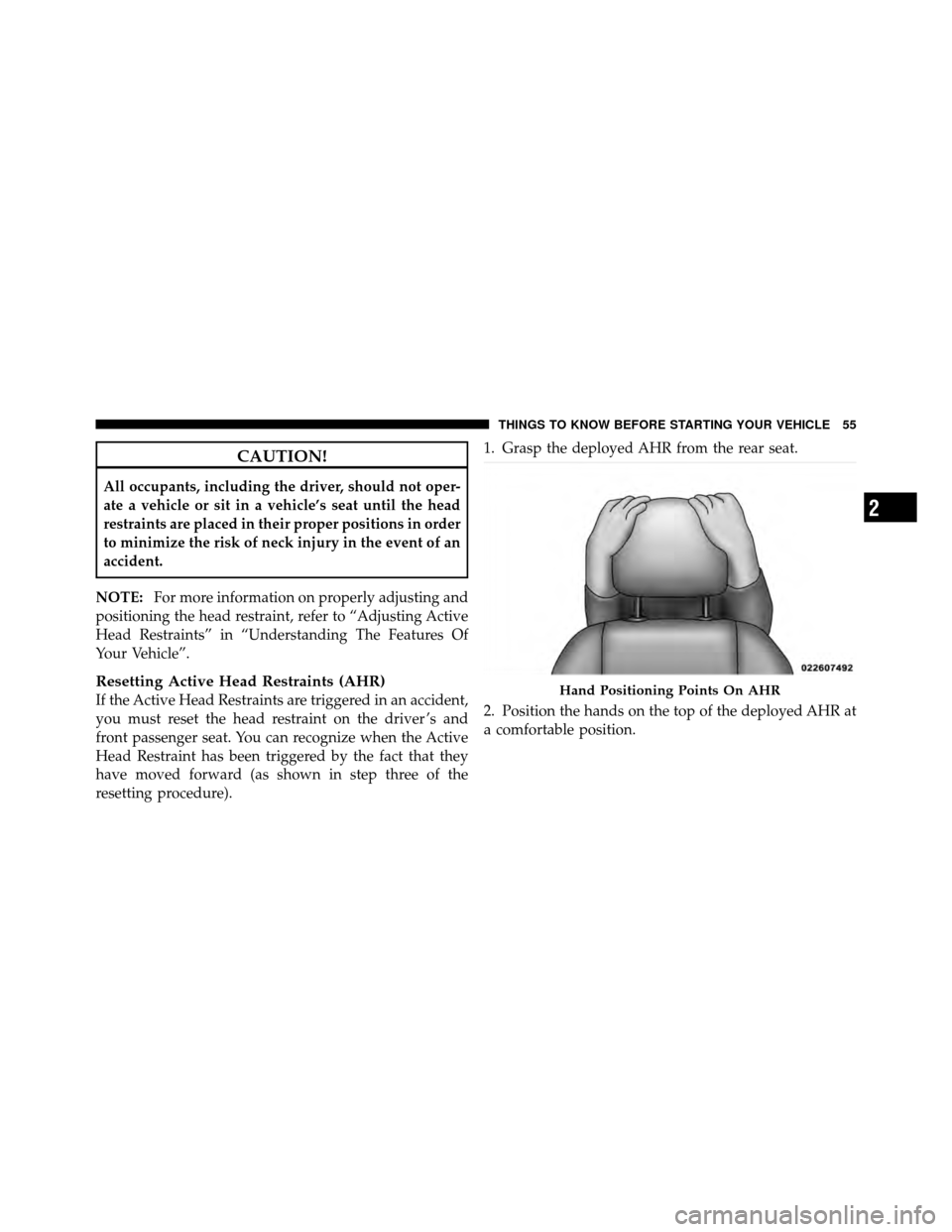
resetting procedure). 1. Grasp the deployed AHR from the rear seat.
2. Position the hands on the top of the deployed AHR at
a comfortable position.Hand Positioning Points On AHR
2
THINGS TO KNOW BEFORE STARTING YOUR VEHICLE 55
Page 59 of 490

NOTE:
•If you have difficulties or problems resetting the
Active Head Restraints, see an authorized dealer.
•For safety reasons, have the Active Head Restraints
checked by a qualified specialist at an authorized
dealer.
Enhanced Seat Belt Use Reminder System
(BeltAlert�)
BeltAlert�is a feature intended to remind the driver and
front passenger (if equipped with front passenger
BeltAlert�) to fasten their seat belts. This feature is active
whenever the ignition is on. If the driver or front seat
passenger is unbelted, the Seat Belt Reminder Light will
turn on and remain on until both front seat belts are
fastened. BeltAlert� triggers within 60 seconds of vehicle
speed over 5 mph (8 km/h). The reminder sequence lasts
for 96 seconds or until the respective seat belts are
fastened. After the sequence completes, the Seat Belt
Reminder Light remains illuminated until front belts are
fastened. The driver should instruct all other occupants
to fasten their seat belts. If a front seat belt is unbuckled
while traveling at speeds greater than 5 mph (8 km/h),
BeltAlert� will chime as a single notification and illumi-
nate the Seat Belt Reminder Light, then will proceed to
the 96 second reminder sequence.
AHR In Reset Position
2
THINGS TO KNOW BEFORE STARTING YOUR VEHICLE 57
Page 120 of 490

best results, the Voice Training session should be com-
pleted when the vehicle is parked with the engine
running, all windows closed, and the blower fan
switched off.
This procedure may be repeated with a new user. The
system will adapt to the last trained voice only.
Reset
•
press thebutton.
•After the “Ready” prompt, and the following beep, say
“Setup”, then “Reset”.
This will delete all phone pairing, phone book entries,
and other settings in all language modes. The System will
prompt you before resetting to factory settings.
Voice Command
•
For best performance, adjust the rearview mirror to
provide at least12in (1 cm) gap between the overhead
console (if equipped) and the mirror.
•Always wait for the beep before speaking.
•Speak normally, without pausing, just as you would
speak to a person sitting a few feet/meters away from
you.
•Make sure that no one other than you is speaking
during a Voice Command period.
•Performance is maximized under:
•low-to-medium blower setting,
•low-to-medium vehicle speed,
•low road noise,
•smooth road surface,
118 UNDERSTANDING THE FEATURES OF YOUR VEHICLE
Page 123 of 490
Send Messages:
You can send messages using Uconnect™ Phone. To send
a new message:
•Press thebutton.
•After the “Ready” prompt and the following beep, say
“SMS Send” or “Send Message.”
•You can either say the message you wish to send or say
“List Messages.” There are 20 preset messages.
To send a message, press the
button while the
system is listing the message and say “Send.”
Uconnect™ Phone will prompt you to say the name or
number of the person you wish to send the message to.
List of Preset Messages:
1. Yes
2. No 3. Where are you?
4. I need more direction.
5. L O L
6. Why
7. I love you
8. Call me
9. Call me later
10. Thanks
11. See You in 15 minutes
12. Iamonmyway
13. I’ll be late
14. Are you there yet?
15. Where are we meeting?
3
UNDERSTANDING THE FEATURES OF YOUR VEHICLE 121
Page 145 of 490
NOTE:
•The head restraints should only be removed by quali-
fied technicians, for service purposes only. If either of
the head restraints require removal, see your autho-
rized dealer.
•In the event of deployment of an Active Head Re-
straint, refer to “Occupant Restraints/Resetting Active
Head Restraints (AHR)” in “Things To Know Before
Starting Your Vehicle” for further information.
WARNING!
•Do not place items over the top of the Active Head
Restraint, such as coats, seat covers or portable
DVD players. These items may interfere with the
operation of the Active Head Restraint in the event
of a collision and could result in serious injury or
death.(Continued)
Active Head Restraint (Tilted)
3
UNDERSTANDING THE FEATURES OF YOUR VEHICLE 143
Page 160 of 490
System can be reactivated by pushing the Electronic
Speed Control ON/OFF button and resetting the desired
vehicle set speed.
To Activate
Push the ON/OFF button. The Cruise Indicator Light in
the instrument cluster will illuminate. To turn the system
off, push the ON/OFF button a second time. The Cruise
Indicator Light will turn off. The system should be
turned off when not in use.
WARNING!
Leaving the Electronic Speed Control system on
when not in use is dangerous. You could accidentally
set the system or cause it to go faster than you want.
You could lose control and have an accident. Always
leave the system OFF when you are not using it.
To Set A Desired Speed
Turn the Electronic Speed Control ON. When the vehicle
has reached the desired speed, press the SET (-) button
and release. Release the accelerator and the vehicle will
operate at the selected speed.
NOTE:The vehicle should be traveling at a steady
speed and on level ground before pressing the SET (-)
button.
To Deactivate
A soft tap on the brake pedal, pushing the CANCEL
button, or normal brake pressure while slowing the
vehicle will deactivate Electronic Speed Control without
erasing the set speed memory. Pressing the ON/OFF
button or turning the ignition switch OFF erases the set
speed memory.
158 UNDERSTANDING THE FEATURES OF YOUR VEHICLE
Page 174 of 490
CAUTION! (Continued)
•Accessories that draw higher power (i.e., coolers,
vacuum cleaners, lights, etc.) will degrade the
battery even more quickly. Only use these inter-
mittently and with great caution.
•After the use of high power draw accessories, or
long periods of the vehicle not being started (with
accessories still plugged in), the vehicle must be
driven a sufficient length of time to allow the
generator to recharge the vehicle’s battery.
POWER INVERTER — IF EQUIPPED
A 115 Volt (150 Watt) AC power inverter is located on the
front of the center console for added convenience. This
outlet can power cellular phones, electronics and other
low power devices requiring power up to 150 Watts.
Certain high-end video games, such as Playstation3 and
XBox360 will exceed this power limit, as will most power
tools.
The power inverter is designed with built-in overload
protection. If the power rating of 150 Watts is exceeded,
the power inverter will automatically shut down. Once
the electrical device has been removed from the outlet the
inverter should automatically reset. If the power rating
exceeds approximately 170 Watts, the power inverter
may have to be reset manually. To reset the inverter
manually, unplug the device and plug it in again. To
avoid overloading the circuit, check the power ratings on
electrical devices prior to using the inverter.
172 UNDERSTANDING THE FEATURES OF YOUR VEHICLE
Page 203 of 490
WARNING!
A hot engine cooling system is dangerous. You or
others could be badly burned by steam or boiling
coolant. You may want to call an authorized dealer-
ship for service if your vehicle overheats. If you
decide to look under the hood yourself, see “Main-
taining Your Vehicle”. Follow the warnings under the
Cooling System Pressure Cap paragraph.
18. Cruise Indicator — If Equipped This indicator shows that the Electronic Speed
Control System is ON.
19. 4WD Indicator Light
This light indicates the vehicle is in 4WD Locked mode. 20. Shift Lever Indicator
The Shift Lever Indicator is self-contained within the
instrument cluster. It displays the gear position of the
automatic transmission.
NOTE:
You must apply the brakes before shifting from
PARK.
21. Odometer/Trip Odometer Display Reset Button
Press this button to change the display from odometer to
either of the two trip odometer settings. Trip A or Trip B
will appear when in the trip odometer mode. Push in and
hold the button for two seconds to reset the trip odometer
to 0 miles (0 km). The odometer must be in Trip mode to
reset.
If the vehicle is equipped with the optional Electronic
Vehicle Information Center (EVIC) in the instrument
cluster, refer to “Electronic Vehicle Information Center —
If Equipped” for further information.
4
UNDERSTANDING YOUR INSTRUMENT PANEL 201