Page 138 of 490
Heated Seats — If Equipped
On some models, the front driver and passenger seats
may be equipped with heaters in both the seat cushions
and seatbacks. The controls for the front heated seats are
located on the center instrument panel area.
You can choose from HIGH, LOW or OFF heat settings.
Amber indicator lights in each switch indicate the level of
heat in use. Two indicator lights will illuminate for
HIGH, one for LOW and none for OFF.Press the switch once to select HIGH-level
heating. Press the switch a second time to select
LOW-level heating. Press the switch a third
time to shut the heating elements OFF.
If HIGH-level heating is selected, the system automati-
cally switches to LOW-level heating and turns one indi-
cator light OFF after a maximum of 60 minutes of
continuous operation. It will turn the heater and the
remaining indicator light OFF after an a maximum of 45 minutes of continuous operation. If LOW-level heating
is selected, the system automatically turns the heater and
the indicator light OFF after a maximum of 45 minutes of
continuous operation.
NOTE:
Once a heat setting is selected, heat will be felt
within two to five minutes.
WARNING!
•Persons who are unable to feel pain to the skin
because of advanced age, chronic illness, diabetes,
spinal cord injury, medication, alcohol use, ex-
haustion or other physical condition must exercise
care when using the seat heater. It may cause burns
even at low temperatures, especially if used for
long periods of time.
(Continued)
136 UNDERSTANDING THE FEATURES OF YOUR VEHICLE
Page 139 of 490
WARNING! (Continued)
•Do not place anything on the seat that insulates
against heat, such as a blanket or cushion. This
may cause the seat heater to overheat. Sitting in a
seat that has been overheated could cause serious
burns due to the increased surface temperature of
the seat.
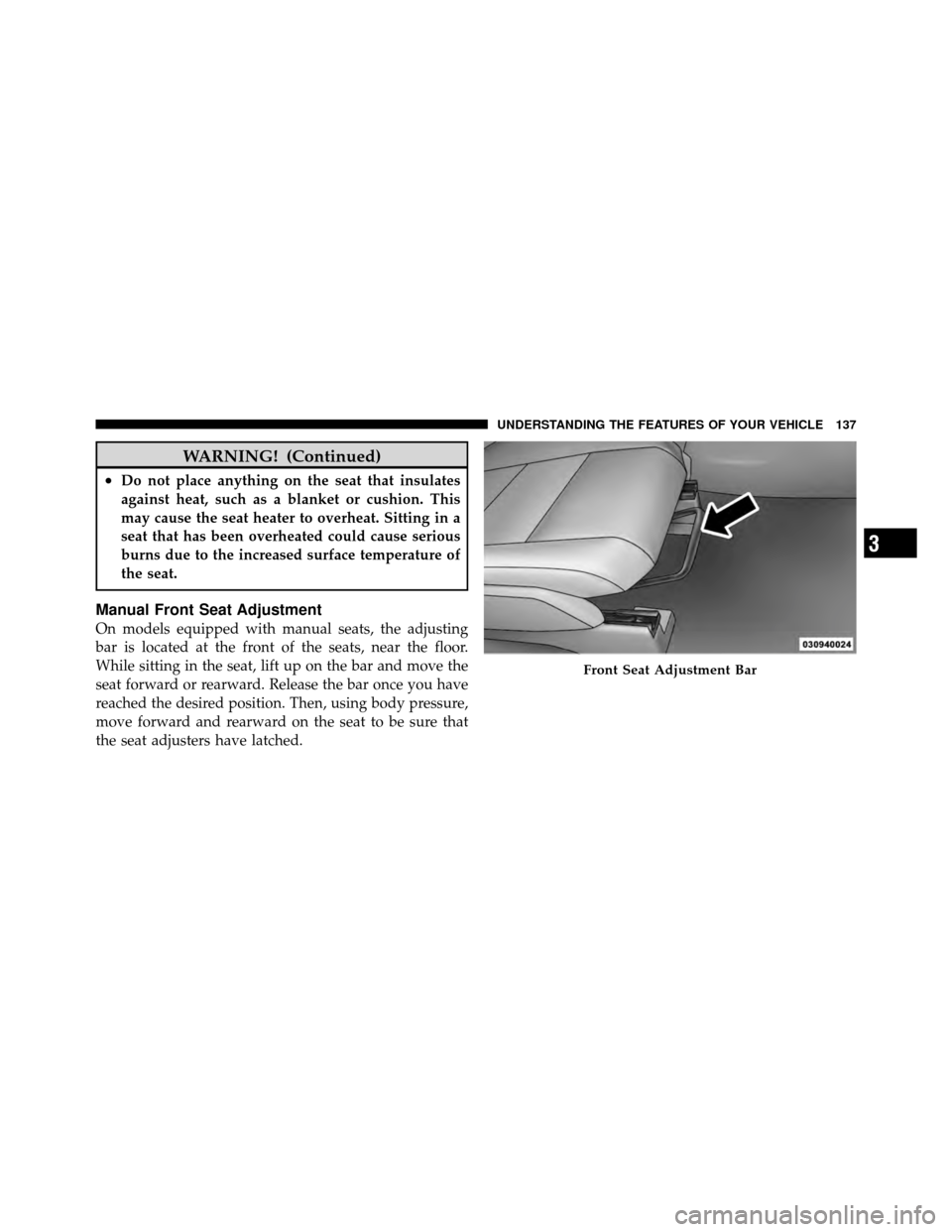
Manual Front Seat Adjustment
On models equipped with manual seats, the adjusting
bar is located at the front of the seats, near the floor.
While sitting in the seat, lift up on the bar and move the
seat forward or rearward. Release the bar once you have
reached the desired position. Then, using body pressure,
move forward and rearward on the seat to be sure that
the seat adjusters have latched.
Front Seat Adjustment Bar
3
UNDERSTANDING THE FEATURES OF YOUR VEHICLE 137
Page 140 of 490
WARNING!
•Adjusting a seat while driving may be dangerous.
Moving a seat while driving could result in loss of
control which could cause a collision and serious
injury or death.
•Seats should be adjusted before fastening the seat
belts and while the vehicle is parked. Serious
injury or death could result from a poorly adjusted
seat belt.
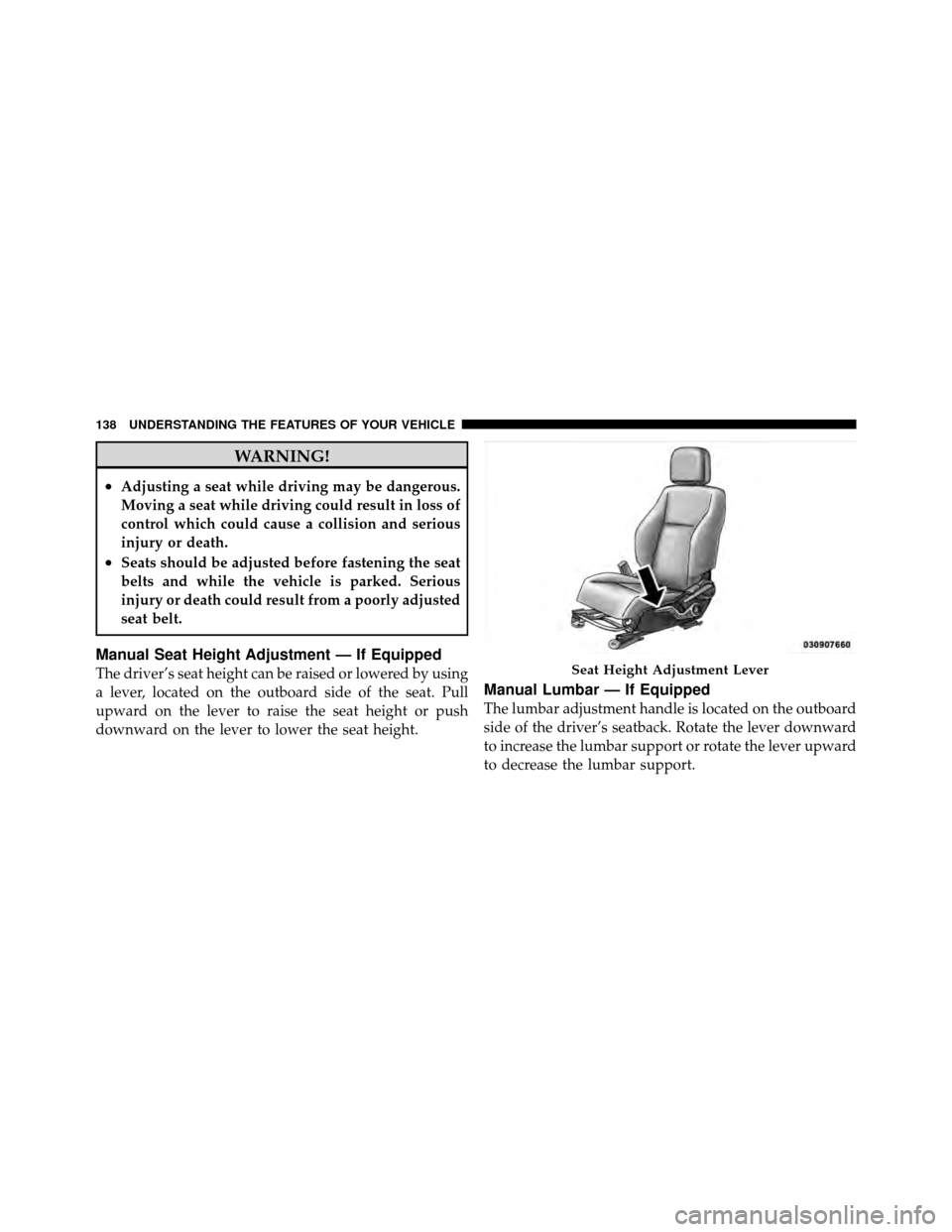
Manual Seat Height Adjustment — If Equipped
The driver’s seat height can be raised or lowered by using
a lever, located on the outboard side of the seat. Pull
upward on the lever to raise the seat height or push
downward on the lever to lower the seat height.
Manual Lumbar — If Equipped
The lumbar adjustment handle is located on the outboard
side of the driver’s seatback. Rotate the lever downward
to increase the lumbar support or rotate the lever upward
to decrease the lumbar support.
Seat Height Adjustment Lever
138 UNDERSTANDING THE FEATURES OF YOUR VEHICLE
Page 143 of 490

WARNING!
The head restraints for all occupants must be prop-
erly adjusted prior to operating the vehicle or occu-
pying a seat. Head restraints should never be ad-
justed while the vehicle is in motion. Driving a
vehicle with the head restraints improperly adjusted
or removed could cause serious injury or death in the
event of a collision.
Active Head Restraints — Front Seats
Active Head Restraints are passive, deployable compo-
nents, and vehicles with this equipment can not bereadily identified by any markings, only through visual
inspection of the head restraint. The head restraint will be
split in two halves, with the front half being soft foam
and trim, the back half being decorative plastic.
When AHRs deploy during a rear impact, the front half
of the head restraint extends forward to minimize the gap
between the back of the occupant’s head and the AHR.
This system is designed to help prevent or reduce the
extent of injuries to the driver and front passenger in
certain types of rear impacts. Refer to “Occupant Re-
straints” in “What To Know Before Starting Your Vehicle”
for further information.
3
UNDERSTANDING THE FEATURES OF YOUR VEHICLE 141
Page 147 of 490
To raise the seatback, pull the strap forward and lift the
seatback into its upright position.
WARNING!
Be certain that the seatback is securely locked into
position. If the seatback is not securely locked into
position the seat will not provide the proper stability
for child seats and/or passengers. An improperly
latched seat could cause serious injury.
Rear Seats Folded Flat
3
UNDERSTANDING THE FEATURES OF YOUR VEHICLE 145
Page 185 of 490
WARNING! (Continued)
•Place as much cargo as possible in front of the rear
axle. Too much weight or improperly placed
weight over or behind the rear axle can cause the
rear of the vehicle to sway.
•Do not pile luggage or cargo higher than the top of
the seatback. This could impair visibility or be-
come a dangerous projectile in a sudden stop or
collision.
•To help protect against personal injury, passengers
should not be seated in the rear cargo area. The
rear cargo space is intended for load carrying
purposes only, not for passengers, who should sit
in seats and use seat belts.
Fold Down Speakers — If Equipped
When the liftgate is open, the speakers can swing down
off the trim panel to face rearward, for tailgating and
other activities.
Fold-Down Speakers
3
UNDERSTANDING THE FEATURES OF YOUR VEHICLE 183
Page 430 of 490
•If you carry special cargo such as chemicals, fertilizers,
de-icer salt, etc., be sure that such materials are well
packaged and sealed.
•If a lot of driving is done on gravel roads, consider
mud or stone shields behind each wheel.
•Use MOPAR�Touch Up Paint or equivalent on
scratches as soon as possible. Your authorized dealer
has touch up paint to match the color of your vehicle.
Wheel And Wheel Trim Care
All wheels and wheel trim, especially aluminum and
chrome-plated wheels, should be cleaned regularly with
a mild soap and water to prevent corrosion. To remove
heavy soil, use MOPAR� Wheel Cleaner or select a
nonabrasive, non-acidic cleaner. Do not use scouring
pads, steel wool, a bristle brush or metal polishes. Only
MOPAR� cleaners or equivalent are recommended. Do not use oven cleaner. Avoid automatic car washes that
use acidic solutions or harsh brushes that may damage
the wheels’ protective finish.
Stain Repel Fabric Cleaning Procedure –
If Equipped
Stain Repel seats may be cleaned in the following man-
ner:
•Remove as much of the stain as possible by blotting
with a clean, dry towel.
•Blot any remaining stain with a clean, damp towel.
•For tough stains, apply MOPAR�
Total Clean or a mild
soap solution to a clean, damp cloth and remove the
stain. Use a fresh, damp towel to remove soap residue.
•For grease stains, apply MOPAR� Multi-Purpose
Cleaner or a equivalent high quality cleaner to a clean,
damp cloth and remove the stain. Use a fresh, damp
towel to remove soap residue.
428 MAINTAINING YOUR VEHICLE
Page 434 of 490
Cavity CartridgeFuseMini-
Fuse Description
3 10 Amp
Red Rear Center Brake
Light Switch
4 10 Amp
Red Ignition Switch/
Occupant Classifica-
tion Module
5 20 Amp
Yellow Trailer Tow
6 10 Amp
Red Power Mirror/
Steering Control Sat-
ellite Radio/Hands-
Free Phone
7 30 Amp
Green Ignition Off Draw
8 30 Amp
Green Ignition Off Draw
9 40 Amp Green Power SeatsCavity Cartridge
FuseMini-
Fuse Description
10 20 Amp
Yellow Power Locks/Interior
Lighting
11 15 Amp
Lt Blue Power Outlet
12 20 Amp
Yellow 115V AC Inverter
13 20 Amp
Yellow Cigar Lighter
14 10 Amp
Red Instrument Cluster
15 40 Amp Green Radiator Fan
16 15 Amp
Lt Blue Dome Lamp/
Sunroof/Rear Wiper
Motor
17 10 Amp
Red Wireless Control
Module
432 MAINTAINING YOUR VEHICLE