Page 153 of 490
Instrument Panel Dimming
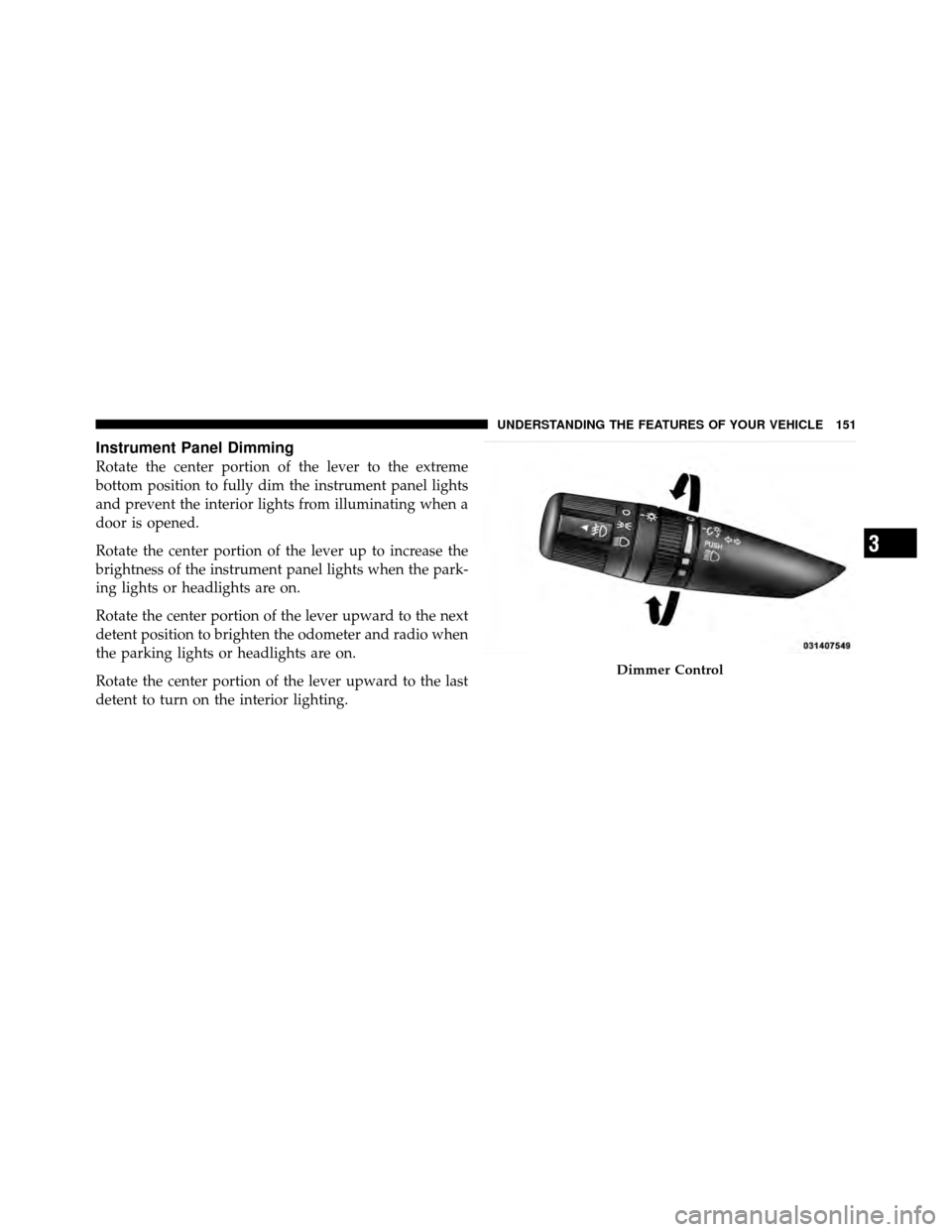
Rotate the center portion of the lever to the extreme
bottom position to fully dim the instrument panel lights
and prevent the interior lights from illuminating when a
door is opened.
Rotate the center portion of the lever up to increase the
brightness of the instrument panel lights when the park-
ing lights or headlights are on.
Rotate the center portion of the lever upward to the next
detent position to brighten the odometer and radio when
the parking lights or headlights are on.
Rotate the center portion of the lever upward to the last
detent to turn on the interior lighting.
Dimmer Control
3
UNDERSTANDING THE FEATURES OF YOUR VEHICLE 151
Page 154 of 490
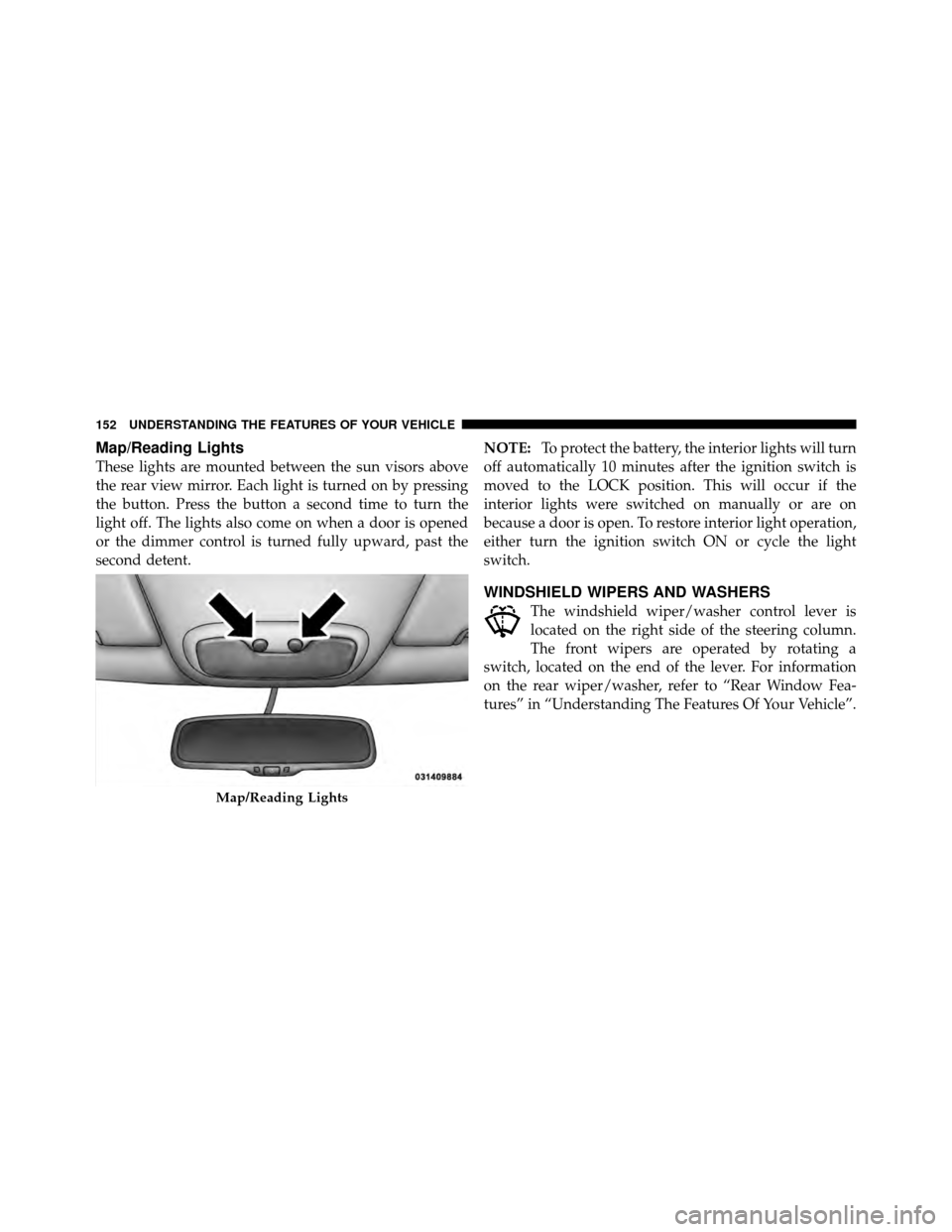
Map/Reading Lights
These lights are mounted between the sun visors above
the rear view mirror. Each light is turned on by pressing
the button. Press the button a second time to turn the
light off. The lights also come on when a door is opened
or the dimmer control is turned fully upward, past the
second detent.NOTE:
To protect the battery, the interior lights will turn
off automatically 10 minutes after the ignition switch is
moved to the LOCK position. This will occur if the
interior lights were switched on manually or are on
because a door is open. To restore interior light operation,
either turn the ignition switch ON or cycle the light
switch.
WINDSHIELD WIPERS AND WASHERS
The windshield wiper/washer control lever is
located on the right side of the steering column.
The front wipers are operated by rotating a
switch, located on the end of the lever. For information
on the rear wiper/washer, refer to “Rear Window Fea-
tures” in “Understanding The Features Of Your Vehicle”.
Map/Reading Lights
152 UNDERSTANDING THE FEATURES OF YOUR VEHICLE
Page 174 of 490
CAUTION! (Continued)
•Accessories that draw higher power (i.e., coolers,
vacuum cleaners, lights, etc.) will degrade the
battery even more quickly. Only use these inter-
mittently and with great caution.
•After the use of high power draw accessories, or
long periods of the vehicle not being started (with
accessories still plugged in), the vehicle must be
driven a sufficient length of time to allow the
generator to recharge the vehicle’s battery.
POWER INVERTER — IF EQUIPPED
A 115 Volt (150 Watt) AC power inverter is located on the
front of the center console for added convenience. This
outlet can power cellular phones, electronics and other
low power devices requiring power up to 150 Watts.
Certain high-end video games, such as Playstation3 and
XBox360 will exceed this power limit, as will most power
tools.
The power inverter is designed with built-in overload
protection. If the power rating of 150 Watts is exceeded,
the power inverter will automatically shut down. Once
the electrical device has been removed from the outlet the
inverter should automatically reset. If the power rating
exceeds approximately 170 Watts, the power inverter
may have to be reset manually. To reset the inverter
manually, unplug the device and plug it in again. To
avoid overloading the circuit, check the power ratings on
electrical devices prior to using the inverter.
172 UNDERSTANDING THE FEATURES OF YOUR VEHICLE
Page 176 of 490
CAUTION!
•Many accessories that can be plugged in draw
power from the vehicle’s battery, even when not in
use (i.e., cellular phones, etc.). Eventually, if
plugged in long enough, the vehicle’s battery will
discharge sufficiently to degrade battery life
and/or prevent engine starting.
•Accessories that draw higher power (i.e., coolers,
vacuum cleaners, lights, etc.) will degrade the
battery even more quickly. Only use these inter-
mittently and with great caution.
•After the use of high power draw accessories, or
long periods of the vehicle not being started (with
accessories still plugged in), the vehicle must be
driven a sufficient length of time to allow the
generator to recharge the vehicle’s battery.
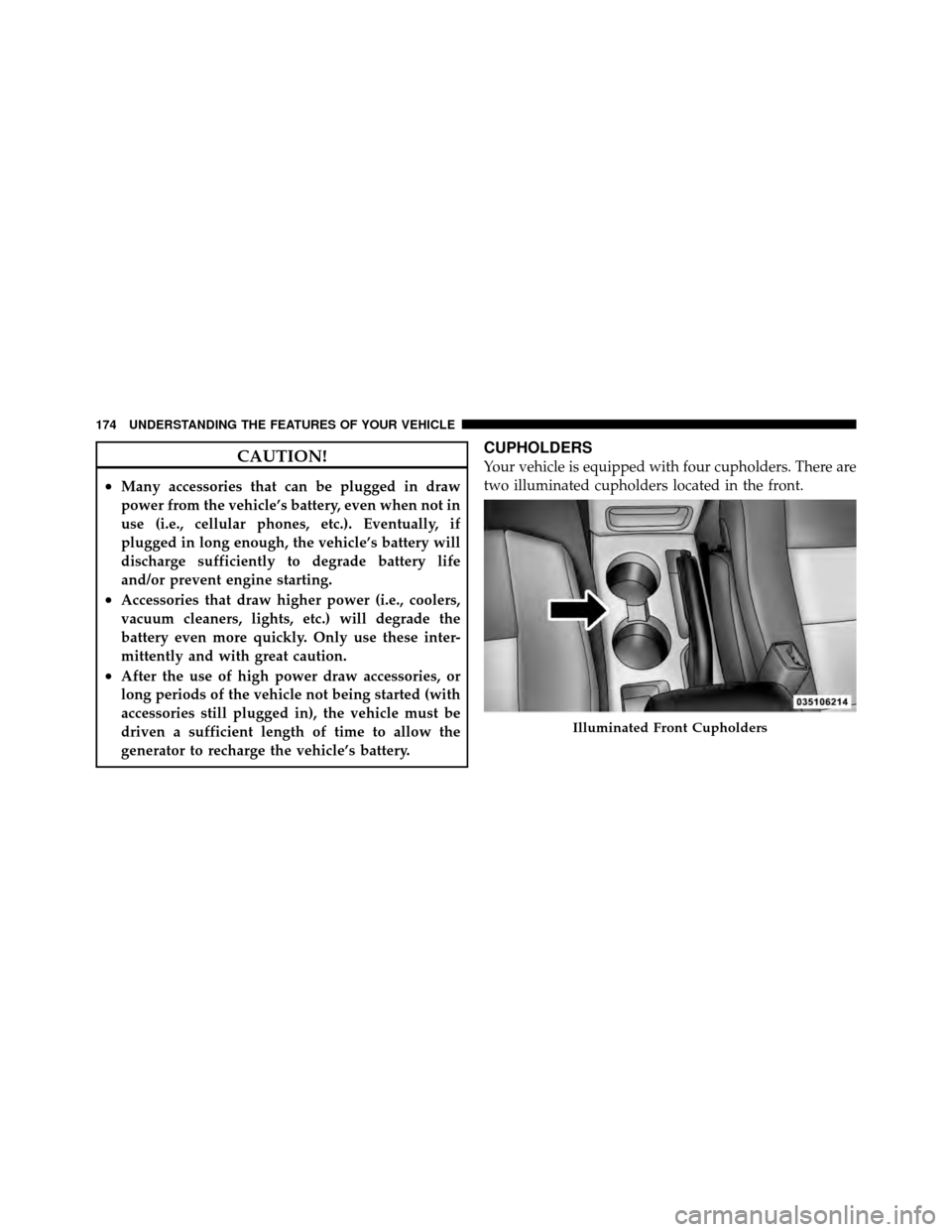
CUPHOLDERS
Your vehicle is equipped with four cupholders. There are
two illuminated cupholders located in the front.
Illuminated Front Cupholders
174 UNDERSTANDING THE FEATURES OF YOUR VEHICLE
Page 197 of 490
on briefly as a bulb check. If the light does not come on
during starting, have the system checked by an autho-
rized dealer.
4. Oil Pressure Warning LightThis light indicates low engine oil pressure. The
light should turn on momentarily when the engine
is started. If the light turns on while driving, stop the
vehicle and shut off the engine as soon as possible. A
chime will sound for four minutes when this light turns
on.
Do not operate the vehicle until the cause is corrected.
This light does not indicate how much oil is in the engine.
The engine oil level must be checked under the hood.
5. Low Fuel Light When the fuel level reaches approximately 2.0 gal
(7.8 L) this light will turn on, and remain on until
fuel is added. 6. Speedometer
Indicates vehicle speed.
7. Airbag Warning Light
This light will turn on for four to eight seconds
as a bulb check when the ignition switch is first
turned to ON/RUN. If the light is either not on
during starting, stays on, or turns on while
driving, have the system inspected at an authorized
dealer as soon as possible. Refer to “Occupant Restraints”
in “Things To Know Before Starting Your Vehicle” for
further information.
8. Turn Signal Indicators The arrow will flash with the exterior turn signal
when the turn signal lever is operated.
9. High Beam Indicator This indicator shows that the high beam head-
lights are on. Push the multifunction lever forward
4
UNDERSTANDING YOUR INSTRUMENT PANEL 195
Page 198 of 490
to switch the headlights to high beam, and pull toward
yourself (normal position) to return to low beam.
10. Anti-Lock Brake (ABS) Light — If EquippedThis light monitors the Anti-Lock Brake System
(ABS). The light will turn on when the ignition
switch is turned to the ON/RUN position and
may stay on for as long as four seconds.
If the ABS light remains on or turns on while driving, it
indicates that the Anti-Lock portion of the brake system
is not functioning and that service is required. However,
the conventional brake system will continue to operate
normally if the BRAKE warning light is not on.
If the ABS light is on, the brake system should be serviced
as soon as possible to restore the benefits of Anti-Lock
brakes. If the ABS light does not turn on when the
ignition switch is turned to the ON/RUN position, have
the light inspected by an authorized dealer. 11. Seat Belt Reminder Light
When the ignition switch is first turned to ON/
RUN, this light will turn on for four to eight
seconds as a bulb check. During the bulb check, if
the driver’s seat belt is unbuckled, a chime will sound.
After the bulb check or when driving, if the driver or
front passenger’s seat belt remains unbuckled, the Seat
Belt Reminder Light will illuminate and the chime will
sound. Refer to “Occupant Restraints” in “Things To
Know Before Starting Your Vehicle” for further informa-
tion.
12. Tachometer
The white area of the scale shows the permissible engine
revolutions-per-minute (RPM x 1000) for each gear range.
Before reaching the red area, ease up on the accelerator to
prevent engine damage.
196 UNDERSTANDING YOUR INSTRUMENT PANEL
Page 208 of 490
CAUTION!
Prolonged driving with the MIL on could cause
damage to the engine control system. It also could
affect fuel economy and drivability. If the MIL is
flashing, severe catalytic converter damage and
power loss will soon occur. Immediate service is
required.
WARNING!
A malfunctioning catalytic converter, as referenced
above, can reach higher temperatures than in normal
operating conditions. This can cause a fire if you
drive slowly or park over flammable substances such
as dry plants, wood, cardboard, etc. This could result
in death or serious injury to the driver, occupants or
others.26. Hill Descent Indicator — If Equipped
The symbol illuminates (is armed) when the
4WD Lock switch is activated and the trans-
mission range indicator is in LOW or REVERSE
position (Off-Road Mode).
27. Front Fog Light Indicator — If Equipped This indicator will illuminate when the front fog
lights are on.
28. Electronic Stability Control (ESC) OFF Indicator
Light — If Equipped This light indicates the Electronic Stability Con-
trol system (ESC) has been turned off by the
driver.
206 UNDERSTANDING YOUR INSTRUMENT PANEL
Page 218 of 490

press to unlock the remaining locked doors. When Re-
mote Unlock All Doors is selected, all of the doors will
unlock at the first press of the RKE transmitter UNLOCK
button. Press and hold the SELECT button when in this
display until “Driver’s Door 1st” or “All Doors” appears
to make your selection.
Flash Lamps with Lock
When ON is selected, the front and rear turn signals will
flash when the doors are locked or unlocked using the
RKE transmitter. This feature may be selected with or
without the sound horn with lock feature selected. Press
and hold the SELECT button when in this display until
“ON” or “OFF” appears to make your selection.
Sound Horn with Lock
When ON is selected, a short horn sound will occur when
the RKE transmitter LOCK button is pressed. This feature
may be selected with or without the Flash Lights withLock feature. Press and hold the SELECT button when in
this display until “ON” or “OFF” appears to make your
selection.
Headlamp Off Delay
When this feature is selected the driver can choose to
have the headlights remain on for 0, 30, 60, or 90 seconds
when exiting the vehicle. Press and hold the SELECT
button when in this display until 0, 30, 60, or 90 appears
to make your selection.
Key Off Power Delay
When this feature is selected the power window
switches, radio, Uconnect™ phone, power sunroof, and
power outlets will remain active for up to 10 minutes
after the ignition switch has been turned OFF. Opening
either front vehicle door will cancel this feature. Press
and hold the SELECT button when in this display until
“OFF”, “45 sec.”, “5 min.”, or “10 min.” appears to make
your selection.
216 UNDERSTANDING YOUR INSTRUMENT PANEL