2011 JEEP LIBERTY weight
[x] Cancel search: weightPage 63 of 542

Air Bag System Components
Your vehicle may be equipped with the following air bag
system components:
•Occupant Restraint Controller (ORC)
•Air Bag Warning Light
•Steering Wheel and Column
•Instrument Panel
•Knee Impact Bolster
•Driver Advanced Front Air Bag
•Passenger Advanced Front Air Bag
•Supplemental Side Air Bag Inflatable Curtains
(SABIC)
•Front and Side Impact Sensors
•Front Seat Belt Pretensioners, Seat Belt Buckle Switch,
and Seat Track Position Sensors
•Supplemental Active Head Restraint for Driver and
Front Passenger
•Occupant Classification System (OCS)
•Occupant Classification Module (OCM)
•Passenger Air Bag Disable (PAD) Indicator Light
•Weight Sensors
Advanced Front Air Bag Features
The Advanced Front Air Bag system has multistage driver
and front passenger air bags. This system provides output
appropriate to the severity and type of collision as deter-
mined by the Occupant Restraint Controller (ORC), which
may receive information from the front impact sensors.
The first stage inflator is triggered immediately during an
impact that requires air bag deployment. This low output
is used in less severe collisions. A higher energy output is
used for more severe collisions.
2
THINGS TO KNOW BEFORE STARTING YOUR VEHICLE 61
Page 69 of 542

•Occupant Classification Module (OCM)
The OCM is located beneath the front passenger seat. The
OCM classifies the occupant into categories based on the
measurements made by the seat weight sensors. The
OCM communicates with the ORC. The ORC uses the
occupant category to determine whether the passenger
Advanced Front Air Bag should be turned off. It also
determines the rate of air bag inflation during a collision.
•Weight Sensors
Your vehicle has four Weight Sensors located between the
seat and the floor pan. The weight sensors measure
applied weight and transfers that information to the
OCM.
•Passenger Air Bag Disable (PAD) Indicator Light
The PAD Indicator Light (an amber light located in the
center of the instrument panel) tells the driver and front
passenger when the passenger Advanced Front Air Bag is
turned off. The PAD Indicator light illuminates the words “PASS AIR BAG OFF” to show that the passenger
Advanced Front Air Bag will not inflate during a collision
requiring air bag deployment. When the right front
passenger seat is empty or when very light objects are
placed on the seat, the passenger air bag will not inflate
even though the PAD indicator light is not illuminated.
Indicator Light Location
2
THINGS TO KNOW BEFORE STARTING YOUR VEHICLE 67
Page 70 of 542
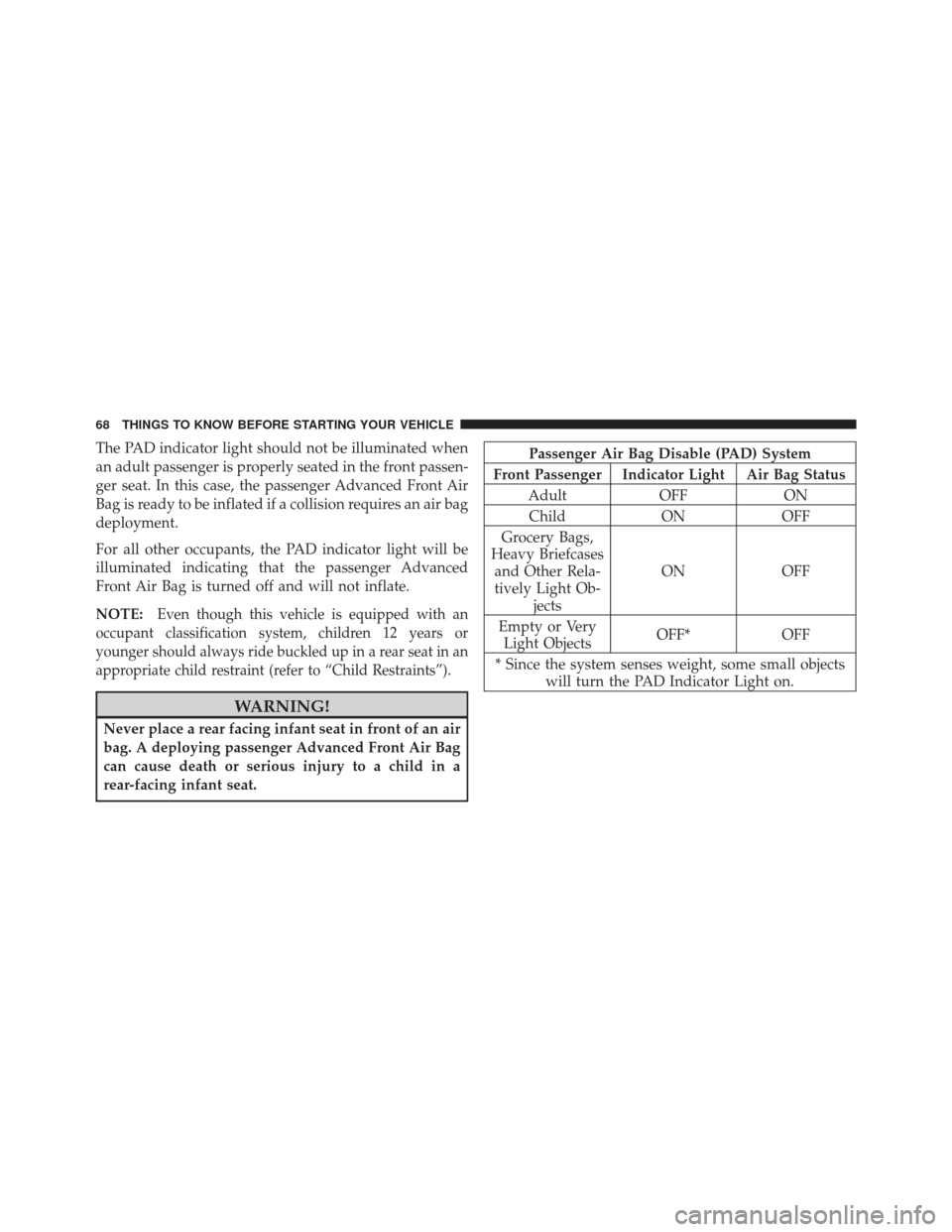
The PAD indicator light should not be illuminated when
an adult passenger is properly seated in the front passen-
ger seat. In this case, the passenger Advanced Front Air
Bag is ready to be inflated if a collision requires an air bag
deployment.
For all other occupants, the PAD indicator light will be
illuminated indicating that the passenger Advanced
Front Air Bag is turned off and will not inflate.
NOTE:
Even though this vehicle is equipped with an
occupant classification system, children 12 years or
younger should always ride buckled up in a rear seat in an
appropriate child restraint (refer to “Child Restraints”).
WARNING!
Never place a rear facing infant seat in front of an air
bag. A deploying passenger Advanced Front Air Bag
can cause death or serious injury to a child in a
rear-facing infant seat.
Passenger Air Bag Disable (PAD) System
Front Passenger Indicator Light Air Bag Status Adult OFF ONChild ON OFF
Grocery Bags,
Heavy Briefcases and Other Rela-
tively Light Ob- jects ON OFF
Empty or Very Light Objects OFF*
OFF
* Since the system senses weight, some small objects will turn the PAD Indicator Light on.
68 THINGS TO KNOW BEFORE STARTING YOUR VEHICLE
Page 71 of 542

Drivers and adult passengers should verify that the PAD
Indicator Light is not illuminated when an adult is riding
in the front passenger seat. If an adult occupant’s weight
is transferred to another part of the vehicle (like the door
or instrument panel), the weight sensors in the seat may
not properly classify the occupant. Objects lodged under
the seat or between the seat and the center console can
prevent the occupant’s weight from being measured
properly and may result in the occupant being improp-
erly classified. Ensure that the front passenger seatback
does not touch anything placed on the second row of
seats because this can also affect occupant classification.
Also, if you fold down the seats in the second row check
to be sure they don’t touch the front passenger seat.
If the front passenger seat is damaged in any way, it
should only be serviced by an authorized dealer. If the
seat is removed (or even if the seat attachment bolts are
loosened or tightened in any way), take the vehicle to an
authorized dealer.If there is a fault present in the air bag system, the Air Bag
Warning Light (a red light located in the center of the
instrument cluster directly in front of the driver) will be
turned on. This indicates that you should have an autho-
rized dealer service the system immediately. The Air Bag
Warning Light is turned on whenever there is a fault that
can affect the operation of the air bag system. If there is a
fault present in the PAD Indicator Light, the Air Bag
Warning Light will be illuminated to show that the
passenger Advanced Front Air Bag may be turned off
until the fault is cleared. If the Air Bag Warning Light is
illuminated, have an authorized dealer service the air bag
system immediately. If an object is lodged under the seat
and interferes with operation of the weight sensors, a
fault will occur which turns on both the PAD Indicator
Light and the Air Bag Warning Light. Once the lodged
object is removed, the fault will be automatically cleared
after a short period of time.
2
THINGS TO KNOW BEFORE STARTING YOUR VEHICLE 69
Page 80 of 542
Infants And Child Restraints
•
Safety experts recommend that children ride
rearward-facing in the vehicle until they are at least
one year old and weigh at least 20 lbs (9 kg). Two types
of child restraints can be used rearward-facing: infant
carriers and “convertible” child seats.
•The infant carrier is only used rearward-facing in the
vehicle. It is recommended for children who weigh up
to about 20 lbs (9 kg). “Convertible” child seats can be
used either rearward-facing or forward-facing in the
vehicle. Convertible child seats often have a higher
weight limit in the rearward-facing direction than
infant carriers do, so they can be used rearward-facing
by children who weigh more than 20 lbs (9 kg) but are
less than one year old. Both types of child restraints are
held in the vehicle by the lap/shoulder belt or the
LATCH child restraint anchorage system. Refer to
“Lower Anchors and Tether for CHildren (LATCH)”.
WARNING!
Rearward-facing child seats must never be used in
the front seat of a vehicle with the front passenger air
bag unless the air bag is turned off. An air bag
deployment could cause severe injury or death to
infants in this position.
Older Children And Child Restraints
Children who weigh more than 20 lbs (9 kg) and who are
older than one year can ride forward-facing in the
vehicle. Forward-facing child seats and convertible child
seats used in the forward-facing direction are for children
who weigh 20 to 40 lbs (9 to 18 kg) and who are older
than one year. These child seats are also held in the
vehicle by the lap/shoulder belt or the LATCH child
restraint anchorage system. Refer to “Lower Anchors and
Tether for CHildren (LATCH)”.
78 THINGS TO KNOW BEFORE STARTING YOUR VEHICLE
Page 82 of 542
WARNING!
•Improper installation can lead to failure of an
infant or child restraint. It could come loose in a
collision. The child could be badly injured or
killed. Follow the manufacturer’s directions ex-
actly when installing an infant or child restraint.
•A rearward- facing infant restraint should only be
used in a rear seat. A rearward-facing infant re-
straint in the front seat may be struck by a deploy-
ing passenger air bag, which may cause severe or
fatal injury to the infant.Here are some tips on getting the most out of your child
restraint:
•Before buying any restraint system, make sure that it
has a label certifying that it meets all applicable Safety
Standards. Chrysler Group LLC also recommends that
you try a child restraint in the vehicle seats where you
will use it before you buy it.
•The restraint must be appropriate for your child’s
weight and height. Check the label on the restraint for
weight and height limits.
•Carefully follow the instructions that come with the
restraint. If you install the restraint improperly, it may
not work when you need it.
•Buckle the child into the restraint exactly as the
manufacturer’s instructions tell you.
80 THINGS TO KNOW BEFORE STARTING YOUR VEHICLE
Page 209 of 542
WARNING!
•Cargo tie-downs are not safe anchors for a child
seat tether strap. In a sudden stop or accident, a
tie-down could pull loose and allow the child seat
to come loose. A child could be badly injured. Use
only the anchors provided for child seat tethers.
•To help protect against personal injury, passengers
should not be seated in the rear cargo area. The
rear cargo space is intended for load carrying
purposes only, not for passengers, who should sit
in seats and use seat belts.
WARNING!
The weight and position of cargo and passengers can
change the vehicle center of gravity and vehicle
handling. To avoid loss of control resulting in per-
sonal injury, follow these guidelines for loading your
vehicle:
•Do not carry loads that exceed the load limits
described on the label attached to the left door or
left door center pillar.
•Always place cargo evenly on the cargo floor. Put
heavier objects as low and as far forward as
possible.
•Place as much cargo as possible in front of the rear
axle. Too much weight or improperly placed
weight over or behind the rear axle can cause the
vehicle to sway.(Continued)
3
UNDERSTANDING THE FEATURES OF YOUR VEHICLE 207
Page 242 of 542
NOTE:If the indicator message illuminates when you
start the vehicle, the oil change indicator system did not
reset. If necessary, repeat this procedure.
Trip Functions
Press and until one of the following Trip Functions
displays in the EVIC:
•Average Fuel Economy
•Distance To Empty
•Elapsed Time
•Display Units of Measure in
Press the SCROLL button to cycle through all the Trip
Computer functions. The Trip Functions mode displays the following informa-
tion:
•Average Fuel Economy
Shows the average fuel economy since the last reset.
When the fuel economy is reset, the display will read
“RESET” or show dashes for two seconds. Then, the
history information will be erased, and the averaging will
continue from the last fuel average reading before the
reset.
•Distance To Empty (DTE)
Shows the estimated distance that can be traveled with
the fuel remaining in the tank. This estimated distance is
determined by a weighted average of the instantaneous
and average fuel economy, according to the current fuel
tank level. DTE cannot be reset through the FUNCTION
SELECT button.
240 UNDERSTANDING YOUR INSTRUMENT PANEL