Page 182 of 587

The ACC screen will display once again if any ACC
activity occurs, which may include any of the following:
•Set Speed Change
•Distance Setting Change
•System Cancel
•Driver Override
•System Off
•ACC Proximity Warning
•ACC Unavailable Warning
The EVIC will return to the last display selected
after five seconds of no ACC display activity.
Display Warnings And Maintenance
“Clean Radar Sensor In Front Of Vehicle” Warning
The ACC “Clean Radar Sensor In Front Of Vehicle”
warning will display when conditions temporarily limit
system performance. This most often occurs at times of
poor visibility, such as in snow or heavy rain. The ACC
system may also become temporarily blinded due to
obstructions, such as mud, dirt or ice. In these cases, the
EVIC will display “Clean Radar Sensor In Front Of
Vehicle” and the system will deactivate.
The “Clean Radar Sensor In Front Of Vehicle” message
can sometimes be displayed while driving in highly
reflective areas (i.e. tunnels with reflective tiles, or ice and
snow). The ACC system will recover after the vehicle has
left these areas. Under rare conditions, when the radar is
not tracking any vehicles or objects in its path this
warning may temporarily occur.
180 UNDERSTANDING THE FEATURES OF YOUR VEHICLE
Page 185 of 587

NOTE:Do not change the adjustment fasteners or pull
the sensor off of the bracket. Doing so may misalign the
sensor.
Store the sensor and bracket assembly in a safe location.
The wiring and connector must be stowed properly after
the sensor and bracket assembly is removed.
A connector plug is stowed on top of the bumper beam.
Insert the wiring connector into the connector plug.
NOTE: When the sensor is removed, Adaptive Cruise
Control, Normal Cruise Control, and Forward Collision
Warning will not be available. The cluster will display the
warning “ACC/FCW Unavailable - Service Radar Sen-
sor.” To reinstall the sensor and bracket assembly reverse the
process above. The fastener torque required to assembly
the bracket back to the beam is 6.6 ft lbs (9 Nm).
ACC Unavailable Warning
If the system turns off, and the EVIC displays “ACC/
FCW Unavailable, Vehicle System Error”, there may be a
temporary malfunction that limits ACC functionality.
Although the vehicle is still drivable under normal
conditions, ACC will be temporarily unavailable. If this
occurs, try activating ACC again later, following a key
cycle. If the problem persists, see your authorized dealer.3
UNDERSTANDING THE FEATURES OF YOUR VEHICLE 183
Page 186 of 587
Service ACC Warning
If the system turns off, and the EVIC displays “ACC/
FCW Unavailable Service Radar Sensor”, it indicates
there is an internal system fault. Although the vehicle is
still drivable under normal conditions, have the system
checked by an authorized dealer.
Precautions While Driving With ACC
In certain driving situations, ACC may have detection
issues. In these cases, ACC may brake late or unexpect-
edly. The driver needs to stay alert and may need to
intervene.
Adding A Trailer Hitch
The weight of a trailer/hitch may affect the performance
of ACC. If there is a noticeable change in performance
following the installation of a trailer/hitch, or if the ACC
performance does not return to normal after removing
the trailer/hitch see your authorized dealer.
ACC/FCW Unavailable Warning
184 UNDERSTANDING THE FEATURES OF YOUR VEHICLE
Page 190 of 587
Stationary Objects And Vehicles
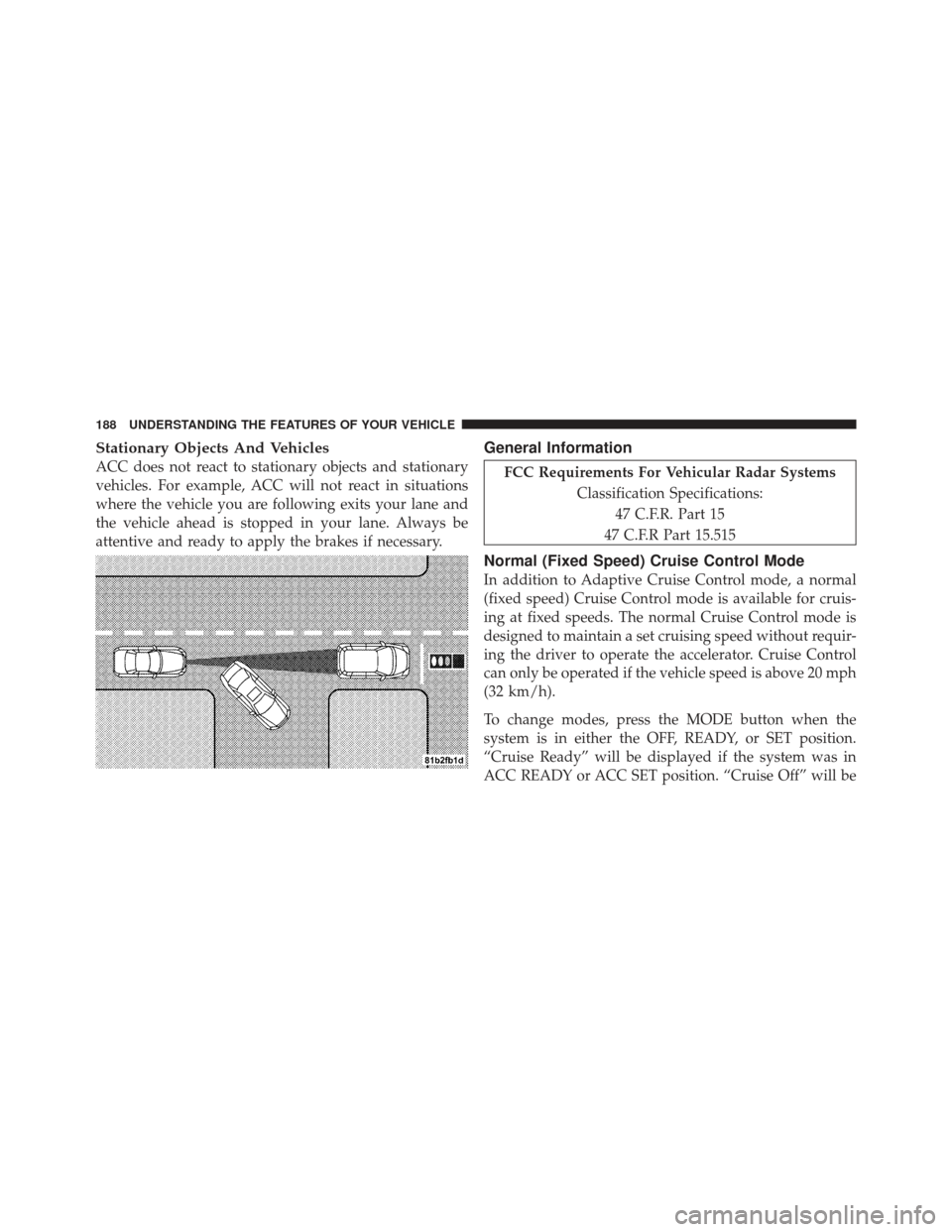
ACC does not react to stationary objects and stationary
vehicles. For example, ACC will not react in situations
where the vehicle you are following exits your lane and
the vehicle ahead is stopped in your lane. Always be
attentive and ready to apply the brakes if necessary.
General Information
FCC Requirements For Vehicular Radar SystemsClassification Specifications:47 C.F.R. Part 15
47 C.F.R Part 15.515
Normal (Fixed Speed) Cruise Control Mode
In addition to Adaptive Cruise Control mode, a normal
(fixed speed) Cruise Control mode is available for cruis-
ing at fixed speeds. The normal Cruise Control mode is
designed to maintain a set cruising speed without requir-
ing the driver to operate the accelerator. Cruise Control
can only be operated if the vehicle speed is above 20 mph
(32 km/h).
To change modes, press the MODE button when the
system is in either the OFF, READY, or SET position.
“Cruise Ready” will be displayed if the system was in
ACC READY or ACC SET position. “Cruise Off” will be
188 UNDERSTANDING THE FEATURES OF YOUR VEHICLE
Page 191 of 587
displayed if the system was in the ACC OFF position. To
switch back to Adaptive Cruise Control mode, press the
MODE button a second time.
WARNING!
In the normal Cruise Control mode, the system will
not react to vehicles ahead. In addition, the proximity
warning does not activate and no alarm will sound
even if you are too close to the vehicle ahead since
the presence of the vehicle ahead nor the vehicle-to-
vehicle distance is detected. Be sure to maintain a
safe distance between your vehicle and the vehicle
ahead. Always be aware which mode is selected.
To Set A Desired Speed
When the vehicle reaches the speed desired, press the
SET-button and release. The EVIC will display the set
speed. NOTE:
You must observe the display when setting or
changing speed, not the speedometer.
To Vary The Speed Setting
There are two ways to change the set speed:
•Use the accelerator pedal to adjust the vehicle to the
desired speed and press the SET -button.
•Tap the RES +or SET -button to increase or decrease
the set speed in 1 mph (1.6 km/h) increments respec-
tively. Hold the RES +or SET -button for 5 mph
(8 km/h) increments.
To Cancel
The system will disable normal Cruise Control without
erasing the memory if:
•You softly tap or depress the brake pedal.
•You press the CANCEL button.
3
UNDERSTANDING THE FEATURES OF YOUR VEHICLE 189
Page 192 of 587

•The Electronic Stability Control/Traction Control Sys-
tem (ESC/TCS) activates.
To Resume
Press the RES+button and then remove your foot from
the accelerator pedal. The EVIC will display the last set
speed.
To Turn Off
The system will turn off and erase the set speed in
memory if:
•You push the ON/OFF button.
•You turn off the ignition.
•You engage Four-Wheel Drive Low.
If the Cruise Control system is turned off and reactivated,
the system will return to the last driver setting (ACC or
Normal Cruise Control).
Forward Collision Warning — If Equipped
Forward Collision Warning (FCW) warns the driver of a
potential collision with the vehicle in front of you and
prompts the driver to take action in order to avoid the
collision.
FCW monitors the information from the forward looking
sensor as well as the Electronic Brake Controller (EBC),
wheel speed sensors, i.e., to calculate a probable rear-end
collision. When the system determines that a rear-end
collision is probable a warning message (both audible
and visual) will be displayed on the EVIC. When the
system determines a collision with the vehicle in front of
you is no longer probable, the warning message will be
deactivated.
190 UNDERSTANDING THE FEATURES OF YOUR VEHICLE
Page 193 of 587
NOTE:The minimum speed for FCW activation is
10 mph (16 km/h).
WARNING!
Forward Collision Warning (FCW) is not intended to
avoid a collision on its own, nor can FCW detect
every type of collision. The driver has the responsi-
bility to avoid a collision by controlling the vehicle
via braking and steering. Failure to follow this warn-
ing could lead to serious injury or death.
Changing FCW Status
The FCW feature can be set to far, set to near or turned off
in the Electronic Vehicle Information Center (EVIC) refer
to “Electronic Vehicle Information Center (EVIC)” in
“Understanding Your Instrument Panel” for further in-
formation. The FCW Status Off, Near or Far will be
displayed in the EVIC.
FCW settings can only be changed when the vehicle is in
PARK.
FCW Message
3
UNDERSTANDING THE FEATURES OF YOUR VEHICLE 191
Page 195 of 587
Changing the FCW status to “Off” prevents the system
from warning you of a possible collision with the vehicle
in front of you.
NOTE:In the “Off” setting FCW OFF will be displayed
in the EVIC. NOTE:
•The system will retain the last setting selected by the
driver after ignition shut down.
Example Only
FCW Off Example
3
UNDERSTANDING THE FEATURES OF YOUR VEHICLE 193