Page 162 of 419
Features of your vehicle
84
4
D210000AEN
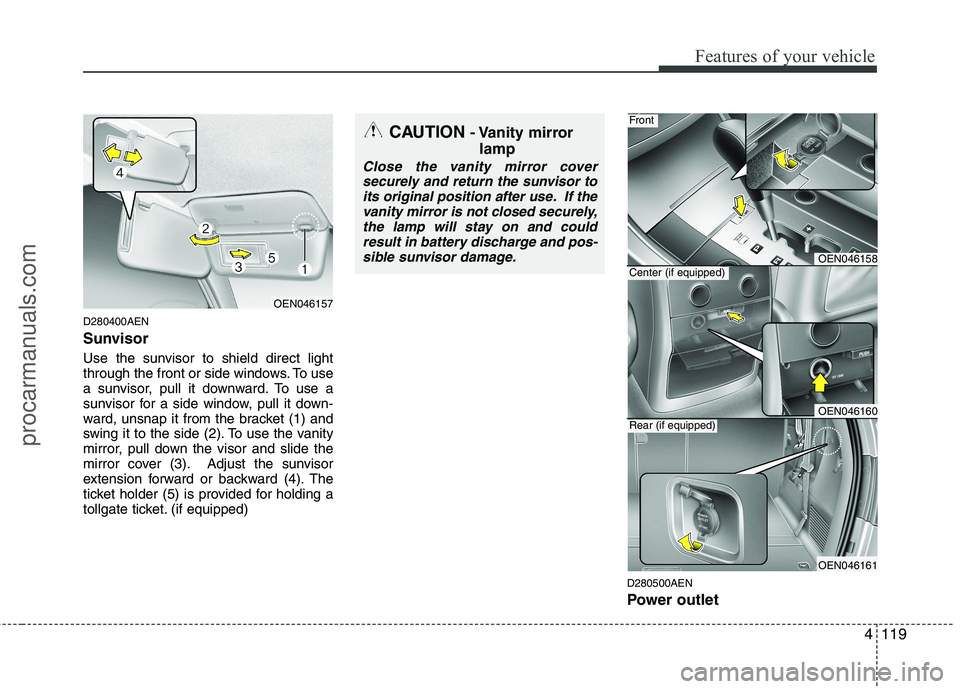
D210100AEN-EU Map lamp
- 1st row
The light comes on when any door is
opened regardless of the ignition switchposition.
When doors are unlocked by the trans-
mitter (or smart key), the light comes on
for approximately 30 seconds as long as
any door is not open. The light goes out
gradually after approximately 30 seconds
if the door is closed. However, if the igni-
tion switch is ON or all doors are locked,
the light will turn off immediately. If a door is opened with the ignition
switch in the ACC or LOCK position, the
light stays on for about 20 minutes.
However, if a door is opened with the
ignition switch in the ON position, the
light stays on continuously.
: Push the switch to turn the
map lamp on or off. This light
produces a spot beam for con-
venient use as a map lamp at
night or as a personal lamp for
the driver and the front pas-
senger.
Push the switch to turn the mood lamp on or off.
: Push the switch to turn the rear room lamp (2nd row) on
or off.
INTERIOR LIGHT
CAUTION
Do not use the interior lights for
extended periods when the engineis not running.
It may cause battery discharge.
OEN046074
procarmanuals.com
Page 183 of 419
4105
Features of your vehicle
Adjusting the driver and passenger side
temperature individually
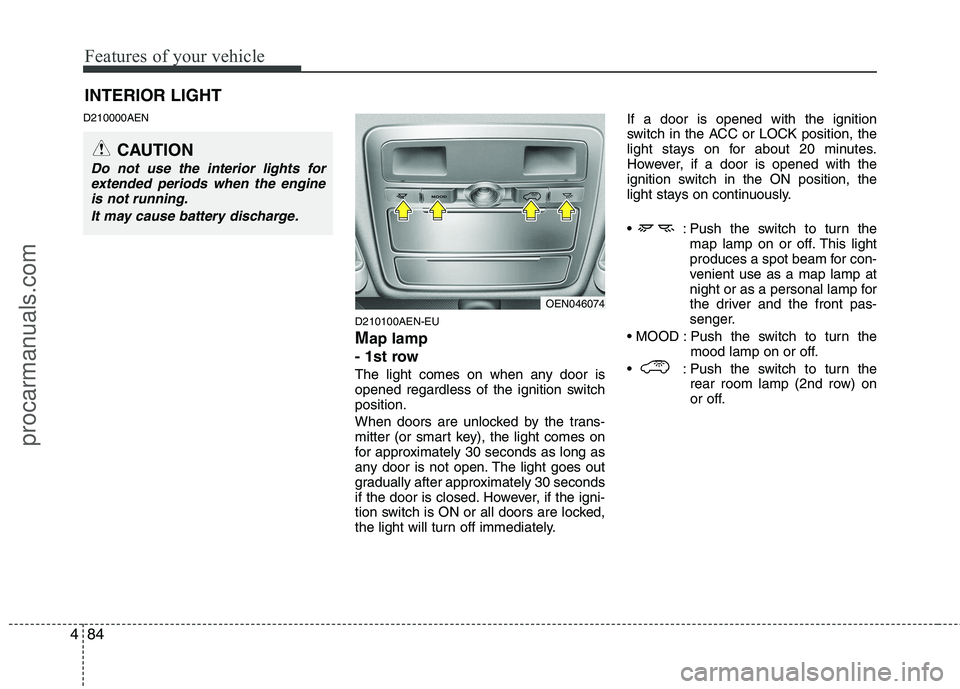
1. Press the DUAL button to operate thedriver and passenger side temperature
individually. Pressing the right temper-
ature control button will automatically
switch to the DUAL mode as well.
2. Press the left temperature control to adjust the driver side temperature.
Press the right temperature control to
adjust the passenger side tempera-
ture.
When the driver side temperature is set
to the highest (HI) or lowest (Lo) temper-
ature setting, the DUAL mode is deacti-
vated for maximum heating or cooling. Adjusting the driver and passenger side
temperature equally
1. Press the DUAL button again to deac-
tivate DUAL mode. The passenger
side temperature will be set to the
same as the driver side temperature.
2. Press the left temperature control but- ton. The driver and passenger side
temperature will be adjusted equally.
Temperature conversion
If the battery has been discharged or dis-
connected, the temperature mode dis-
play will reset to Centigrade.
This is a normal condition. You can switch
the temperature mode between
Centigrade to Fahrenheit as follows;
While pressing the MODE button,
depress the DUAL button for 3 seconds
or more. The display will change from
Centigrade to Fahrenheit, or from
Fahrenheit to Centigrade. D240203AEN
Air intake control
This is used to select the outside (fresh) air position or recirculated air position.
To change the air intake control position,
push the control button.
OEN046125OEN046126
procarmanuals.com
Page 191 of 419
4113
Features of your vehicle
D250300AEN
Defogging logic
To reduce the probability of fogging up
the inside of the windshield, the air intakeor air conditioning are controlled auto-
matically according to certain conditions
such as or position.
To cancel or return the defogging logic,
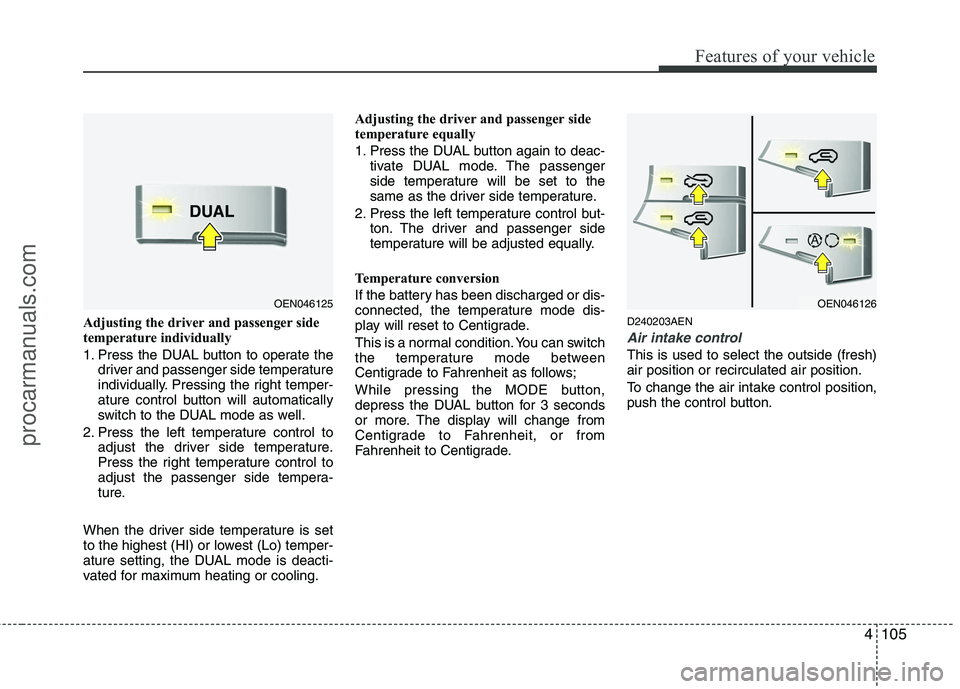
do the following. (if equipped)D250301AUN
Manual climate control system
1. Turn the ignition switch to the ON posi-tion.
2. Turn the mode selection knob to the defrost position ( ).
3. Push the air intake control button at least 5 times within 3 seconds.
The indicator light in the air intake control
button will blink 3 times with 0.5 second
of interval. It indicates that the defogging
logic is canceled or returned to the pro-
grammed status.
If the battery has been discharged or dis-
connected, it resets to the defog logic
status. D250302AUN
Automatic climate control system
1. Turn the ignition switch to the ON posi-
tion.
2. Select the defrost position pressing defrost button ( ).
3. While holding the air conditioning but- ton (A/C) pressed, press the air intake
control button at least 5 times within 3
seconds.
The A/C display blinks 3 times with 0.5
second of interval. It indicates that the
defogging logic is canceled or returned to
the programmed status.
If the battery has been discharged or dis-
connected, it resets to the defog logic
status.
OEN046141OEN046142
procarmanuals.com
Page 197 of 419
4119
Features of your vehicle
D280400AEN
Sunvisor
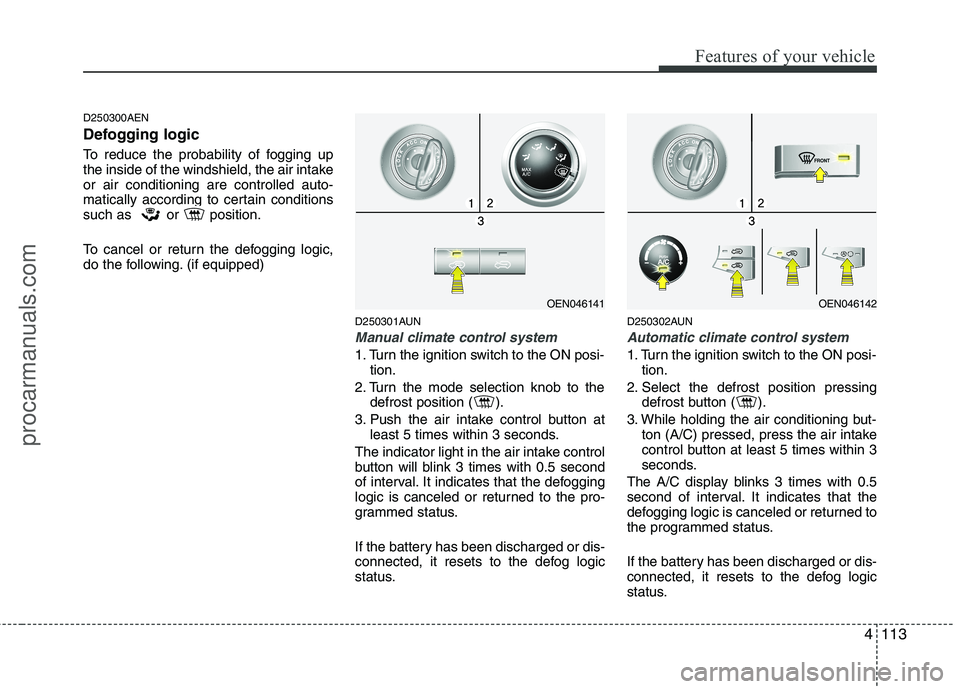
Use the sunvisor to shield direct light
through the front or side windows. To use
a sunvisor, pull it downward. To use a
sunvisor for a side window, pull it down-
ward, unsnap it from the bracket (1) and
swing it to the side (2). To use the vanity
mirror, pull down the visor and slide the
mirror cover (3). Adjust the sunvisor
extension forward or backward (4). The
ticket holder (5) is provided for holding a
tollgate ticket. (if equipped)D280500AEN
Power outlet
OEN046157
CAUTION- Vanity mirror
lamp
Close the vanity mirror coversecurely and return the sunvisor to
its original position after use. If thevanity mirror is not closed securely,the lamp will stay on and could result in battery discharge and pos-
sible sunvisor damage.
OEN046158
OEN046160
OEN046161
Front
Center (if equipped)
Rear (if equipped)
procarmanuals.com
Page 198 of 419

Features of your vehicle
120
4
The power outlet is designed to provide
power for mobile telephones or other
devices designed to operate with vehicle
electrical systems. The devices should
draw less than 10 amps with the engine
running.
D280600AEN
Digital clock
Whenever the battery terminals or relat-
ed fuses are disconnected, you must
reset the time.
When the ignition switch is in the ACC or
ON position, the clock buttons operate as
follows:D280601AUN
Hour (2)
Pressing the H button with your finger, a
pencil or similar object will advance the
time displayed by one hour.
CAUTION
Use the power outlet only when
the engine is running and removethe accessory plug after use.
Using the accessory plug for pro-longed periods of time with theengine off could cause the bat-tery to discharge.
Only use 12V electric accessories which are less than 10A in elec-tric capacity.
Adjust the air-conditioner or heater to the lowest operatinglevel when using the power outlet.
Close the cover when not in use. Some electronic devices can cause electronic interferencewhen plugged into a vehicle’spower outlet. These devices may
cause excessive audio static andmalfunctions in other electronic systems or devices used in your vehicle.
WARNING
Do not adjust the clock while driv-
ing. You may lose your steering
control and cause an accident that
results in severe personal injury ordeath.
WARNING
Do not put a finger or a foreign ele-
ment (pin, etc.) into a power outlet
and do not touch with a wet hand.
You may get an electric shock.
OEN049159L
OEN046159
Type B
Type A
procarmanuals.com
Page 199 of 419

4121
Features of your vehicle
D280602AUN
Minute (3)
Pressing the M button with your finger, a
pencil or similar object will advance the
time displayed by one minute.
D280603AUN
Reset (1)
To clear away minutes, press the R but-
ton with your finger, a pencil or similar
object. Then the clock will be set precise-
ly on the hour.
For example, if the R button is pressed
while the time is between 9:01 and 9:29,
the display will be reset to 9:00.
9:01 ~ 9:29 display changed to 9:00
9:30 ~ 9:59 display changed to 10:00 D280604AEN
Display conversion
To change the 12 hour format to the 24
hour format, press the R button until the
display blinks.
For example, if the R button is pressed
while the time is 10:15 p.m., the displaywill be changed to 22:15.D281200AEN Outside thermometer
The current outside temperature is dis-
played in 1°C (1°F) increments. The tem-
perature range is between -30°C ~ 60°C(-30°F~140°F). The outside temperature on the display
may not change immediately like a
general thermometer to prevent the
driver from being inattentive.
Temperature conversion If the battery has been discharged or
disconnected, the temperature mode
display will reset to Centigrade.
This is a normal condition. You can
switch the temperature mode between
Centigrade to Fahrenheit as follows;
While depressing the R button,
depress the H or M button. The display
will change from Centigrade to
Fahrenheit, or from Fahrenheit to
Centigrade.
OEN049135L
OEN046135
Type B
Type A
procarmanuals.com
Page 237 of 419
4159
Features of your vehicle
✽✽NOTICE - Using iPod
device
Some iPod models might not sup- port the communication protocol
and the files will not be played.
(iPod models supported: Mini, 4G,
Photo, Nano, 5G)
The order of search or playback of songs in the iPod can be different
from the order searched in the
audio system.
If the iPod crashes due to its own trouble, reset the iPod. (Reset:
Refer to iPod manual)
An iPod may not operate normally
on low battery.CAUTION - Using iPod
device
You need the power cable exclu-sive for an iPod in order to oper-
ate an iPod with the buttons onthe audio system. The PC cable provided by Apple may cause amalfunction and do not use it for
vehicle use.
When connecting the device with an iPod cable, push in the jackfully to not to interfere with com-
munication.
When adjusting the sound effects of an iPod and the audio system,the sound effects of both devices will overlap and might reduce or
distort the quality of the sound.
Deactivate (turn off) the equalizer function of an iPod when adjust-ing the audio system’s volume,and turn off the equalizer of the
audio system when using the equalizer of an iPod.
(Continued)
(Continued) When the iPod cable is connected, the system can be switched to theAUX mode even without the iPoddevice and can cause noise.
Disconnect the iPod cable whenyou are not using the iPod device.
When the iPod is not used for the audio system, the iPod cable has
to be separate from iPod devies.Origin display of iPod may not be displayed.
procarmanuals.com
Page 241 of 419
Driving your vehicle
4
5
E030100AEN
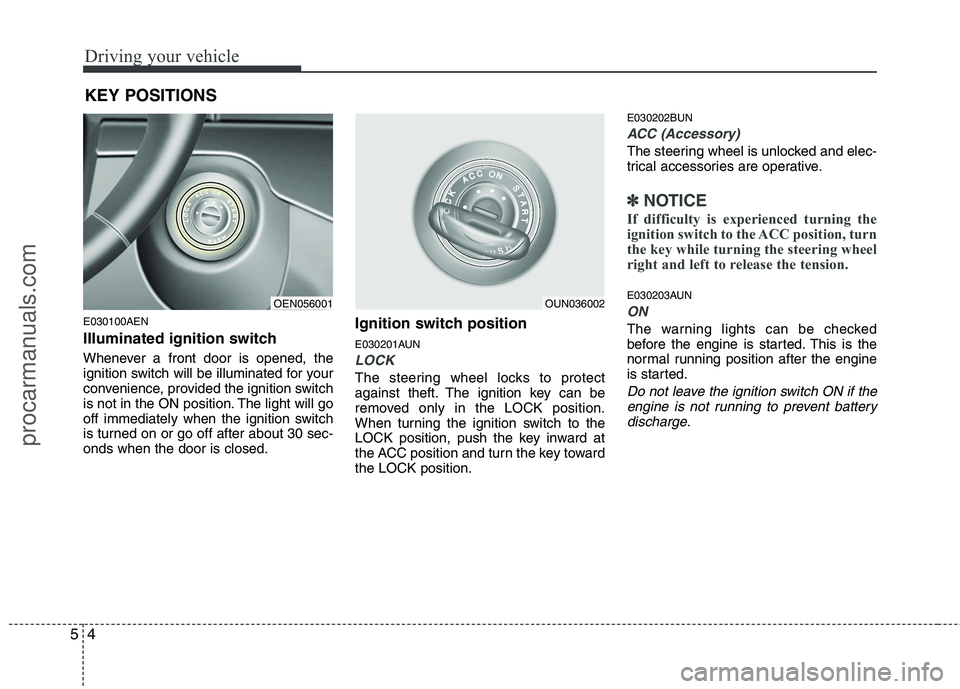
Illuminated ignition switch
Whenever a front door is opened, the
ignition switch will be illuminated for your
convenience, provided the ignition switch
is not in the ON position. The light will go
off immediately when the ignition switch
is turned on or go off after about 30 sec-onds when the door is closed. Ignition switch position
E030201AUN
LOCK
The steering wheel locks to protect
against theft. The ignition key can be
removed only in the LOCK position.
When turning the ignition switch to the
LOCK position, push the key inward at
the ACC position and turn the key towardthe LOCK position.E030202BUN
ACC (Accessory)
The steering wheel is unlocked and elec-
trical accessories are operative.
✽✽
NOTICE
If difficulty is experienced turning the
ignition switch to the ACC position, turn
the key while turning the steering wheel
right and left to release the tension.
E030203AUN
ON
The warning lights can be checked
before the engine is started. This is the
normal running position after the engine
is started.
Do not leave the ignition switch ON if the engine is not running to prevent battery
discharge.
KEY POSITIONS
OEN056001OUN036002
procarmanuals.com